
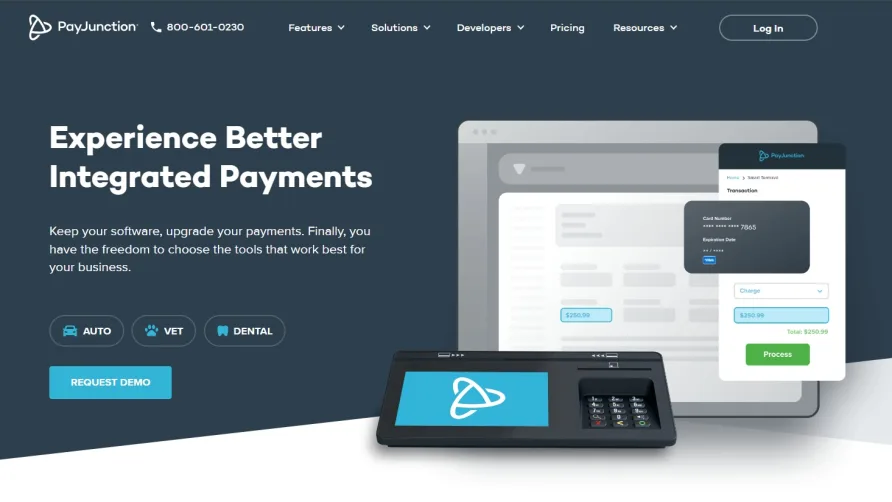
A Processor Built Around Going Paperless
For a small business owner sorting through credit card processing solutions, PayJunction's pitch is refreshingly specific: process payments without the paper trail. We score PayJunction 6.7 out of 10 in the credit card processing category, a reflection of its strong environmental ethos and reliable core processing paired with limited pricing transparency and a narrower feature set than some larger competitors.
PayJunction has been operating out of Santa Barbara, California since 2000, giving it a 25-year track record in the payments industry. The company remains privately held with a team of roughly 50 to 80 employees. That longevity matters in credit card processing, where merchant account stability and processor reliability directly affect your cash flow. PayJunction has processed billions in transactions over that span, and the company leans heavily into its claim of eliminating paper waste across those transactions through its digital receipt infrastructure.
How PayJunction Handles Payments
The core processing suite covers the fundamentals that most small businesses need. In-person transactions run through PayJunction's Smart Terminal, a countertop device that supports chip cards, contactless tap payments via NFC, and magnetic stripe. The terminal includes a built-in signature capture screen, which feeds into the paperless workflow by storing signatures digitally rather than printing slips for customers to sign.
Where PayJunction puts real emphasis is the digital receipt system. Every transaction can trigger an automatic receipt sent by email or text message instead of a printed thermal slip. That's not just a sustainability talking point. For a coffee shop running 200 transactions a day, eliminating paper receipts cuts a genuine operational cost and removes the need to restock receipt rolls. Users in retail and food service settings report that the transition away from printed receipts went smoother than expected, with most customers opting for text receipts without hesitation.
The virtual terminal comes bundled in, not as a paid add-on. Phone orders and mail-order transactions get processed through a browser-based interface without additional hardware. ACH and eCheck processing are also available for businesses that handle recurring payments or prefer lower-cost bank transfer options. A 2024 update expanded the platform's recurring billing tools, adding more flexible scheduling options for subscription-based businesses and service providers who bill on custom cycles.
What PayJunction Costs in Practice
This is where PayJunction creates friction for comparison shoppers. The company doesn't publish its processing rates, monthly fees, or per-transaction costs on its website. You'll need to contact sales for a custom quote, which PayJunction frames as tailored pricing based on your business type and volume. That approach isn't unusual in the payments industry, but it makes side-by-side comparisons with processors that do publish rates difficult from the outset.
What PayJunction does communicate clearly is its contract structure: no long-term agreements and no early termination fees. You can leave without financial penalty. That's a real advantage over processors that lock merchants into multi-year contracts with cancellation fees that can run $200 to $500 or more. Without published rates, though, building a concrete annual budget projection requires getting through the sales process first. If PayJunction's quoted rate lands around 2.6% plus $0.10 per transaction, which is a rough midpoint for custom-quote processors in this range, a business processing $15,000 per month would pay approximately $4,680 to $5,400 annually in processing fees alone, before any monthly service charges. A solo practitioner processing $5,000 monthly at similar rates would see roughly $1,560 to $1,800 per year. Those are illustrative figures only, since your actual quote will vary.
The Digital Receipt Experience Up Close
The receipt system is genuinely PayJunction's calling card. When a transaction completes, the terminal prompts the customer to choose email or text for their receipt. The merchant dashboard stores every receipt digitally, creating a searchable transaction history that doubles as a record-keeping tool. One interface label that could use refinement is the "Receipts" tab in the dashboard, which covers both customer-facing receipts and internal transaction records. Separating those two functions with clearer naming would reduce confusion, especially for staff members managing end-of-day reconciliation.
The environmental angle is more than marketing copy. PayJunction has tracked the paper waste eliminated across its merchant base and uses those figures as part of its brand identity. For business owners who factor sustainability into vendor decisions, or who serve customers who care about environmental practices, the paperless system provides both an operational benefit and a customer-facing brand signal.
Is PayJunction Right for Your Operation?
Picture a wellness studio with three treatment rooms and a front desk handling 40 to 60 card transactions daily. The owner doesn't want a contract because she's still growing and may need to switch processors if her volume changes. She likes the idea of text receipts because her clientele skews younger and paper receipts pile up in the lobby trash. PayJunction fits that scenario well: the Smart Terminal handles in-person payments, the virtual terminal covers phone bookings, and the digital receipts align with the studio's health-and-sustainability brand.
Now consider a restaurant group operating four locations across two states, processing $80,000 monthly per location, and needing detailed multi-location reporting, employee-level access controls, and integration with a kitchen display system. That's a mismatch. PayJunction's reporting tools and integration options aren't built for multi-site complexity at that scale.
The sweet spot is a single-location or small multi-location business doing under $30,000 in monthly card volume that values flexibility and a clean, modern checkout experience. Service businesses, professional offices, and boutique retail fit the profile best.
Integrations and Technical Reach
PayJunction connects with QuickBooks for accounting synchronization, which covers the most common integration need for small businesses. Beyond that, the integration list is short. The company offers a developer API through its documentation portal for custom connections, but pre-built integrations with major e-commerce platforms, inventory systems, or CRM tools are limited compared to processors in the top tier of the category. A business running an online store on one platform and PayJunction in-store would manage two separate systems rather than a unified payment flow.
The developer API itself is reasonably well-documented, and PayJunction has published RESTful endpoints for transaction management, customer vaulting, and receipt retrieval. Businesses with a technical resource on hand can build custom workflows, but most small businesses won't have that capacity and will rely on out-of-the-box connections. That's a meaningful gap for any merchant whose daily operations depend on syncing payment data with scheduling software, CRM tools, or e-commerce inventory.
Security and Compliance Posture
PayJunction handles PCI compliance on the processor side, which removes a significant burden from the merchant. Card data is tokenized so that sensitive numbers don't sit on local hardware or in the merchant's systems. For businesses that previously managed their own PCI questionnaires with a different processor, that shift alone can justify a switch. The Smart Terminal's built-in encryption handles point-of-sale security without requiring the merchant to configure anything beyond plugging in the device.
Fraud prevention tools exist but are basic. There's no AI-driven transaction monitoring or customizable risk scoring, which larger-volume merchants may find limiting. For a retailer processing $10,000 to $20,000 monthly, the built-in protections are adequate. Beyond that threshold, supplementing with a third-party fraud tool is worth considering.
Where PayJunction Stops
The hardware selection is narrow. The Smart Terminal is the primary option for in-person processing, and businesses needing mobile card readers for on-the-go transactions or multiple terminal configurations have fewer choices than they'd find elsewhere. That's a problem for service providers who visit client sites and need a pocket-sized reader paired to a phone.
Reporting covers transaction basics and batch summaries but doesn't offer the granular analytics, custom dashboards, or trend visualizations that data-driven businesses expect from a processing platform in 2025. You can pull daily and monthly totals, review individual transactions, and export basic CSVs. Drill-down analysis by product category, time-of-day patterns, or customer segments isn't available without exporting data and running it through a separate tool.
International processing isn't part of the picture. PayJunction serves U.S.-based merchants only and doesn't support multi-currency transactions. For any business with international customers paying in foreign currencies, this is a non-starter.
Our Verdict
PayJunction occupies a specific niche with conviction. The paperless processing model, anchored by its digital receipt system and contactless payment support, gives it a clear identity in a category where many processors blend together. Twenty-five years of operational history and a no-contract model add trust and flexibility that matter to small business owners wary of commitments they can't exit cleanly. The support team is responsive and hands-on during onboarding, which is a real advantage for first-time merchant account holders who need guidance through the setup process.
The gaps are real, though. Opaque pricing makes it hard to evaluate before you're in a sales conversation, the integration ecosystem is thin, and the feature set doesn't stretch to cover businesses with complex or multi-location needs. Hardware options are limited, and reporting won't satisfy anyone who wants analytical depth. If your business is a single-site operation that values sustainability and modern checkout experiences, PayJunction deserves a spot on your shortlist. If you need advanced analytics, extensive third-party integrations, or published pricing you can model against your budget before picking up the phone, keep looking.