
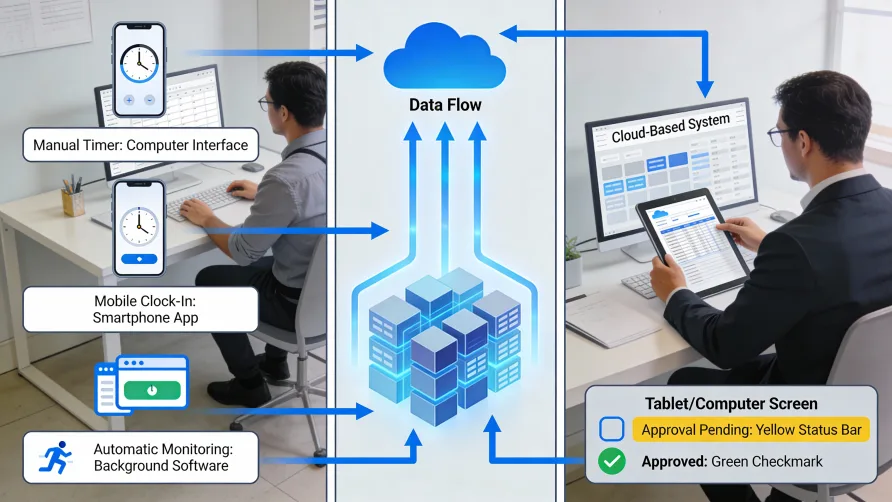
Time tracking software works by capturing employee work hours through digital methods, storing that data in a central system, routing it through approval workflows, and integrating with payroll or billing platforms. Employees record time using timers, clock-in buttons, manual entry, or automated background tracking. Managers review and approve submissions, and the approved data flows to downstream systems for wage calculations, client invoicing, or project analysis.
The Basic Time Tracking Process
Understanding how time tracking works starts with the fundamental workflow that most systems follow. While specific time tracking software features vary, the core process remains consistent across platforms.
The cycle begins when an employee records their working time. This might happen at the start and end of a shift, throughout the day as tasks change, or automatically in the background. The system timestamps each entry and associates it with the employee's profile.
Next, the recorded hours move into a review stage. Depending on how the organization configures the software, employees might submit timesheets for approval on a daily, weekly, or bi-weekly basis. Managers receive notifications when submissions arrive and can approve entries, request corrections, or make adjustments.
Once approved, the time data becomes available for downstream use. Payroll systems pull the hours to calculate wages. Billing platforms convert billable time into client invoices. Project management tools compare actual hours against estimates. Reporting dashboards aggregate the data for analysis.
This cycle repeats continuously, creating an ongoing record of labor hours that serves multiple business functions.
How Do Employees Clock In with Time Tracking Software?
The employee experience varies depending on the system and how the organization deploys it. Most platforms offer multiple input methods to accommodate different work environments.
Start/Stop Timers
Timer-based tracking lets employees click a button to begin recording and click again to stop. Some systems display a running clock so workers can see accumulated time throughout the day. This approach works well for knowledge workers who move between tasks and want to track time at a granular level.
When starting a timer, employees typically select a project, task, or client code so hours are categorized as they accumulate. Switching tasks means stopping one timer and starting another. At the end of the day, the system compiles all recorded segments into a complete timesheet.
Clock-In and Clock-Out
Traditional clock functionality mimics the punch-card experience in digital form. Employees clock in when they arrive and clock out when they leave. The system records the timestamp and calculates total hours automatically.
This method suits shift-based work where tracking start and end times matters more than granular task allocation. Retail stores, restaurants, healthcare facilities, and manufacturing operations commonly use clock-in systems because they align with how those businesses already think about scheduling.
Modern implementations offer several ways to clock in. A shared tablet or kiosk in a break room can serve as a central time clock. Mobile apps let field workers clock in from job sites. Browser-based access allows remote employees to clock in from home computers. Some systems support all these methods simultaneously, giving workers flexibility while feeding all entries into the same central database.
Manual Timesheet Entry
Not all tracking happens in real time. Many systems allow employees to fill out timesheets after the fact, entering hours worked across the day or week. This manual approach resembles traditional paper timesheets but with digital storage and validation.
Manual entry makes sense for workers who cannot interact with tracking software during their actual work, such as technicians working with their hands or employees in customer-facing roles where stopping to log time would be impractical. It also serves as a fallback when someone forgets to start a timer or clock in.
The downside is accuracy. Research published in Harvard Business Review indicates that hindsight time estimates are significantly less accurate than contemporaneous tracking. Employees filling out timesheets at the end of the week often round hours or forget exactly how they spent Tuesday afternoon. Manual entry remains useful, but organizations seeking precision typically encourage real-time tracking methods.
Biometric and Secure Authentication
For businesses concerned about time theft or identity verification, some systems incorporate biometric clock-in methods. Employees might use fingerprint scanners, facial recognition cameras, or palm readers to verify their identity when clocking in or out.
Biometric authentication prevents buddy punching, where one employee clocks in on behalf of another. The system confirms that the person present matches the employee on record before accepting the punch. Organizations with large hourly workforces or multiple locations sometimes find biometric time tracking features worth the additional hardware investment.
Can Time Tracking Software Run Automatically?
Yes, automated time tracking has become increasingly sophisticated. These systems record work hours passively without requiring employees to start timers or remember to clock in.
Background Activity Monitoring
Desktop applications can track time automatically by monitoring which programs and websites an employee uses throughout the day. The software runs quietly, recording when you switch from a spreadsheet to email to a web browser. At the end of the day, you see a timeline showing every application and how long you spent in each.
This approach captures time that manual methods miss. The five minutes spent responding to a client email, the quick research detour that turned into half an hour of reading, the context switches between projects throughout the day. Automatic tracking catches all of it.
The recorded data typically stays private to the individual employee until they choose to convert it into official timesheet entries. Most systems let workers review their activity log, select relevant segments, assign them to projects, and submit those entries for approval. The automation reduces the burden of remembering and logging, but the employee retains control over what gets reported.
Calendar Integration
Another form of automated time tracking pulls data from calendar applications. When you have a meeting scheduled, the software can automatically create a time entry for that block. Project planning sessions, client calls, and internal reviews appear on your timesheet without manual input.
Calendar-based tracking works well for structured days where appointments drive how time is spent. It captures meetings reliably but may miss the unscheduled work happening between them.
Intelligent Suggestions
Some platforms use pattern recognition to suggest time entries based on your typical behavior. If you usually spend Monday mornings on a particular client's work and the software detects you in relevant applications, it might prompt you to confirm a time entry rather than requiring you to create one from scratch.
These suggestions reduce friction while keeping the employee in control of final submissions. The software proposes, the worker disposes.
How Data Flows Through the System
Once time is captured, the time tracking process continues through several stages before the information reaches its final destination.
Data Storage and Organization
Every time entry lands in a central database where it associates with metadata: which employee recorded it, when it occurred, what project or cost code it belongs to, and whether it's billable or non-billable. Cloud-based systems store this data on remote servers accessible from anywhere. On-premise installations keep it within the organization's own infrastructure.
The stored data maintains an audit trail. If someone edits an entry, the system logs who made the change and when. This history matters for compliance purposes and for resolving disputes about what was actually recorded.
Validation and Error Checking
Before time entries reach the approval stage, the software often runs validation checks. Did an employee somehow log 25 hours in a single day? The system flags it. Does a time entry overlap with another entry already on record? An alert appears. Is someone clocking in at a location far from their assigned job site? The manager sees a notification.
These automated checks catch obvious errors and potential fraud before they propagate into payroll. The goal is reducing manual review burden by surfacing only the entries that need human attention.
Approval Workflows
Most organizations configure approval requirements based on their management structure. A common setup routes employee timesheets to their direct supervisor for review. The manager sees submitted hours, can drill into details, and either approves, rejects, or sends back entries for correction.
More complex workflows might require multiple approvals. A project manager approves that hours were actually worked on their project, then a department head approves the overall timesheet. Organizations with strict compliance requirements sometimes add a final review by HR or finance before data moves to payroll.
The software tracks where each timesheet sits in the workflow. Employees see whether their submission is pending approval, approved, or returned for revision. Managers see their approval queue and any approaching deadlines.
Integration with Other Business Systems
Standalone time tracking provides limited value. The real benefits emerge when time data connects to other systems the business already uses.
Payroll Integration
The most common integration links time tracking to payroll software. When the approval workflow completes, approved hours become available for payroll processing. The integration handles data transfer automatically, eliminating the need for someone to export a report from one system and import it into another.
Payroll integration reduces errors by removing manual data entry. It also speeds up processing since hours are ready for wages calculation immediately after approval rather than waiting for someone to move them manually.
The specifics depend on which payroll platform you use. Most time tracking solutions offer pre-built integrations with popular payroll providers. For less common combinations, data export in standard formats lets you move information between systems with moderate effort.
Project Management Connections
When time tracking software connects to project management platforms, actual hours can flow alongside task completion data. Project managers see not just that a task finished, but how many hours it consumed. This comparison against original estimates improves future planning accuracy.
Bidirectional integrations let employees select tasks from their project management tool when logging time, ensuring entries map correctly to the project structure without requiring duplicate data entry.
Billing System Links
Professional services firms often integrate time tracking with invoicing. Billable hours recorded against a client automatically appear in draft invoices, complete with applicable rates and descriptions. The billing team reviews and adjusts as needed before sending to clients.
This integration eliminates the tedious work of compiling billable hours from timesheets and manually entering them into invoices. It also reduces the risk of missing billable time or applying incorrect rates.
Accounting Software
Beyond payroll, time data can feed into broader accounting systems for job costing and labor expense tracking. Knowing how many hours went into a specific project, client, or department enables profitability analysis at granular levels.
Mobile vs. Desktop Functionality
How time tracking works often depends on where employees need to access it.
Desktop Applications
Full-featured desktop apps typically offer the most comprehensive experience. Background automatic tracking, detailed reporting, administrative controls, and complex workflow management work best on larger screens with keyboard and mouse input.
Knowledge workers sitting at computers all day often prefer desktop applications. The software can run continuously, tracking activity automatically or providing quick access to timers without leaving the work context.
Mobile Apps
Field workers, traveling employees, and anyone without regular computer access rely on mobile functionality. Time tracking apps for phones and tablets prioritize quick clock-in and clock-out, GPS verification, and essential timesheet functions.
Mobile interfaces trade depth for speed. You can start a timer, clock in with location verification, or submit a timesheet approval. Complex reporting and administrative tasks typically require returning to a desktop or web interface.
Web Browser Access
Browser-based access splits the difference. Employees can log time from any computer with internet access without installing software. Features approach desktop depth while maintaining accessibility.
Web interfaces work well for hybrid scenarios where employees sometimes work from office computers and sometimes from personal devices or remote locations.
Reporting and Analytics
The time tracking process generates data that becomes valuable when analyzed. Reporting features turn raw hours into business insights.
Standard Reports
Most systems include pre-built reports covering common needs: total hours by employee, overtime accumulation, hours by project or client, billable versus non-billable breakdowns, and attendance summaries. Managers run these reports on schedule to monitor labor costs and utilization.
Custom Analysis
Beyond standard reports, many platforms let you build custom queries and visualizations. Filter by date range, department, project type, or employee classification. Group and aggregate data to answer specific business questions. Export results to spreadsheets for further manipulation.
Trend Identification
Accumulated data over weeks and months reveals patterns. Which projects consistently run over their hour estimates? When does overtime spike? How does utilization vary by season? These insights support better resource planning and more accurate project scoping.
The value of analytics compounds over time. A few weeks of data shows current status. Months of history reveals trends. Years of records enable meaningful benchmarking and forecasting.
Putting It All Together
The way time tracking software works creates a continuous loop: capture, store, validate, approve, integrate, and analyze. Each stage adds value by improving accuracy, reducing administrative burden, or generating insights.
For employees, the experience centers on recording hours as painlessly as possible. The best systems fade into the background, capturing work automatically or requiring only quick interactions that don't interrupt productive work.
For managers, the focus shifts to exception handling and decision support. Rather than reviewing every entry in detail, they address flagged anomalies and use aggregated data to manage their teams effectively.
For the organization, time tracking software transforms labor data from a compliance requirement into a strategic asset. Accurate hours support fair paychecks, precise billing, reliable project estimates, and informed business decisions.