
More Than a Clock: Scheduling Meets Attendance
Shift-based businesses don't just need to know when employees clocked in. They need to know who's scheduled, whether coverage is adequate, and if the whole operation stays compliant with local labor rules. Deputy approaches time and attendance from that angle, building its time tracking on top of what is fundamentally a scheduling engine. We score Deputy 7.7 out of 10 in the time and attendance software category.
The platform serves over 1.5 million workers across 385,000 workplaces in more than 100 countries. Founded in 2008 in Sydney, Australia by Ashik Ahmed and Steve Shelley, Deputy has raised over $100 million in funding from investors including IVP, Bessemer Venture Partners, and Square Peg. The company now maintains its U.S. headquarters in San Francisco, with CEO Silvija Martincevic leading the organization through a period of aggressive product expansion, including an AI platform launch in late 2025 and a strategic payroll partnership with Paycor.
Scheduling That Drives the Time Tracking Engine
Deputy's core strength is how tightly it connects scheduling to time and attendance. You don't build a schedule in one tool and track hours in another. The schedule becomes the reference point for clock-ins, break compliance, overtime calculations, and timesheet approval.
The auto-scheduling feature uses AI to generate shift assignments based on employee availability, qualifications, labor budgets, and demand forecasts pulled from point-of-sale integrations. Managers set the rules, including maximum hours, required certifications, shift equality preferences, and minimum coverage thresholds. The system fills the schedule accordingly. For a restaurant manager building next week's roster, this can compress hours of manual work into a few minutes of review and adjustment.
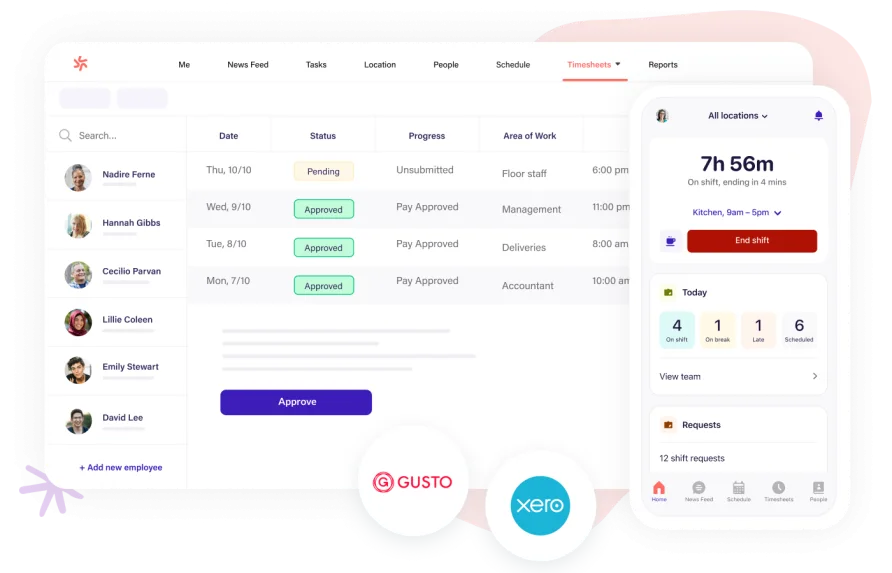
Time clock options cover the range you'd expect: mobile app clock-in with GPS verification, web browser access, kiosk mode with biometric facial recognition, and PIN entry. Geofencing restricts clock-ins to specific locations, which prevents employees from punching in before they've arrived on site. The facial recognition feature, available on Core and Pro plans, eliminates buddy punching at shared terminals.
Break tracking runs automatically based on the rules you configure. If an employee misses a required break or a break runs short, the system flags it. Overtime calculations follow the same logic, applying the labor rules you've set at the location or jurisdiction level. For businesses operating across state lines, this matters. Fair workweek compliance, fatigue management alerts, and award interpretation (particularly useful for Australian clients under complex modern awards) are built into the scheduling and attendance workflow rather than bolted on as afterthoughts.
Timesheets populate from clock-in data and can be auto-approved on the Core plan when they fall within defined thresholds. Only timesheets with exceptions, like missed punches or unscheduled overtime, require manual review. This cuts the weekly approval process considerably for managers overseeing large hourly teams. The mobile app handles timesheet exports and approvals cleanly, though users managing large teams with complex pay rules have noted that the desktop interface sometimes requires more clicks than expected to complete the same edits. That's a minor workflow friction point, not a dealbreaker, but it's the kind of detail that surfaces after weeks of daily use.
A mid-2025 update added bulk shift editing with multi-select, modern time pickers, and an enhanced employee search. This addressed a common frustration among managers handling schedules for 30 or more employees at once. Around the same time, Shift Pulse+ rolled out, letting managers collect real-time employee feedback after each shift, which feeds into the platform's broader engagement and performance tracking.
The bigger product move came in November 2025, when Deputy launched its AI platform built on AWS. Currently in beta with a broader rollout planned for 2026, Deputy AI acts as a conversational assistant that can answer scheduling questions, find shift replacements, check who's clocked in, and approve timesheets through natural language prompts. A manager could ask something like “who's available to cover Sarah's Friday evening shift?” and get an actionable answer pulled from schedule data, employee availability, and qualification records. It's early, but the direction is clear: moving from a tool you operate to one that operates alongside you.
Deputy connects to over 45 third-party platforms. The payroll integration list includes ADP, Gusto, QuickBooks, Paychex, Xero, and the December 2025 Paycor partnership that created “Deputy Payroll enabled by Paycor,” a bundled product bringing payroll directly into the Deputy environment for U.S. customers. On the HR side, connections to BambooHR and Rippling sync employee records. POS integrations with Square, Lightspeed, and Clover feed sales data into the demand forecasting engine. Zapier support and an open API on higher tiers extend connectivity further.
What Deputy Costs in Practice
Deputy restructured its pricing in late 2025, moving from the old Scheduling/Time & Attendance/Premium model to three tiers: Lite, Core, and Pro.
The Lite plan at $5 per user per month includes basic scheduling, basic timesheets, clock-in functionality, labor law compliance, shift swapping, leave management, and payroll integrations. It's the entry point, but it lacks auto-scheduling, biometric clock-in, and timesheet auto-approval.
Core, the most popular plan at $6.50 per user per month, adds advanced scheduling, auto-scheduling with demand forecasting, biometric time clocking, wage and labor budgets, micro-scheduling, and a customer success manager. For most mid-sized shift-based operations, this is where the real value sits.
Pro runs $9 per user per month and layers on custom access levels, advanced timesheets, location hierarchies, SSO, a dedicated customer success manager, a sandbox environment, and 24/7 live chat support. It also bundles the Analytics+ and Messaging+ add-ons that lower tiers must purchase separately.
Those add-ons matter in the cost math. Analytics+ costs $1.50 per user per month, Messaging+ runs $1.95, and the HR module is $2. A business on the Core plan that adds Messaging+ and Analytics+ is paying $9.95 per user per month before the HR module, which approaches the Pro plan's price without all of Pro's features.
Here's the annual math. A solo owner with 10 employees on the Core plan pays $6.50 times 10 users, which comes to $65 per month or $780 per year. Scale that to 25 employees and you're at $162.50 per month, or $1,950 annually. If that same 25-person team adds Analytics+ and Messaging+, the monthly cost jumps to $249 ($9.95 per user), totaling $2,988 per year. Selecting Pro outright at $9 per user for 25 employees costs $225 per month or $2,700 annually, with both add-ons included.
There's also a $30 minimum monthly spend on Lite, Core, and Pro plans, which means teams of fewer than 5 users on the Lite plan still pay $30 per month regardless. No free plan exists. The 31-day free trial gives full access to features without requiring a credit card, which is generous enough to properly evaluate the platform before committing.
The Right Fit (and the Wrong One)
Deputy works best when scheduling complexity drives the time tracking need. Picture a healthcare staffing agency placing 40 nurses across three facilities, each with different shift patterns, certification requirements, and overtime rules. The agency needs to know not just when people clock in, but whether the right people are in the right locations with the right credentials. Deputy's scheduling engine handles that logic, and the time and attendance tools confirm execution against the plan.
A retail chain managing weekend coverage across a dozen locations faces a similar challenge. The auto-scheduler can build rosters based on projected foot traffic from POS data, filling shifts with available employees who meet the store's skill requirements. The time clock confirms they showed up. The compliance layer checks that break rules were followed. That's the full loop Deputy is designed to close.
Where it fits less naturally is with project-based or salaried teams. If your workforce bills hours against client projects, tracks deep-focus productivity metrics, or consists primarily of desk-based employees working standard schedules, Deputy's scheduling-first architecture doesn't deliver the same return. It's built for shift work. That's a strength in its target market, not a flaw, but it does narrow the audience.
Businesses that straddle both worlds, say a construction company with hourly field crews and salaried project managers, may find that Deputy handles the field side well but leaves the office side underserved. The platform doesn't offer project-based time allocation or billable-hour tracking in the way that tools designed for professional services do. If your hourly-to-salaried ratio leans heavily toward hourly, Deputy still makes sense. If it's closer to 50/50, you may end up running two systems.
Users managing field crews have reported that GPS accuracy can occasionally drift in indoor locations or dense urban areas, which is a known limitation of device-level GPS rather than a Deputy-specific issue. The geofencing radius can be adjusted to compensate, but crews working inside large warehouses or multi-floor buildings should test this during the trial period.
Feedback from businesses in hospitality and cleaning services consistently highlights that frontline employees with limited technical experience tend to adopt the mobile app quickly. The interface uses large buttons, clear shift displays, and minimal navigation depth, which reduces training time for workforces with high turnover.
Where Deputy Stops
Within the time and attendance scope, there are gaps to consider.
Deputy doesn't offer continuous GPS tracking during shifts. It captures location at clock-in and clock-out, and geofencing can verify an employee is within a defined area at those moments. But it won't show a breadcrumb trail of where a field worker traveled between those timestamps.
Offline functionality on the mobile app is limited. If your crews work in areas with inconsistent cell service, like rural construction sites or underground facilities, clock-in data may not sync until connectivity returns. Users have reported delays in these scenarios.
The Android experience, while functional, doesn't match the iOS app's polish consistently. Users on review platforms note occasional lag and interface inconsistencies on older Android devices. App store ratings of 4.7 on both platforms suggest the gap isn't dramatic, but it's a recurring theme in user feedback.
Custom reporting requires the Analytics+ add-on on Lite and Core plans. Without it, you're limited to standard reports. For businesses that need audit-grade reporting or automated report delivery, this pushes the effective cost higher than the base plan price suggests.
SSO, custom access levels, and sandbox environments are locked to the Pro tier. Organizations with strict IT security requirements or those needing to test configuration changes before deploying them will need to budget for the $9 per user price point.
Task management exists in Deputy but stays basic. You can assign tasks to employees and attach them to shifts, but there's no subtask hierarchy, recurring task templates with full customization, or Kanban-style project views. For businesses that need employees to complete checklists during shifts (opening procedures, cleaning protocols, safety checks), the current task tools cover the basics. If you need anything more structured, you'll likely pair Deputy with a dedicated task management app.
Our Verdict
Deputy makes the most sense for businesses where scheduling is the harder problem and time tracking is the verification layer. If you're running a 50-person hospitality operation, a multi-location retail chain, or a healthcare facility with rotating shifts across different credential requirements, this platform covers both scheduling and attendance without forcing you to stitch together separate tools. The 17-year track record, $100 million in institutional backing, and a customer base spanning 385,000 workplaces provide a stability signal that matters when you're building operational processes around a vendor's product.
The late 2025 launch of Deputy AI, built on AWS and currently in beta, signals the company's direction: using workforce data to move beyond reactive scheduling toward predictive operations. The December 2025 Paycor partnership adds another dimension, bringing integrated payroll to U.S. customers directly within the Deputy platform. These aren't features you're buying today at full maturity, but they indicate active product investment and a roadmap that extends the platform's utility beyond what you see in the current release.
The tradeoff is cost. There's no free entry point, the add-on model can inflate per-user costs beyond the listed plan price, and some features that mid-market businesses expect (SSO, advanced reporting, dedicated support) sit behind the highest tier. For a 25-person team on Core, you're investing just under $2,000 per year before add-ons. That's a reasonable spend if scheduling automation and compliance tooling save you even a few hours of manager time each week, but it's a commitment that smaller operations should weigh carefully against their actual needs.
With a 4.6/5 aggregate across major review platforms and 4.7/5 on both mobile app stores, user satisfaction runs high, particularly among the shift-based industries Deputy targets. Deputy has earned its position as a category leader in shift-based workforce management. For the right business, the combination of intelligent scheduling, compliant time tracking, and a mobile experience that hourly workers actually use makes it a strong choice in the time and attendance category.