
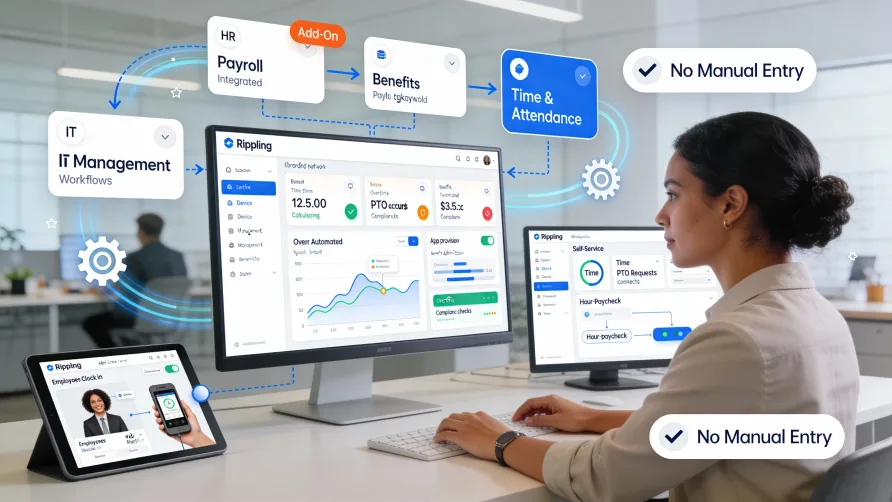
Yes, Rippling offers time tracking and attendance management through a dedicated module within its platform. The time tracking functionality integrates with Rippling's HR and payroll systems, creating a unified workflow where employee hours flow automatically from time capture through to payroll processing.
For businesses using Rippling for HR and payroll, adding time tracking means all your workforce data exists in a single system. Employees clock in through the same platform where they access pay stubs, request time off, and view benefits information.
Is Time Tracking Included With Rippling?
Time tracking in Rippling operates as an add-on module rather than a feature included in the base platform. You can add time tracking to your existing Rippling services if you're currently using Rippling for HR, payroll, or benefits administration.
This modular approach means you pay for time tracking as a separate component of your Rippling subscription. Businesses that don't need time tracking can use other Rippling features without it, while those that need comprehensive time and attendance capabilities can add the full module.
The availability of time tracking as an add-on gives you flexibility in how you build your Rippling implementation. You might start with HR and payroll, then add time tracking later as your needs evolve or as your business grows beyond manual timesheet processes.
How Does Rippling Time Tracking Work?
Rippling time tracking captures employee hours through multiple clock-in methods and consolidates that data within the broader Rippling platform. Employees can record their time using web-based clocks, mobile apps, or physical time clock hardware depending on your configuration and their work environment.
When an employee clocks in, the system records their identity, timestamp, and any additional information you require like job codes, projects, or locations. This data populates timesheets that managers can review and approve through the Rippling dashboard.
The platform calculates hours worked in real-time, applying your configured rules for overtime, shift differentials, or multiple pay rates. As employees work through the pay period, you can see accumulated hours, monitor overtime risk, and identify attendance issues before they become problems.
Timesheet approval workflows direct completed timesheets to designated managers for review. Managers see flagged exceptions such as missed clock-outs, schedule deviations, or unusual patterns that need attention. Once managers approve timesheets, the hours transfer automatically into Rippling's payroll system.
Because time tracking, HR, and payroll operate within the same platform, employee data stays synchronized. When you add a new employee in Rippling, they gain access to time tracking with their pay information, job details, and work schedules already configured based on their HR profile.
Mobile and Web Time Clock Options
Rippling provides mobile time tracking through its mobile app, allowing employees to clock in and out from their smartphones. This mobile access works well for remote employees, field workers, or anyone who needs to record hours away from a fixed location.
The mobile time clock includes GPS tracking that captures employee location when they clock in. You can review where employees were when they started their shifts, which helps verify that field service workers are at job sites or that remote employees are clocking in from approved locations.
Geofencing features let you define boundaries where employees can clock in. When geofencing is active, employees must be within specified geographic areas to record their time. This prevents early clock-ins from home and ensures workers are physically present at work locations before starting the clock.
Web-based time clocks let employees record hours from any internet-connected computer. Office workers or employees with computer access during shifts can clock in through their browser without needing the mobile app or physical hardware.
For businesses that need physical time clock terminals, Rippling supports hardware options that can be installed at facility entrances or common areas. These terminals offer centralized clocking locations and support identification methods including badge swipes, PIN codes, or biometric verification.
Integration With Rippling HR and Payroll
The integration between Rippling's time tracking and payroll modules eliminates manual data transfer between systems. Approved timesheets flow directly into payroll processing, applying all configured pay rules during calculation.
This connection means your time tracking system uses the same employee records as payroll. Pay rates, job classifications, overtime eligibility, and employment details exist in one place. When you update an employee's pay rate or job title, that change affects both time tracking and payroll simultaneously.
Pay calculations incorporate the hours recorded in approved timesheets. Regular time, overtime, different pay rates for different work types, and shift premiums all factor into payroll automatically based on the hours employees worked and the rules you've configured.
For businesses tracking labor costs by department, project, or client, time entries can include allocation codes. When employees clock in, they can select which cost center their hours apply to. This granular data flows through to payroll and accounting, supporting detailed labor cost analysis.
The integration with Rippling's HR functions means time tracking connects to other workforce processes. Approved time off requests automatically reduce available hours in schedules. New hires get time tracking access based on their hire date and employment terms. Terminated employees lose time clock access immediately when you process their departure in the HR system.
Key Time Tracking Features
Rippling's time tracking includes scheduling capabilities that let managers create and distribute work schedules. Employees view their upcoming shifts through the mobile app or web portal, and the system sends notifications about schedule changes or upcoming shifts.
Attendance monitoring tracks patterns beyond just hours worked. The system identifies chronic tardiness, frequent absences, or early departures based on rules you define. These analytics help managers spot attendance problems early and address them before they escalate.
Time off management connects to Rippling's broader PTO tracking. Employees submit time off requests through the same interface they use for time tracking. Managers approve requests based on available balances and scheduling needs, and approved time off appears on schedules and reduces accrual balances automatically.
Overtime management monitors hours against thresholds you configure. The system alerts managers when employees approach overtime limits, giving you opportunity to adjust schedules before overtime becomes unavoidable. You can set different overtime rules for different employee groups based on classifications, locations, or applicable labor laws.
Break tracking ensures compliance with meal and rest break requirements. You can configure mandatory break rules, and the system will flag violations when employees work through required breaks or don't take appropriate rest periods during long shifts.
Customization and Configuration
Rippling's time tracking module offers configuration options to match your business requirements. You can set up multiple pay rules within the same system, applying different overtime calculations, shift differentials, or break requirements based on employee classification or location.
Job code and project tracking lets employees allocate their time to specific categories when clocking in. This granular tracking supports businesses that need detailed labor cost data for client billing, project profitability analysis, or departmental budgeting.
Approval workflows can be customized to match your organizational structure. You might route timesheets to direct managers for initial review, then to department heads for final approval, or configure automatic approval for employees who work consistent schedules with no exceptions.
The system supports complex pay scenarios including multiple rates for the same employee, tip credit calculations for hospitality workers, or specialized overtime rules for industries with unique requirements. Configuration happens during implementation and can be adjusted as your business needs change.
Reporting and Analytics
Rippling includes reporting tools that analyze time and attendance data. Standard reports cover hours by employee, department labor costs, overtime trends, and attendance summaries. You can run these reports for specific pay periods or custom date ranges.
Real-time dashboards show current workforce status including who's clocked in right now, hours accumulated during the current pay period, and employees who haven't clocked in for scheduled shifts. This immediate visibility supports operational decisions throughout the workday.
Labor cost analytics break down expenses by the dimensions you define such as department, location, project, or job code. These insights help with budget management, identifying cost overruns, and understanding where labor expenses concentrate across your organization.
Custom reporting capabilities let you build analyses specific to your business. If you need specialized compliance reports, want to track unique metrics, or need to export data for use in other systems, custom reporting tools provide that flexibility.
Implementation and Setup
Adding time tracking to your Rippling platform involves configuring the module to match your business rules and operational requirements. You'll work through setup steps including defining pay policies, establishing approval workflows, selecting time clock methods, and configuring any integrations with existing scheduling systems.
Configuration includes creating job codes, cost centers, or other labor categories if you track time at a detailed level. The system needs to know which options employees should see when clocking in and how to categorize hours for payroll and reporting purposes.
Employee setup happens largely automatically if you're adding time tracking to existing Rippling services. The time tracking module inherits employee data from your HR records, including pay rates, job classifications, and work schedules. You mainly need to assign time clock access permissions and configure any employee-specific rules.
Training needs depend on user roles. Employees need basic instruction on clocking in and out, viewing schedules, and requesting time off. Managers require training on timesheet approval, exception handling, and running reports. Rippling provides documentation and support resources to facilitate training.
If you're implementing physical time clock hardware, installation involves mounting devices, configuring network connections, and testing clock-in functionality. Rippling can coordinate hardware setup as part of the implementation process.
Getting Started With Rippling Time Tracking
If you currently use Rippling for HR or payroll and want to add time tracking, contact Rippling to discuss adding the module to your account. They can explain the setup process, configuration options, and what you'll need to get time tracking operational.
For businesses implementing Rippling for the first time, you can include time tracking as part of your initial setup. This approach ensures time tracking configuration aligns with your HR and payroll setup from day one.
Consider which time clock methods your workforce needs before starting implementation. Understanding whether you need mobile access, web clocks, physical terminals, or multiple options helps ensure you implement appropriate clock-in methods for your work environments and employee situations.
Establish timesheet approval deadlines that align with your payroll schedule. Most businesses set deadlines that give managers sufficient time to review and correct timesheets before payroll processing begins, preventing delays caused by unresolved exceptions or missing approvals.