
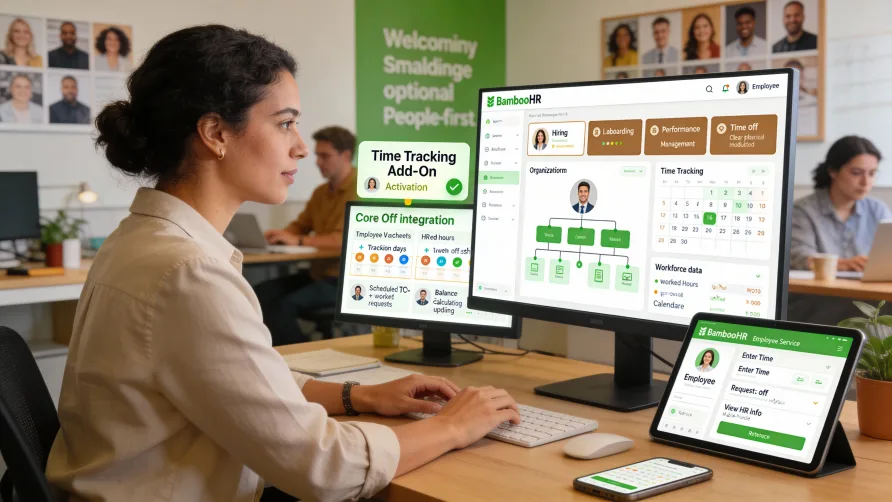
Yes, BambooHR offers time tracking capabilities through an optional add-on module called BambooHR Time Tracking. This feature operates separately from BambooHR's core HR platform but integrates with it to connect employee hours with other HR data like time off requests, employee profiles, and organizational information.
Unlike some HR platforms where time tracking comes standard, BambooHR requires you to add time tracking as a separate component to your subscription. This modular approach means businesses can use BambooHR for HR functions without time tracking if they don't need it, or add it when time and attendance management becomes necessary.
Is BambooHR Time Tracking Extra?
Yes, BambooHR Time Tracking is an add-on feature that carries separate costs beyond the base BambooHR platform. You purchase time tracking as an additional module if you need time and attendance capabilities alongside your core HR functions.
This pricing structure differs from all-inclusive platforms where time tracking comes standard. BambooHR's approach gives you flexibility to pay only for features you need, but it also means time tracking represents an incremental investment on top of your core HR subscription.
For businesses already using BambooHR for HR management, adding time tracking creates a more integrated experience than using a completely separate time tracking system. Employee data, organizational structure, and time off policies synchronize between the HR platform and time tracking module.
If you're evaluating BambooHR and know you need time tracking, factor the add-on into your budget planning. The time tracking module adds functionality but requires additional investment beyond the base platform costs.
Does BambooHR Have a Time Clock?
Yes, BambooHR Time Tracking includes multiple clock-in options for employees to record their hours. The system provides web-based time clocks, mobile apps, and kiosk modes to accommodate different work environments and employee situations.
The mobile app lets employees clock in and out from their smartphones, which works well for remote workers, field service teams, or employees who work away from fixed locations. Mobile time tracking captures GPS coordinates at clock-in, recording where employees were when they started their shifts.
Web-based time clocks allow employees to record hours from any internet-connected computer. Office workers or employees with computer access during their shifts can log into BambooHR and clock in through their browser without needing mobile devices or physical hardware.
Kiosk mode converts tablets or computers into shared time clocks that multiple employees can use. You can set up kiosks in common areas like break rooms or near facility entrances, giving employees a centralized location to clock in and out. Kiosks support PIN-based identification to verify employee identity at clock-in.
Each clock-in method records the same core information including employee identification, timestamp, and any additional data you require like job codes or project numbers. You can use different clock-in methods for different employee groups based on their work situations.
How BambooHR Time Tracking Works
BambooHR Time Tracking captures employee hours as they clock in and out throughout their workdays. The system records timestamps for each punch and calculates total hours worked based on your configured rules for regular time, overtime, and breaks.
Employees access time tracking through the BambooHR interface where they already manage other HR tasks. They clock in when starting work, clock out for breaks if required, and clock out at shift end. The system accumulates these punches into timesheets that show total hours worked.
Managers review and approve timesheets through the BambooHR dashboard. They can see all employee hours, identify exceptions that need attention like missed punches or unusual patterns, and approve timesheets before hours move to payroll processing.
The time tracking module connects to BambooHR's core HR platform, which means it accesses employee information including job titles, departments, pay rates, and supervisor relationships. This integration eliminates duplicate data entry and ensures time tracking uses current employee details.
Approved timesheets can export to payroll systems you use. While BambooHR doesn't process payroll itself, the time tracking module generates exports in formats compatible with common payroll providers, facilitating the transfer of hours data from time tracking into payroll.
Integration With BambooHR Core Platform
The connection between BambooHR Time Tracking and the core HR platform creates workflow efficiencies. Employee records exist in one system, so adding new employees automatically gives them time tracking access with their job information, department assignments, and supervisor relationships already configured.
Time off integration connects approved PTO requests with time tracking. When employees request time off through BambooHR's time off management system and managers approve it, that approved time off can reflect in schedules and time tracking records. This connection prevents scheduling conflicts and ensures time off appears in workforce planning.
Organizational structure from the HR platform determines approval workflows in time tracking. The supervisor relationships and department hierarchies you've established for HR purposes carry over to time tracking, routing timesheets to appropriate managers without separate workflow configuration.
Employee self-service through BambooHR extends to time tracking. Employees use the same login credentials and interface for clocking in, requesting time off, viewing pay stubs, and accessing other HR information. This unified experience reduces confusion about which system to use for different tasks.
Key Time Tracking Features
BambooHR Time Tracking includes overtime monitoring that tracks hours against thresholds you define. The system can alert managers when employees approach overtime limits, giving you opportunity to adjust schedules before overtime becomes unavoidable.
Project and task tracking lets employees allocate their hours to specific projects or job codes when clocking in. For businesses that need detailed labor cost data, this feature supports tracking which projects consume employee time and helps with client billing or project profitability analysis.
Exception management highlights issues that need resolution before finalizing timesheets. Missed clock-outs, gaps in punch records, or hours that seem unusual appear as exceptions requiring manager attention. Resolving exceptions during the review process prevents errors in the hours you send to payroll.
Time tracking reports provide visibility into labor data. You can analyze hours by employee, department, or project, identify overtime trends, and review attendance patterns. These reports help with labor cost management and workforce planning decisions.
The system supports different pay rules for different employee groups. You can configure varied overtime calculations, break requirements, or tracking rules based on employee classification, location, or employment type. This flexibility accommodates businesses with diverse workforces operating under different labor policies.
Mobile Time Tracking Capabilities
The BambooHR mobile app provides time tracking functionality alongside other mobile HR features. Employees can clock in and out, view their timesheets, check schedules, and request time off from the same mobile application.
GPS tracking captures employee location at clock-in when using mobile time tracking. This location data helps verify that field employees are at assigned work sites when they start recording hours. You can review GPS coordinates as part of timesheet approval if location verification matters for your operations.
Photo capture at clock-in adds identity verification to mobile time tracking. When enabled, employees take a photo as part of the clock-in process, helping prevent situations where someone records hours for another employee who isn't actually working.
Push notifications through the mobile app can remind employees about upcoming shifts, alert them to schedule changes, or notify them about timesheet issues that need their attention. These proactive communications help reduce missed shifts and timesheet errors.
Scheduling and Shift Management
BambooHR Time Tracking includes basic scheduling features that let managers create and publish work schedules. Employees view their assigned shifts through the web interface or mobile app, reducing confusion about when they're expected to work.
Schedule adherence tracking compares actual clock-in times against scheduled start times. This comparison helps identify chronic tardiness or patterns where employees consistently arrive late or leave early compared to their assigned schedules.
Shift swapping capabilities let employees request to trade shifts with coworkers when schedule changes become necessary. Managers can approve or deny these swap requests, maintaining control over schedule modifications while giving employees flexibility to manage personal needs.
The scheduling features integrate with time tracking to provide context for hours worked. When reviewing timesheets, managers can see scheduled hours alongside actual hours, making it easier to spot discrepancies or understand why hours differ from expectations.
Payroll Integration and Exports
While BambooHR doesn't process payroll internally, the time tracking module generates exports formatted for common payroll systems. Approved timesheets export to files you can import into your payroll software, transferring employee hours without manual data entry.
Export formats support various payroll providers, and you can often customize export layouts to match your specific payroll system's requirements. This flexibility helps ensure time data moves cleanly from BambooHR into whatever payroll solution you use.
For businesses using payroll providers with direct integrations, BambooHR may offer automated data transfer rather than manual exports. These integrations eliminate the export and import steps, allowing approved hours to flow automatically into payroll processing.
The connection between time tracking and payroll means updating employee pay rates or job classifications in BambooHR can affect both time tracking rules and payroll calculations. Maintaining accurate employee data in the HR platform ensures both time tracking and payroll use current information.
Implementation Considerations
Adding BambooHR Time Tracking to your existing BambooHR platform involves configuring the module to match your business requirements. You'll set up overtime rules, define projects or job codes if needed, establish approval workflows, and select which clock-in methods employees will use.
Employee setup happens largely automatically since the time tracking module inherits employee data from your BambooHR HR records. You mainly need to assign time clock permissions and configure any employee-specific time tracking rules or restrictions.
Training requirements vary by role. Employees need instruction on clocking in and out, viewing their timesheets, and understanding your time tracking policies. Managers need training on reviewing timesheets, approving hours, handling exceptions, and running time tracking reports.
If you're implementing kiosk time clocks, you'll need tablets or computers to dedicate as kiosk devices. Setup involves configuring devices to run in kiosk mode, mounting them in accessible locations, and testing the clock-in process.
Getting Started With BambooHR Time Tracking
If you currently use BambooHR for HR and want to add time tracking, contact BambooHR to discuss adding the module to your account. They can explain implementation steps, configuration options, and timeline for getting time tracking operational.
For businesses implementing BambooHR for the first time, consider whether you need time tracking from the start. Adding it during initial implementation means your time tracking configuration happens alongside HR setup, creating a more integrated experience from day one.
Think through which clock-in methods your employees need before starting implementation. Understanding whether you need mobile access, web clocks, kiosks, or multiple options helps ensure you configure appropriate time tracking for your workforce.
Establish timesheet approval processes and deadlines that align with your payroll schedule. Setting clear deadlines for timesheet submission and approval prevents last-minute rushes before payroll processing and gives managers adequate time to resolve exceptions.