
Better Reporting for Jira's Built-In Time Data
Jira teams that rely on native work logging often hit the same wall: the data exists, but pulling it into a useful format means exporting CSVs, building manual spreadsheets, or bolting on heavyweight tools that add features nobody asked for. Time Tracker for Jira, built by Tempo Software, takes a different angle. It’s a reporting-first plugin that turns Jira’s existing time data into configurable dashboards, visual breakdowns, and exportable reports. We score it 7.0 out of 10 in the time and attendance software category, a solid fit for teams that want better visibility into project hours without leaving Jira.
What Time Tracker for Jira Actually Does
Tempo Software launched its first Jira time tracking app back in 2009 from the company’s headquarters in Reykjavik, Iceland. Since then, Tempo has grown into a Platinum Atlassian Marketplace Partner serving over 30,000 organizations globally, with one in three Fortune 500 companies using at least one Tempo product. The company’s portfolio expanded significantly through acquisitions of Alpha Serve, ALM Works, Old Street Solutions, Roadmunk, and Prime Timesheet, building out a full strategic portfolio management suite that launched in 2025.
Time Tracker for Jira Cloud & DC sits on the lighter end of that portfolio. The listing has been active on the Atlassian Marketplace since October 2013, and the current install base tops 11,000 organizations. Its core pitch is simple: take the time data your team already logs in Jira and make it visible, filterable, and shareable through prebuilt report templates.
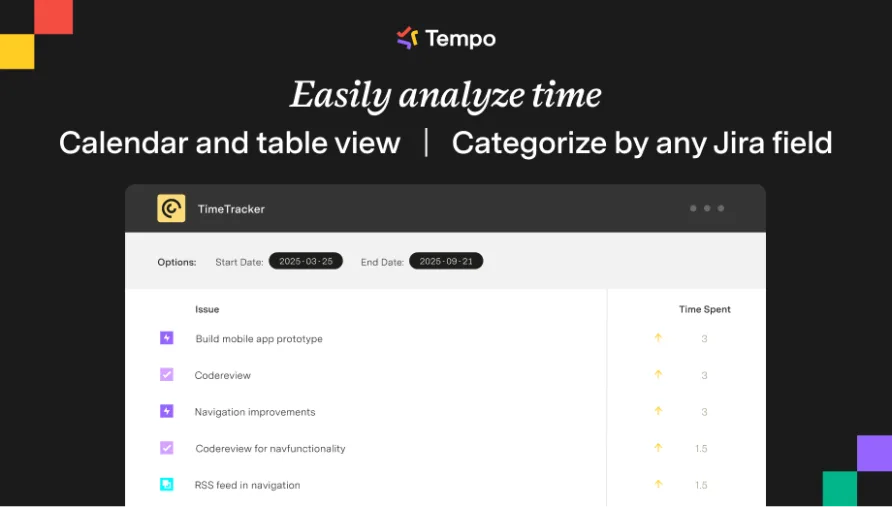
The plugin includes more than 10 report templates covering timesheet views, workload analysis, time-in-status tracking, time balance changes, and pie chart summaries. Each template accepts filters by user, project, issue, worklog, lead, and role, with grouping options that let you slice data by project, epic, sub-task, or individual contributor. Reports can pull in additional Jira fields and display time estimates alongside actual hours logged, giving project managers a quick read on schedule accuracy.
That flexibility matters. A development lead reviewing sprint capacity needs a different view than a finance manager calculating billable hours for a client invoice. Time Tracker handles both use cases through the same template engine.
Jira-Native Time Logging and Timesheets
Time entry in Time Tracker works through Jira’s standard worklog system. Team members log hours directly on issues using either manual entry or the plugin’s interface, and those worklogs feed into the reporting engine. The timesheet view aggregates individual entries into a weekly or custom-period grid, letting managers see who logged what across which projects.
One thing to understand: this isn’t a standalone time tracking application. There’s no mobile app, no desktop timer running in your system tray, and no AI-powered suggestions for filling in missed entries. Those capabilities belong to Tempo Timesheets, the company’s flagship product that starts at $1/user/month for teams of ten or fewer. Time Tracker occupies a deliberately narrower lane, focused on reporting and visualization rather than the full capture-approve-export workflow.
The dashboard gadget feature is a practical addition. You can embed any configured report directly into a Jira dashboard, which means project leads don’t need to open a separate reporting interface. The gadgets update dynamically, and you can place multiple report gadgets on the same dashboard for a consolidated project health view.
What It Costs in Annual Terms
A solo user or a team of up to ten on Jira Cloud pays approximately $1/user/month through the Atlassian Marketplace, putting the annual cost for a five-person team at roughly $60. That’s one of the lowest entry points in the Jira time tracking category. For a team of ten, you’re looking at around $120/year. Teams in the 11–100 user range see per-user costs increase, with Atlassian’s tiered pricing scaling based on your Jira license size. A 50-person team at approximately $5/user/month would pay around $3,000 annually, though exact pricing depends on your specific Marketplace tier.
There’s an important licensing constraint: your Time Tracker license must match or exceed your Jira license tier. If you’re licensing Jira at 100 users, you buy Time Tracker at the 100-user tier even if only 30 people actively use the reports. This is standard Atlassian Marketplace policy, but it catches some buyers off guard.
The 30-day free trial can be extended up to five times without vendor approval, giving you up to six months of evaluation before committing. That’s generous. Tempo also applied a 10% price increase across its portfolio in September 2025 as part of a broader alignment with Atlassian’s platform pricing evolution, so current rates reflect that adjustment.
Data Center pricing follows an annual model based on user count, with costs rising in defined tiers. For organizations already invested in Data Center infrastructure, the incremental add is modest relative to the base Jira license.
The Reporting Engine Up Close
Reports are where Time Tracker earns its keep. The template library covers the most common time analysis scenarios: who spent how long on what, how actual hours compare to estimates, where time concentrates across a project portfolio, and how individual workloads trend over defined periods. The pie chart report gives a quick visual read on time distribution, while the time balance report tracks changes in logged hours over a set window, useful for spotting inconsistent logging habits before they become a billing problem.
Export options include Excel, CSV, and JSON via REST API. The scheduled email feature lets you configure automatic report delivery to stakeholders on a recurring basis, which removes one more manual step from the reporting cycle. Print-formatted versions of reports are available for teams that still circulate physical status documents.
Where the reporting shows its limits is in complex cross-project analysis. Users managing time across multiple Jira instances or needing advanced data transformations (pivot tables, custom calculated fields, multi-layer drill-downs) will find the template-based system constraining. The reports are configurable but not customizable at a code level. A recurring theme among users working with larger Tempo products is that report performance can slow when processing large date ranges or high-volume worklog data, and Time Tracker is likely subject to the same constraint.
Is Time Tracker the Right Fit for Your Team?
Consider a software consultancy running three active client projects in Jira Cloud with a team of fifteen developers and two project managers. The PMs need weekly visibility into hours logged per client, estimates versus actuals for sprint planning, and exportable data for monthly client invoices. Nobody on the team wants to learn a separate tool or maintain another login. Time Tracker fits that scenario cleanly: the PMs configure their report templates once, pin gadgets to their dashboards, and get the visibility they need without pulling the developers out of their existing Jira workflow.
Now consider a construction firm managing field crews across multiple job sites. Employees need GPS-verified clock-ins, managers need overtime alerts, and payroll requires approved timesheets exported to a third-party system. That’s a fundamentally different set of requirements. Time Tracker doesn’t operate outside Jira, doesn’t track location, and doesn’t include approval workflows. It’s the wrong tool for that scenario.
The product sits in a specific niche: Jira teams that already track time in their issues and want better reporting on top of that existing data. If you aren’t using Jira, Time Tracker has no standalone value.
Where Time Tracker Stops
The boundaries are clear. There’s no mobile application for logging time away from a desktop. Automated time capture, which detects your activity across tools and pre-fills worklogs, isn’t part of the package. Approval workflows for manager sign-off on submitted timesheets require upgrading to Tempo Timesheets. Calendar integrations with Google or Microsoft aren’t available in Time Tracker.
The zero-review situation on the Atlassian Marketplace deserves attention. With more than 11,000 installs and a listing active since 2013, the absence of a single user review creates an unusual trust gap. The broader Tempo product line has built a strong reputation among Jira teams, and our evaluation of the Timesheets flagship confirms that Tempo’s Jira integration and reporting capabilities are genuinely well-executed. But Time Tracker is a different, more limited product. Buyers evaluating it specifically don’t have peer reviews to reference on the marketplace itself, which makes hands-on evaluation during the trial period especially important.
Recent Updates and Product Direction
Tempo has maintained a steady update cadence for Time Tracker, releasing version 7.25.0 in December 2025 and version 7.44.0 in February 2026, both tagged as minor version updates. The product supports the latest Jira Data Center releases through version 11.3.2, keeping pace with Atlassian’s platform evolution.
The larger strategic picture is Tempo’s push toward its Strategic Portfolio Management suite, which launched in 2025 and integrates time data, capacity planning, financial management, and roadmapping into a unified Jira-connected platform. Time Tracker feeds into that vision as an entry point: teams can start with basic time reports and expand into Timesheets, Capacity Planner, or Financial Manager as their needs grow. Tempo’s modular architecture means you aren’t locked into buying the full suite upfront.
Who Should Choose This Tool
If your team already logs time against Jira issues and your primary frustration is turning that data into something useful, Time Tracker solves a real problem at a low cost. The combination of prebuilt templates, dashboard embedding, and scheduled exports covers the reporting gap that Jira’s native time tracking leaves wide open. For a five-person team paying $60/year, the return on even modest time savings in manual report building is immediate.
The tradeoff is scope. You’re getting a reporting layer for Jira, not a time and attendance platform. Teams that need employee scheduling, break tracking, PTO management, compliance alerts, or any workflow that extends beyond Jira issue worklogs will need to look at the broader Tempo suite or a different category of tool entirely. Time Tracker does what it promises, and it doesn’t pretend to do more. For Jira teams with straightforward reporting needs, that focus is exactly the right approach.