
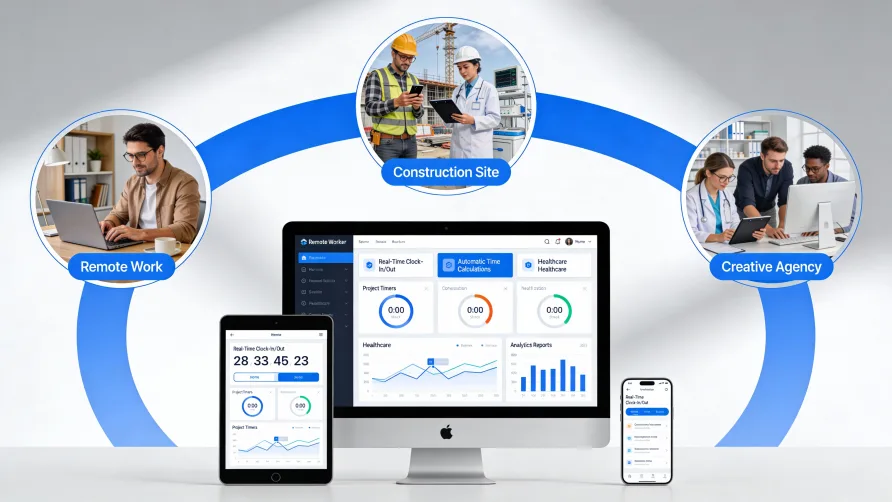
Time tracking software is a digital tool that records, manages, and reports employee work hours automatically. These time tracking applications replace manual methods like paper timesheets and spreadsheets with features such as digital timers, clock-in systems, project assignment, and integration with payroll platforms. Businesses use time tracking tools to improve accuracy, reduce administrative burden, and gain visibility into how labor hours are spent across projects, clients, and departments.
The Time Tracking Software Definition Explained
To understand the time tracking software definition, start with the problem it solves. Every business that pays hourly workers or bills clients by the hour must track time somehow. The question is whether you do it manually or let software handle the mechanics.
Manual methods require employees to remember their hours, write them down or type them into spreadsheets, and submit them to managers who then review, correct, and enter the data into payroll systems. Each handoff introduces potential for errors, delays, and disputes. According to industry data, approximately 38% of U.S. companies still use paper timesheets and punch cards, and those businesses report needing to correct the majority of the timesheets they receive.
Time tracking software eliminates most of these manual steps. Employees clock in through an app, website, or physical terminal. The system records the exact time automatically. Managers approve hours through a dashboard instead of reviewing handwritten entries. The approved data flows directly into payroll without re-keying. What previously took hours of administrative effort now happens in minutes.
How Time Tracking Software Differs from Manual Methods
The gap between manual tracking and software goes beyond convenience. Several fundamental differences affect accuracy, efficiency, and the insights you can extract from your data.
Accuracy and Error Rates
Manual time tracking relies on human memory and honest self-reporting. Employees filling out timesheets at the end of the week often estimate rather than record precisely. Research indicates that manual time tracking systems can suffer from error rates as high as 30%. Handwriting legibility, transposition mistakes during data entry, and simple calculation errors compound the problem.
Time tracking systems capture exact timestamps at the moment of clocking in or out. There's no relying on memory and no transcription from paper to digital. Built-in validation catches anomalies like overlapping shifts or missed punches before they become payroll problems.
Administrative Efficiency
Paper timesheets create work at every stage. Employees spend time filling them out. Managers spend time reviewing and correcting them. Someone in accounting spends time entering approved hours into payroll. According to Deloitte, half of professionals without automated tracking systems cite manual data input and adjustments as the most time-consuming part of their process.
Employee time tracking software compresses these steps. Employees tap a button to start or stop tracking. Managers review exceptions rather than every entry. Payroll systems pull approved hours directly, eliminating double entry. The time savings scale with workforce size.
Data Depth and Insights
A paper timesheet tells you someone worked eight hours. It rarely tells you what they worked on or how those hours compared to budget. You get attendance data, but limited operational intelligence.
Time tracking applications capture richer information. Employees can assign hours to specific projects, tasks, or clients as they work. The software aggregates this data into reports showing labor costs by project, utilization rates by team member, and trends over time. This visibility supports better project estimates, staffing decisions, and profitability analysis.
What Does Time Tracking Software Do?
Modern time tracking systems handle far more than simple clock-in and clock-out functions. The features you need depend on your business, but most solutions offer a core set of capabilities.
Digital Timers and Clock Functions
The most basic function is recording when work starts and stops. This might take the form of a start/stop timer that employees activate manually, a scheduled clock-in system tied to shifts, or passive tracking that monitors computer activity. Some systems support multiple methods, letting office workers use a desktop timer while field crews clock in from mobile devices with GPS verification.
Timesheet Management
Rather than paper forms, employees complete digital timesheets through the software. They can add hours in real-time throughout the day or enter them at the end of a shift. Managers receive submissions for review and can approve, reject, or request corrections through the same interface. The system maintains an audit trail of all changes.
Project and Task Assignment
For businesses that need to know where hours go, not just how many were worked, time tracking tools allow employees to categorize their time. A marketing agency employee might log two hours to Client A's social media campaign, three hours to Client B's website redesign, and three hours to internal meetings. This granular tracking supports both client billing and internal project management.
Reporting and Analytics
Raw time data becomes useful when you can analyze it. Reporting features let you see total hours by employee, department, or location. You can track overtime accumulation, compare actual hours to scheduled hours, and monitor trends week over week. More advanced time tracking systems offer labor cost analysis, budget tracking, and forecasting tools.
Integration Capabilities
Time tracking applications rarely operate in isolation. Integration with payroll software ensures that approved hours flow directly into wage calculations. Integration with billing systems supports invoice generation for professional services firms. Connections to project management platforms link time data to task progress and deadlines. Calendar integrations can auto-populate time entries based on meetings.
Types of Time Tracking Systems: Cloud vs. On-Premise
When evaluating time tracking tools, one of the first decisions involves deployment model. The two primary options are cloud-based and on-premise, each with distinct trade-offs.
Cloud-Based Solutions
Cloud solutions run on the vendor's servers. You access them through a web browser or mobile app without installing software on your own infrastructure. Market data from Mordor Intelligence shows that cloud solutions command approximately 78% of the time tracking software market, making them the dominant model.
The advantages are straightforward. Cloud systems require no server hardware or IT maintenance on your end. Updates happen automatically. Employees can access the system from anywhere with internet connectivity, which supports remote and distributed teams. Pricing typically follows a subscription model with monthly or annual per-user fees, keeping upfront costs low.
The trade-offs involve control and data residency. Your time data lives on the vendor's servers, which may raise concerns for organizations in regulated industries or those with strict data governance requirements. You also depend on the vendor's uptime and security practices.
On-Premise Solutions
On-premise systems run on your own servers. You purchase a license, install the software, and maintain it internally. This model has declined in popularity but remains relevant for organizations with specific security or compliance requirements.
The primary advantage is control. Your data stays within your network. You decide when to apply updates and how to configure security. For businesses in healthcare, finance, or government that face strict data handling requirements, on-premise deployment may simplify compliance.
The downsides include higher upfront costs, ongoing IT burden for maintenance and updates, and reduced flexibility for remote access. Mobile and work-from-home scenarios require additional configuration.
Hybrid Approaches
Some vendors offer hybrid models that combine elements of both. You might store sensitive data on-premise while using cloud infrastructure for mobile access and reporting. These configurations add complexity but can address specific compliance needs without sacrificing all cloud benefits.
Who Needs Time Tracking Software?
Virtually any business that employs people can benefit from time tracking tools, but certain situations make software adoption especially valuable.
Businesses with Hourly Workforces
If you pay workers by the hour, accurate time records are not optional. Labor laws require it, and payroll accuracy depends on it. Companies in retail, hospitality, healthcare, manufacturing, and food service typically have large hourly workforces where manual tracking becomes unwieldy quickly. Software scales to handle dozens or hundreds of employees with consistent accuracy.
Professional Services Firms
Law firms, accounting practices, consulting agencies, and marketing firms bill clients based on time spent. These businesses need detailed records of who worked on what and for how long. Employee time tracking software designed for professional services supports project-based time entry, multiple billing rates, and integration with invoicing systems.
Project-Based Organizations
Construction companies, software development teams, and agencies that manage multiple concurrent projects need visibility into labor allocation. Time tracking applications show which projects are consuming more hours than budgeted and which team members have capacity for additional work.
Remote and Hybrid Teams
The shift toward distributed work has increased demand for digital time tracking. When employees work from various locations, managers cannot rely on physical presence as a proxy for productivity. Time tracking software provides structure without requiring everyone to be in the same building. According to industry research, remote and hybrid work models rank among the top drivers of time tracking software adoption.
Growing Small Businesses
A five-person company might manage with spreadsheets. At 15 or 25 employees, the administrative burden of manual tracking starts to hurt. Small businesses often adopt time tracking systems as they scale, recognizing that the efficiency gains outweigh the subscription cost. Market data indicates that small and medium enterprises represent over 60% of global time tracking software revenue.
How Time Tracking Software Connects to Other Systems
The value of time tracking data increases when it flows into other business systems without manual intervention.
Payroll Integration
The most common integration links time tracking to payroll. Approved hours, overtime calculations, and PTO usage transfer directly to payroll software, where they factor into wage calculations. This eliminates duplicate data entry and reduces the risk of transcription errors affecting paychecks.
Billing and Invoicing
For businesses that bill by the hour, integration with invoicing systems converts tracked time into client charges. The software can apply different billing rates by employee or project, calculate totals, and generate draft invoices for review. Professional services firms particularly benefit from this connection.
Project Management
When time tracking integrates with project management platforms, you can compare planned hours to actual hours at the task level. Project managers see whether work is proceeding on schedule and budget without switching between systems.
Accounting Software
Beyond payroll, time data can feed into general accounting systems for job costing, departmental expense allocation, and financial reporting. Understanding true labor costs by project or client supports profitability analysis and pricing decisions.
Choosing the Right Approach for Your Business
The gap between manual tracking and software is real, but selecting the right solution requires matching capabilities to your actual needs. A 10-person retail shop has different requirements than a 200-person consulting firm.
Consider what problems you're trying to solve. If payroll errors and administrative overhead are your main concerns, basic clock-in functionality with payroll integration may be sufficient. If client billing accuracy drives revenue, you need project-based tracking and invoicing features. If you manage complex shift schedules across multiple locations, look for scheduling and labor forecasting capabilities.
The time tracking software market has matured considerably, with options available at every price point and complexity level. Understanding what these tools do and how they differ from manual methods is the starting point for making an informed choice.