
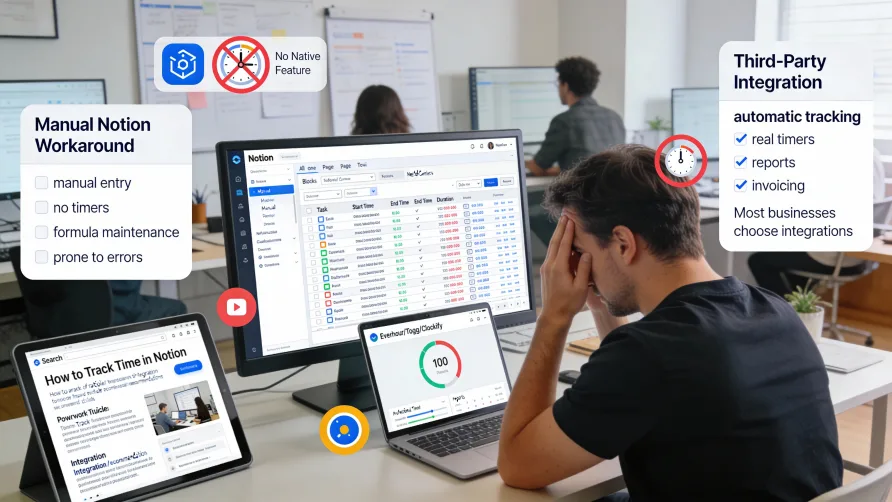
No, Notion does not have built-in time tracking features. The platform excels at documentation, knowledge management, project planning, and database organization, but it lacks native capabilities for automatically tracking how much time you spend on tasks or managing employee hours.
This means you cannot start a timer within Notion that automatically tracks elapsed time, nor can you access time tracking reports, timesheet views, or workforce management features without adding external functionality. However, Notion's flexibility lets you create manual time tracking workarounds, and several third-party tools integrate with Notion to add comprehensive time tracking capabilities.
Why Notion Doesn't Include Time Tracking
Notion positions itself as an all-in-one workspace for notes, docs, wikis, and projects rather than as specialized project management or workforce management software. The platform focuses on flexible content creation and organization through its block-based structure and database functionality.
While Notion's databases can store almost any type of information including time-related data, the platform doesn't include automatic time tracking mechanisms. There's no built-in timer that runs while you work, no automated time capture based on when you interact with pages, and no time tracking features designed for workforce management or billing purposes.
This design choice reflects Notion's philosophy of providing building blocks that users customize for their specific needs rather than prescribing specific workflows. The advantage is tremendous flexibility; the disadvantage is you must build or integrate functionality that other platforms include by default.
For users who need time tracking, this means either creating manual tracking systems within Notion or connecting external time tracking tools to your Notion workspace.
Can You Build a Time Tracker in Notion?
Yes, you can build manual time tracking systems in Notion using databases, formulas, and properties, but these workarounds lack the automation and convenience of dedicated time tracking software. The manual approaches require users to enter time data themselves rather than using running timers that track time automatically.
A basic Notion time tracking setup uses a database with properties for task name, start time, end time, and duration. You manually enter when you started and finished working on tasks, and formulas calculate the elapsed time between those timestamps.
More sophisticated Notion time trackers use database relations to connect time entries with project databases, client databases, or task databases. This structure lets you track which project or client your time applies to and aggregate time across multiple entries.
Formulas in Notion can calculate durations, sum total time by project, or perform other calculations on your time data. You might create rollup properties that show total time logged for a project based on all related time entries.
Some Notion users create elaborate dashboards with filtered views showing today's time entries, this week's totals, or time breakdowns by client or project. These views help visualize time data within Notion's interface.
Limitations of Manual Notion Time Tracking
Manual time tracking in Notion requires remembering to log your start and end times for every task. There's no running timer that automatically tracks elapsed time, which means you must note when you begin work and manually record that timestamp in your database.
This manual process is prone to errors and omissions. People forget to log start times, estimate durations after the fact, or skip logging time entries entirely when busy. The resulting data is often incomplete or inaccurate compared to automatic time tracking.
The lack of a timer interface means you can't see at a glance what's currently running or how long you've been working on the current task. You must calculate elapsed time yourself or wait until logging your end time to see the calculated duration.
Notion's manual approach doesn't support common time tracking needs like timesheet approval workflows, integration with payroll systems, or automatic invoicing based on billable hours. You can store time data in Notion databases, but using that data for payroll or billing requires exporting and processing it in other systems.
Multi-user time tracking becomes cumbersome in manual Notion systems. While multiple team members can log time in a shared database, there's no streamlined workflow for managers to review and approve hours, no automated alerts for missing time entries, and no enforcement mechanisms to ensure consistent time logging.
Reporting capabilities are limited to what you can build using database views and formulas. While Notion's databases are flexible, they don't provide the specialized time tracking reports, analytics dashboards, or labor cost calculations that dedicated time tracking platforms offer.
How Do I Track Time in Notion?
If you decide to track time manually in Notion despite the limitations, here's a basic approach:
Create a database called "Time Entries" with properties for task description, start time, end time, and project. Add a formula property that calculates duration by subtracting start time from end time.
When you begin working on a task, create a new entry in your time database and record the current time in the start time property. Notion's date property can include timestamps, so you capture both the date and specific time you started.
When you finish the task, return to that entry and add the end time. The formula property automatically calculates how long you worked based on the difference between start and end times.
Use database relations to connect time entries with your projects, clients, or task databases. This connection lets you see all time logged for a specific project or analyze time distribution across different work categories.
Create filtered database views to see time entries for specific date ranges, projects, or team members. You might create a "This Week" view that shows only current week entries, or project-specific views that display time for individual projects.
Add rollup properties to project databases that sum total time from all related time entries. This gives you project-level time totals without manually adding up individual entries.
This manual approach works for personal time tracking when you need rough data about how you spend your time. It's less suitable for business needs like payroll processing, client billing, or team workforce management where accuracy and automation matter more.
Third-Party Time Tracking Integrations
Dedicated time tracking tools that integrate with Notion provide comprehensive functionality that manual Notion systems cannot match. These platforms are purpose-built for time tracking and offer automatic timers, timesheet management, approval workflows, detailed reporting, payroll integration, and invoicing capabilities.
Integrations work by connecting your Notion workspace to the time tracking platform. The time tracking tool can access your Notion databases and pages, letting you associate time entries with specific Notion tasks or projects. Some integrations use browser extensions to add timer buttons directly to Notion pages.
The time data lives primarily in the time tracking platform rather than in Notion databases. You access detailed reports, timesheet views, and time analytics through the time tracking tool's interface. Some integrations can sync summary data back to Notion, but the comprehensive time tracking functionality exists in the external system.
This integrated approach combines Notion's strengths in knowledge management and project organization with specialized time tracking capabilities. You maintain your workflow in Notion while using a dedicated tool for the time tracking features Notion lacks.
Toggl Track for Notion
Toggl Track provides time tracking that integrates with Notion through browser extensions and API connections. The integration lets you start timers for specific Notion pages or database entries, connecting your time tracking with your Notion workspace.
Toggl Track offers one-click time tracking with running timers that accurately capture time as you work. The platform includes timeline views showing how you spent your day, detailed reporting for analyzing time distribution, and project-based time organization.
The tool supports billable hour tracking with configurable rates for different work types or team members. For businesses that invoice clients based on time, Toggl Track can generate reports showing billable hours by client or project.
Team features include manager dashboards for reviewing employee time, timesheet functionality for approving hours, and integrations with payroll systems. The platform provides the workforce management capabilities that Notion's manual tracking cannot support.
Clockify Integration With Notion
Clockify offers free and paid time tracking that can integrate with Notion workflows. While the integration is less direct than some platforms, you can use Clockify alongside Notion for comprehensive time tracking with unlimited users on the free plan.
Clockify includes timer and manual time entry modes, giving users flexibility in how they record hours. The platform supports unlimited projects and clients even on free plans, making it accessible for growing teams.
Reporting features show time breakdowns by project, client, or team member. You can generate detailed time reports, analyze productivity patterns, and export data for payroll or billing purposes.
Paid plans add timesheet approval workflows, invoicing capabilities, labor cost tracking, and more sophisticated analytics. The platform can generate invoices directly from tracked billable hours.
Everhour Time Tracking for Notion
Everhour provides time tracking designed for project-based work and can integrate with Notion through browser extensions. The platform focuses on features agencies and professional services firms need including budget tracking, capacity planning, and invoice generation.
Everhour's browser extension can add time tracking functionality to various project management tools, and users can track time against Notion pages when combined with proper workflow setup. The platform excels at converting tracked time into business insights.
Budget monitoring features let you set project budgets and compare actual time against budgeted hours. The system alerts you when projects approach budget limits, helping prevent overruns.
Timesheet functionality supports team time review and approval. Managers can review employee hours, request corrections, and approve timesheets before processing hours for payroll or client billing.
TMetric for Notion Workflows
TMetric offers time tracking with project management integrations and can work alongside Notion-based workflows. The platform provides automatic time tracking with browser activity monitoring to capture what you're working on.
The tool includes features for both individual productivity tracking and team workforce management. You can track time automatically based on applications and websites you use, or manually start timers for specific tasks.
Billing and invoicing features let you configure hourly rates, mark time as billable or non-billable, and generate invoices from tracked hours. The platform supports multiple billing rates within the same organization.
Reporting capabilities cover time by project, client profitability, team utilization, and individual productivity. The analytics help you understand where time goes and which work is most profitable.
Comparing Manual Notion Tracking Versus Dedicated Tools
Manual time tracking in Notion keeps all your data within your Notion workspace, which appeals to users who want everything in one place. You don't need to manage additional software subscriptions or train team members on new tools.
However, the manual approach requires significant discipline and creates data quality issues. Without automatic timers, people forget to log time, estimate durations inaccurately, or skip entries entirely. The resulting data is unreliable for important business decisions like payroll processing or client billing.
Manual Notion systems lack essential features for business time tracking including timesheet approval workflows, payroll integrations, compliance support for labor regulations, and professional invoicing capabilities. You can store time data in Notion, but using it for business processes requires extensive manual work.
Dedicated time tracking tools provide automatic timers that accurately capture time without requiring users to remember to log start and end times. This automation dramatically improves data accuracy and reduces the burden on team members.
The specialized platforms include features purpose-built for workforce management, client billing, or productivity analysis. Timesheet approval, payroll export, invoice generation, and detailed analytics are standard features that would require extensive custom development in Notion.
For personal time tracking where you want rough insights into how you spend time, manual Notion tracking might suffice. For business needs involving multiple people, payroll processing, client billing, or compliance requirements, dedicated time tracking tools provide necessary capabilities that Notion cannot match.
Implementation Considerations
If you choose manual Notion time tracking, you'll need to design your database structure, create necessary views and formulas, and train team members on the logging process. Establish clear expectations about when and how people should log their time.
Creating accountability for time logging is difficult with manual systems. Consider how you'll remind people to log time, what happens when entries are missing, and how you'll verify the accuracy of manually entered time data.
For integrated time tracking tools, you'll need to select a platform that fits your requirements and budget. Evaluate whether you need features like invoicing, payroll integration, or advanced reporting that justify the cost of dedicated software.
Most time tracking tools work alongside Notion rather than deeply integrating with it. You'll track time in the external platform while using Notion for project management, documentation, and knowledge management. Browser extensions can minimize friction by adding timer buttons to your workflow.
Training needs depend on your chosen approach. Manual Notion tracking requires teaching people your custom database structure and time logging procedures. Dedicated tools need training on the time tracking platform itself, though many are designed for quick adoption.
Selecting Your Time Tracking Approach
Define what you need from time tracking before choosing your approach. Are you tracking time for personal productivity insights, team workforce management, client billing, or payroll processing? Your primary use case determines whether manual Notion tracking could work or whether you need a dedicated platform.
Evaluate how important data accuracy is for your use case. Personal productivity tracking can tolerate the inaccuracies of manual entry, but payroll and client billing require precise, verifiable time data that automatic tracking provides.
Consider the number of people who need to track time. Manual Notion systems become increasingly unwieldy as team size grows. Dedicated platforms are built to handle team time tracking with features for reviewing, approving, and managing employee hours.
Think about what you'll do with time data once collected. If you need to generate invoices, export to payroll systems, or produce compliance reports, dedicated time tracking tools provide these capabilities. Manual Notion data requires extensive additional processing for business use.
Assess your budget and whether you can justify the cost of time tracking software. Free options like Clockify exist for basic time tracking needs, while more sophisticated platforms charge per user for advanced features.
Getting Started With Time Tracking for Notion
If using manual Notion tracking, create your time entry database with properties for all information you need to capture. Set up formulas for calculating durations and totals, create useful database views, and document your time logging process.
Establish time logging policies including when to create entries, how detailed descriptions should be, and expectations for logging frequency. Clear procedures improve compliance and data quality.
For dedicated time tracking integrations, choose your platform based on your requirements and create an account. Install any browser extensions that add timer functionality to your browser.
Set up projects or clients in your time tracking platform to mirror your Notion organizational structure. This alignment makes it easier to understand time distribution and generate reports that match your project framework.
Train your team on the time tracking workflow. Show them how to start and stop timers, categorize time entries, and where to view their tracked time. Demonstrate how managers will review timesheets if you're using approval workflows.
Monitor adoption and data quality in the early stages. Identify gaps in time tracking compliance and provide additional support or training as needed to ensure consistent, accurate time data.
Regularly review time tracking data to ensure it's serving your needs. Adjust your approach if the manual system proves too burdensome or if the integrated tool isn't providing the insights or functionality you expected.