
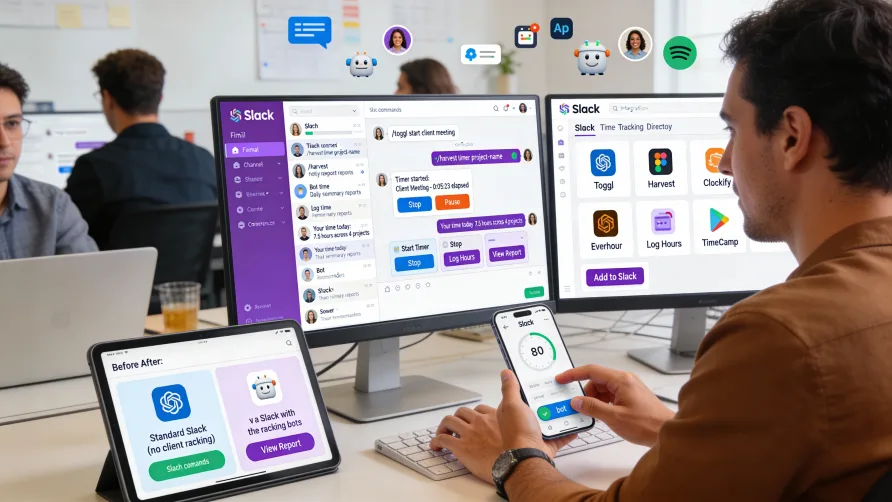
Slack does not include built-in time tracking features. The platform focuses on team communication and collaboration through messaging, channels, and file sharing, but lacks native capabilities for tracking work hours, managing timesheets, or monitoring employee time.
This absence means you cannot track time directly within Slack without adding external functionality. However, Slack's extensive integration ecosystem includes numerous time tracking applications that connect with your Slack workspace, bringing time tracking capabilities into your communication workflow.
Why Slack Doesn't Include Time Tracking
Slack built its platform around team communication rather than attempting to be an all-in-one business management system. The core product excels at real-time messaging, channel organization, file sharing, and integrating various work tools, but Slack deliberately keeps focused on its communication strengths.
Rather than building time tracking, project management, or other specialized business functions into the core product, Slack provides an app integration framework that lets specialized tools connect to your workspace. This approach lets you choose best-in-class tools for different functions while using Slack as your central communication hub.
For time tracking specifically, this design means you'll add a dedicated time tracking app to your Slack workspace rather than finding time tracking features built into Slack itself. The advantage is you can select a time tracking solution that matches your specific needs rather than being limited to whatever basic tracking Slack might have included.
The integration approach also means businesses can use Slack for communication while selecting specialized tools for workforce management, choosing solutions that meet industry-specific requirements or complex business needs.
How Do I Track Time in Slack?
Time tracking in Slack works through integrated apps that connect to your workspace. These apps add time tracking functionality accessible through Slack commands, bot interactions, or app interfaces that open within Slack.
The typical workflow involves installing a time tracking app from Slack's App Directory, configuring it for your workspace, and then using Slack-based commands or interfaces to track time. Most time tracking apps add slash commands you can type directly into Slack to start timers, log hours, or view time summaries.
For example, you might type a command like "/track start project-name" to begin tracking time on a project, then "/track stop" when you finish. The specific commands vary by app, but the pattern of using text commands within Slack is common across time tracking integrations.
Some time tracking apps add buttons or interactive messages within Slack that you can click to start timers or log time. These interactive elements make time tracking more visual and accessible compared to remembering text commands.
Many integrations also send notifications or reminders through Slack. You might receive messages prompting you to start your timer at the beginning of the day, reminding you to stop running timers, or alerting you to submit your timesheet.
The time data typically lives in the time tracking app's own system rather than being stored in Slack. Slack serves as the interface for interacting with time tracking, while the external app handles data storage, reporting, payroll integration, and other time tracking functions.
What Time Tracking Apps Work With Slack?
Slack's App Directory includes dozens of time tracking integrations with varying features and capabilities. These apps range from simple time logging tools to comprehensive workforce management platforms that happen to integrate with Slack.
The best time tracking app for your Slack workspace depends on your specific needs including team size, whether you need payroll integration, if you bill clients based on hours, and the level of reporting and analytics you require.
Toggl Track Integration With Slack
Toggl Track provides time tracking that integrates with Slack through an app you install in your workspace. The integration lets you start and stop timers, view time summaries, and manage your time tracking through Slack commands without opening the Toggl Track website or app.
The Slack integration adds slash commands for common time tracking actions. You can start timers for specific projects, stop running timers, view what's currently tracking, and see daily or weekly time summaries, all from within Slack.
Toggl Track sends notifications through Slack including reminders to start your timer if you haven't tracked time yet today, alerts when you've left a timer running for extended periods, and daily summaries of time logged. These proactive notifications help improve time tracking compliance.
The integration works bidirectionally in some cases. Time you track through Slack commands records in your Toggl Track account where it's available for detailed reporting, payroll export, or invoice generation. Conversely, timers you start in the Toggl Track app or browser extension can send status updates to Slack.
For team environments, managers can receive time tracking summaries through Slack showing team member hours, project time distribution, or other workforce metrics without needing to log into separate reporting dashboards.
Clockify Slack Integration
Clockify offers a Slack app that brings time tracking into your workspace. The integration provides slash commands for starting timers, logging manual time entries, and checking your tracked time, making time tracking accessible without leaving Slack.
The Clockify Slack app supports both timer-based tracking and manual entry. You can start a running timer that tracks time as you work, or retroactively log hours you've already worked using manual entry commands.
Project and task organization from Clockify carries over into the Slack integration. When starting timers through Slack, you can specify which project and task the time applies to, ensuring proper categorization for reporting and billing purposes.
Time tracking reminders and notifications come through Slack. You might receive messages reminding you to start tracking at the beginning of your workday, alerts about running timers you may have forgotten to stop, or summaries showing your tracked time for the day or week.
The integration connects to your Clockify account where comprehensive time data, detailed reports, and team management features live. Slack serves as a convenient interface for day-to-day time tracking while Clockify handles the robust functionality like payroll integration and invoicing.
Hubstaff for Slack
Hubstaff provides workforce management and time tracking with Slack integration designed for remote teams and distributed workforces. The Slack app lets team members clock in and out, view their tracked time, and receive time-related notifications through Slack.
The integration emphasizes workforce monitoring features alongside basic time tracking. Hubstaff tracks not just time but also activity levels, applications used, and websites visited, with summaries available through Slack commands.
Team managers can receive productivity reports and time summaries through Slack without logging into separate dashboards. The integration sends automated reports showing team hours, project time allocation, and productivity metrics directly to Slack channels or direct messages.
Clock-in reminders and timesheet notifications come through Slack. Team members receive messages prompting them to start their workday, alerts about upcoming timesheet deadlines, or notifications about missing time entries.
The Slack integration connects to Hubstaff's comprehensive workforce management platform where detailed time data, screenshots, activity monitoring, and payroll features exist. Slack provides quick access to time tracking while Hubstaff handles the heavy lifting of workforce analytics.
Time Doctor Slack Integration
Time Doctor offers time tracking and productivity monitoring with Slack integration for teams that need detailed workforce visibility. The Slack app adds time tracking commands and sends productivity reports through Slack channels.
The integration lets team members start and stop work timers using Slack commands. When you begin working, you can start Time Doctor tracking from Slack, and the time records in your Time Doctor account where it's available for payroll and reporting.
Productivity insights and time summaries come through Slack notifications. Managers can receive automated reports showing team productivity scores, time tracked by project, or individual employee summaries delivered directly to Slack.
The app sends reminders about time tracking compliance. If team members haven't started their timers or have stopped tracking during work hours, Time Doctor can send prompts through Slack encouraging them to track their time.
Time Doctor's comprehensive features including screenshot capture, website and application monitoring, and detailed productivity analytics exist in the main platform. The Slack integration provides convenient access to core time tracking functions while keeping advanced features in the dedicated tool.
Benefits of Time Tracking Through Slack
Integrating time tracking with Slack reduces friction in your time tracking workflow. Team members can start timers, log hours, and check time summaries without leaving the communication platform they use all day. This convenience improves time tracking compliance compared to requiring people to open separate applications.
Slack-based time tracking reminders reach people where they're already working. Notifications prompting team members to start timers, stop forgotten trackers, or submit timesheets arrive in Slack where they're more likely to be seen and acted upon compared to email reminders or notifications from separate apps.
The integration centralizes work activities in Slack. Rather than switching between communication tools, project management platforms, and time tracking software, you can handle multiple work functions from within your Slack workspace.
For distributed or remote teams already relying on Slack for communication, adding time tracking to the same platform maintains workflow cohesion. Team members have fewer tools to juggle and fewer reasons to leave their primary work environment.
Limitations of Slack-Based Time Tracking
Time tracking through Slack provides convenient access but typically offers limited functionality compared to using time tracking platforms directly. Slack integrations focus on core actions like starting timers and checking summaries, while advanced features require accessing the time tracking platform's website or dedicated app.
Detailed reporting, timesheet approval workflows, payroll integration configuration, and workforce analytics usually aren't available through Slack interfaces. You'll need to use the time tracking platform's full interface for these administrative and analytical functions.
The Slack experience depends heavily on which time tracking app you integrate. Some integrations provide robust Slack functionality with comprehensive commands and interactive elements, while others offer minimal Slack presence and primarily just send notifications to Slack.
Time tracking apps accessible through Slack still require separate subscriptions and accounts with those platforms. Installing the Slack integration doesn't give you free access to the time tracking service; it just connects your existing account to Slack.
Choosing a Time Tracking App for Slack
Start by identifying your time tracking requirements beyond just Slack integration. Do you need time data for payroll processing? Will you bill clients based on tracked hours? Do you need productivity monitoring features? Understanding your core needs helps narrow your options.
Evaluate the depth of Slack integration each platform offers. Some time tracking apps provide extensive Slack functionality with numerous commands and interactive features, while others simply send occasional notifications to Slack with minimal interactive capability.
Consider the time tracking platform's standalone features. Since you'll use the full platform for reporting, timesheet management, and administrative functions, ensure it provides the capabilities you need beyond what's accessible through Slack.
Review team size limits and costs. Most time tracking platforms charge per user, so calculate total costs based on your team size and required feature tier.
Test Slack integrations before committing. Many time tracking platforms offer free trials, giving you opportunity to evaluate how well the Slack integration works for your team's workflow and whether team members find it convenient.
Implementation Considerations
Installing a time tracking app in your Slack workspace typically requires workspace admin permissions. The installation process connects the time tracking platform to Slack and sets permissions for what the app can access within your workspace.
After installation, team members usually need to connect their individual time tracking accounts to Slack. This authentication step links each person's Slack identity with their time tracking account so commands they issue through Slack record time under the correct user.
Training should cover the specific Slack commands available for your chosen time tracking app. Create a quick reference showing how to start timers, stop tracking, log manual time, and view summaries through Slack.
Establish expectations about when to use Slack-based tracking versus accessing the time tracking platform directly. Clarify which functions are available through Slack and when team members need to use the full platform interface.
Configure notifications and reminders appropriately for your team. Too many notifications become annoying and decrease engagement, while too few reminders may not provide enough prompting for consistent time tracking.
Alternatives to Slack Integration
Some businesses find that direct use of time tracking platforms works better than Slack integration despite the convenience factor. Browser extensions from time tracking platforms can provide similarly convenient access without depending on Slack integration.
For teams that prefer keeping time tracking separate from communication, using dedicated time tracking apps with mobile access or browser extensions might create clearer boundaries between communication and time management activities.
Standalone time tracking platforms often provide more comprehensive mobile apps than what's accessible through Slack mobile. If your team works primarily from phones or tablets, dedicated time tracking apps might offer better mobile experiences.
Getting Started With Slack Time Tracking
If you decide to add time tracking to Slack, start by selecting a time tracking platform that meets your business needs and offers Slack integration. Create an account with the platform and configure it for your organization.
Install the time tracking app in your Slack workspace through Slack's App Directory. Follow the authentication steps to connect your time tracking account with Slack.
Have team members link their individual accounts following the app's connection process. This setup ensures time tracked through Slack commands records under the correct user in your time tracking system.
Communicate with your team about the new time tracking capability in Slack. Share the commands they'll use most frequently and explain when to track time through Slack versus accessing the time tracking platform directly.
Monitor adoption and gather feedback during the first few weeks. Identify confusion points or friction in the workflow and adjust your approach or provide additional training as needed.
Consider creating a Slack channel dedicated to time tracking questions and support. This gives team members a place to ask questions about commands, troubleshoot issues, or share tips about effective time tracking through Slack.
Review time tracking data regularly to ensure the Slack integration is capturing accurate time and that team members are using the system consistently. Address any data quality issues or compliance problems early before they become ingrained habits.