
Visibility Into How Remote Work Actually Happens
Remote teams need more than a clock-in button. They need visibility into how work actually happens, where productive hours go, and whether logged time translates into real output. Time Doctor is built around that premise, combining employee time and attendance tracking software with deep productivity analytics, and after evaluating its features, pricing, and real-world usability, we score it 7.7 out of 10 for the time and attendance software category. It's a strong choice for organizations that treat workforce analytics as a management priority rather than an afterthought.
What separates Time Doctor from simpler time trackers is its focus on the quality of work, not just the quantity of hours. The platform doesn't just record when someone clocks in. It monitors app and website usage, captures screenshots, rates productivity levels, sends distraction alerts, and surfaces AI-driven insights about work patterns across your entire team. For remote-first companies, BPOs, and distributed agencies, that depth of visibility is the whole point.
Time Doctor was co-founded in 2012 by Rob Rawson and Liam Martin, both remote work advocates who built the product to solve problems they faced managing their own distributed teams. The company is headquartered in Las Vegas, Nevada, and operates as a fully distributed organization with roughly 150 employees spanning 31 countries and 44 nationalities. It's bootstrapped with no external venture funding and has grown to more than 280,000 active users and approximately $22 million in annual recurring revenue. Enterprise clients include Verizon, Ericsson, and RE/MAX, which gives the platform a credibility floor that smaller competitors in the employee time and attendance software space can't match.
Time Doctor Review: Productivity Analytics and Activity Monitoring
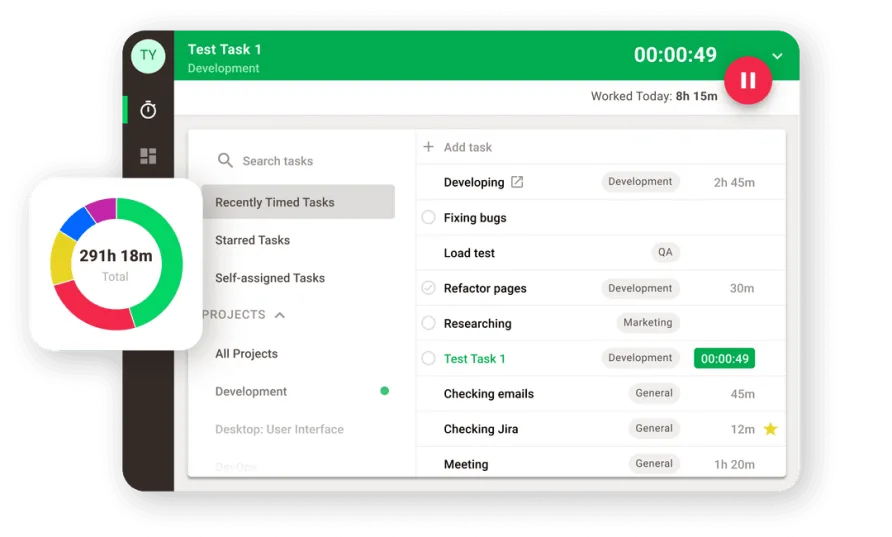
Time Doctor's core feature set is built around the idea that tracking hours is only useful if you also understand what happens during those hours. The platform offers two distinct tracking modes: an interactive mode where employees actively start and stop timers, and a silent mode that runs in the background without any visible interface. Silent mode is particularly relevant for BPOs and enterprises with compliance requirements that need continuous monitoring without disrupting workflows.
The analytics engine is where Time Doctor earns its highest marks. Beyond basic time logs, the platform tracks which applications and websites each team member uses during work hours, assigns productivity ratings based on customizable categories, and flags periods of idle time or excessive use of non-work sites. Managers see this data through a visual dashboard that breaks information into charts, color-coded timelines, and filterable reports. The Team Dashboard shows who's currently working, who hasn't started, top projects, and activity levels based on keyboard and mouse input. Individual user views drill into timelines, idle minutes, productivity percentages, and top-used applications. The reporting layer ties all of this together with daily email summaries, downloadable CSV exports, and scheduled reports that can be shared with clients or stakeholders. For managers overseeing shifts across multiple time zones, the ability to pull a consolidated view of yesterday's activity across every team member, broken down by project and productivity category, replaces what would otherwise take hours of manual data gathering.
A 2025 addition that stands out is the Benchmarks AI feature. It uses aggregated data from across the Time Doctor user base to let managers compare their team's productivity metrics against similar organizations. If you're running a 30-person customer support team and want to know whether your average productive hours per agent are above or below the norm, Benchmarks AI gives you that context. The Unusual Activity AI Report, also introduced in 2025, flags anomalies in work patterns, like sudden drops in activity or irregular usage spikes, so managers can investigate potential issues before they become problems.
Screenshots are available on all plans, with options for timed intervals and blurred captures for privacy-conscious organizations. The Premium tier adds video screen recordings, which some compliance-heavy industries require for audit trails. Distraction alerts nudge employees when they've spent too much time on unproductive sites, and the work-life balance dashboard monitors patterns that could signal burnout risk. That last feature is a thoughtful addition. Users managing teams of 20 or more frequently mention that the burnout indicators helped them catch workload imbalances they wouldn't have spotted through time data alone.
One UX observation: the settings panel for configuring what counts as "productive" versus "unproductive" requires some initial effort. The default categorizations are reasonable, but teams in creative or research roles will need to reconfigure them. The toggle between interactive and silent modes isn't always intuitive from the admin side, and a few clicks are required to verify that the right mode is active for each team member. These aren't dealbreakers, but they add friction during setup that a more polished onboarding flow could reduce.
The integration ecosystem deserves its own mention. On the Standard tier and above, Time Doctor connects with more than 60 third-party tools spanning project management (Asana, Trello, Jira, monday.com), CRM platforms (Salesforce, HubSpot), communication tools (Slack), and payroll providers (Gusto, ADP, Deel, Payoneer, Wise). API access and Zapier support extend the platform further for teams with custom workflows. The payroll integrations are particularly practical: once timesheets are approved, data syncs directly to your payroll provider without re-entering hours. For BPOs and agencies billing clients by the hour, the ability to pipe tracked time straight into invoicing and payroll cuts a real administrative step out of the process.
Security certifications are another area where Time Doctor punches above its weight class for a bootstrapped company. The platform holds ISO 27001:2013 certification, earned SOC 2 Type II compliance with zero exceptions in November 2025, and maintains GDPR and HIPAA compliance policies. All data is encrypted with TLS in transit and at rest, daily backups run automatically, and the company conducts regular penetration testing through NetSparker. For organizations in healthcare, finance, or other regulated industries evaluating time and attendance tracking software, those certifications remove a procurement hurdle that many smaller vendors can't clear.
What Time Doctor Costs in Practice
There's no free plan. That's the first thing to know. Time Doctor offers a 14-day free trial with full Premium access and no credit card required, but once the trial ends, every user costs money. For teams used to free-tier options in the time tracking space, that's a meaningful ask before proving value.
The Basic plan runs $8 per user per month on monthly billing, or $6.70 per user per month if you commit to an annual contract. It includes time tracking, task and project assignment, unlimited screenshots, activity monitoring, and idle time detection. For a solo freelancer or a very small team that only needs to log hours and capture proof of work, Basic covers the essentials. But it doesn't include integrations, payroll features, or detailed productivity reports. That's a notable gap at this tier.
Standard comes in at $14 per user per month (monthly) or $11.70 annually, and it adds the features most growing teams actually need: 60+ integrations with tools like Asana, Jira, Salesforce, and Slack; daily email activity summaries; attendance tracking; scheduling; web and app usage reports; and productivity ratings. For a team of 10 on annual billing, Standard costs $1,404 per year. On monthly billing, that same team pays $1,680 annually. The gap between Basic and Standard is where most teams will land, and the jump from $6.70 to $11.70 per user is steep enough to make the decision feel consequential.
Premium, at $20 per user per month ($16.70 annual), adds video screen captures, the executive dashboard, a client login portal, and VIP support. A 10-person team on annual Premium billing pays $2,004 per year. For a 25-person BPO operation, that's $5,010 annually on the annual rate, or $6,000 on monthly billing. Whether Premium is worth it depends on whether your operation needs video-level proof of work or executive-facing reporting dashboards. Many teams won't.
Enterprise pricing is custom and adds dedicated account management, enterprise-grade security configurations, and custom onboarding.
Is Time Doctor the Right Fit for Your Team?
Time Doctor is built for a specific kind of organization, and it's honest about that. The product fits best when visibility into distributed work patterns is a business requirement, not just a nice-to-have.
Consider a BPO operating three shifts of customer support agents across the Philippines and Colombia. Management needs to verify that agents are active during their scheduled hours, identify which agents are spending time on non-work websites, and generate client-facing accountability reports that prove SLA compliance. Time Doctor's silent monitoring, productivity ratings, screenshot capture, and client login portal on the Premium tier are purpose-built for that scenario. The analytics go beyond "did they clock in" to show exactly how each hour was spent.
A distributed marketing agency with 15 remote creatives tells a different story. The agency needs to track billable hours across client projects and understand where time goes at a high level, but the team operates on creative timelines that don't map neatly to keyboard activity rates. Distraction alerts that flag research browsing as "unproductive" could irritate more than they help. Time Doctor can be configured to accommodate this, but it takes intentional setup to get the productivity categories right.
Where the fit weakens is with small teams that value autonomy over oversight. A five-person startup where everyone trusts each other's output probably doesn't need screenshot monitoring and activity rate tracking. The tool's strength is also its limitation: it's a monitoring-forward platform, and not every team culture aligns with that philosophy. Feedback from teams in less structured environments suggests the monitoring features can feel heavy-handed if the organization hasn't set clear expectations about how the data will be used.
Time Doctor's own data claims support its case for larger deployments. The company reports that organizations using the platform see a 22% average productivity increase, and the user base spans industries including technology, healthcare, finance, insurance, and global BPOs. That tracks with the feature set: the deeper your visibility needs, the more value you'll extract from what Time Doctor offers.
Where Time Doctor Stops
Time Doctor doesn't offer GPS tracking or geofencing. For businesses with field-based employees who need location verification, that's a real gap within the time and attendance scope. The mobile apps are functional for basic time logging, but they don't match the desktop experience in depth or reliability. With a 2.4 rating on Google Play and 2.8 on the Apple App Store, the mobile experience is the weakest part of the product. Users report occasional sync issues, delayed time entries, and crashes that don't occur on the desktop client.
There's no phone support. Live chat and email are available daily, and the knowledge base covers common scenarios well. Initial chat response times are fast, often under two minutes. But follow-through on complex issues can be slower, with some users reporting multi-day resolution timelines for technical problems. For a product serving enterprise clients, the absence of a phone channel is a gap.
The Basic plan's lack of integrations deserves emphasis. If your team uses Asana, Jira, Slack, or any other project management or communication tool, you'll need Standard at minimum to connect Time Doctor to your existing stack. That makes Basic feel more like a trial tier than a viable long-term plan for any team that uses modern SaaS tools.
Our Verdict on Time Doctor
Time Doctor delivers workforce analytics that most time and attendance tools don't attempt. The combination of dual tracking modes, AI-powered anomaly detection, peer benchmarking, and granular productivity ratings gives managers a level of insight into remote work patterns that goes well beyond logging hours. The November 2025 achievement of SOC 2 Type II certification with zero exceptions reinforces that the company takes data security as seriously as it takes productivity data. For BPOs, distributed agencies, and compliance-driven organizations, that combination of depth and security is hard to find at this price point.
The limitations tie back to accessibility and team culture fit. Mobile apps underperform badly relative to the desktop experience. Feature gating means most teams need Standard or Premium to get real value, pushing per-user costs into the $12-$20 range. And the monitoring-forward philosophy, while powerful for accountability, requires organizational buy-in to avoid creating the surveillance culture it's designed to prevent. If your team operates remotely and you need to understand not just when people work but how they work, Time Doctor is one of the best time and attendance tracking software options in the category. Just make sure your team is ready for the level of visibility it provides.