
A Different Philosophy in a Crowded Category
Most time and attendance platforms compete by adding more ways to watch employees. Toggl Track took the opposite approach, and the result is a product that people actually want to use. We score Toggl Track 7.9 out of 10 in the time and attendance software category, with its highest marks coming from an interface that practically eliminates the learning curve and a free plan generous enough to run a small team on indefinitely.
Toggl Track is developed by Toggl OÜ, a bootstrapped company headquartered in Tallinn, Estonia. Founded in 2006 by Alari Aho, the company has grown to roughly $32.8 million in annual revenue with approximately 146 employees, all without taking venture capital. That financial independence matters because it means product decisions aren't driven by investor pressure to add surveillance features or force upgrades. The product originated as an internal tool for an Estonian software consultancy and became a standalone product after clients asked to use it themselves. Today, more than 70,000 businesses rely on the platform, and Toggl maintains an explicit anti-surveillance policy promising it will never add screenshot capture or activity monitoring.
How the Core Tracking Works in Practice
The timer is the center of everything. You click one button, and tracking starts. Click it again, and the entry saves automatically with a timestamp, duration, and whatever project or client tag you've assigned. That's the whole workflow for the most common use case, and it's the reason Toggl Track consistently earns top ratings for ease of use across thousands of verified reviews.
Beyond the one-click timer, you can enter time manually after the fact, drag entries across a calendar view, or use duration-only mode if your workflow doesn't require specific start and stop times. An autotracker feature on the desktop app maps application and website activity to projects based on keywords you define, creating a private timeline you can review and selectively convert into time entries. The privacy element is worth emphasizing: this activity data never leaves your device unless you choose to use it.
Offline tracking works as expected. If you lose connectivity on a laptop or phone, Toggl Track continues recording and syncs everything once you're back online. Cross-device sync covers web, desktop apps for Mac and Windows, mobile apps for iOS and Android, and browser extensions for Chrome, Edge, and Firefox. Idle detection notices when you've stepped away and prompts you to either discard or keep the idle time. The Pomodoro timer is built in for anyone who prefers working in focused intervals.
One interface detail that could use refinement: stopping a timer and restarting it on the same task creates a separate time entry rather than pausing and resuming the original. Users who take breaks throughout a project end up with multiple entries where they expected one continuous session. It's a minor friction point, but it adds cleanup time when reviewing daily logs.
Reporting and Analytics Across Plan Tiers
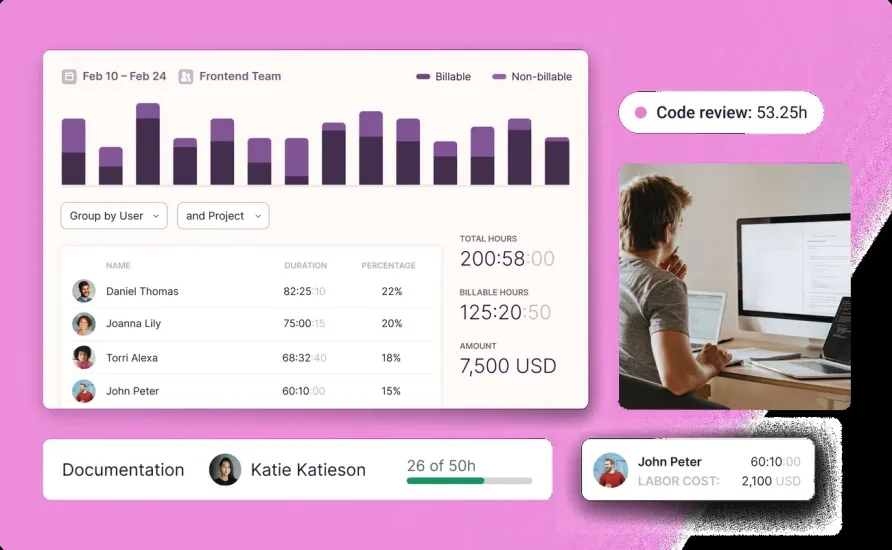
Toggl Track overhauled its reporting experience in early 2025, consolidating what had been separate Reports, Analytics, and Insights sections into a unified interface with five tabs: Summary, Detailed, Workload, Profitability, and My Reports. The change makes the data easier to find and eliminates the confusion of having similar information scattered across three different sections.
Free plan users get Summary and Detailed reports with basic grouping by member, client, project, and description. That's enough to answer the fundamental question of where your team's hours are going. Starter adds grouping by task, tag, team, and billable status, along with revenue and billable percentage metrics. Premium is where reporting becomes a serious business tool, adding labor cost tracking, profit and profitability metrics, custom analytics with chart types including bar, donut, line, and pivot table, and scheduled report delivery via email. The updated filter system supports 11+ properties with AND/OR logic and eight condition types, so you can build specific views without exporting data to a spreadsheet. For teams that need detailed profitability analysis broken down by member, project, client, and more, the Premium reporting is strong. Teams managing client retainers or fixed-fee projects will find the profitability tab especially useful for spotting scope overruns before they eat into margins.
That said, the gap between free and Premium reporting is wide. If you need anything beyond basic time summaries, you're looking at a paid plan.
What Toggl Track Costs in Practice
The free plan covers up to five users with unlimited projects and clients, basic reporting, and full access to every tracking method: timer, manual entry, calendar, desktop, mobile, browser extension, and offline mode. For a solo operator or a small partnership, this plan is legitimately usable as a long-term solution, not just a trial.
Starter runs $10 per user per month on monthly billing or $9 per user per month if you commit annually. It adds billable rates at five levels, project templates, task management, time estimates, and the ability to group reports by additional dimensions. For a solo consultant billing by the hour, that's $108 per year on an annual plan. A team of five on annual billing pays $540 per year.
Premium costs $20 per user per month, or $18 per user per month billed annually. This tier adds timesheet approvals, project forecasts, labor cost tracking, profitability reporting, audit log access, historical billable rates, and advanced integrations with tools like Jira, Salesforce, and Slack. The annual math matters here: a single user pays $216 per year, but a team of 10 on annual Premium billing hits $2,160 per year. A 10-person team paying month-to-month would spend $2,400 annually. For a 20-person team, the annual Premium cost reaches $4,320.
Enterprise pricing is custom and requires contacting sales. It adds a dedicated account manager, custom onboarding, multi-workspace organization management, SSO with SAML 2.0, and priority support.
No paid plan includes free seats. Every active user in your workspace counts toward your bill, whether they tracked time that week or not. Toggl doesn't offer refunds outside of billing errors, so taking full advantage of the 30-day free trial before committing to a paid tier is smart.
The Right Fit (and the Wrong One)
Picture a digital marketing agency with eight people: a couple of account managers, a creative director, four specialists, and an office manager handling client billing. Each person works across three to five client accounts daily and needs to log hours accurately for invoicing. Nobody wants to fuss with a complicated interface between tasks. This is where Toggl Track thrives. The one-click timer and browser extension let team members start tracking from inside the project management tools they already use, and the billable rate system handles the per-client, per-project rate differences that agencies deal with constantly.
Now picture a construction company with 40 field workers arriving at different job sites each morning. The crew leads need to verify who showed up where and when, GPS records matter for compliance, and the back office wants automated timesheet-to-payroll processing. This isn't what Toggl Track was built for. The platform doesn't include GPS tracking, geofencing, or location verification, and that's by design. The anti-surveillance philosophy means these features aren't coming, either.
Consultancies, law firms, software teams, creative agencies, and accounting practices are the natural audience. Users who've adopted Toggl Track in these environments frequently report that the simplicity of the interface is what finally got their whole team to actually log time consistently, which is half the battle with any time and attendance tool.
Toggl Track Pricing and Integrations
The integration list runs past 100 tools. Native connectors exist for Jira, Salesforce, Slack, and QuickBooks, meaning data flows between platforms without manual exports. The Jira integration is a one-way sync that pulls issue data into Toggl Track for time logging. The Salesforce connector works similarly, keeping your workspace current with Salesforce objects. The Slack integration lets team members start and stop timers without leaving their messaging app, and Premium users can set up timesheet approval reminders through Slack as well.
The browser extension deserves specific mention because it changes how people interact with the tool day-to-day. It embeds a Toggl Track timer button directly into the interfaces of web apps like Asana, Trello, GitHub, Todoist, and dozens more. Instead of switching tabs to start tracking, you click the button right inside the tool where you're already working. Users managing multiple projects across different platforms consistently cite this as one of the features that keeps them using the product.
For custom needs, the platform provides both a tracking API and a reporting API, plus webhook support for event-driven integrations. Zapier and Make connections extend the reach further, linking Toggl Track to thousands of additional apps through automation workflows.
Recent Product Development
Toggl Track's development pace has been steady. In Q3 2024, the team shipped Toggl Track Goals, which lets users and admins set specific time tracking targets for tasks, projects, or billable hours and monitor progress visually. The same quarter introduced an audit log for Premium and Enterprise workspaces, giving admins visibility into changes to projects, time entries, billable rates, labor costs, clients, tags, and workspace settings. Historical labor costs also arrived, allowing rate updates without overwriting past profitability data.
The Q1 2025 update was larger in scope, bringing the rebuilt reporting experience described earlier along with ISO/IEC 27001:2022 certification, two-factor authentication, dark mode, a referral program, and granular access controls for billable rate and labor cost visibility. The reporting filters alone represent a meaningful upgrade for teams that previously had to export data to analyze it.
Where Toggl Track Stops
Within the scope of time and attendance, there are a few gaps to be aware of. Toggl Track doesn't include timesheet approval workflows on its free or Starter plans. If you need a manager to review and sign off on employee hours before they're processed, you'll need Premium. Similarly, there's no built-in time rounding at the entry level on free plans, which matters for businesses that bill in quarter-hour increments.
Scheduled reporting, which lets you automate recurring report deliveries, is also Premium-only. And while the platform generates basic invoices and connects to QuickBooks, the invoicing feature is limited compared to dedicated billing tools.
The mobile app is the weakest link in the platform's cross-device experience. Users running field-based or mobile-heavy workflows report that the mobile interface offers less editing flexibility than the desktop or web app, and occasional sync delays between devices can result in duplicated or missing entries. The desktop app on Windows also takes a few seconds to launch, which is a small annoyance that some users say causes them to forget to start their timer.
Our Verdict
Toggl Track does a few things exceptionally well. The timer is fast. The interface stays out of your way. The free plan gives small teams everything they need to start tracking time today without spending a dollar. And the rebuilt reporting tools on Premium are capable enough to drive real business decisions about profitability, workload distribution, and billing accuracy. The anti-surveillance stance isn't just a marketing position; it shapes the product in ways that encourage employee adoption rather than resistance, and that matters more than most feature comparisons suggest.
The limitations are real, though, and they concentrate around cost and feature access. A business that needs timesheet approvals, project forecasting, or detailed profitability analysis is looking at $18 per user per month on an annual plan, and that number climbs fast with headcount. The mobile app doesn't match the quality of the desktop and web experience, and teams larger than 15 to 20 people may find themselves paying premium prices for what's still fundamentally a straightforward time tracker. For freelancers, small agencies, and professional services firms that value simplicity and trust their teams to track honestly, Toggl Track remains one of the best options in the time and attendance category. For organizations that need enforcement-level oversight or cost efficiency at 50+ seats, the fit weakens. A 7.9 reflects a product that excels at its core purpose while acknowledging that its pricing model and feature gating limit its reach.