
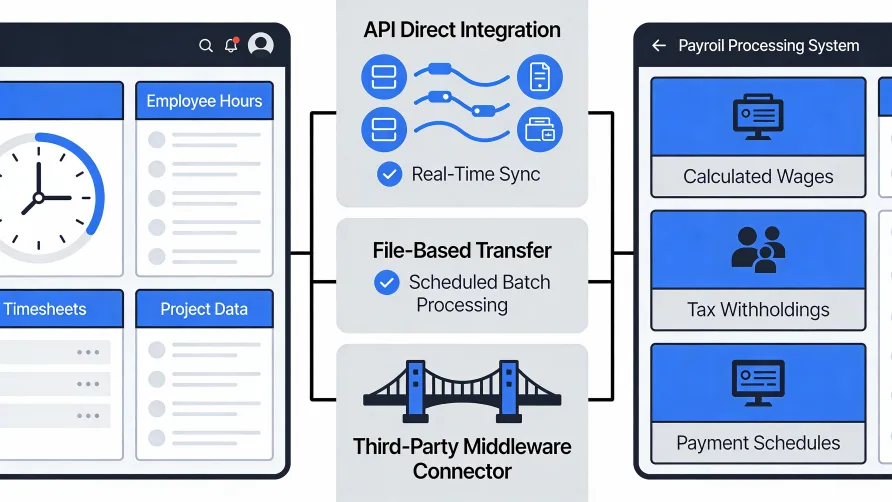
Integrating time tracking with payroll eliminates the manual transfer of hours worked into wage calculations, reducing errors and saving administrative time. When these systems connect properly, approved employee hours flow directly into payroll processing without re-keying data, ensuring that what employees record matches what they get paid. The integration can happen through built-in connections, custom API development, or structured data exports, depending on which platforms you use and how tightly you need them coupled.
Benefits of Time Tracking Payroll Integration
Before examining how integration works, consider why it matters. The case for connecting these systems rests on concrete operational improvements.
Reduced Data Entry Errors
Manual data transfer introduces mistakes. Someone reads hours from the time tracking system, then types them into payroll. Transposition errors turn 54 hours into 45. Decimal points land in wrong places. Names get matched to wrong employee records. According to EY research, companies average about 15 payroll corrections per pay period, with each incident costing roughly $281 in direct expenses.
Integration eliminates this handoff. Data moves electronically from one system to the other without human transcription. The hours an employee logged appear in payroll exactly as recorded, with no opportunity for typing errors.
Time Savings
Processing payroll manually for even a modest workforce consumes hours each pay period. Someone must pull time reports, verify totals, enter data, check entries, and reconcile discrepancies. As headcount grows, this burden scales proportionally.
Automated integration compresses this work. Instead of entering every employee's hours individually, you verify that the data transfer completed correctly and address exceptions. The time previously spent on data entry becomes available for analysis, employee support, or other valuable activities.
Faster Payroll Processing
When time data must travel manually between systems, payroll processing depends on someone completing that transfer. Delays in pulling reports or entering data push back the entire payroll timeline. Vacation days, sick calls, or competing priorities can create bottlenecks.
Direct integration removes this dependency. Approved hours become available in payroll immediately, without waiting for someone to move them. The payroll team can process wages as soon as approvals complete rather than after an additional data entry step.
Audit Trail Integrity
Integrated systems maintain consistent records across both platforms. The hours in time tracking match the hours in payroll because they came from the same source through an automated process. If questions arise about a particular paycheck, you can trace the data back through connected systems with confidence that nothing changed in transit.
Manual transfers create gaps in this trail. Handwritten notes, spreadsheet manipulations, or undocumented adjustments between systems make it harder to demonstrate exactly where numbers came from.
Can Time Tracking Software Connect to Payroll?
Yes, most modern time tracking software offers some form of payroll connection. The method and depth of integration varies considerably, though.
Native Integrations
Many time tracking platforms include built-in connections to popular payroll systems. The vendors have already done the technical work of linking the two applications. You enable the integration through settings, authenticate both accounts, map your data fields, and the connection activates.
Native integrations typically offer the smoothest experience. The vendors designed them to work together, tested common scenarios, and provide support when issues arise. Setup usually requires minimal technical expertise beyond following configuration instructions.
The limitation is availability. Native integrations exist only for specific platform pairings. If your time tracking vendor has not built a connection to your particular payroll system, this option is not available to you.
Third-Party Integration Platforms
When native connections do not exist, middleware platforms can bridge the gap. These services specialize in connecting applications that do not otherwise talk to each other. You configure both your time tracking and payroll systems to communicate with the middleware, which handles data translation and transfer between them.
This approach extends integration possibilities beyond what vendors offer natively. If both your systems support the middleware platform, you can likely connect them regardless of whether they have a direct relationship.
The trade-off involves added complexity and cost. You now have three systems to manage instead of two. The middleware subscription adds expense. Troubleshooting issues requires understanding how data flows through the intermediary.
API-Based Custom Integration
Application programming interfaces allow technical teams to build custom connections between systems. If your time tracking and payroll platforms both offer APIs, a developer can write code that pulls data from one and pushes it to the other according to your exact specifications.
Custom integration provides maximum flexibility. You control precisely what data moves, when it moves, and how it transforms along the way. Unique business requirements that standard integrations cannot accommodate become possible.
This flexibility comes with significant investment. Building custom integrations requires development resources, testing, and ongoing maintenance. When either platform updates its API, your custom code may need adjustments. For most organizations, native or middleware integrations prove more practical unless specific requirements demand customization.
Manual Export and Import
The simplest integration method involves exporting data from time tracking in a format your payroll system can import. You run a report, download a file, and upload it to payroll. The systems never connect directly, but structured data transfer replaces manual re-keying.
This approach works when tighter integration is not available or not worth the setup effort. The process still requires human involvement each pay period, but the work involves moving files rather than transcribing numbers. Error rates drop compared to manual entry even though full automation is not achieved.
What Data Flows Between Systems
Understanding what information moves helps you configure integration correctly and troubleshoot problems when they occur.
Employee Identification
Both systems need to match time records to the correct employee. This typically happens through a shared identifier: employee ID number, email address, or another unique field that exists in both platforms. During integration setup, you map which field in time tracking corresponds to which field in payroll.
Mismatched identifiers cause records to fail or assign hours to wrong people. If your time tracking system uses employee numbers but your payroll system uses email addresses as primary keys, the integration must translate between them.
Hours Worked
The core data element is total hours worked during the pay period. This includes regular hours, overtime hours, and sometimes hours broken down by category such as sick time, vacation, or different pay rates.
Time tracking systems calculate these totals from individual clock-in and clock-out records. The integration sends summary figures rather than every individual punch, though some systems can transfer detailed records if needed.
Pay Period Alignment
Both systems must agree on which dates constitute a pay period. Hours worked January 1-15 need to land in the correct payroll cycle, not the previous or following one. Integration configuration typically includes mapping pay period definitions between platforms.
Misaligned pay periods cause hours to appear in wrong paychecks or not appear at all. If your time tracking week ends Sunday but your payroll week ends Saturday, the integration must account for this difference.
Job Codes and Departments
Organizations that track labor costs by department, project, or job code may need this classification data to flow into payroll. An employee who works 20 hours in Department A and 20 hours in Department B should have those hours allocated correctly in payroll for cost accounting purposes.
This level of detail requires both systems to use compatible classification structures. Job codes in time tracking must map to equivalent codes in payroll. Setting up these mappings adds complexity but enables more sophisticated labor cost tracking.
Pay Rates
Some integrations pull pay rate information from payroll into time tracking to calculate costs or validate overtime rules. Others rely on time tracking only for hours while payroll maintains all rate information. The direction of rate data flow depends on where you want to manage compensation details.
How Do I Automate Payroll from Time Tracking?
Moving from manual processing to automated payroll integration involves several steps.
Step 1: Verify Integration Availability
Start by confirming that your time tracking and payroll systems can connect. Check your time tracking platform's integration directory for your payroll provider. Check your payroll platform's documentation for compatible time tracking systems. If a native integration exists, you have a straightforward path forward.
If no native integration exists, investigate whether both systems support a common middleware platform or offer APIs that could enable custom development.
Step 2: Plan Your Data Mapping
Before configuring anything, document how data should flow. Which employee identifier field will link records? What hour categories need to transfer? How do pay periods align? Do you need department or job code data to flow through?
Write down the answers. This mapping document guides configuration and helps troubleshoot issues later.
Step 3: Configure the Connection
Follow your chosen integration method's setup process. For native integrations, this typically involves authenticating both platforms, mapping fields according to your plan, and setting transfer frequency.
Work through configuration carefully. Rushing this step creates problems that surface during payroll processing when stakes are higher and time is shorter.
Step 4: Test Before Going Live
Never trust a new integration with real payroll without testing. Run the integration with a small set of employees or historical data first. Compare the results to what you would expect from manual processing.
Check that hours transferred correctly, landed in the right pay period, and associated with the right employees. Verify that overtime calculated properly. Confirm that job codes mapped as intended.
Step 5: Run Parallel Processing
For the first few pay periods, run both the new integrated process and your old manual process. Compare results. When they match consistently, you can retire the manual backup.
This parallel approach catches problems before they affect paychecks. The extra work upfront prevents costly corrections later.
Questions to Ask Vendors
When evaluating time tracking and payroll software or planning integration, these questions help clarify what is possible.
Does a native integration exist between these specific platforms? Vendor websites list integration partners. Confirm that the connection you need is available, not just similar ones.
What data fields can the integration transfer? Not all integrations handle all data types. Verify that the specific elements you need, whether overtime categories, job codes, or PTO balances, are supported.
How frequently does data sync? Some integrations run continuously; others transfer on a schedule. Understand the timing to ensure data reaches payroll when you need it.
Who provides support when issues occur? Integration problems can involve either platform or the connection between them. Know whom to contact and how they coordinate troubleshooting.
What happens when one system updates? Platform updates sometimes break integrations. Ask how vendors handle compatibility during upgrades and who bears responsibility for fixes.
Are there additional costs for integration? Some platforms include integration in base pricing; others charge separately. Understand the full cost before committing.
Testing and Validation
Ongoing validation ensures integration continues working correctly over time.
Reconciliation Reports
Run regular reconciliation comparing hours in time tracking to hours in payroll. The totals should match exactly when integration works properly. Discrepancies indicate data transfer problems that need investigation.
Exception Monitoring
Track failed transfers and error messages. Integration dashboards often show records that did not sync successfully. Review these exceptions each pay period rather than assuming everything transferred.
Employee Feedback
Employees notice when paychecks are wrong. Create an easy channel for reporting discrepancies. Patterns in reported issues may reveal integration problems not visible in system reports.
Troubleshooting Common Issues
Even well-configured integrations encounter problems. Common issues and their typical causes include:
Hours not appearing in payroll: Check that time entries were approved before the sync ran. Verify that the employee exists in both systems with matching identifiers. Confirm that pay period dates align correctly.
Wrong employee receiving hours: Employee identifier mapping is likely incorrect. Review how records link between systems and fix any mismatches.
Overtime calculating incorrectly: Verify that overtime rules in both systems agree. Check whether hours transferred include proper regular and overtime classification.
Job codes not mapping: Classification structures between systems may not align. Review code mappings and add any missing translations.
Sync failing entirely: Authentication may have expired. API rate limits may be exceeded. One system may be temporarily unavailable. Check connection status and re-authenticate if necessary.
Maintaining Your Integration
Integration is not a one-time setup. Both platforms will update over time. New employees will join; others will leave. Pay structures and job codes will change.
Build integration review into your regular processes. When adding new job codes or departments, update mappings in the integration. When either platform announces updates, test the connection afterward to confirm continued functionality.
The goal is reliable, accurate data flow that you can trust pay period after pay period. Investing in proper setup, testing, and maintenance delivers that reliability and the operational benefits that come with it.