
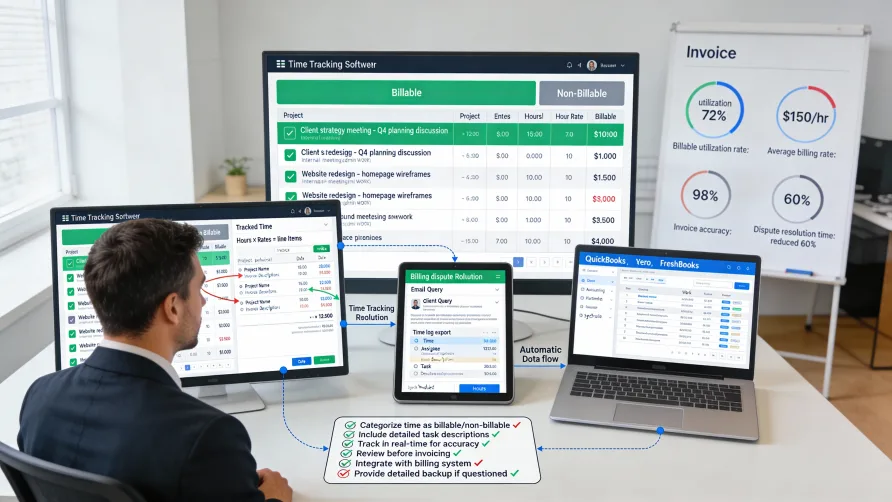
Professional services businesses including agencies, consultancies, law firms, and freelancers often bill clients based on hours worked. This time-based billing model requires accurate tracking of how much time was spent on client work to ensure proper invoicing. Time tracking creates the foundation for client billing by documenting work performed, supporting invoice accuracy, and providing transparency when clients question charges.
Understanding how to implement time tracking specifically for client invoicing purposes helps businesses get paid accurately for their work while maintaining positive client relationships through transparent, defensible billing practices.
How Do You Track Time for Client Billing?
Time tracking for client billing requires capturing not just duration but also sufficient context to support invoice line items and respond to client questions about charges.
Essential Elements of Billable Time Entries
Every billable time entry should include several key pieces of information that support invoicing and client transparency.
Duration represents how long you worked on the billable task. Most businesses track time in increments ranging from six minutes (0.1 hours) to fifteen minutes (0.25 hours), with six-minute increments being common in professional services.
Client and project identification ensures time gets billed to the correct client and associated with the right project or engagement. Clear client attribution prevents time from being billed incorrectly or not billed at all.
Task or activity descriptions explain what work was performed during the logged time. Good descriptions provide enough detail that clients understand what they're paying for without requiring excessive narrative.
Date and time stamps record when work occurred. Some clients care about when work was performed, and accurate dates help with period-based billing and audit trails.
Team member identification shows who performed the work. When different team members have different billing rates, knowing who did the work is essential for calculating the correct charge.
Billable status marking distinguishes between time that should be invoiced to clients and time spent on internal activities. This distinction is critical for accurate client billing.
Billable Versus Non-Billable Time
Professional services businesses must distinguish between billable time that clients will be charged for and non-billable time that represents internal work or client relationship activities.
Billable time includes work directly advancing client projects or deliverables. Client meetings, project work, deliverable creation, client communication, and similar activities that provide value to clients are typically billable.
Non-billable time includes internal activities, business development, administrative work, and client relationship building that doesn't directly advance paid projects. Internal meetings, proposal writing, professional development, and similar activities usually aren't billable.
Some activities fall into gray areas requiring judgment. Brief client check-ins might be non-billable relationship maintenance or billable project management depending on context and client agreements.
Clear policies about what is and isn't billable help team members mark time appropriately. Without clear guidance, different people make different decisions about billable status, creating inconsistency.
Client contracts or agreements often specify what types of activities are billable. Review agreements to understand whether activities like travel time, waiting time, or communication are billable for specific clients.
Billing Rate Configuration
Different work types, team members, or clients may have different hourly billing rates. Your time tracking system needs to support varied rates and apply them correctly when generating invoices.
Individual billing rates assign specific hourly rates to team members based on their role, seniority, or expertise. Senior consultants bill at higher rates than junior staff, reflecting their experience and value.
Activity-based rates charge different amounts for different work types. Strategy work might bill at higher rates than execution work, or specialized technical work might command premium rates.
Client-specific rates accommodate negotiated billing arrangements. Some clients negotiate discounted rates, preferred rates, or volume-based rate adjustments that differ from standard billing.
Project-based rates apply specific rates to all work on particular projects. Fixed-fee projects might use internal rates for cost tracking even though clients pay flat fees rather than hourly charges.
Your time tracking system should store rate information and apply it automatically when calculating billable amounts. Manual rate application creates opportunities for errors and inconsistency.
Capturing Adequate Detail
Time entry descriptions need enough detail to support invoicing without becoming burdensome to create.
Good descriptions explain what was accomplished without excessive narrative. "Developed homepage wireframes incorporating client feedback from 2/1 meeting" provides clear context, while "worked on website" lacks useful detail.
Client-facing descriptions should be professional and clear. Assume clients will see time entry descriptions on invoices or in billing inquiries, and write accordingly.
Consistent description formats help with invoice readability. Establish conventions for how your team describes common activities so invoice line items follow recognizable patterns.
Too much detail creates inefficiency. While adequate context is important, excessively detailed descriptions waste time during time entry without proportionally improving invoice clarity.
Balance speed of entry with quality of information. Team members more likely to track time consistently when the process is quick and simple, but insufficient detail undermines invoicing utility.
How Do You Invoice Based on Time Tracked?
Converting tracked time into client invoices requires aggregating time entries, applying billing rates, formatting invoice line items, and generating professional invoices.
Time Period Selection
Most invoices cover specific time periods such as monthly, biweekly, or milestone-based periods depending on client agreements.
Monthly invoicing is common for ongoing retainers or service agreements. At month end, you aggregate all billable time from the previous month and generate an invoice.
Project-based invoicing occurs at project milestones or completion. You invoice for all time spent on the project up to the milestone or invoice for total project time at completion.
Retainer arrangements might involve invoicing monthly for a flat fee while tracking actual hours for internal cost analysis. Time tracking helps understand whether retainer fees cover actual work investment.
Your client agreements specify invoicing frequency and terms. Follow agreement terms to avoid confusion or disputes about when invoices should be issued.
Aggregating Billable Time
Invoice generation requires aggregating time entries for the billing period and calculating charges.
Filter time entries by client, date range, and billable status to identify what should appear on the invoice. Only billable time entries within the invoicing period should be included.
Group time entries by category, project phase, team member, or activity type depending on how you want invoice line items structured. Grouping creates organized invoices rather than simple chronological lists of time entries.
Calculate hours and charges for each line item by summing time and applying appropriate rates. Total hours multiplied by billing rates yields the charge for each invoice line.
Sum all line items to produce the total invoice amount. Add any applicable taxes, expenses, or adjustments to reach the final amount due.
Invoice Formatting
Invoice presentation affects client understanding and payment speed. Clear, professional invoices receive faster payment than confusing or sloppy ones.
Invoice line items should clearly communicate what work was performed and how much time it consumed. Each line typically shows a description, hours, rate, and calculated amount.
Grouping related work items creates logical invoice organization. Instead of listing individual time entries, group entries into summary lines like "Website Development - 15.5 hours" with detailed time entries available as supporting documentation if needed.
Detailed time logs can be attached as appendices for clients who want to see individual time entries. The main invoice shows summary lines while attachments provide full detail.
Professional invoice design includes your business information, client details, invoice number, date, payment terms, and clear call-to-action for payment. Using templates ensures consistency.
Automating Invoice Generation
Many time tracking platforms integrate with invoicing or accounting systems to automate invoice creation from tracked time.
Direct integration between time tracking and invoicing tools eliminates manual data entry. Approved time automatically flows into the invoicing system where it becomes invoice line items.
Invoice templates define how time data transforms into invoice formatting. Configure templates to structure line items, apply your branding, and include standard terms and conditions.
Batch invoicing capabilities let you generate multiple client invoices simultaneously. At month end, you can invoice all clients at once rather than creating invoices individually.
Automated invoice delivery sends completed invoices directly to clients via email or through client portals. Automation reduces the administrative burden of invoice distribution.
Benefits of Time Tracking for Invoicing
Implementing proper time tracking for client billing provides numerous benefits beyond simply knowing what to charge.
Invoice Accuracy
Time tracking ensures invoices reflect actual work performed rather than estimates or guesses. Accurate invoices mean you get paid appropriately for your work and clients are charged fairly.
Real-time tracking captures work as it happens, preventing the forgotten hours that occur when relying on end-of-week or end-of-month reconstruction. Team members who track time daily or in real-time log more hours than those estimating time retroactively.
Detailed time records reduce billing errors. When you have specific time entries rather than rough estimates, invoices are more likely to be correct the first time.
Accurate invoicing improves cash flow by ensuring you bill for all work performed. Unbilled time represents revenue leakage that time tracking helps prevent.
Client Transparency
Detailed time tracking enables transparency with clients about how their money is spent. When clients question invoices, you can provide specific time entries supporting the charges.
Time entry descriptions explain what work was done, giving clients visibility into how hours were allocated. Clients are more comfortable paying for work when they understand what was accomplished.
Providing detailed time logs with invoices preemptively answers many client questions. When clients can see exactly what work occurred, they're less likely to dispute charges.
Transparency builds trust in the client relationship. Clients appreciate detailed documentation showing you're billing honestly for actual work rather than padding invoices.
Dispute Prevention and Resolution
Time tracking documentation helps prevent billing disputes and provides evidence to resolve disagreements when they arise.
Clear records make inflated billing accusations less likely. When you can show specific time entries for all charged hours, clients can see the invoice reflects actual work.
Time entry descriptions provide context that resolves questions. When a client questions why a task took so long, you can point to specific complications or requirements documented in time entries.
Date stamps on time entries verify when work occurred. If a client claims work wasn't performed during a specific period, time records provide objective evidence.
Audit trails from time tracking systems show the integrity of your billing. Entries recorded in real-time with timestamps are more credible than retroactively created records.
Project Profitability Analysis
Time tracking for client invoicing also provides data for internal analysis about project profitability.
Comparing billed hours to budgeted hours reveals whether projects are profitable or over budget. This analysis informs decisions about project scope, pricing, and resource allocation.
Understanding which project types or clients are most profitable helps focus business development. You can pursue more work similar to profitable engagements and reconsider unprofitable client types.
Time data shows which team members work most efficiently on different project types. This information helps with project staffing and assignment decisions.
Historical time data improves future project estimates. When you track actual time consistently, you build a database of how long different work types actually take, improving bid accuracy.
Improved Cash Flow
Accurate, timely invoicing supported by time tracking improves cash flow compared to delayed or inaccurate billing.
Invoicing all billable hours prevents revenue leakage from forgotten work. When you track time consistently, you bill for everything you should rather than inadvertently providing free work.
Faster invoice generation at period end accelerates payment. When time data is already captured and organized, you can generate invoices immediately at month end rather than spending days reconstructing work performed.
Reduced billing disputes mean fewer delayed payments. When invoices are accurate and well-documented, clients are more likely to pay promptly without questioning charges.
Professional, detailed invoices receive faster payment. Clients are more comfortable paying quickly when invoices clearly show what work was performed and charges are easy to understand.
Best Practices for Time Tracking for Invoicing
Implementing time tracking for client billing works best when following proven practices that balance accuracy with efficiency.
Track Time in Real-Time or Daily
Log time as close to when work occurs as possible. Real-time tracking or daily logging captures hours more accurately than end-of-week or end-of-month reconstruction.
Running timers during work sessions provide the most accurate duration capture. Start a timer when beginning a task and stop it when finishing eliminates estimation errors.
End-of-day time logging works well for people who find running timers disruptive. Reviewing the day's work and logging time for each activity captures hours while details are fresh.
Weekly time entry significantly reduces accuracy. By week's end, people forget smaller tasks, underestimate durations, or overlook work performed early in the week.
Be Specific in Time Entry Descriptions
Write descriptions that clearly communicate what work was performed without requiring excessive detail or internal jargon.
Use action verbs that clearly indicate what you did: "developed," "reviewed," "revised," "analyzed," or "presented" rather than vague verbs like "worked on."
Include enough context to make the entry meaningful. "Revised homepage based on client feedback" is better than "worked on homepage" or the overly detailed "revised homepage wireframes incorporating client's request to change hero image positioning and update call-to-action button text."
Write for a client audience. Assume descriptions might appear on invoices or in billing discussions, so avoid internal shorthand or technical jargon that clients wouldn't understand.
Establish team conventions for common activities. When everyone describes similar work consistently, invoice line items follow recognizable patterns.
Review Time Before Invoicing
Review billable time entries before generating invoices to catch errors, inconsistencies, or missing information.
Verify time entry descriptions are professional and clear. Edit any entries with inadequate detail or inappropriate language before clients see them.
Check that time is allocated to correct clients and projects. Misallocated time creates incorrect invoices and billing disputes.
Confirm billable status is marked correctly. Time incorrectly marked as billable or non-billable affects invoice accuracy and your profitability.
Look for obvious errors like unusual durations or duplicated entries. Eight-hour time entries or identical entries for the same work might indicate mistakes.
Communicate About Billing Expectations
Establish clear expectations with clients about billing practices, invoicing frequency, and time tracking transparency.
Discuss billing arrangements during client onboarding. Clarify what's billable, how you track time, when invoices will be issued, and what detail they'll receive.
Provide sample invoices showing how your time-based billing appears. Setting expectations about invoice format prevents surprise when clients receive their first invoice.
Offer to provide detailed time logs if clients want more information than summary invoices show. Some clients are satisfied with summary invoices while others prefer full detail.
Address billing questions promptly and professionally. When clients ask about invoice charges, respond quickly with supporting time entry details.
Integrate Time Tracking With Billing Systems
Connect time tracking with your invoicing or accounting software to streamline the billing process and reduce manual data entry.
Direct integration eliminates manual transfer of time data to invoicing systems. Approved time automatically becomes available for invoice generation.
Automation reduces billing errors from manual data entry or transcription mistakes. System-to-system integration is more accurate than human data transfer.
Faster invoicing at period end results from integrated systems. When time data lives in your invoicing system, you can generate invoices immediately without data preparation.
Better financial reporting emerges when time tracking and accounting data connect. Integrated systems enable analysis of billable utilization, revenue per hour, and project profitability.
Common Mistakes to Avoid
Several common mistakes undermine effective time tracking for client invoicing.
Tracking time infrequently leads to forgotten hours and inaccurate records. Daily tracking or real-time tracking dramatically improves accuracy compared to weekly or monthly reconstruction.
Insufficient detail in time entries makes invoices unclear and raises client questions. Balance efficiency with adequate description.
Failing to distinguish billable from non-billable time results in overcharging clients or not tracking internal time for profitability analysis. Mark time appropriately when logging it.
Not reviewing time before invoicing allows errors to reach clients. Always review time entries before generating client invoices.
Lacking written agreements about billing terms creates misunderstandings. Document billing arrangements in client agreements to prevent disputes.
Delaying invoicing past agreed periods affects cash flow and complicates time reconstruction. Invoice on schedule per client agreements.
Getting Started
If you're not currently using formal time tracking for client invoicing, implement it systematically to avoid overwhelming your team.
Select time tracking software that supports billable time marking, multiple billing rates, client and project organization, and integration with your invoicing or accounting system.
Establish clear policies about what's billable, how to describe time entries, and when to log time. Document these policies and train your team.
Configure clients, projects, and billing rates in your time tracking system. Accurate rate configuration ensures correct invoice calculations.
Start tracking time consistently before generating invoices from time data. Build several weeks of time tracking history to verify your process works before relying on it for billing.
Review tracked time regularly to ensure quality and accuracy. Address problems with incomplete tracking, unclear descriptions, or incorrect billable status marking.
Generate your first time-based invoices and evaluate the results. Assess whether invoices clearly communicate work performed and calculate correct charges.
Iterate based on client feedback and internal review. Adjust your time tracking and invoicing processes based on what works well and what needs improvement.