
A Visual Take on Time Entry
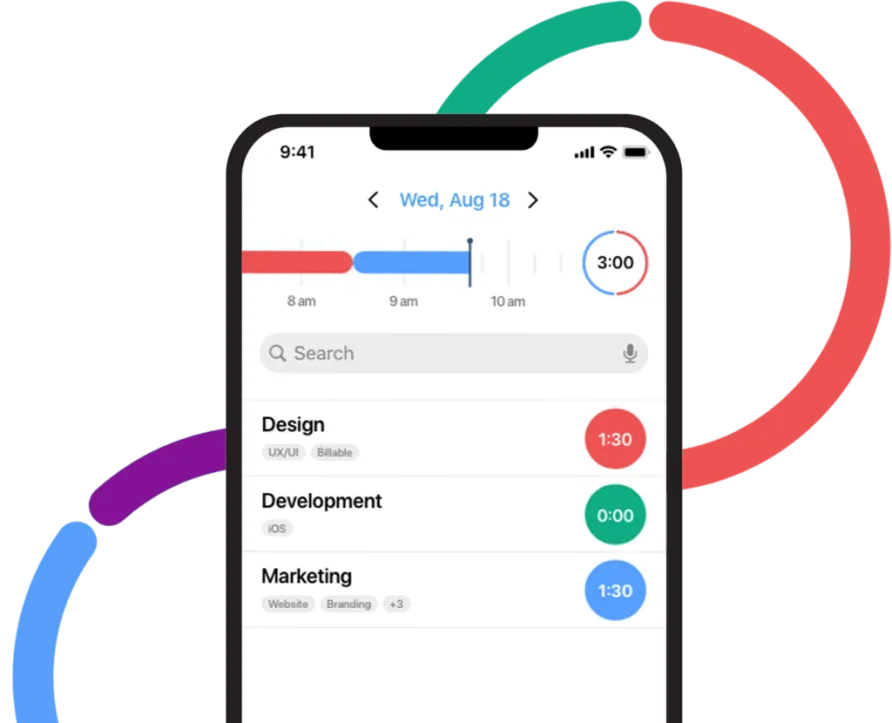
Most time tracking apps ask you to type entries into a form or click a timer and hope you remember to stop it. Hours takes a different approach. Its visual timeline turns your workday into a color-coded bar you can drag, resize, and correct with your finger, and that interface choice is what makes it stand out in a crowded category. We score Hours 7.2 out of 10 for the time and attendance software category, with its design and simplicity lifting it well above its weight class for individual users, even as limited integrations and a small development footprint hold it back for teams.
The app doesn't try to be everything. It tracks time visually, generates reports, and gets out of your way. That focus is a product decision, not an oversight, and it shapes everything from the pricing to the platform priorities.
Hours grew out of Tapity, a family-run design studio that won an Apple Design Award in 2011 for their education app Grades. Jeremy Olson and his team spent three years building Hours before launching it in July 2014, and the app earned praise from Forbes, TechCrunch, and Apple's own editorial team. In 2016, Five Pack Creative acquired the product, and the team eventually rebuilt it as Hours TimeLord, the current version available at hourstimetracking.com. The company is now based in Frisco, Texas, operating as Hours, LLC. It's a small operation. The website lists roughly 32,000 total downloads and around 4,000 active installs, which tells you this is an indie product, not a venture-backed platform chasing enterprise contracts.
What Makes the Timeline Work
The timeline sits at the top of the screen and fills with colored blocks as you track throughout the day. Each timer gets its own color, so switching between a client project and internal work shows up as distinct bands you can read at a glance. If you forgot to start a timer at 9 AM and it's now 9:45, you drag the edge of the block backward to cover that time. If two entries overlap because of a sync delay, you pinch and adjust them directly on the timeline. This interaction model eliminates the most common frustration with time tracking apps: discovering at the end of the week that your logged hours don't add up, and having no easy way to fix them.
Timers start and stop with a single tap. You can run one timer at a time, and switching to a different task automatically stops the previous one. Tags and notes let you associate each entry with a client or project, and those tags carry through to reporting. The reports themselves can be filtered by date range, timer, or tag, then exported as PDF or CSV. Users who manage multiple client relationships report that the color-coded timeline gives them a much clearer picture of where their hours went than a traditional spreadsheet-style timesheet.
One UX detail that's easy to miss: the timeline's snap-to-time feature rounds entry edges to the nearest five-minute increment when you drag them. This sounds minor, but it prevents the tiny one- or two-minute fragments that clutter reports in other apps. The rounding is optional and configurable.
On Apple Watch, you can start and stop timers, switch between active tasks, and add notes through dictation. Siri shortcuts also work for hands-free control. These touches make sense for the product's core audience. If you're a consultant walking between meetings, tapping your wrist to switch a timer is faster than pulling out your phone.
What Hours Costs in Practice
The free plan gives you five timers, the visual timeline, and summary reports. That's enough for someone tracking three or four regular tasks. The Personal plan at $9.99 per year unlocks unlimited timers, full reporting with PDF and CSV exports, and the custom color picker. A solo freelancer on the Personal plan spends $9.99 annually. That's it. No per-month billing, no per-user fees. For context, a single month of many mid-tier time tracking tools costs more than a full year of Hours Personal.
The price jump to Pro is still modest. At $49 per year, you get invoicing, billable rate tracking, advanced reporting, and access to the web app at web.hourstimelord.com. A solo consultant billing clients for time would spend $49 annually for a tool that handles both tracking and invoicing. That works out to about $4.08 per month.
The Teams plan runs $199 per year for five users, which comes to roughly $39.80 per person per year, or $3.32 per user per month. This tier adds team timers, shared tags, team-level reporting, and admin controls. For a small studio or agency with five or fewer people, the math is favorable. But there's a hard limit here: the Teams plan caps at five users. If your team grows to six, Hours doesn't currently offer a path forward. There's no enterprise tier, no custom pricing for larger groups, and no self-serve way to add seats beyond the five-user ceiling.
The Right Freelancer for This Tool (and the Wrong One)
Picture a freelance graphic designer who juggles four or five client projects in a given week. Each morning, she opens Hours on her iPhone, taps the timer for her first client, and starts working. When a call comes in from another client, she taps to switch. By 5 PM, the timeline shows exactly how her hours broke down, color by color. If she accidentally left one timer running through lunch, she spots the oversized block and drags it to the correct end point. Friday afternoon, she exports a PDF report for each client, attaches it to her invoice, and moves on. For this user, Hours does everything she needs, and the $49 annual Pro plan costs less than a single billable hour.
That's the sweet spot. Hours doesn't pretend otherwise.
Now consider a growing marketing agency with twelve employees who need to track billable hours across thirty active projects, push approved timesheets into QuickBooks for payroll, and generate profitability reports by client. Hours can't serve that operation. The Teams plan caps at five users, there are no accounting integrations, and the reporting, while clean, doesn't support the multi-variable analysis that agencies running at that scale require. The product isn't broken for this use case. It simply wasn't designed for it.
Platform also matters. Hours is strongest on iOS. The Apple Watch integration, Siri shortcuts, and home screen widgets all contribute to an experience that feels native to the Apple ecosystem. A late 2024 developer response to a user inquiry confirmed that the team continues prioritizing iOS and Mac development. The Android version of Hours TimeLord, last updated in May 2023, has accumulated roughly 1,600 total downloads on Google Play with no user ratings. If your team uses Android devices, this isn't a viable option.
Where Hours Stops
The biggest gap is integrations. Hours doesn't connect to any third-party tools. No Zapier automation. No direct export to accounting software. No calendar sync. Your options for getting data out are PDF reports and CSV files. For a freelancer who invoices manually or copies totals into a spreadsheet, that's workable. For anyone whose billing or payroll workflow depends on automated data flow between systems, it's a dealbreaker.
Automated time tracking isn't available either. Every timer in Hours is manual. You start it, you stop it, you switch it. There's no background activity detection, no calendar-based auto-fill, and no idle detection that pauses a timer when you step away from your desk. The smart reminders help, nudging you to start tracking at your configured work start time, but the system relies entirely on user discipline.
The development pace is another consideration. The product's blog hasn't published new content since late 2022. The Android app's last update was May 2023. A January 2024 developer response acknowledged delays on a promised iPad-native version of TimeLord, and as of this writing, that release still hasn't arrived. Hours, LLC appears to be a very small team maintaining two separate app versions, the legacy Hours and the newer TimeLord, and the update cadence reflects those resource constraints.
Recent Product Direction
The most significant recent development is the ongoing transition from the original Hours app to Hours TimeLord. Developer responses in the App Store through late 2024 actively encouraged legacy Hours users to migrate to TimeLord, suggesting the company sees TimeLord as the long-term product. TimeLord added invoicing, billable rates, team forecasting, and a web app that the original Hours lacked. These are real feature additions that move the product closer to being a complete time-to-invoice solution for freelancers.
The tradeoff is that TimeLord still doesn't support native iPad use, which the legacy app did. Some long-time users have expressed frustration about being pushed toward a newer version that dropped a capability they relied on. The developer has acknowledged this and indicated iPad support is planned but deprioritized.
Our Verdict
Hours occupies a specific niche, and it fills it well. The visual timeline is genuinely different from what most time tracking tools offer, and for the right user, that interface alone justifies the price. A freelancer or independent consultant on Apple devices who tracks time across a handful of clients will find a focused, well-designed tool that costs less per year than most alternatives charge per month. The design heritage shows in every interaction, from the one-tap timer switching to the drag-to-correct timeline editing. If you don't need integrations, don't run a team larger than five, and live primarily within Apple's hardware and software environment, Hours delivers a time tracking experience that's hard to match at this price point. The limitations are real, but they're also predictable. This isn't a product that almost does everything. It's a product that does one thing with unusual care, and is honest about where it stops.