
The Timer You Never Have to Start
Most time tracking tools ask employees to remember to start and stop a timer, which means the data is only as reliable as human memory. DeskTime takes a different approach. The software tracks time automatically from the moment an employee opens their computer, categorizing every app, URL, and document as productive, unproductive, or neutral without anyone pressing a button. We score DeskTime 7.7 out of 10 for the time and attendance software category, with its automatic tracking engine and competitive pricing carrying the product while a narrower integration library and gated scheduling features hold it back.
That automation isn't just a convenience feature. It's DeskTime's core philosophy. The platform was built around the idea that time tracking should run in the background, capturing real work patterns instead of relying on self-reported entries. The result is a dataset that shows exactly how hours are spent, who's online, and which tools are getting the most use across your team.
DeskTime launched in 2011 as an internal project at Draugiem Group, a Latvian IT company headquartered in Riga. The team originally needed a way to manage flexible work schedules for their own employees, and the tool grew into a standalone product. Today, DeskTime operates with roughly 39 employees and an estimated $3.8 million in annual revenue. The platform reports more than 730,000 users across 50,000 businesses, with over 81 million hours tracked since launch. CEO Artis Rozentals has led the company since 2012, and DeskTime has maintained a consistent 4.5-star rating on major review aggregators over the past several years.
How DeskTime Handles Time and Attendance
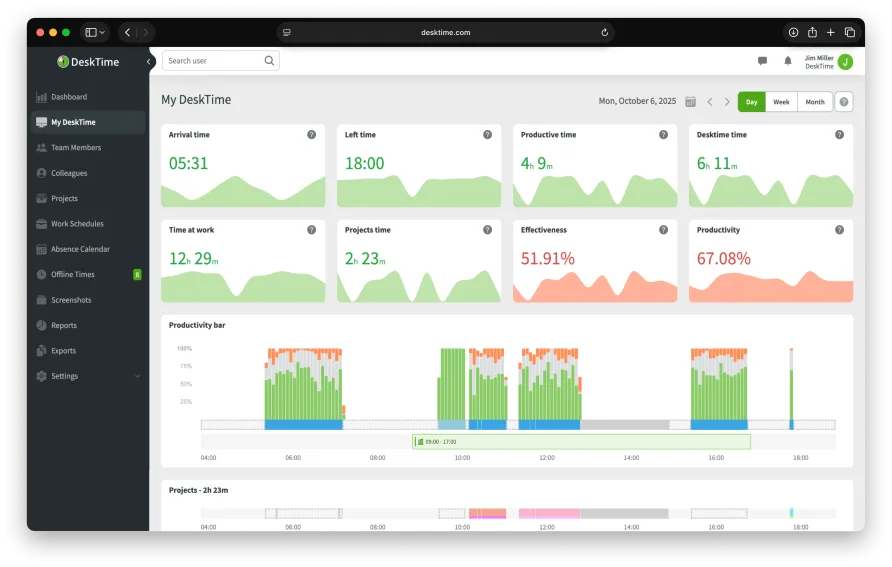
DeskTime's automatic tracking starts when the desktop app launches and stops when the computer shuts down. Every application, website, and document title gets logged and assigned a productivity category. Managers see a real-time dashboard showing who's online, who's idle, and how the team's productive hours break down across the day.
The productivity categorization system sorts apps and URLs into three buckets: productive, unproductive, and neutral. Default assignments cover common applications, but you'll need to customize these for your business. A marketing agency might classify social media platforms as productive work tools, while an accounting firm would flag them differently. This manual setup takes time upfront, and users with more specialized software stacks report spending a couple of hours getting the categories right for their teams.
Beyond time capture, DeskTime includes project tracking that ties hours to specific tasks, making it possible to calculate labor costs using employee hourly rates. Document title tracking adds another layer of visibility, logging the names of files and email subjects an employee works on throughout the day. For managers, this means you can see not just that someone spent three hours in a spreadsheet application, but which specific files they had open. A built-in Pomodoro timer nudges employees toward structured work-break rhythms, defaulting to 52-minute focus sessions followed by 17-minute breaks, a ratio DeskTime derived from analyzing its own user data. The private time feature lets employees pause tracking temporarily for personal tasks, which sends a clear signal that monitoring is about work patterns, not surveillance. That balance matters.
The Pro plan adds optional screenshots at configurable intervals, URL and app tracking, cost calculation for projects, and IP restrictions for controlling where the desktop client can operate. On the Premium tier, you get shift scheduling, an absence calendar for managing PTO and sick days, offline time tracking for work done away from a computer, and a booking feature for coordinating shared workspaces or meeting rooms. Enterprise adds unlimited projects, custom API access, VIP support, and an on-premises deployment option.
One UX detail we noticed: the productivity bar on the individual employee view provides an hourly breakdown that's immediately readable, with color-coded segments making it easy to spot patterns at a glance. The dashboard doesn't require training to interpret. However, navigation between the "Projects" and "Reports" sections could use clearer labeling. Several menu items have similar names, and first-time administrators may click through two or three screens before finding the specific report they need.
A mid-2024 update improved calendar sync, fixing an issue where out-of-office events imported from Google or Outlook calendars were incorrectly counted as productive time. The same release added email productivity summaries that deliver team data directly to managers' inboxes, along with screenshot support for Linux Ubuntu 22.04 using the Wayland display system. More recently, the mobile app gained a manual timer feature, allowing employees to track tasks on the go and assign that time to specific projects.
What DeskTime Costs in Practice
DeskTime offers a free Lite plan, but it's limited to a single user with basic automatic tracking and app monitoring. That makes it useful as a personal productivity tool, not a team solution. All paid plans come with a 14-day free trial that includes the full feature set, so you can test Premium or Enterprise capabilities before committing. The real decision for businesses starts at the Pro tier.
Pro costs $7 per user per month on monthly billing, or $6.42 per user per month with an annual commitment. For a solo user on Pro annual billing, the yearly spend is $77.04. A team of five on the same plan runs $385.20 per year. Those numbers put DeskTime below the category average for time and attendance tools, which typically start in the $8-12 per user range for comparable feature sets.
Premium, at $10 per user per month or $9.17 annually, adds the features many growing teams actually need: shift scheduling, absence management, and offline tracking. A ten-person team on annual Premium billing pays $1,100.40 per year. Enterprise pricing starts at $20 per user per month, with volume discounts dropping the rate to roughly $7.70 per user for larger deployments. Enterprise also includes the on-premises option, which matters for companies in regulated industries or with strict data residency requirements.
The value calculation comes down to which tier you actually need. If your team works standard hours at desks and you mainly want productivity visibility plus project tracking, Pro covers it. The jump to Premium makes sense when you manage shifts or need absence tracking. Teams that don't need scheduling can save $2.75 per user per month by staying on Pro, which adds up to $330 annually for a 10-person team.
Is DeskTime Right for Your Team?
DeskTime fits best when you need passive time capture for computer-based work and want productivity insights without asking employees to change their habits. Consider a consulting firm with 15 people working across client projects. The firm needs to know how many hours went toward each engagement, wants to verify that remote employees are maintaining their schedules, and prefers not to rely on manual timesheets that arrive incomplete every Friday. DeskTime's automatic tracking fills in those gaps without adding a task to anyone's day. The project tracking feature lets the firm assign hours to specific clients, and the cost calculation tells them whether the actual labor on a project stayed within the quoted budget.
The platform also works well for agencies and IT teams where work happens primarily in known applications. Users managing hybrid workforces, with some employees in the office and others remote, report that the real-time dashboard provides enough visibility to manage attendance without micromanaging. The productivity percentage gives managers a quick read on whether someone had a focused day or got pulled into distractions, and the historical trends make it easier to spot patterns over weeks rather than reacting to a single slow afternoon. A recurring theme in feedback from mid-size teams is that the productivity data helps identify when someone is struggling with a task or getting pulled into too many context switches, rather than just confirming whether they're at their desk. For teams that bill clients by the hour, the project tracking data feeds directly into those calculations. The combination of passive tracking and actionable reporting is where DeskTime's value proposition is strongest.
DeskTime isn't built for field-heavy operations. If your workforce is primarily mobile, traveling between job sites, or working away from computers for most of the day, the desktop-centric tracking won't capture most of their hours. The mobile app exists, but it's considerably less capable than the desktop client, offering a manual timer and basic status views rather than full automatic tracking. Users who rely heavily on the mobile experience consistently flag it as the platform's weakest area, citing limited functionality and occasional sync delays. And if your business requires deep integration with a large software stack, DeskTime's roughly 10 native integrations plus Zapier may feel limited compared to tools offering 50 or more direct connections.
The Gaps to Know About
DeskTime doesn't include GPS or geofencing for verifying field worker locations. Mobile time capture is manual rather than automatic. Offline time tracking, where employees log hours spent away from the computer, requires the Premium plan and relies on employees to submit those entries after the fact.
The screenshot feature, while optional and configurable in frequency, may not sit well with every team culture. Some organizations find it valuable as proof-of-work documentation for client billing or compliance. Others view it as too intrusive for a trust-based work environment. DeskTime's private time toggle helps offset that tension, but it's a conversation to have with your team before deployment, not after.
Custom reporting is available but doesn't support the depth of filtering that larger analytics-focused tools provide. Reports export as CSV files, which works for most small and mid-size teams but may frustrate companies that expect more sophisticated data visualization built into the platform itself. The integration library covers essentials, including Jira, Asana, Trello, Basecamp, GitLab, Google Calendar, Outlook, and Zapier. An API is available on the Enterprise plan for custom connections. But with roughly 10 native integrations, DeskTime's ecosystem is noticeably smaller than what many buyers at the Premium and Enterprise tiers expect, and teams with specialized tool stacks will need to build their own bridges or rely on Zapier for automation.
Our Verdict
DeskTime earns its 7.7 with a strong core product that does what most time and attendance buyers actually need: it captures hours accurately, shows how those hours were spent, and does it without adding work to anyone's plate. The pricing is honest, the desktop experience is clean, and the productivity categorization gives managers a perspective that basic clock-in/clock-out tools don't provide. Fourteen years of continuous operation and a team that's grown alongside the product give it a stability that newer tools haven't proven yet.
The tradeoffs land in predictable places: mobile tracking lags well behind the desktop product, the integration list is shorter than most alternatives in the same price range, and scheduling features require a plan upgrade that not every team will want to pay for. None of those gaps are dealbreakers for the right buyer. For businesses where most work happens on computers, where team sizes range from 5 to a few hundred, and where automatic tracking matters more than manual timesheets, DeskTime delivers a focused product that does its job well. It won't try to be your project management platform or your HR system, but for time and attendance specifically, the automation and productivity insights justify the investment.