
A Time Tracker That Watches So You Don't Have To
Most time and attendance tools ask employees to clock in. RescueTime takes a completely different approach: it watches what you're already doing. The software runs in the background on your computer and phone, tracking every app, website, and document you touch throughout the day, then turns that raw data into productivity reports, focus scores, and personalized goals. For knowledge workers who want to understand where their hours actually go, that's a compelling pitch. We score RescueTime 6.7 out of 10 for the time and attendance software category. That number reflects a product that's genuinely good at what it does but doesn't do what most buyers in this category expect.
RescueTime has been around since 2008, making it one of the older names in the productivity tracking space. Based in Seattle, Washington, the company operates with a small team of roughly 10 people and has raised just over $2 million in total funding. That's a lean operation by software standards, but longevity counts for something. The platform has accumulated over 3 billion hours of tracked activity data across its user base, and that dataset informs features like its daily Focus Work Goal, which calibrates your targets based on how similar professionals spend their time.
What RescueTime Actually Tracks
Once you install the desktop app, RescueTime begins recording immediately. It captures application names, website URLs, window titles, and document names as you move through your workday. There's no timer to start. There's no project to select. The software simply observes.
Each activity gets assigned to a category you can customize, and RescueTime scores it on a five-point productivity scale ranging from "Very Productive" to "Very Distracting." Your aggregated score appears as a Productivity Pulse, displayed as a number out of 100, so you can see at a glance whether Tuesday was more or less focused than Monday. The categorization isn't always perfect out of the box. A marketing professional might find social media platforms flagged as distracting when they're actually work tools. You can recategorize individual sites and apps, but the process requires some upfront effort to get the classifications right for your specific role. Users who've invested that initial setup time report that the system becomes a reliable mirror of their work habits, tracking patterns they wouldn't have noticed on their own.
The tracking works across devices too. Connect your phone and computer to the same account, and RescueTime consolidates the data into a unified view of your day.
Focus Sessions and Distraction Blocking
The Focus Session feature is where RescueTime moves from passive observer to active tool. When you start a session, the software blocks websites and apps you've categorized as personal or distracting. You set a timer, optionally assign a project or task, and work. Every device connected to your account enters focus mode simultaneously, so starting a session on your laptop also locks down your phone. That cross-device sync is a detail that matters more than it sounds. Most browser-based blockers only cover one device, leaving your phone as an escape hatch.
Sessions can be scheduled in advance, and the system sends alerts when it's time to start. There's also a Spotify and YouTube Music integration that plays focus-oriented audio during sessions. It's a small touch, but it reinforces the habit loop.
One UX detail that could be clearer: starting a Focus Session from the web portal isn't immediately obvious. The feature lives in the desktop Assistant widget, and the web dashboard doesn't offer a direct launch button. If you're accustomed to managing everything from a browser tab, you'll need to adjust your workflow.
RescueTime Pricing and Annual Cost Math
The free Lite plan gives you basic automatic tracking and a weekly email summary. It's a reasonable starting point, but the dashboard access and reporting are limited enough that most serious users will upgrade quickly.
RescueTime restructured its paid tiers in 2025, splitting them into "Focus" plans (productivity tracking and distraction blocking) and "Plus" bundles that add automated timesheets and project tracking. For an individual on the Solo Focus plan, you're looking at $7 per month billed annually, which works out to $84 per year. The Solo+ bundle with timesheets costs $12 per month annually, or $144 per year. Monthly billing runs higher: $9 and $15, respectively.
Team pricing is where costs climb. The Team Focus plan runs $10 per user per month billed annually. For a five-person team, that's $600 per year. The Team+ bundle jumps to $16 per user per month annually, putting that same five-person team at $960 per year. Given that the team features are primarily consolidated billing, team productivity reports, and shared project management, the per-user cost feels high relative to what dedicated time and attendance platforms offer at similar or lower price points.
All paid plans include a 14-day free trial. No sales tax or VAT is charged.
Reports and Productivity Data
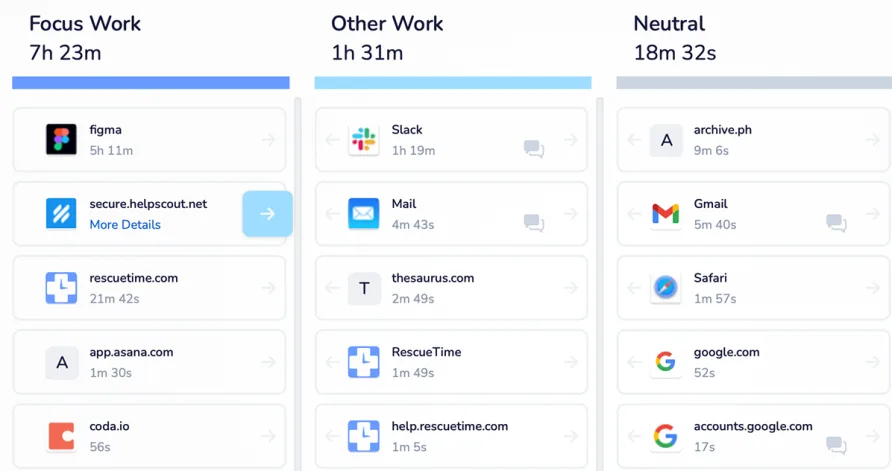
The reporting dashboard is RescueTime's strongest asset. Daily and weekly summaries break down time by category, application, and productivity level. You can drill into specific dates to see exactly which apps and sites consumed your hours, how long you spent in meetings (pulled from calendar data), and how your focus patterns shifted throughout the day. The Highlights feature, available on premium plans, adds context by letting you annotate specific days or time blocks with notes about what you were working on.
Goal tracking adds another layer. You set daily targets for productive time, and RescueTime monitors your progress with alerts when you're falling behind or hitting your mark. The system uses its database of aggregated user behavior to suggest a personalized Focus Work Goal, which is a useful benchmark if you're not sure what a reasonable daily target looks like.
Data export is available via CSV, API, or automated email reports.
What Changed in 2025
RescueTime made several meaningful updates during 2025. A Q3 update introduced a redesigned Productivity Menu that consolidates the Dashboard, Reports, and Highlights into a single navigation section. The same update added a Timer feature inside the Assistant, letting premium users track time against specific projects or tasks without leaving the productivity widget. Updated Timesheets tools made it easier to manage timeline visibility and control which activities appear as auto-completion hints. A smarter rounding feature now lets users choose between precision rounding and fractional hour rounding for billing-aligned reports.
Looking ahead, the company has flagged continued iOS improvements and a refreshed interface as 2026 priorities. They've also signaled that the timesheet auto-completion engine will receive concentrated development in early 2026, aiming to make the smart fill suggestions more accurate.
The Mobile Experience Falls Behind
This is the clearest weakness in RescueTime's offering. The desktop and web applications are polished, with a clean interface, fast syncing (updates roughly every minute), and detailed data visualization. The mobile apps tell a different story. The Google Play Store rating sits at 2.7 out of 5, and the Apple App Store is even lower at 2.0 out of 5. Users report syncing failures, crashes, and data loss. The app's interface also looks dated compared to the web version.
RescueTime has acknowledged this gap and says iOS improvements are a continuing priority. But as of this review, the mobile experience remains a liability.
Is RescueTime Right for Your Situation?
Picture a freelance web developer who bills clients by the hour but keeps losing track of where the day went. She knows she spent time coding, but she also suspects an hour disappeared into Slack threads and another into email. RescueTime would give her an automatic, unbiased accounting of every minute, complete with a breakdown of productive versus unproductive time, without ever asking her to start a timer. That's the ideal use case.
Now picture a plumbing company with 15 field technicians who need to clock in at job sites each morning. The owner needs GPS-verified attendance records, schedule management, and the ability to export hours directly to a system that handles pay processing. RescueTime can't do any of that. It doesn't have a punch clock. It doesn't manage schedules. It doesn't verify physical location.
The product sits firmly in the personal productivity space. It's built for people who work primarily on computers, consultants, designers, writers, software developers, and other knowledge workers, and who want data-driven insight into their work habits. Remote professionals and anyone struggling with digital distractions will find the focus tools especially useful.
What RescueTime Doesn't Cover
Within the time and attendance category, RescueTime is missing several core capabilities. There's no clock-in or clock-out mechanism for employees. Shift scheduling doesn't exist. Geofencing and GPS attendance verification aren't part of the product. Overtime calculation is limited to what the timesheets module captures from tracked activity rather than managed through configurable rules. There's no break tracking tied to labor compliance, and the team management tools don't include role-based approval workflows for timecards.
These aren't criticisms of the product. They're boundaries of its design. RescueTime built a productivity analytics tool, and it does that job well.
Our Verdict on RescueTime
If you clicked on this RescueTime review expecting a traditional time and attendance tool, the honest answer is that it isn't one. The 6.7 score reflects that reality: a product that does something different from what the category typically demands. But different isn't the same as bad. For the individual professional or small creative team that wants to understand and improve how they spend their digital work hours, RescueTime offers something most time and attendance platforms don't, which is genuine behavioral insight. The automatic tracking is effortless, the focus tools are effective, and the reporting is detailed enough to drive real changes in work habits.
The gaps are real, though. Mobile app quality drags down the experience for anyone who isn't primarily at a desk. Team pricing feels steep for what you get. And if your business needs employee attendance management, scheduling, or compliance-grade time records, you'll need to look at tools built for those problems. RescueTime is best understood as a productivity companion, and on those terms, it delivers.