
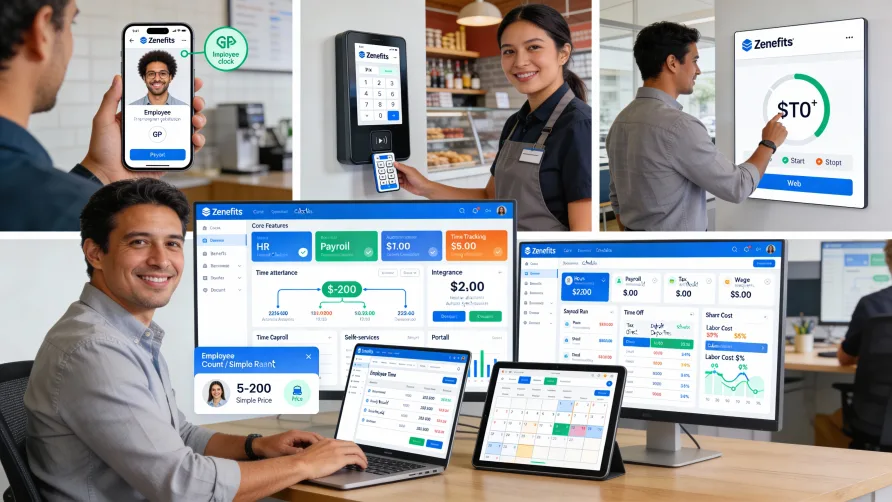
Yes, Zenefits offers time tracking and attendance management capabilities integrated with its HR and payroll platform. The time and attendance features let employees record their hours through multiple methods and connect time data directly to Zenefits payroll processing for automated hour transfer.
For businesses using Zenefits for HR and payroll, the time tracking functionality operates within the same system where you manage employee records, benefits, and other workforce functions. This integration eliminates the need for separate time tracking software and the data synchronization challenges that come with using disconnected systems.
Is Time Tracking Included With Zenefits?
Time tracking availability in Zenefits depends on which plan level you select. The platform offers different tiers of service, and time and attendance features are included in certain plans while requiring add-ons or higher-tier plans in other cases.
For businesses evaluating Zenefits, understanding which plan includes the time tracking features you need matters for budgeting and implementation planning. Some basic time tracking capabilities may be available at lower plan levels, while advanced features like scheduling or detailed labor analytics might require higher-tier plans.
The modular nature of Zenefits means you can often customize your feature set based on business needs. If you need comprehensive time and attendance capabilities, selecting a plan that includes these features from the start avoids later complications of adding functionality or upgrading plans.
When discussing plans with Zenefits, clarify which time tracking features you need and confirm they're included in your selected tier. Features like mobile time clocks, geofencing, advanced scheduling, or specific reporting capabilities may have different availability across plan levels.
How Does Zenefits Time Tracking Work?
Zenefits time tracking captures employee work hours through various clock-in methods and consolidates that data into timesheets for review and approval. Employees can record their time using web-based clocks, mobile apps, or kiosk devices depending on your configuration and their work environment.
When employees clock in, the system records their identity, timestamp, and any additional information you require such as job codes, departments, or project allocations. These punch records accumulate into timesheets that reflect total hours worked during each pay period.
The platform calculates hours in real-time as employees work through their shifts. Managers can view current hours worked, see who's clocked in at any moment, and monitor employees approaching overtime thresholds. This real-time visibility supports proactive scheduling decisions before overtime becomes unavoidable.
Timesheet approval workflows route completed timesheets to designated managers. Managers review hours, address exceptions like missed punches or schedule deviations, and approve timesheets before hours transfer to payroll. The approval process creates a checkpoint to catch and correct errors before they affect paychecks.
Once managers approve timesheets, the hours flow automatically into Zenefits payroll. The integration eliminates manual data entry between time tracking and payroll systems, reducing errors and speeding up payroll processing.
Clock-In Methods and Options
Zenefits provides multiple ways for employees to record their hours. The web-based time clock lets employees clock in from any internet-connected computer, which works well for office workers or anyone with computer access during their shifts.
The Zenefits mobile app turns smartphones into portable time clocks. Employees can clock in and out from their phones regardless of location, solving time tracking challenges for remote workers, field service teams, or employees who work away from fixed locations.
Mobile time tracking includes GPS capture that records employee location at clock-in. This feature helps verify that field employees are at assigned job sites when they start their shifts and provides documentation of where remote workers were when recording hours.
Geofencing capabilities let you define approved clock-in locations. When enabled, employees can only clock in when their mobile device is within specified geographic boundaries. This prevents early clock-ins from home and ensures workers are physically present at work sites before starting the clock.
Kiosk mode converts tablets or computers into shared time clocks for multiple employees. You can set up kiosks in break rooms, near facility entrances, or other common areas. Kiosks support identification methods including PIN codes to verify employee identity at clock-in.
Integration With Zenefits HR and Payroll
The connection between Zenefits time tracking and payroll creates efficiency in how you process employee hours. Approved timesheets flow directly into payroll processing, applying all your configured pay rules during calculation without manual data transfer.
Employee data exists in a single unified system. When you add a new employee to Zenefits, they automatically gain access to time tracking with their pay rates, job classifications, and employment details already configured from their HR profile. You don't maintain separate employee records in different systems.
Pay calculations use the hours recorded in approved timesheets. Regular time, overtime, different pay rates for different work types, and shift differentials all flow from time tracking into payroll automatically. The system applies federal and state overtime regulations based on employee classifications and your business location.
For businesses tracking labor costs at detailed levels, time entries can include allocation information. Employees can select which department, project, or cost center their hours apply to when clocking in. This granular data flows through to payroll and supports job costing, project profitability analysis, or departmental budget tracking.
The integration with Zenefits HR functions means time tracking connects to other workforce processes. Approved time off requests automatically appear in schedules and reduce hours worked. New hires gain time tracking access based on their start date. Terminated employees lose clock-in access immediately when you process their departure.
Time and Attendance Features
Zenefits time tracking includes attendance monitoring that tracks more than just hours worked. The system identifies patterns including chronic tardiness, frequent absences, or early departures based on rules you define. These analytics help managers spot attendance problems early.
Overtime management monitors hours against thresholds you configure. The system can alert managers when employees approach overtime limits, providing opportunity to adjust schedules before overtime becomes necessary. You can set different overtime rules for different employee groups based on classifications or locations.
Break tracking ensures compliance with meal and rest break requirements. You can configure mandatory break rules, and the system flags violations when employees work through required breaks or don't take appropriate rest periods during long shifts.
Exception management highlights issues requiring resolution before finalizing timesheets. Missed clock-outs, gaps in punch records, or hours that deviate significantly from schedules appear as exceptions needing manager attention. Resolving exceptions during approval prevents errors in payroll.
The platform supports multiple pay rules within the same organization. You can configure different overtime calculations, break requirements, or tracking methods for different employee groups, and the system applies the correct rules based on each employee's profile.
Scheduling Capabilities
Zenefits includes scheduling tools that let managers create and publish work schedules. Employees view their assigned shifts through the mobile app or web portal, and the system can send notifications about upcoming shifts or schedule changes.
Schedule creation tools help managers build shifts based on labor needs, employee availability, and business requirements. The system can highlight scheduling conflicts, show when employees are unavailable due to time off, and help ensure adequate coverage across all shifts.
Shift swapping features let employees request to trade shifts with coworkers when personal needs require schedule changes. Managers retain control by approving or denying swap requests, balancing employee flexibility with operational requirements.
Schedule adherence tracking compares actual clock-in times against scheduled start times. This comparison identifies patterns where employees consistently arrive late or leave early compared to assigned schedules, helping managers address attendance issues.
Time Off Integration
Zenefits time tracking connects to the platform's time off management features. Employees submit time off requests through the same system they use for time tracking, and managers approve or deny requests based on available balances and scheduling needs.
Approved time off automatically appears in schedules and affects available hours. When employees have approved vacation or sick leave, that time shows on their schedule and prevents conflicts with shift assignments during their absence.
Accrual tracking happens automatically based on policies you define. Employees can view their current time off balances when requesting leave, and the system prevents requests that would exceed available balances if you configure those restrictions.
The time off integration ensures time tracking and leave management work together cohesively. Managers see a complete picture of employee availability when creating schedules, including who's on leave and who's available to work.
Reporting and Analytics
Zenefits includes reporting capabilities for analyzing time and attendance data. Standard reports cover common needs like hours by employee, department labor costs, overtime analysis, and attendance summaries. You can run reports for specific pay periods or custom date ranges.
Real-time dashboards show current workforce status including who's clocked in, hours worked so far this pay period, and employees who haven't clocked in for scheduled shifts. This immediate visibility supports operational decisions throughout the workday.
Labor cost reporting breaks down expenses by dimensions you choose including department, location, or job code. These insights help with budget management, identifying cost overruns, and understanding where labor expenses concentrate across your organization.
Custom reporting tools let you build analyses specific to your business needs. If you track unique metrics, need specialized compliance reports, or want to compare actual hours against scheduled hours, custom reporting provides flexibility to surface this information.
Implementation and Setup
Implementing Zenefits time tracking involves configuring the system to match your business rules and operational requirements. You'll set up overtime policies, define approval workflows, select clock-in methods, and configure any job codes or cost centers for labor allocation.
Employee setup happens largely automatically since time tracking inherits employee data from your Zenefits HR records. You mainly need to assign clock-in permissions and configure any employee-specific time tracking rules or restrictions.
Training requirements differ by role. Employees need instruction on clocking in and out, viewing timesheets, checking schedules, and requesting time off. Managers require more comprehensive training covering timesheet approval, exception handling, schedule creation, and reporting.
If you're implementing kiosk time clocks, you'll need tablets or computers to dedicate as kiosk devices. Setup involves configuring devices to run in kiosk mode, placing them in accessible locations, and testing clock-in functionality.
Getting Started With Zenefits Time Tracking
If you currently use Zenefits for HR or payroll and want to add or activate time tracking, contact Zenefits to discuss your options. They can explain which features are available in your current plan, what adding time tracking involves, and the implementation timeline.
For businesses implementing Zenefits for the first time, including time tracking from the start creates a more integrated experience. Time tracking configuration happens alongside HR and payroll setup, ensuring all systems work together from day one.
Consider which clock-in methods your workforce needs before starting implementation. Understanding whether you need mobile access, web clocks, kiosks, or multiple options helps ensure you configure appropriate time tracking for your work environments.
Establish timesheet approval deadlines that align with your payroll schedule. Most businesses set deadlines that give managers adequate time to review and correct timesheets before payroll processing begins, preventing delays caused by unresolved exceptions.