
Closing the Gap Between Tracked Hours and Paid Invoices
For a freelancer or small agency owner tracking billable hours across multiple clients, the gap between logging time and actually getting paid can be wider than it should be. Paymo closes that gap. It's a work management platform that ties project planning, time tracking, and invoicing together in a single interface, and we score it 7.6 out of 10 in the time and attendance software category. The tool won't replace a dedicated enterprise workforce management system, but that's not who it's built for. It's built for teams that bill by the hour and want one fewer tab open while doing it.
Paymo has been around since 2008, headquartered in Timisoara, Romania, and operates as Paymo LLC. The company targets freelancers, consultants, creative agencies, architecture firms, and small software teams, typically groups under 20 people managing client-facing work. It supports 23 languages and accepts payments in over 85 currencies, which signals a product with a genuinely global user base. There's no publicly disclosed venture funding or user count milestone, but the platform's longevity and consistent update cycle suggest a stable, self-sustaining operation.
How Paymo Handles Time Tracking in Practice
Paymo gives you three ways to capture time. The first is a standard timer you can start and stop from the web app, desktop app, or mobile app. The second is manual entry, where you fill in hours against a specific task after the fact. The third, and the most distinctive, is Paymo Track, an automatic desktop tracker that runs in the background, logs which applications and websites you use throughout the day, and lets you map that activity to tasks and projects at the end of your session. For consultants who bounce between client projects throughout the day and forget to start a timer, that passive capture is a practical safety net. It doesn't replace deliberate tracking, but it catches the hours that would otherwise disappear.
The timesheet module was redesigned in a prior update with a user-centric layout that shows the individual first, then their assigned projects and entries. A more recent addition, launched in April 2025, is Timesheet Approvals. Available on the Plus and Pro plans (currently in beta), this feature lets team members submit timesheets for manager review. Managers can approve, reject with a reason, or edit entries directly. You can also configure incomplete timesheet reminders on a weekly or monthly cadence, which helps catch gaps before they compound into billing errors at month-end.
One observation during evaluation: the "Add Time" interface in the web app uses a somewhat unintuitive flow when switching between projects. The task selector loads after the project selector, and on larger accounts with many task lists, there's a noticeable pause. It's a minor friction point, and users managing fewer than a dozen active projects likely won't notice it. But agencies juggling 30 or more concurrent projects may find the extra clicks add up across a full team.
Active Timers is another feature that deserves attention. It shows, in real time, which team members currently have a running timer and what they're working on. For a project manager coordinating a distributed creative team across time zones, that live visibility is a meaningful upgrade over checking timesheets retroactively.
Project Management and Task Views
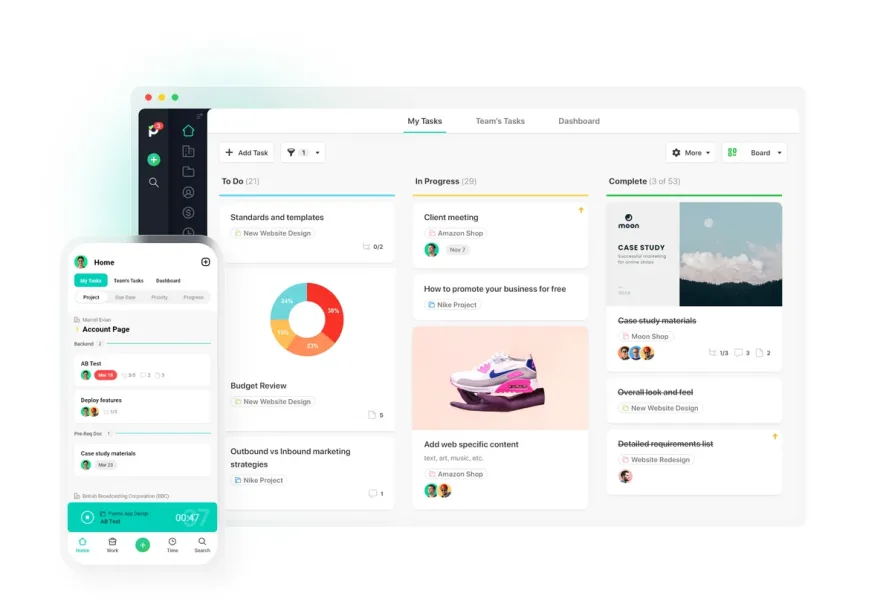
Paymo isn't a time tracker with project features bolted on. The project management side is surprisingly deep for a platform at this price point. You get task lists, a Kanban board, a calendar view, a spreadsheet-style table view, and Gantt charts with task dependencies and critical path calculations. The Gantt view also extends to a portfolio level, letting you see all active projects on a single timeline. That portfolio Gantt is locked to the Pro plan, but for agencies managing parallel client engagements, it's the kind of feature that justifies the price difference.
Resource scheduling and workload visualization sit at the Pro tier as well. The scheduling grid shows employee bookings alongside their time off, and Paymo can auto-generate "ghost bookings" when you assign tasks, so you can see projected capacity without building a separate schedule. Converting those ghost bookings into confirmed bookings takes a single click. Users managing field teams or shift-based work won't find this as useful as agencies planning creative sprints, but for the intended audience, it fills a real gap.
From Tracked Hours to Paid Invoices
The tightest integration in Paymo is the pipeline from time entry to invoice. Once hours are tracked against a project, you can generate an invoice directly from those entries with a few clicks. Paymo offers ten customizable invoice templates, supports invoicing in multiple languages from a single account, and connects to payment gateways including PayPal, Stripe, and Authorize.net so clients can pay directly from the invoice itself. You can also attach the corresponding timesheet report to the invoice for full transparency, which is a small touch that clients who scrutinize line items tend to appreciate.
Recurring invoices, estimates that convert into invoices with one click, and expense tracking with mobile receipt scanning round out the financial feature set. A recurring theme in user feedback from freelancers and boutique agencies is that this billing pipeline saves significant administrative time each month, particularly for professionals who previously tracked hours in one tool and invoiced from another. The integration between QuickBooks Online and Xero means your accounting stays in sync without manual exports. For agencies that bill in multiple currencies, Paymo supports over 85 options, which eliminates the need for manual conversion or separate invoicing tools for international clients.
The expense tracking module ties into this same financial workflow. Team members can log expenses, tag them by category, and attach receipt photos captured through the mobile app. Those expenses then roll into project profitability calculations and can be included on client invoices. It's a tighter loop than managing expenses in a separate spreadsheet and reconciling at month-end.
What Paymo Costs in Practice
Paymo's current pricing includes four tiers, all billed per user per month with annual billing discounts of up to 40%. The Free plan supports a single user with unlimited time tracking and invoicing but limits you to one client and two projects. Solo costs $5.90/month (one user only) and expands to three clients, five projects, and adds Kanban and calendar views. Plus runs $10.90/user/month with unlimited users, clients, and projects, along with timesheet reports, project templates, recurring tasks, and estimates. Pro, at $16.90/user/month, adds Gantt charts, task dependencies, resource scheduling, leave management, and timesheet approvals.
For a solo consultant on the Solo plan, you're looking at $70.80/year. That's a low entry point for combined time tracking and invoicing. A five-person agency on Plus pays $654/year ($10.90 x 5 x 12), and stepping up to Pro for the same team hits $1,014/year. The jump from Plus to Pro is where the math gets interesting: you're paying an extra $360/year for the team to gain Gantt charts, scheduling, and leave management. For agencies that actively use those features, it's defensible. For teams that just need solid time tracking and invoicing, Plus covers the essentials without overpaying.
No hidden fees or base platform charges. That simplicity counts.
The Right Fit (and the Wrong One)
Picture a marketing consultancy with eight people, three of whom are contractors. The team runs four to six client projects at any given time, tracks hours daily, and invoices biweekly. The owner needs to see where hours are going, whether projects are profitable, and who has capacity for new work. That's Paymo's sweet spot. The project management layer organizes the work. The time tracking layer captures it. The invoicing layer bills for it. And the reporting layer tells you whether the numbers make sense.
Now picture a 50-person construction firm that needs GPS-verified clock-ins, geofenced job sites, and compliance-grade overtime calculations. Paymo isn't that tool. It doesn't track overtime or breaks natively, doesn't offer geolocation-based attendance verification, and its leave planner, while functional, is admin-managed rather than employee-initiated (though self-service time off requests have been on the roadmap). Teams that need a strict time and attendance system for hourly wage compliance will find Paymo's strengths misaligned with their requirements.
Where Paymo Stops
Within the scope of time and attendance specifically, there are a few gaps to be aware of. Paymo doesn't calculate overtime. There's no built-in mechanism for tracking break periods. The leave planner tracks balances and types but doesn't currently allow employees to submit their own time-off requests through the platform. And while the Active Timers dashboard tells you who's tracking right now, there's no clock-in/clock-out attendance model with shift assignments.
These aren't oversights so much as reflections of who the product serves. Paymo was designed around project-based billing, not workforce compliance. If your primary concern is tracking when employees arrive and leave, this platform approaches time from a different angle entirely.
Integration and Workflow Fit
Paymo connects natively with Slack, QuickBooks Online, Xero, Google Calendar, Google Drive, Adobe Creative Cloud, Typeform, and JotForm. The Zapier integration extends that reach to over 1,000 additional apps, covering most common workflow automation needs. A public API is also available for custom integrations. The native integration list is smaller than what you'd find from the largest players in the project management space, but for the typical small agency workflow of calendar syncing, accounting exports, and team notifications, the coverage is solid.
Users who rely on Google Calendar for scheduling will find the sync functional but occasionally inconsistent, based on recurring feedback. Calendar events don't always appear in the Paymo interface, which can create confusion for teams that treat Google Calendar as their primary schedule.
Mobile Experience and Desktop Apps
Paymo offers native apps for iOS and Android, along with a desktop app and a browser-based web interface. The mobile apps cover the essentials: you can view tasks, start and stop timers, create and send invoices, and add expenses with receipt photos. For a consultant at a client site who needs to log time or fire off an invoice between meetings, that coverage is sufficient. But the mobile experience doesn't match the desktop version in depth. Features like resource scheduling, Gantt chart editing, and detailed reporting are either absent or limited on smaller screens. Users who tested the product on mobile have consistently noted that the app feels less polished than the web interface, with occasional lag and navigation that requires more taps than expected to reach common actions.
The desktop app, available for Windows and macOS, primarily serves as a persistent timer and quick-access point rather than a full replacement for the web interface. Paymo Track, the automatic activity tracker, runs through this desktop application. For teams that work from their computers all day, having the desktop timer always available in the system tray reduces the friction of remembering to start and stop tracking.
Our Verdict on Paymo
Paymo occupies a specific and defensible position in the time and attendance software market. It's not trying to be an enterprise workforce management suite, and judging it by those standards misses the point. What it does is give freelancers, consultants, and small agencies a single place to plan projects, track time, and send invoices, with enough depth in each area that you don't feel like you're compromising. The April 2025 launch of Timesheet Approvals signals continued investment in the time tracking side of the platform, and the 17-year track record provides a level of stability that newer tools haven't earned yet. At $10.90/user/month on the Plus plan, the value math works for most small teams. If your business bills for time and you're tired of stitching three tools together, Paymo deserves a serious look.