
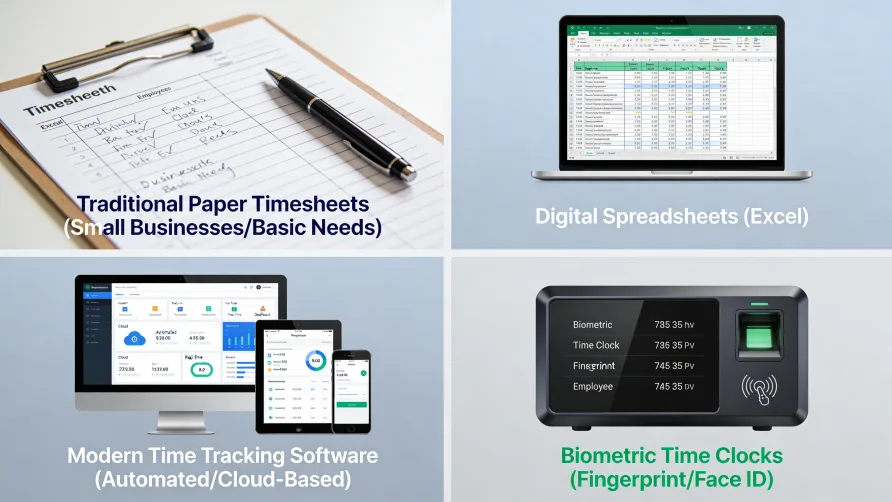
Tracking employee hours requires selecting a method that matches your business size, workforce type, and operational complexity, then implementing it consistently. Options range from paper timesheets that cost almost nothing to sophisticated software that automates calculations, integrates with payroll, and provides detailed reporting. The right approach depends on how many employees you have, where they work, what level of detail you need, and how much administrative time you can devote to the process.
Why Accurate Employee Hour Tracking Matters
Before examining methods, consider what accurate tracking accomplishes. Every hour you record affects paychecks, tax withholdings, overtime calculations, and labor cost reporting. Errors create problems in multiple directions: underpaying employees generates legal liability and damages trust, while overpaying inflates labor costs and reduces profitability.
The American Payroll Association estimates that manual timecard calculations produce error rates between 1% and 8% of total payroll. For a business with $300,000 in annual labor costs, even a 3% error rate means $9,000 in mistakes over the course of a year. Some of that money goes to workers who did not earn it; some fails to reach workers who did.
Beyond payroll accuracy, time records serve compliance purposes. Federal law requires employers to maintain documentation of hours worked by non-exempt employees. State laws may add requirements around meal breaks, rest periods, and daily overtime. Complete records protect you during audits and provide evidence in wage disputes.
Manual Methods for Tracking Employee Hours
The simplest employee hours tracking methods require minimal technology investment. They work for small teams with straightforward schedules, though they demand more administrative effort as headcount grows.
Paper Timesheets
Paper timesheets have tracked work hours for generations. Employees write down when they start, when they stop, and when they take breaks. At the end of the pay period, someone collects the sheets, calculates totals, and enters the numbers into payroll.
The approach costs almost nothing to implement. Print a template, distribute copies, and collect them on payday. No software licenses, no training on new systems, no technical support issues.
The downsides emerge at scale. Handwriting legibility varies. Employees forget to fill out their sheets or lose them entirely. Calculation errors creep in during manual addition. Someone must spend time transcribing paper records into whatever system processes payroll. According to industry research, approximately 38% of U.S. companies still use paper timesheets, and those organizations report needing to correct the majority of submissions they receive.
Paper works for very small businesses with simple needs: a handful of employees, consistent schedules, and minimal project tracking requirements. Beyond that threshold, the administrative burden and error rates typically justify investing in better methods.
Spreadsheet Tracking
Spreadsheets offer a step up from paper. Employees enter hours into a shared file or email their own spreadsheets to a manager. The file calculates totals automatically, eliminating arithmetic errors. Digital storage makes records easier to organize and search than paper files.
Setting up a spreadsheet system requires creating a template with appropriate columns: date, start time, end time, break duration, total hours, and any project or task codes you want to track. Formulas handle the math. You might create one sheet per employee or consolidate everyone onto a single workbook with separate tabs.
The advantages over paper include automatic calculations, easier storage, and the ability to copy formulas rather than redoing math each pay period. Spreadsheets can also feed data into other tools through export features.
The limitations persist, though. Employees must remember to update the file. Version control becomes problematic when multiple people edit the same document. There's no built-in validation to catch impossible entries like negative hours or overlapping shifts. Someone still needs to transfer the data into payroll manually unless you build custom integrations.
Spreadsheets suit small businesses that want better accuracy than paper provides but are not ready to invest in dedicated software. They scale reasonably well to perhaps 15 or 20 employees before management overhead becomes significant.
Software Methods for Employee Hour Tracking
Dedicated time tracking software automates much of what manual methods require humans to do. The investment increases, but so do accuracy, efficiency, and the insights you can extract from your data.
Time Tracking Applications
Standalone time tracking apps focus specifically on recording and managing work hours. Employees clock in through a website, mobile app, or desktop application. The system timestamps each entry automatically, removing reliance on memory or self-reported times.
These applications typically include features that paper and spreadsheets cannot match. Automatic overtime calculations apply your pay rules without manual intervention. Alerts notify managers when employees approach overtime thresholds. Reporting dashboards show labor hours by department, project, or time period. Many apps integrate with popular payroll platforms, eliminating the data transfer step entirely.
The employee experience improves as well. Workers can clock in from their phones rather than hunting for a paper timesheet. They can see their own hours in real time, reducing confusion about what has been recorded. Mobile access supports remote workers and field employees who never come to a central office.
Pricing usually follows a per-user monthly model, often ranging from a few dollars to $15 or more per employee per month depending on features. Free tiers exist for very small teams, though they typically limit functionality or user counts.
Time tracking apps make sense for businesses that have outgrown spreadsheets, need mobile access for distributed teams, or want reporting capabilities that manual methods cannot provide.
Integrated HR and Payroll Systems
Larger organizations often track time through comprehensive HR platforms that bundle time and attendance with payroll, benefits administration, scheduling, and other workforce management functions. Rather than a standalone app, time tracking becomes one module within a broader system.
Integration provides the primary advantage. Time data flows directly into payroll without export and import steps. Scheduling tools connect to actual hours worked, flagging attendance exceptions automatically. Managers access everything through a single interface rather than switching between applications.
These systems typically serve businesses with 50 or more employees, though some target the small business market. Implementation takes longer than standalone apps because you're configuring multiple interconnected modules. Costs run higher, with pricing often based on total employee count and which modules you use.
For businesses already using an HR platform, adding the time tracking module usually makes more sense than maintaining a separate system. For smaller companies, the complexity and cost may outweigh the integration benefits.
Physical Time Clocks and Biometric Systems
Some work environments call for physical devices where employees record their time rather than apps and spreadsheets.
Traditional Time Clocks
Wall-mounted time clocks, whether the classic punch-card variety or modern digital terminals, require employees to physically interact with a device when arriving and departing. The machine records the timestamp, removing the subjectivity of self-reported times.
Time clocks work well for businesses where employees report to a central location and where preventing early departures or late arrivals matters. Retail stores, manufacturing facilities, warehouses, and restaurants commonly use them. Employees cannot clock in from home or round their times favorably because the machine records exactly when they pressed the button.
Modern digital clocks sync with software systems, combining the physical verification of a dedicated device with the reporting and integration capabilities of time tracking apps. The clock captures punches; the connected software calculates totals, manages exceptions, and sends data to payroll.
Biometric Time Clocks
Biometric systems add identity verification to the clock-in process. Instead of punching a code or swiping a badge, employees use fingerprint scanners, facial recognition cameras, or palm readers. The system confirms that the person clocking in matches the employee on record.
The primary benefit is preventing "buddy punching," where one employee clocks in on behalf of another who has not actually arrived. According to the American Payroll Association, 75% of U.S. companies lose money to buddy punching. Biometric verification makes this type of time theft nearly impossible.
Before implementing biometric tracking, understand the legal requirements in your state. Illinois, Texas, Washington, and several other states have laws governing the collection, storage, and use of biometric data. These laws typically require written disclosure and employee consent. Non-compliance can result in significant penalties.
What Is the Best Way to Track Employee Hours?
The best method depends on your specific situation. No single approach works optimally for every business.
For very small businesses (1-5 employees): Simple methods often suffice. Paper timesheets or spreadsheets cost little and require minimal setup. If your team works consistent schedules at a single location, the administrative burden stays manageable. As you approach five employees, consider whether the time spent on manual processing justifies moving to software.
For small businesses (5-25 employees): Time tracking software typically pays for itself through reduced administrative time and fewer errors. The cost per employee is modest, and the accuracy improvements are substantial. Mobile access becomes valuable if any employees work remotely or at multiple locations.
For medium businesses (25-100 employees): At this scale, manual methods become impractical. Dedicated time tracking apps or integrated HR platforms handle the volume while providing reporting that supports management decisions. Physical time clocks may make sense for shift-based workforces.
For larger organizations (100+ employees): Comprehensive workforce management systems that integrate time tracking with scheduling, payroll, and HR administration typically make the most sense. The implementation investment is justified by operational efficiency at scale.
How Do Small Businesses Track Employee Hours?
Small businesses face a particular challenge: they need accurate tracking without the budget or administrative capacity for enterprise-grade solutions. Several practical approaches work well at smaller scales.
Start simple and upgrade as needed. Begin with spreadsheets or basic free-tier time tracking apps. Monitor how much time you spend managing the system and how often errors occur. When the burden becomes noticeable, invest in a more capable solution.
Choose mobile-friendly options. Even small teams increasingly include remote workers, field employees, or staff who split time between locations. Apps that work on smartphones provide flexibility that paper timesheets cannot match.
Prioritize payroll integration. Manual data transfer between time tracking and payroll consumes administrative time and introduces error opportunities. Even inexpensive time tracking apps often integrate with popular small business payroll platforms.
Consider your workforce type. A small retail store with shift workers has different needs than a consulting firm with salaried professionals tracking billable hours. Match the tracking method to how your people actually work.
Setting Up a Time Tracking System
Implementation matters as much as selection. A good system poorly deployed creates more problems than it solves.
Define Your Requirements
Before evaluating options, clarify what you need to track. Basic attendance only? Hours by project or client? Location verification for field workers? Break and meal period documentation for state compliance? The answers shape which features matter.
Consider who needs access to what information. Managers may need to approve timesheets and run reports. Employees need to enter their time and view their records. Payroll staff need export capabilities. Map out these requirements before shopping for solutions.
Establish Clear Policies
Technology alone does not create accurate time records. You need policies that explain how employees should track their time, when they should submit timesheets, what happens if they forget to clock in, and how corrections get handled.
Document these policies and communicate them during onboarding and whenever you change systems. Ambiguity leads to inconsistent practices and disputes when paychecks do not match expectations.
Train Thoroughly
Assume nothing about what employees know. Walk through the clock-in process step by step. Show managers how to review and approve timesheets. Demonstrate how to handle common situations like forgotten punches or project changes mid-day.
Training time invested upfront prevents confusion, errors, and frustrated calls for help once the system goes live.
Plan the Transition
If you're moving from one tracking method to another, plan the changeover carefully. Run parallel systems briefly if possible, using the new method while maintaining the old one as backup. This overlap helps you catch problems before they affect paychecks.
Communicate the timeline to employees well in advance. Explain why you're making the change and what they need to do differently.
Best Practices for Accurate Employee Hour Tracking
Regardless of which method you choose, certain practices improve accuracy.
Require real-time recording. The closer employees record time to when they actually work, the more accurate the records. Policies that allow end-of-week timesheet completion invite memory errors and rounding.
Review before processing. Someone should examine time records before they flow into payroll. Look for anomalies: unusually high hours, missing entries, patterns that suggest clock manipulation. Catching errors before paychecks go out is far easier than correcting them afterward.
Make corrections promptly. When employees report errors, investigate and fix them quickly. Delayed corrections erode trust and sometimes become more complicated as time passes.
Audit periodically. Even with good systems, spot-check accuracy occasionally. Compare time records against schedules, project outcomes, or other independent data sources. Patterns of discrepancy may indicate system problems or policy confusion.
Common Mistakes to Avoid
Certain pitfalls undermine even well-intentioned tracking efforts.
Choosing based on features rather than fit. The most sophisticated system is not necessarily the best choice for your business. A feature-rich platform that overwhelms your team or exceeds your budget creates problems, not solutions.
Skipping the policy step. Implementing software without clear rules about how to use it leads to inconsistent practices. Every employee ends up inventing their own approach.
Ignoring mobile needs. If any portion of your workforce works away from a central location, tracking methods that require physical presence or desktop access create gaps in your records.
Automatic meal deductions without verification. Some systems automatically deduct meal periods from total hours. If employees work through lunch, automatic deductions mean you are not paying for time actually worked, which creates legal liability.
Rounding that favors the employer. The FLSA permits rounding clock times to the nearest quarter hour, but rounding must be neutral over time. Policies that consistently round in the company's favor violate wage and hour laws.
Failing to track all work time. Non-exempt employees must be paid for all hours worked, including time before or after scheduled shifts. If your tracking system only captures scheduled hours, you may be missing compensable work time.
Moving Forward with Employee Hour Tracking
Effective tracking balances accuracy, efficiency, and practicality. Start by understanding your requirements: how many people, what type of work, what level of detail you need. Match those requirements to a method that fits your budget and administrative capacity.
Remember that tracking methods can evolve. The spreadsheet that works for five employees may need replacement when you hit fifteen. The basic app suitable for a single location may require upgrading when you open a second. Build flexibility into your approach and revisit your choices as your business grows.
The goal is accurate records that support fair pay, legal compliance, and informed management. When tracking achieves those objectives without consuming excessive time or creating friction with employees, you have found the right approach for your business.