
Time Tracking Built for Teams That Never Touch a Desk
Managing time and attendance for a workforce that doesn't sit at desks creates problems that most office-focused software never had to solve. Employees clock in from job sites, client locations, and vehicles. Schedules shift daily. Paper timesheets disappear. Connecteam was built to address exactly this situation, and after evaluating the platform as time and attendance software, we score it 7.9 out of 10. It's a strong fit for small to mid-size businesses running deskless teams, though the per-hub pricing model demands careful budgeting.
What Connecteam Brings to Time and Attendance
Connecteam launched in 2016 out of Tel Aviv, with US offices now in New York. The company was co-founded by Amir Nehemia, who serves as CEO, alongside Matan Elmalam and Hadar Shmueli. They've raised over $160 million in venture funding, backed by investors including Insight Partners, Stripes, and Tiger Global, and reached a valuation of roughly $800 million during a 2022 Series C round. More than 36,000 businesses across 80 countries use the platform today, with estimated annual revenue exceeding $50 million. That funding trajectory and customer base suggest a company with enough runway and market traction to stick around, which matters when you're building your operations around a tool.
The platform's time tracking works through a mobile app that employees use to clock in and out with GPS location stamps. Managers see real-time records of who's working, where they clocked in, and how long they've been on the job. Automated timesheets compile this data and calculate overtime, breaks, and total hours without manual entry. You can set different pay rates by employee or by job type, and the system handles the math across multiple rate structures. The system exports directly to payroll providers including QuickBooks, Gusto, Xero, and Paychex.
Geofencing lets you define work zones so employees can only clock in when physically present at a job site. This feature alone addresses one of the biggest headaches in field workforce management: verifying that someone actually arrived before their shift started. Breadcrumb tracking goes further by recording location points throughout a shift, creating a movement trail that's useful for delivery routes or multi-site work. Kiosk mode turns a shared tablet into a team time clock with facial recognition, which suits crews that report to the same location each morning. One thing to note about the face ID implementation: it captures a photo at clock-in and attaches it to the activity log, but it doesn't automatically compare the photo against a stored profile image. Managers have to review the photos manually to catch discrepancies.
Auto clock-out is a small but practical addition. If an employee forgets to punch out, the system can automatically end their shift based on preset rules. That keeps timesheets clean without requiring managers to chase down corrections.
The reporting side pulls timesheet data into summaries that can be scheduled for automatic delivery. Managers can receive daily or weekly reports by email showing total hours per employee, overtime tallies, and late arrivals. Employees get individual timesheet summaries too, which helps reduce disputes at payroll time. The reports export in multiple formats, and the payroll integrations handle the conversion from raw time data to the format your provider expects. For a team of 15 running weekly payroll, this eliminates the manual data entry that used to take an hour or more every pay period.
Scheduling That Handles the Complexity
Employee scheduling inside Connecteam goes well beyond a basic calendar. The drag-and-drop scheduler supports shift templates, recurring schedules, and open shifts that employees can claim through the app. Conflict detection flags issues like double-booking or scheduling someone during approved time off, and a cross-schedule conflict feature prevents overlap for employees who work across multiple schedules or sites. A 2025 update introduced AI-powered auto-scheduling that assigns employees to shifts based on availability, qualifications, past assignments, and fairness distribution. You define the roles and headcount you need, and the system fills the roster in seconds. Managers can still adjust the output manually before publishing, which turns the AI output into a starting point rather than a final answer.
A security company staffing guard shifts across twelve client sites, for example, needs to match certifications to site requirements while balancing overtime limits and employee preferences. Connecteam's scheduling handles that kind of multi-variable problem faster than any spreadsheet could. Employees can confirm or reject shifts directly from their phones, and open shift bidding lets staff express interest in unfilled slots, giving managers a list of candidates to choose from.
Users who manage shift-based teams frequently mention how much time the scheduling tools save. The ability to duplicate previous weeks and modify from there rather than building from scratch is a common highlight. The schedule also supports color-coding by job type or location, attached notes and documents per shift, and shift-specific task lists that tell employees exactly what's expected when they arrive.
Beyond the Clock: The All-in-One Factor
Connecteam isn't just time tracking software. It bundles communication tools (team chat, company newsfeed, employee directory), HR features (training courses, document storage, recognition programs, PTO tracking), and operations tools (forms, checklists, task management) into the same app. For a cleaning company dispatching five crews to different client sites each morning, this means the crew lead can clock in, check their schedule, complete a site inspection checklist, and message the office about a supply issue without leaving one app. That kind of consolidation reduces the app fatigue that plagues frontline teams juggling three or four separate tools for daily workflows. The forms feature deserves specific mention: managers can build custom digital checklists for safety inspections, client walkthroughs, or equipment checks, and employees complete them on-site with photo attachments and GPS data automatically captured. Completed forms trigger automated reports to designated recipients, closing the loop between field activity and office oversight.
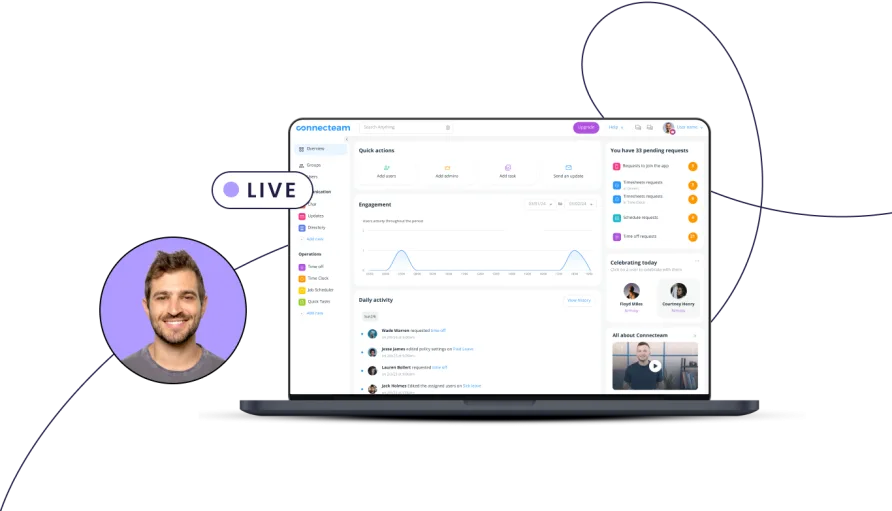
The breadth cuts both ways. Teams that only need basic time tracking may find the full platform overwhelming. The admin dashboard packs dozens of features into its navigation, and during evaluation, configuring the Operations hub settings alone required clicking through multiple nested menus to find options like overtime rules and break policies. The labels in the admin panel aren't always self-explanatory; "Quick Tasks" and "Forms" serve overlapping purposes that take time to distinguish. The interface on the mobile side is cleaner and more focused, but the web admin panel can feel dense when you're trying to configure settings across multiple feature areas.
A 2025 addition brought AI-generated training courses, letting managers create onboarding or compliance content from a text prompt. The same year, Connecteam rolled out a Help Desk feature, an internal ticketing system for deskless workers to submit support requests about equipment, payroll, or onboarding issues. Form editing directly on mobile devices and NFC-based clock-in for faster tap-to-punch workflows also arrived in 2025. These updates signal a product team that's actively building rather than coasting.
What Connecteam Costs in Practice
The free Small Business Plan covers up to 10 users with full access to every feature across all three hubs. For a very small team, this is one of the most generous free tiers in the time and attendance category. No feature restrictions, no trial expiration. It's free for life.
Once you outgrow 10 users, the pricing model requires attention. Connecteam organizes its paid features into three hubs: Operations (time clock, scheduling, forms), Communications (chat, updates, directory), and HR & Skills (training, documents, PTO). Each hub has its own subscription tier. A team of 20 employees on the Basic Operations plan pays $29 per month billed annually for the first 30 users, which covers time tracking and scheduling. That's $348 per year for time and attendance essentials. Monthly billing runs higher at $35 per month ($420 annually), so annual commitment saves about 17%.
The math changes if you need features from multiple hubs. Adding the Communications Basic hub costs another $29 per month. Adding HR & Skills Basic adds a third $29. Suddenly you're at $87 per month ($1,044 per year) for basic features across all three hubs, and that's before you hit 30 users. A team of 50 on the Advanced Operations plan alone would pay $49 plus $2.50 for each of the 20 additional users, totaling $99 per month ($1,188 per year). Multiply across hubs and the numbers grow quickly. A 50-person team on Advanced across all three hubs would run $297 per month plus the additional user fees, landing somewhere around $4,200 per year.
For teams that primarily need time tracking and scheduling, the Operations hub alone often provides enough. The per-hub model becomes expensive only when you treat Connecteam as a full workforce management suite. Understanding which hub contains which features before you sign up saves budget surprises later.
The Right Fit (and the Wrong One)
Connecteam works best when three conditions line up: your employees work away from desks, they carry smartphones, and you need more than just a time clock. A home healthcare agency with 25 caregivers visiting patients across a metro area gets real value from the GPS verification, the mobile scheduling, and the ability to send training materials through the same app employees use to clock in. The all-in-one approach means fewer logins, less app fatigue, and tighter operational control.
Construction crews, cleaning services, and security firms are the other sweet spot. These industries deal with rotating shift schedules, multiple job sites, and workers who rarely see an office. The kiosk mode, geofencing, and auto-scheduling features were clearly designed with these use cases in mind. Users in these industries consistently report that employees with limited technical experience picked up the app within their first shift, a claim supported by the platform's 4.8 and 4.9 ratings on Google Play and the App Store respectively.
The platform fits less naturally in two scenarios. Office-based teams that work at computers all day don't gain much from GPS tracking or mobile-first design, and they'll find the desktop admin experience less refined than what dedicated office-focused tools offer. And businesses that really just need a simple punch clock with payroll export may find Connecteam's feature depth more than they want to manage. The free plan mitigates that risk for very small teams, but once you're paying, you're paying for a platform that does a lot more than track hours.
Where Connecteam Stops
Within the time and attendance scope, a few gaps stand out. Geofencing and breadcrumb tracking require the Advanced plan or higher, which means teams on the Basic paid plan get GPS location stamps at clock-in but can't restrict where employees punch in. Live GPS tracking, seeing an employee's real-time position during a shift, is only available on the Expert tier. That's a meaningful restriction for businesses that consider location verification a core requirement rather than an upgrade.
The integration list is narrower than some alternatives. Payroll connections cover QuickBooks, Gusto, Xero, and Paychex, plus export templates for ADP. There's a Google Calendar sync and Zapier connector for broader workflows. But API access is locked behind the Expert plan, and there are no native integrations with major project management or accounting platforms beyond payroll. If your tech stack relies on tight connections between time tracking and other business systems, verify that the integrations you need exist before committing.
Occasional app stability issues also surface in user feedback. Some employees report the time clock freezing during clock-in attempts, particularly on older devices or when cellular connections are weak. GPS accuracy can drop when devices rely on mobile data rather than WiFi, which is a recurring frustration for field workers in areas with inconsistent coverage. A common observation among long-term users is that the app performs well once loaded, but initial load times on the mobile app can lag when switching between features. These aren't universal complaints, and Connecteam's 2025 app updates specifically addressed loading speed and time clock stability, but they're patterns worth knowing about if your crews work in low-connectivity environments.
The notification system has also drawn mixed feedback. Push notifications for schedule changes, clock-in reminders, and shift offers are central to how deskless teams stay coordinated, and some users report that these alerts don't always fire reliably. Missed shift notifications can cascade into scheduling gaps, so teams that depend on real-time alerting should test notification behavior during the 14-day free trial before committing to a paid plan. If reliable alerts are mission-critical, this is the first thing to verify.
Our Verdict on Connecteam
Connecteam earns its 7.9 score by doing something well that most time and attendance platforms only partially address: serving the deskless workforce with a genuinely mobile-first tool that extends into scheduling, communication, and operational management. The free plan for up to 10 users is a compelling entry point, and the Operations hub alone delivers solid time tracking with GPS, automated timesheets, and AI-powered scheduling at competitive pricing. Where the platform demands caution is the per-hub billing model, which can balloon costs for businesses that need the full suite, and the tier-gated access to features like geofencing and live GPS that some teams will consider essential from day one. For businesses managing frontline crews across multiple locations, especially in construction, cleaning, healthcare, or field services, Connecteam consolidates tools that would otherwise require three or four separate subscriptions. That consolidation, despite the pricing complexity, is where the real value sits.