
The Free Tier That Built a Category Leader
Most time and attendance software asks you to pay before you can evaluate whether it fits your workflow. Clockify took the opposite approach and built its entire reputation on a free plan with no user limits, no project caps, and no expiration date. That strategy has attracted over five million users since the product launched in 2017, and it earned a Forbes Advisor nod as the best overall time tracking app in 2023. We score Clockify 8.3 out of 10 for the time and attendance software category, with its strongest marks in core functionality and pricing value.
CAKE.com Inc., the privately held parent company behind Clockify, operates out of Palo Alto, California with a team of 200 to 500 employees. Founded by Nenad Milanovi?, CAKE.com also produces Pumble for team messaging and Plaky for project management. The three products share an organizational account structure, and a bundled plan combines all three at $12.99/user/month on annual billing. That suite context matters because it signals where Clockify sits in a broader productivity strategy, not as an isolated tool, but as one piece of an integrated workspace.
Clockify Review: Core Time Tracking Features
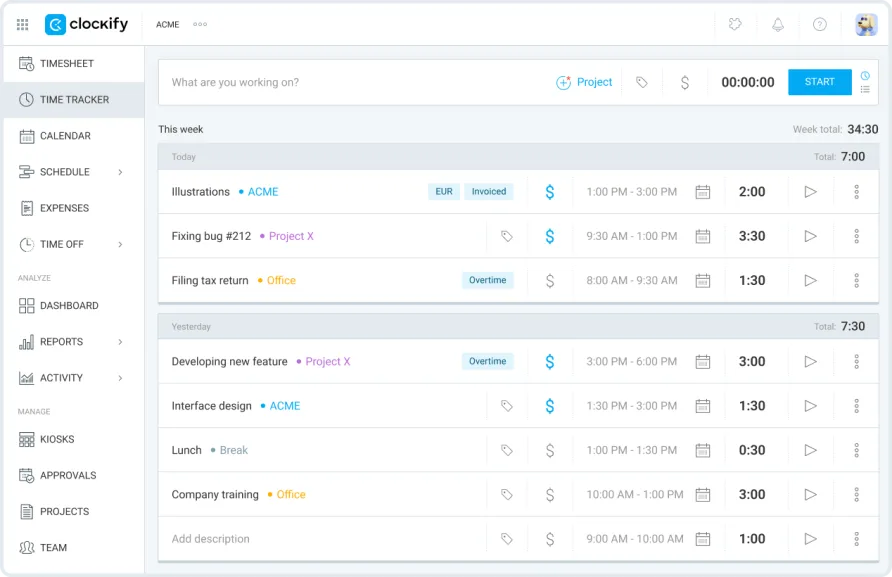
Clockify covers more tracking methods than most products in this price range. The timer runs from any device: web app, desktop clients for Windows, Mac, and Linux, mobile apps for iOS and Android, and browser extensions for Chrome, Firefox, and Edge. If you forget to start a timer, manual entry and timesheet views let you fill in hours after the fact. The calendar view shows tracked time alongside your schedule, and an offline mode on desktop and mobile captures entries when you don't have a connection, syncing everything once you're back online.
The auto tracker on the desktop app records which programs and websites you use throughout the day, then lets you convert that activity into time entries. It's a passive approach that works well for knowledge workers who switch between tasks frequently and don't want to start and stop a timer for each one. A Q2 2025 update improved the auto tracker on Windows with auto-logging, better timeline visibility, and a search function that lets you filter recorded activities by keyword and merge them into a single entry.
Kiosk mode turns a shared tablet or computer into a team clock-in station. Employees enter a PIN or scan a QR code to start and stop shifts. For a cleaning company dispatching crews to five different client locations each morning, the kiosk gives field workers a single point of entry without requiring individual app logins or even email addresses. These "limited members" cost just $0.99/month on paid plans, keeping costs manageable for businesses with large frontline workforces. A Q3 2025 update added the ability to customize the kiosk interface with your company logo and control how long the kiosk stays open after launch, giving the experience more of a branded feel for client-facing locations.
The scheduling module, available on Standard and higher, lets managers create and assign shifts on a visual timeline. You can see who's available, track capacity, and get forecasts on project progress based on scheduled versus tracked hours. Time-off management ties into scheduling with policy-based leave tracking, balance calculations, and approval workflows. A recurring theme in feedback from mid-size teams is that employees with limited technical experience find the basic clock-in process easy to learn, often within their first shift, but the scheduling interface takes longer for managers to configure properly because the settings are spread across multiple screens.
One area where the experience stumbles slightly is the mobile app's relationship to the broader feature set. The timer, manual entry, and basic reporting work well on both iOS and Android. But admin functions like creating schedules, managing kiosk settings, approving timesheets, and sending invoices still require the web or desktop app. If you're a manager who works primarily from your phone, you'll find yourself reaching for a laptop more often than expected. The web app itself, however, is where Clockify performs best. Reports load quickly even with six months of accumulated data, keyboard shortcuts work as expected, and creating a new project takes under ten seconds. The interface won't win design awards, but it's clean and functional in a way that keeps daily use from feeling like a chore.
Reporting and the Free vs. Paid Divide
Clockify's reporting tools are available on the free plan, and they cover more ground than you might expect for a product charging nothing. Summary reports, detailed time logs, and weekly overviews all ship free. You can filter by user, project, client, task, tag, or billing status and export to PDF, CSV, or Excel.
The free plan does have boundaries, though. Custom fields, required fields, time auditing, and data import/export controls come with the Basic tier. Rounding rules, QuickBooks integration, scheduled email reports, and labor cost tracking require Standard or Pro. The pattern is consistent: basic reporting is free, but operational reporting designed for billing or payroll workflows sits behind a paywall.
That tiered structure is a strength for teams growing into the product. You don't pay for scheduling until you need scheduling. You don't pay for GPS until you send crews into the field. The granularity here is unusual. Many competitors offer two or three tiers with large feature jumps between them. Clockify's five tiers let you match your plan to your actual requirements.
What Clockify Costs in Practice
The per-user monthly rates are clear, but the annual math tells a more complete story. A solo freelancer on the Pro plan at $7.99/month billed annually spends $95.88 per year. A team of eight on the Standard plan at $5.49/user/month annual pays $527.04 per year, which works out to $65.88 per person. A team of eight on Pro pays $767.04 annually.
The free plan, by contrast, costs nothing regardless of team size. A 20-person startup using Clockify's free tier for basic time tracking and reporting pays zero while it figures out which premium features it actually needs. That kind of extended evaluation period, without artificial time limits or feature crippling on the core tracking experience, is rare.
Monthly billing carries a roughly 25% premium across all tiers. Basic jumps from $3.99 to $4.99, Standard from $5.49 to $6.99, Pro from $7.99 to $9.99, and Enterprise from $11.99 to $14.99. If there's any chance you'll stick with a paid plan for a full year, annual billing is the clear choice.
One financial consideration that catches some teams off guard: Clockify doesn't offer refunds once payment processes. You can cancel anytime and retain access through the end of your billing period, but there's no money-back window. The 7-day free trial of Pro features helps mitigate this, but teams committing to annual plans should be confident in their choice before entering payment details.
The CAKE.com Bundle at $12.99/user/month annual deserves a mention for teams that also need project management and team chat. It includes full Enterprise-tier Clockify alongside Pumble and Plaky. For a 10-person team, that's $1,559/year for three tools that would individually cost more if purchased separately. Whether the bundle makes sense depends on whether you'd actually use all three products, but the per-tool savings are real.
Is Clockify the Right Fit for Your Team?
Consider a freelance web developer tracking billable hours across four client projects. The free plan handles this without limitations. Timer, manual entry, project-level tracking, and exportable reports cover the full workflow. Clockify stays free for this user indefinitely.
Now consider a property management company with 15 maintenance technicians, three office staff, and a need to verify arrival times at job sites. This team needs GPS tracking (Pro tier), scheduling to assign shifts (Standard or Pro), time-off management (Standard), and likely kiosk mode for the warehouse. The Pro plan at $7.99/user/month annual for 18 users totals $1,725.84 per year. That's a meaningful number, but it covers scheduling, GPS, attendance, expenses, and invoicing in a single platform.
The product fits less naturally when heavy integrations matter on lower tiers. QuickBooks sync doesn't appear until Standard, and teams on the free or Basic plans working with complex tool stacks may find the integration options limiting. Clockify does offer 80+ integrations across its paid tiers, including connections to Jira, Trello, Asana, Slack, Google Calendar, and GitHub, but the depth of those integrations varies. The QuickBooks sync, for instance, works for time and project data but requires the Payroll feature in QuickBooks to be inactive, a quirk that catches some accounting teams off guard during setup.
Users managing large teams also note that the approval workflow could offer more flexibility, particularly in routing approvals to either team managers or project managers depending on the context. One long-term user reported that employees can't be prevented from self-approving time entries in certain configurations, which creates an oversight gap for finance teams reviewing submissions.
Where Clockify Stops
Within the time and attendance category, Clockify's gaps are specific rather than broad. The free plan doesn't include time-off tracking, timesheet approvals, or attendance reporting. Those become available at Standard. GPS tracking, screenshot monitoring, expense tracking, labor cost analysis, and budget alerts all require Pro. If your needs include any of those from day one, the free tier is a starting point rather than a long-term solution.
Scheduled reporting, custom user fields, and multi-currency support sit at the Pro tier and above. SSO authentication, audit logs, and custom subdomains are Enterprise-only. For organizations with strict security or compliance requirements, the path to Enterprise at $11.99/user/month annual is straightforward but represents a significant step up from the free experience.
The mobile admin gap is worth repeating here. You can track time from your phone without issue, but managing a team from mobile alone isn't practical with the current app. Users running field operations where managers are also on the move consistently flag this as a limitation.
Recent Development and Product Direction
Clockify maintained a steady release cadence through 2025. The Q3 2025 update introduced recurring invoices, overdue invoice reminders with both email and in-app notifications, and the ability to bulk-submit timesheets across multiple team members at once. That bulk submission feature directly addresses a common complaint from managers handling weekly timesheet reviews for large teams.
A September 2025 overhaul of the Time Off feature unified how positive and negative balances calculate, added optional expiry dates for leave policies, and improved balance visibility for both employees and admins. The company acknowledged user feedback drove these changes, and community forum posts confirm the iterative improvements continued into late 2025.
The Pumble integration launched in Q2 2025 sends Clockify notifications, including timesheet approvals, tracking reminders, and time-off updates, directly into Pumble chat channels. For teams already using the CAKE.com suite, this reduces the need to check multiple apps for status updates.
Our Verdict on Clockify
Clockify's free tier isn't a gimmick or a limited trial dressed up as a permanent plan. It's a fully functional time tracking tool that a freelancer or small team can use indefinitely without hitting an artificial wall. That alone makes it worth evaluating before committing budget to any time and attendance platform.
The five-tier pricing structure adds real flexibility. You can run a three-person agency on the free plan, move to Standard when you need invoicing and approvals, and upgrade to Pro when you send technicians into the field and need GPS verification. Each step adds specific capabilities at predictable costs, and the per-user pricing stays competitive even as teams scale past 20 or 30 people.
Where you'll feel the friction is in the space between the free plan and the Pro tier. Scheduling, GPS, expenses, screenshots, and labor cost analysis all require Pro at $7.99/user/month. If your operation uses two or three of those features, that tier is fair value. If you only need one, paying for the full Pro bundle may feel like more than necessary. The mobile admin limitations also mean that managers on the go will still rely on desktop access for anything beyond basic time entry.
A team of users consistently rates Clockify's web experience highly. Reports load fast, the interface is clean, and new project setup takes seconds. Those aren't flashy differentiators, but they're the kind of everyday usability details that determine whether a team actually uses the software after the first week. For the price, and especially at the free tier, Clockify delivers more tracking capability than most products in the time and attendance category charge full price for.