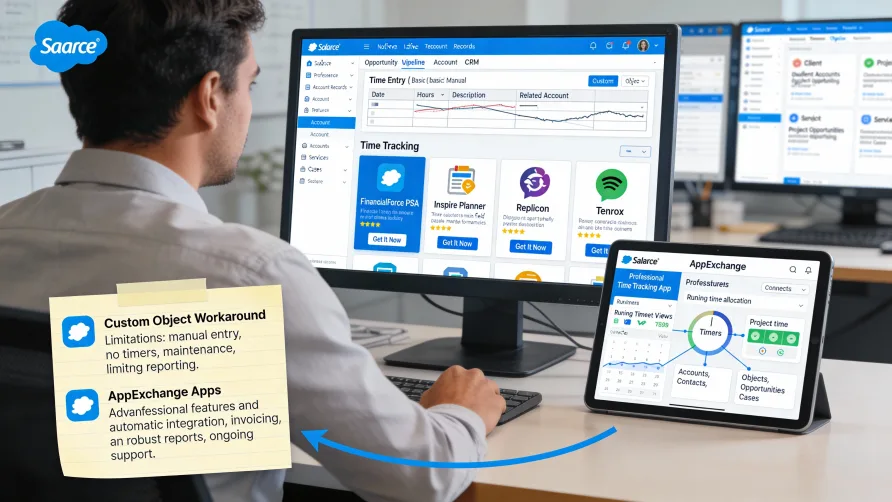
Salesforce does not include native time tracking features in its standard CRM platform. While Salesforce excels at managing customer relationships, sales pipelines, and business processes, time tracking is not part of the core functionality that Salesforce provides out of the box. However, Salesforce's platform flexibility means you can add time tracking capabilities in two ways: building custom time tracking objects within Salesforce using the platform's customization tools, or integrating dedicated time tracking applications from the AppExchange marketplace. Most businesses choose the integration route for comprehensive time tracking functionality. Why Salesforce Doesn't Include Time Tracking Salesforce built its platform primarily as a customer relationship management system focused on sales, marketing, and customer service. The core product addresses prospect tracking, opportunity management, customer communication, and sales analytics rather than internal workforce management. Time tracking falls outside Salesforce's primary focus area. While businesses using Salesforce often need to track time spent on client projects or billable hours, this functionality isn't considered core CRM capability. Salesforce's platform approach provides the infrastructure for building or integrating virtually any business function, but the company relies on its ecosystem of partners and developers to create specialized solutions for needs like time tracking. This strategy lets Salesforce remain focused on CRM while enabling customers to extend functionality through the AppExchange marketplace. The absence of built-in time tracking means businesses must either build custom solutions using Salesforce's platform tools or adopt third-party applications designed specifically for time tracking within the Salesforce environment. Custom Time Tracking Objects in Salesforce Salesforce's platform flexibility allows you to create custom objects for tracking time. You can build a custom "Time Entry" object with fields for duration, date, description, project, and any other attributes relevant to your business. This custom object approach lets you design time tracking that matches your specific workflow. You define which fields exist, what data types they use, and how the time tracking object relates to other Salesforce objects like Accounts, Opportunities, or Cases. Related lists can display time entries on parent records. For example, you might show all time entries related to a specific Account or Opportunity, giving you visibility into time investment for clients or deals directly within those records. Custom reports and dashboards can analyze your time tracking data. Using Salesforce's reporting tools, you can create analyses showing time by salesperson, time by account, or time by project, leveraging the same reporting infrastructure you use for other Salesforce data. Validation rules and workflow automation can enforce time tracking policies. You might create rules that require certain fields on time entries, or workflows that notify managers when time entries need approval. However, custom object time tracking has significant limitations compared to purpose-built time tracking applications. You won't have running timers, mobile time tracking apps, timesheet interfaces, payroll integration, or the specialized features that dedicated time tracking platforms provide. Building and maintaining custom time tracking requires Salesforce administration expertise. Someone needs to design the data model, create page layouts, build reports, and maintain the solution over time. This ongoing investment may not make sense when purpose-built alternatives exist. Custom time tracking also lacks the user interface polish of dedicated time tracking applications. Your team interacts with standard Salesforce forms and layouts rather than streamlined time tracking interfaces optimized for quickly logging hours. How Do I Track Time in Salesforce? For most businesses, tracking time in Salesforce means installing a time tracking application from the AppExchange marketplace. These applications integrate with Salesforce and add comprehensive time tracking functionality that works with your existing Salesforce data. The typical implementation involves browsing the AppExchange for time tracking solutions, selecting one that fits your needs, and installing it in your Salesforce environment. The installation process adds new tabs, objects, and interfaces to your Salesforce instance. Once installed, time tracking apps typically let you track time against Salesforce records like Opportunities, Cases, Accounts, or custom objects. The connection between time tracking and your existing Salesforce data helps you understand time investment in customer relationships or projects. Most AppExchange time tracking apps provide timer interfaces that let users start and stop timers as they work. These timers are more convenient than manually entering time durations and improve accuracy by capturing exact elapsed time. Mobile apps often accompany AppExchange time tracking solutions. Your team can track time from their phones using native mobile interfaces, which works better than accessing Salesforce through mobile browsers for this specific function. Time tracking data integrates with Salesforce reporting and dashboards. You can create reports combining time tracking information with other Salesforce data, analyzing time patterns alongside sales metrics, customer data, or project information. What Time Tracking Apps Work With Salesforce? Salesforce's AppExchange marketplace includes numerous time tracking applications designed specifically for the Salesforce environment. These range from simple time logging tools to comprehensive professional services automation platforms. The best time tracking solution for your Salesforce environment depends on your specific requirements including whether you need project management features, resource scheduling, billing and invoicing, or connections to payroll systems. Professional Services Automation Platforms Several comprehensive PSA (Professional Services Automation) platforms on AppExchange include time tracking as part of broader project and resource management functionality. These platforms serve agencies, consultancies, and professional services firms that need to manage projects, track time, schedule resources, and bill clients. PSA platforms integrate deeply with Salesforce opportunities and accounts. When you win an opportunity, you can convert it into a project where you track time, manage tasks, and monitor budgets. The connection between sales and delivery helps maintain visibility across the client lifecycle. These platforms typically include resource management features that show team capacity, schedule assignments, and help optimize utilization. Time tracking data feeds into utilization reporting, showing how effectively you're deploying your team. Billing and invoicing capabilities let you generate client invoices based on tracked time. You configure billing rates, mark time as billable or non-billable, and create invoices directly from time entries. Some platforms include expense tracking and incorporate expenses into invoicing. The comprehensive nature of PSA platforms means they're often more complex and expensive than standalone time tracking tools. They make sense for professional services organizations that need project management, resource planning, and financial management alongside time tracking. Standalone Time Tracking Apps Simpler time tracking applications on AppExchange focus specifically on time and attendance without the full project management and resource planning features of PSA platforms. These apps serve businesses that need time tracking functionality within Salesforce without requiring comprehensive project management. Standalone time tracking apps typically provide timer interfaces, timesheet views, and basic reporting. Team members track time against Salesforce records, and managers can review and approve timesheets before processing hours for payroll or billing. Integration with Salesforce objects lets you track time against Opportunities, Cases, Projects, or custom objects relevant to your business. The time tracking app reads your existing Salesforce structure and lets you associate time entries with appropriate records. These apps generally cost less than full PSA platforms and implement more quickly since they have narrower scope. They work well for businesses that need time tracking within Salesforce but already have other tools for project management or resource planning. Reporting capabilities vary by app but typically include time summaries by user, project, or time period. Some apps provide dashboards showing time metrics alongside other Salesforce data for integrated business intelligence. Benefits of Salesforce-Integrated Time Tracking Time tracking integrated with Salesforce connects time data with customer and opportunity information. You can see how much time you're investing in specific accounts, which opportunities consume the most resources, or how time spent correlates with deal size. The integration eliminates duplicate data entry. When you win a deal in Salesforce, you can start tracking time against that client without recreating project or client information in a separate system. Your Salesforce accounts, contacts, and opportunities already exist in the time tracking context. Unified reporting across sales and delivery metrics helps analyze business performance holistically. You can create reports showing sales pipeline alongside project delivery metrics, understanding both revenue generation and resource consumption. For professional services firms, the connection between opportunity management and project delivery provides visibility into the full client lifecycle. You track pursuits through close, then track time and project progress during delivery, maintaining continuity in your Salesforce data. Security and permissions leverage Salesforce's robust access control. Time tracking integrated with Salesforce can respect your existing security model, ensuring users only see time data they're authorized to access based on their Salesforce permissions. Limitations of Salesforce Time Tracking Integrations AppExchange time tracking apps add cost beyond your Salesforce subscription. Most charge per user, which can become expensive for larger teams. Calculate total time tracking costs including both Salesforce licenses and time tracking app fees. Integration complexity varies by application. Some time tracking apps integrate seamlessly with Salesforce data, while others require significant configuration or custom development to work with your specific Salesforce implementation. User experience may not match standalone time tracking platforms. Since AppExchange apps operate within Salesforce's interface constraints, the time tracking experience might feel less streamlined than purpose-built time tracking applications. Mobile capabilities depend on the specific app. While many AppExchange time tracking solutions include mobile apps, the mobile experience may not match what dedicated mobile-first time tracking platforms provide. Some integrations have limited payroll system connectivity. If you need to export time data to specific payroll providers, verify that your chosen AppExchange app supports the necessary integrations or export formats. Choosing Between Custom Objects and AppExchange Apps Custom time tracking objects make sense only for very simple time logging needs where you just want to record time durations against Salesforce records without sophisticated features. The development and maintenance effort rarely justifies the savings compared to AppExchange solutions. For most businesses, AppExchange time tracking apps provide better value. The initial cost is higher than building custom objects, but you gain professional interfaces, proven functionality, mobile apps, ongoing updates, and support that custom development can't match cost-effectively. Evaluate AppExchange apps based on your specific requirements. If you need comprehensive project management alongside time tracking, PSA platforms make sense despite higher costs. If you just need time tracking, standalone apps provide focused functionality at lower cost. Consider integration requirements with other systems. Some AppExchange apps integrate with accounting software, payroll systems, or other business tools. Verify that apps you're evaluating support necessary integrations for your workflow. Review the app's rating and reviews in AppExchange. Other customers' experiences provide insight into implementation challenges, ongoing reliability, and support quality. Implementation Considerations Installing AppExchange time tracking apps requires Salesforce administrator permissions. The installation adds new tabs, objects, and potentially custom fields to standard Salesforce objects, which requires administrative access. Plan for configuration time after installation. You'll need to set up billing rates, define project structures, configure approval workflows, and customize the app to match your business processes. Data migration may be necessary if you're moving from another time tracking system. Consider how you'll handle historical time data and whether importing it into the new Salesforce-integrated system is necessary. Training requirements depend on the app's complexity. Simple time tracking apps require minimal training, while comprehensive PSA platforms need substantial training for different user roles including time trackers, project managers, and administrators. Integration with existing Salesforce customizations requires testing. Verify that the time tracking app works properly with your custom objects, workflows, and processes without creating conflicts. Getting Started With Salesforce Time Tracking If you need time tracking within Salesforce, start by defining your requirements. Do you need basic time logging or comprehensive project management? Will you bill clients based on time? Do you need payroll integration? Clear requirements help narrow your AppExchange options. Browse the AppExchange marketplace for time tracking solutions that match your needs. Filter by category, read descriptions, review ratings, and identify several candidates that appear suitable. Install trial versions of promising apps in a Salesforce sandbox environment. Testing in a sandbox lets you evaluate functionality without affecting your production Salesforce instance. Involve actual users in the evaluation. Have team members test time tracking workflows to ensure the app's interface and functionality work for people who will use it daily. Review implementation requirements including any professional services needed for setup, data migration considerations, and integration with other systems. Select an app based on functionality, user experience, cost, and implementation requirements. Consider total cost of ownership including both subscription fees and implementation effort. Plan a phased rollout starting with a pilot group. Test the time tracking solution with a small team before expanding to your entire organization. This approach helps identify issues early and refine your implementation before full deployment. Establish time tracking policies including when to track time, what level of detail to include, and deadlines for timesheet submission. Clear policies improve data quality and compliance. Monitor adoption and data quality during initial rollout. Address questions quickly, provide additional training where needed, and adjust processes based on early feedback to ensure successful time tracking implementation within your Salesforce environment.
Salesforce Time Tracking: Native Options & AppExchange Integrations