
Time tracking for hourly employees carries higher stakes than tracking salaried workers. You're not just measuring productivity—you're creating legal records that determine pay, documenting compliance with wage and hour laws, and building the foundation for every paycheck your hourly workers receive.
The right time tracking system captures accurate hours, calculates overtime correctly, manages breaks appropriately, and integrates seamlessly with your payroll process. The wrong one creates payroll errors, compliance risks, and frustrated employees who feel their hours aren't being recorded fairly.
Why Hourly Employee Time Tracking Is Different
Hourly workers present tracking challenges that don't exist with salaried employees.
Legal compliance requirements are stricter. The Fair Labor Standards Act requires employers to maintain accurate records of hours worked for non-exempt employees. These records must include when employees start and end their workday, when they take meal breaks, and total hours worked each day and week. Failure to maintain proper records creates liability in wage and hour disputes.
Every minute affects pay. When someone earns a salary, being five minutes late doesn't change their paycheck. For hourly workers, those five minutes represent real money. Your tracking system needs precision that salaried tracking can approximate.
Overtime calculation matters immediately. Most hourly workers qualify for overtime pay after 40 hours in a workweek. Your system needs to track these thresholds, flag when employees approach overtime, and calculate the correct overtime rate automatically. Manual calculation invites errors that either shortchange employees or overpay them.
Multiple work locations complicate tracking. Hourly workers in retail, hospitality, healthcare, and field services often work across multiple locations. Your system needs to capture not just when they worked, but where they worked, without creating burdensome administrative processes.
Break and meal period compliance varies by state. Some states require specific break periods. Others mandate meal breaks after certain hours. Your system needs to accommodate these variations and document compliance.
Essential Features for Hourly Employee Tracking
Certain capabilities are non-negotiable when tracking hourly workers.
Clock In/Clock Out Functionality
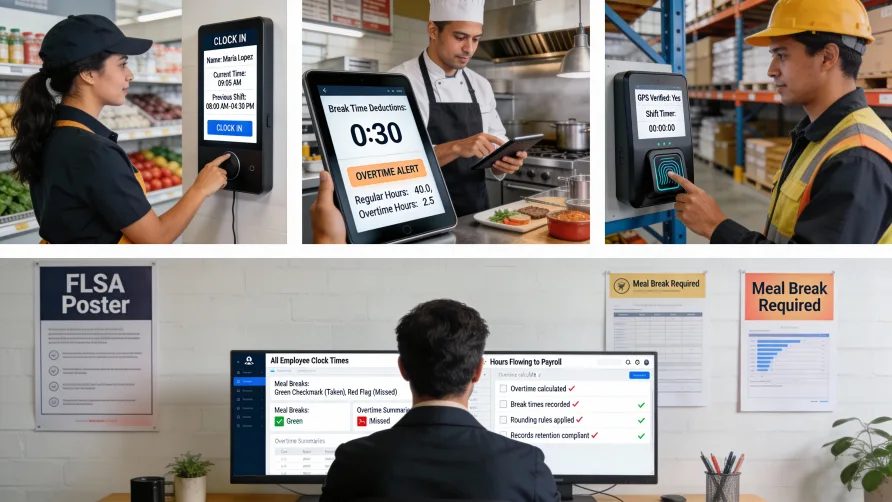
The foundation of any hourly tracking system is reliable clock in/out. Employees need a simple way to record when they start work, when they take breaks, and when they finish their shift.
Physical time clocks, mobile apps, web browsers, and dedicated terminals all work. The method matters less than reliability and ease of use. If clocking in requires multiple steps, complicated passwords, or waiting for slow systems to load, employees will cut corners or estimate times after the fact.
Look for systems that confirm clock-ins with visual or audible feedback. When an employee clocks in, they should see confirmation immediately—not wonder whether the system registered their action.
Automatic Break Deductions
Many businesses have standard meal breaks that should be deducted from hours worked. Some time tracking systems can deduct these breaks automatically when shifts exceed certain durations.
This automation prevents the common error where employees forget to clock out for lunch and end up with extra hours they didn't actually work. However, automatic deductions create risk if employees actually work through breaks. You need the ability to override automatic deductions when employees don't take scheduled breaks.
The safer approach is requiring employees to clock out for breaks manually, creating a clear record of when breaks occurred and how long they lasted. This documentation proves valuable if break compliance ever gets questioned.
Overtime Tracking and Alerts
Your system should calculate overtime automatically based on your business rules and applicable regulations. This means tracking not just daily hours but weekly totals, since FLSA overtime typically applies to workweeks rather than individual days.
Even more valuable are threshold alerts. When an employee approaches 40 hours for the week, managers should receive warnings so they can make informed scheduling decisions. Preventing unplanned overtime is far easier than explaining why an employee worked excessive hours.
Some industries have daily overtime requirements. California, for example, requires overtime pay for hours worked beyond eight in a single day. Your system needs to accommodate these variations if they apply to your business.
GPS and Location Verification
For mobile workers or businesses with multiple locations, knowing where employees clocked in provides essential accountability. GPS tracking confirms employees were actually at the job site when they recorded their hours.
This feature addresses a common problem: employees clocking in from home or arriving late but having a coworker clock them in. Location verification eliminates these practices by creating objective records of where clock-ins occurred.
Privacy concerns matter here. Employees rightfully object to GPS tracking that extends beyond work hours or monitors their movements when not clocked in. The system should capture location only when employees actively clock in or out, not track them continuously.
Geofencing for Remote Workers
Geofencing takes location tracking further by defining acceptable work areas. If your field technicians should only clock in when they're at customer sites, geofencing prevents clock-ins from other locations.
You draw virtual boundaries around job sites, and the system only allows clock-ins when employees are within those boundaries. This prevents time theft while giving employees appropriate flexibility within legitimate work areas.
Photo Verification or Biometric Authentication
Time theft costs businesses when employees clock in for coworkers who haven't arrived. Buddy punching is common enough that many employers require verification beyond passwords or PIN codes.
Photo capture at clock-in provides simple verification. When employees clock in, the system takes their photo. Managers can review these photos to confirm the right person clocked in at the claimed time.
Biometric systems—fingerprint, facial recognition, or palm scans—eliminate buddy punching entirely. No one can clock in for someone else when authentication requires physical biometrics. However, these systems raise privacy concerns and cost more than simpler alternatives.
Consider your actual risk level. If you've had documented buddy punching problems, biometric verification solves them definitively. If buddy punching hasn't been an issue, simpler PIN-based systems with supervisor oversight may suffice.
Overtime Approval Workflows
Many businesses want managerial approval before employees work overtime. Your time tracking system should support this by flagging overtime hours and routing them for approval before they process to payroll.
This workflow prevents situations where employees work unauthorized overtime, managers discover it only when reviewing payroll, and you face the uncomfortable choice between paying for unapproved hours or refusing payment and creating compliance problems.
The system should let managers approve or reject overtime with explanations, creating an audit trail of overtime decisions.
PTO and Paid Leave Tracking
Hourly employees accrue paid time off based on hours worked. Your time tracking system should integrate PTO accrual, usage, and balances so employees see accurate information about available time off.
When hourly workers take vacation or sick time, those hours need to process to payroll at their regular rate. The system should distinguish between worked hours and paid time off, calculating each appropriately.
Mobile Access for Employees
Hourly workers want to see their recorded hours, verify accuracy, and check their schedules without asking managers. Mobile access to time records reduces administrative burden and helps employees catch errors quickly.
The mobile interface should show recent clock-ins, weekly hour totals, overtime status, and upcoming shifts. Employees should be able to report discrepancies directly through the system rather than tracking down managers.
Schedule Integration
Time tracking becomes more valuable when connected to scheduling. Employees see their assigned shifts and clock in/out for specific scheduled periods. Managers see who worked their scheduled hours, who arrived late, and who left early.
This integration also enables exceptions reporting. The system flags situations where employees clocked in significantly before their scheduled start time (possible time theft) or where they forgot to clock out for shifts they definitely worked (missing time that needs correction).
How to Track Time for Hourly Workers
Several methods work for hourly employee time tracking, each with specific advantages and appropriate use cases.
Physical time clocks mounted in fixed locations work well for businesses where employees start and end shifts at a central location. Manufacturing facilities, warehouses, and retail stores with backroom operations benefit from dedicated time clocks that employees pass as they enter and exit.
Modern time clocks are network-connected devices that sync data automatically rather than requiring manual card collection and processing. Look for clocks with clear displays, simple operation, and backup power to prevent data loss during outages.
Mobile apps on employee smartphones suit remote workers, field service technicians, and businesses with multiple locations. Employees clock in from wherever they're working, and GPS verification confirms their location.
The challenge with mobile apps is ensuring all employees have compatible smartphones and data plans. You either provide devices or require employees to use personal phones for work purposes, which creates reimbursement questions.
Web-based browser access works when employees have computers at their workstations. Office environments, call centers, and computer-based roles can clock in through web browsers without dedicated hardware.
Browser-based tracking depends on employees having consistent computer access throughout their shifts. It works poorly for positions where workers move between different areas or spend time away from computers.
Kiosk devices shared by multiple employees provide middle ground between dedicated time clocks and individual device access. Tablets mounted in common areas let employees clock in with PIN codes or badge scans.
Kiosks work well for restaurants, retail stores, and healthcare facilities where employees work in proximity but don't have assigned workstations. One device serves many workers without requiring personal phones or computer access.
The right approach often combines methods. Corporate office employees might clock in through web browsers while field technicians use mobile apps and warehouse staff use physical time clocks—all feeding into the same central system.
Compliance Considerations You Can't Ignore
Time tracking for hourly employees creates legal obligations that go beyond simple hour recording.
FLSA record-keeping requirements specify what you must track and how long you must retain records. At minimum, you need employee name, occupation, total hours worked each day, total hours worked each week, regular hourly rate, overtime earnings, and additions or deductions from wages. These records must be kept for at least three years.
Your time tracking system should generate reports that satisfy these requirements without manual compilation. When auditors request documentation, you should be able to produce complete records quickly.
State-specific break and meal period requirements vary significantly. California requires 30-minute meal breaks for shifts exceeding five hours and 10-minute rest breaks for every four hours worked. Other states have different rules or no requirements at all.
If you operate across multiple states, your system needs to accommodate varying requirements based on work location. An employee working in California one day and Nevada the next faces different break requirements each day.
Overtime calculation rules differ by jurisdiction. While FLSA establishes federal minimums, some states and localities impose additional requirements. Daily overtime, double-time for long shifts, and seventh-consecutive-day premiums exist in some places.
Your system should handle these calculations automatically based on where employees work, not require you to manually adjust rates.
Rounding practices must follow specific rules. FLSA permits rounding to the nearest quarter hour, but the rounding must be neutral—not systematically favor the employer. If you round a 7:53 clock-in to 8:00, you must also round an 8:07 clock-in to 8:00.
Some systems allow you to configure rounding rules. Others track exact times. Either approach works if implemented correctly, but improper rounding creates wage and hour liability.
Off-the-clock work claims represent significant risk. Employees sometimes arrive early, stay late, or work through breaks without clocking in. When this happens regularly, they may have valid claims for unpaid wages.
Your system should make clocking in easy enough that employees have no excuse for working off the clock. Clear policies requiring employees to clock all worked time, combined with technology that makes compliance simple, provide the best protection.
Payroll Integration Requirements
Time tracking systems exist to feed payroll. This integration determines whether your investment saves time or creates headaches.
Direct integration with your payroll provider eliminates manual data entry. Hours flow automatically from time tracking to payroll, reducing errors and administrative time. Every manual transfer step introduces opportunities for mistakes.
Check whether your time tracking system integrates with your specific payroll provider. Some systems have deep partnerships with major payroll companies. Others export data in formats you'll need to import manually into payroll.
Overtime and differential calculations should happen in time tracking, not payroll. Your time tracking system should understand your business rules around overtime, shift differentials, and premium pay. Payroll should receive already-calculated hours at various rates, not raw hours requiring payroll staff to apply complex business logic.
Multiple pay codes and job classifications need support if your hourly employees work different roles at different rates. A restaurant employee might work host shifts at one rate and bar shifts at another. Your system should let employees specify which role they're clocking into and calculate pay accordingly.
Tips, commissions, and bonuses that affect hourly pay calculations need consideration. If these income types exist in your business, verify your time tracking system handles them appropriately or integrates with payroll systems that do.
Export formats and frequency matter for smooth payroll processing. Can the system export daily for review or does it require weekly batch processing? Can you pull data anytime or must you wait for scheduled exports? The more flexibility you have, the easier it becomes to catch and correct errors before payroll runs.
Selection Criteria: What to Evaluate
When comparing time tracking systems for hourly employees, assess these factors systematically.
Ease of use for employees tops the list. If your workers find the system confusing or burdensome, they'll resist using it properly. Clock-ins will be late or forgotten. Time will be recorded inaccurately. Resistance will build.
Test any system with actual employees before committing. Watch them attempt to clock in, take breaks, and clock out. Note where they hesitate or make mistakes. A system that seems obvious to managers might confuse workers who interact with it dozens of times daily.
Administrative burden for managers determines whether the system saves or consumes time. Managers shouldn't spend hours each week correcting time records, approving exceptions, or reconciling schedules with actual hours.
Look for systems that handle routine tasks automatically and flag only genuine exceptions requiring human judgment. Good software reduces management time spent on timekeeping, not increases it.
Reporting capabilities need to serve multiple purposes. Payroll needs clean hour totals by employee. Operations needs attendance tracking and schedule compliance. Finance needs labor cost analysis by department or project. HR needs overtime trends and potential FLSA risks.
Your system should generate all these reports without requiring data exports to spreadsheets. If you find yourself regularly pulling data into Excel to create basic reports, the system isn't meeting your needs.
Scalability matters for growing businesses. A system that works beautifully with 20 employees might collapse under the load of 200. Check user limits, transaction volumes, and performance characteristics at the scale you expect to reach within three years.
Also consider feature scaling. As you grow, you might need capabilities you don't need today—advanced scheduling, predictive analytics, workforce management. Can your chosen system grow with you or will you face migration costs down the road?
Support and training determine how quickly you can implement effectively. Look for vendors offering comprehensive onboarding, training resources for administrators and employees, and responsive support when problems arise.
Implementation difficulty varies dramatically across systems. Some deploy in days with minimal training. Others require weeks of configuration and extensive employee training. Match implementation complexity to your organizational capacity.
Cost structure affects total ownership costs beyond initial fees. Watch for per-employee charges, feature upgrades, support tiers, and usage-based fees that increase as your business grows. Calculate total three-year costs, not just year-one expenses.
Also consider indirect costs. A system requiring significant administrative time to maintain costs more than monthly fees suggest. Include management time, payroll processing time, and error correction in your cost analysis.
Common Pitfalls to Avoid
Several mistakes create problems when selecting time tracking systems for hourly employees.
Choosing systems that work for managers but confuse employees leads to adoption failure. The executives making purchasing decisions interact with the administrative interface. Hourly workers deal with the clock-in interface. These experiences differ dramatically. Systems with sleek management dashboards sometimes have terrible employee-facing interfaces.
Underestimating integration requirements creates data silos. If your time tracking system doesn't talk to payroll, scheduling, and HR systems, you'll spend excessive time moving data between systems manually.
Ignoring mobile requirements limits flexibility. Even if most employees work fixed locations today, business conditions change. The ability to track remote workers or accommodate flexible work arrangements becomes valuable quickly.
Overlooking compliance features creates risk. A system that can't document meal breaks in California or can't properly calculate Massachusetts overtime rules exposes you to wage and hour claims. Compliance capabilities matter more than flashy features.
Failing to plan for exceptions dooms implementation. Your system needs clear processes for when employees forget to clock in, when equipment fails, when emergency situations require manual time entry. If these situations create chaos, adoption will fail.
Not testing with actual employees before purchase leads to buyer's remorse. Sales demonstrations use ideal scenarios. Real implementation involves employees who speak limited English, work in loud environments, have poor vision, or lack technical sophistication. Test with your actual workforce, not theoretical perfect users.
Making the Decision
The best time tracking system for hourly employees balances accuracy, compliance, ease of use, and integration with your existing business systems.
Start by documenting your specific requirements. How many hourly employees do you have? Where do they work? What compliance requirements apply? Which payroll system do you use? What problems does your current approach create?
Then evaluate systems against these requirements, prioritizing must-have features over nice-to-have capabilities. A system that perfectly handles compliance and payroll integration matters more than one with beautiful dashboards but weak integration.
Pilot any serious contender with a small group of employees and managers before full deployment. Real-world testing reveals problems that demos never show. Give the pilot group freedom to complain honestly about what works and what doesn't.
Remember that you're choosing a system your hourly employees will use every workday, possibly for years. Their experience matters more than management convenience. A system employees trust and find easy to use pays for itself through accurate time recording, reduced disputes, and simplified payroll processing.
The right time tracking tool becomes invisible—employees clock in and out without thinking about it, hours flow to payroll automatically, and you only notice the system when reviewing reports or handling genuine exceptions. That's the standard to aim for when making your selection.