
Full-Featured Time Tracking at a Budget Price
At $7 per user per month for its top-tier plan, TMetric enters the time and attendance software conversation as one of the most cost-effective options available to small and mid-sized teams. Built by Devart, a Prague-based software company with over 25 years of history in developer tools, TMetric pairs respectable time tracking fundamentals with project budgeting, invoicing, and team management features that typically cost twice as much from other vendors. We score TMetric 7.6 out of 10 for the time and attendance software category.
Devart was founded in 1997 and has built its reputation primarily around database management tools and data connectivity solutions used by more than 500,000 professionals, including Fortune 100 companies. TMetric started in 2016 as an internal productivity tool before the company released it publicly. The product has matured through steady development over the past nine years, and Devart's self-funded status means the platform isn't chasing venture capital growth metrics at the expense of stability. With more than 10,000 companies now using TMetric and a 91% user satisfaction rating across nearly 600 reviews on recognized platforms, the product has earned credibility despite carrying less brand recognition than some category leaders.
What TMetric Handles Well as Time and Attendance Software
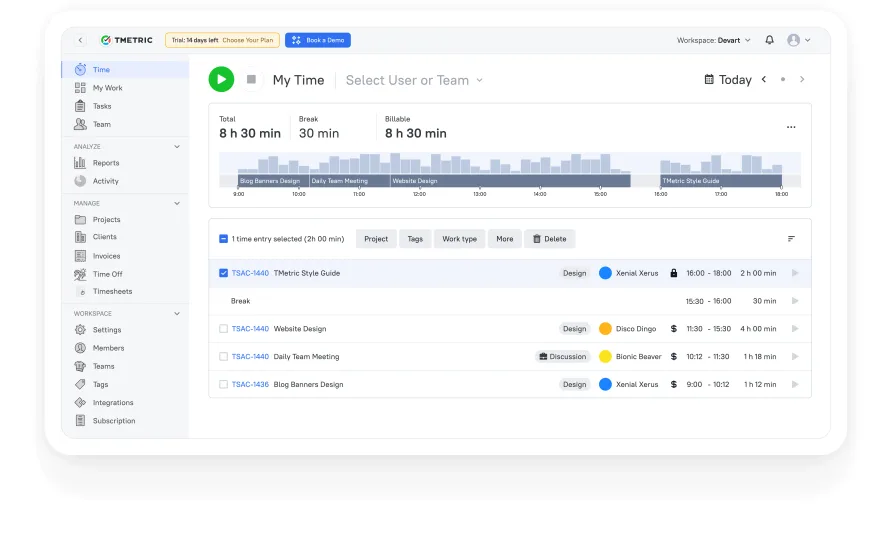
TMetric's core time tracking works through a one-click timer, manual time entry, or direct integration with external project management tools via its browser extension. The timeline view gives you a visual layout of your workday, showing tracked intervals, breaks, and idle periods on a horizontal bar. It's a practical design choice that makes gaps in the day immediately visible without forcing you to read through tabular data.
Where TMetric earns its keep for budget-conscious teams is the project management layer built on top of the time tracker. You can set project budgets by hours or money, attach billable rates at the project, client, or individual team member level, and receive email alerts when a project approaches its budget ceiling. Recurring budgets, added in recent updates, let you reset budget cycles monthly or on custom intervals without manual reconfiguration. For a team of five running client projects, this turns TMetric into both the time clock and the financial early warning system.
The invoicing module pulls tracked time directly into invoices you can customize with your company branding and send to clients. A mid-2025 update introduced an Expenses feature that lets you attach non-labor costs to invoices, which closes a gap that previously forced users to handle expense line items outside the platform. You can also attach files to invoices now. These aren't headline features on their own, but they reduce the number of tools a small operation needs to run.
Team attendance tracking lives in the Business tier through the Time Off module, which provides a color-coded team calendar showing approved and pending leave requests. Managers approve or deny requests directly from the calendar, and the work schedule feature lets you define expected hours globally or per employee. The Timesheets module, which graduated from beta in February 2025, supports both personal and team-level views with locking and approval workflows. That's a complete attendance picture for most small businesses.
TMetric Pricing and What It Costs in Practice
The free tier covers up to two users with unlimited time tracking, unlimited projects and clients, exportable reports, and a browser extension compatible with more than 50 web apps. It's a capable starter plan for a freelancer or a two-person operation, though Devart reduced the free seat count from five to two in February 2025, which narrows its usefulness for small teams trying to evaluate the platform without paying.
The Professional plan runs $5 per user per month on a monthly billing cycle, or about $4.17 per user per month if you commit annually. For a solo consultant billed annually, that's $50 per year. A five-person team on the annual Professional plan pays roughly $250 per year total. This tier adds billable rates, project budgets with alerts, client invoicing, calendar sync with Google and Outlook, and task management. For teams whose primary need is tracking billable hours and sending invoices, Professional covers the essentials.
Business pricing comes in at $7 per user per month (monthly) or $5.83 per user per month on annual billing. A team of 10 on the annual Business plan spends about $700 per year. That same team would pay $1,200-$2,000+ annually for comparable feature sets from many other vendors in this category. The Business tier unlocks the time off module, team timesheets with approvals, app and website activity monitoring, screenshot capturing, and the advanced integrations with Jira, Redmine, ClickUp, and QuickBooks. Activity monitoring being gated to Business is a tradeoff worth noting, since some teams specifically evaluating attendance software will want that functionality from day one.
The Integration Ecosystem and Jira Connection
TMetric connects to external tools primarily through its browser extension, which embeds a timer button directly into the interfaces of more than 50 applications including Asana, Trello, GitHub, GitLab, Notion, Slack, Freshdesk, and Monday.com. The extension approach means you don't leave your project management tool to start tracking time. You click the TMetric button that appears inside the task or issue, and the timer starts with the task context already attached.
The Jira integration goes deeper than the browser button. On the Business tier, TMetric offers bidirectional time synchronization with Jira Software, meaning time logged in TMetric can write back to Jira work logs automatically. For development teams already running their sprints in Jira, this eliminates the manual step of re-entering hours. Users managing software teams consistently call out this integration as a primary reason for choosing the platform. Similar time-sync connections exist for Redmine, ClickUp, GitLab, and QuickBooks.
The catalog doesn't match the breadth of the largest platforms in this space, though. If your stack includes niche tools or you need deep HRIS integrations, check the compatibility list before committing. Zapier support and API access are available on all plans, which provides a workaround for connecting unsupported tools, but that adds configuration overhead.
Is TMetric the Right Fit for Your Team?
Consider a five-person marketing agency that juggles a dozen active client accounts and needs to track billable hours, monitor project budget burn rates, and send invoices at the end of each month. TMetric handles that entire workflow on the Professional plan for about $21 per month. The agency's project manager sets hourly rates per client, each team member tracks time through the browser extension while working in Asana or Trello, and at month's end the invoicing module pulls the tracked hours directly into client-ready invoices. That's the scenario where TMetric's combination of features and pricing makes the strongest case.
The fit weakens for organizations whose primary concern is employee monitoring and attendance verification. Screenshot capturing, app usage tracking, and activity level monitoring all sit behind the Business tier. A cleaning company or field services operation that needs GPS-based location verification at clock-in won't find that here at all. TMetric's attendance features are built around digital knowledge work, not field operations with physical presence requirements.
Usability Observations
The interface follows a minimalist design philosophy that keeps the main workspace uncluttered. The left sidebar organizes navigation into logical groups: time, projects, team, reports, and invoices. First-time users can start a timer within seconds of creating an account. That said, the settings area where you configure work schedules, billing rates, and permission levels can take some exploration to map out fully. The labels on some configuration screens don't always make their purpose obvious at first glance, and a few settings that feel like they should be grouped together live on separate pages.
Users who work across many projects report that the timeline view is one of TMetric's strongest UX decisions. Instead of a flat list of time entries, you see your day as a visual bar where each segment represents a tracked block. Gaps and overlaps stand out immediately. Long-term users who manage 10+ active clients mention that this view saves them from reviewing entry-by-entry logs at the end of each week.
Where TMetric Stops
TMetric doesn't include geofencing, GPS-based clock-in verification, or biometric attendance options. If you need employees to prove they're physically at a job site before their shift starts, you'll need a different tool. There's also no shift scheduling module, so managers who need to build and publish weekly schedules will have to pair TMetric with a separate scheduling solution.
Reporting covers the fundamentals well, with filters by client, project, team member, and billable status plus PDF and CSV exports. But several users have noted a desire for richer visual dashboards with charts and graphs directly inside TMetric. The late-2025 Profitability Report, currently in beta, starts to address this gap by showing revenue, expenses, and profit margins per project. It's a promising direction, but the reporting layer still trails what power users expect from a mature analytics view.
Our Verdict on TMetric
For teams that don't need enterprise-grade monitoring or field-based attendance verification, TMetric delivers an impressive amount of capability at a price that's hard to argue with. The combination of time tracking, project budgets, invoicing, and team attendance management on the Business plan at $7 per user per month positions it as one of the strongest value plays in the category. Devart's long track record and consistent development pace, highlighted by the Profitability Report, Expenses module, and Timesheets graduation in 2025 alone, suggest the platform will continue closing feature gaps over time.
The limitations are real but specific. The free plan's reduction to two seats makes the trial window tighter for small teams. Activity monitoring requires the top tier. The integration list, while solid for development-oriented workflows, doesn't yet cover every corner of the business software ecosystem. If those constraints don't apply to your situation, TMetric is a smart pick, especially if your annual software budget is a line item you watch closely.