
A Different Kind of Time Tracker
Timely doesn't work like most time tracking tools. Instead of asking you to start and stop timers throughout the day, it runs an AI-powered Memory app in the background that records which applications, websites, documents, and meetings you spend time on, then drafts your timesheet entries for review. Founded in 2014 by Mathias Mikkelsen and built by Memory AS out of Oslo, Norway, the platform serves over 5,000 businesses across 160 countries, with clients including Marriott, Kellogg's, PepsiCo, and Yale University. We score Timely 7.9 out of 10 for the time and attendance software category, reflecting a product that actually solves the "I forgot to track my time" problem while carrying tradeoffs in pricing and complexity that not every team will accept.
How Memory AI Works in Practice
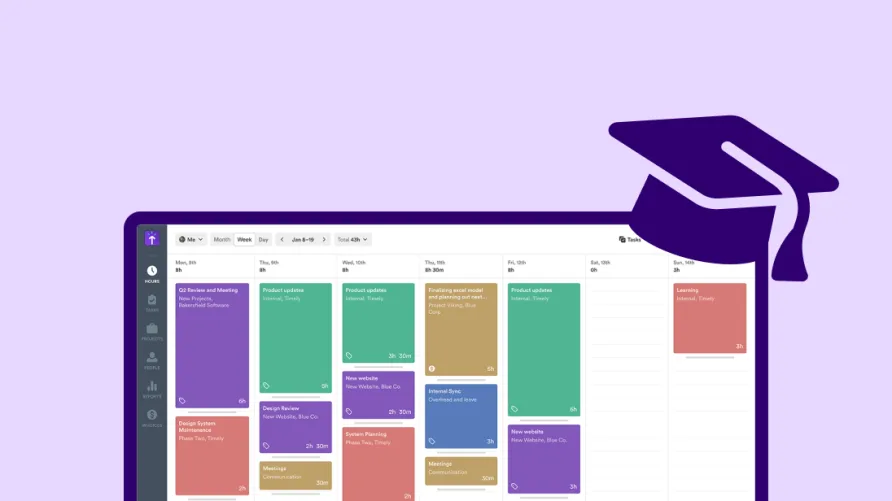
The core experience starts with installing the Memory app on your Mac or Windows computer. Once running, Memory silently tracks your activity across every application you use: your browser tabs, document editors, email clients, calendar events, video calls, and development tools. It records what you worked on, when, and for how long. All of this data feeds into a private timeline that only you can see. Your manager, your team lead, nobody else has access until you decide to log specific entries into your official timesheet.
That privacy architecture is central to Timely's pitch, and it's a real difference from productivity monitoring tools that give managers visibility into employee screens and keystrokes. Timely explicitly positions itself as anti-surveillance. The tracked memories belong to the individual employee, and the company has called this a non-negotiable part of the product's design.
From the private timeline, you drag and drop the work sessions you want to log, or you let the AI Timesheet Assistant handle it. The Assistant analyzes your tracked activity, groups related work sessions together, assigns them to the right projects, and generates draft timesheet entries that you review and approve with a click. You can choose between three AI styles: Exact for precise minute-by-minute tracking, Efficient for a cleaned-up balanced view, or Concise for a simplified summary. Over time, the AI learns your patterns and gets more accurate.
In practice, the AI isn't perfect. Users report that it occasionally misclassifies tasks, especially when switching quickly between projects or working across tools that look similar to the algorithm. Quick meetings and phone calls sometimes don't get captured accurately on mobile. These aren't deal-breaking issues, but they mean you still need to review your timesheets before submitting them. The "one-click timesheet" promise is more like "one-click draft, two minutes of review."
A significant February 2025 update improved how the AI generates suggestions. Previously, the model focused on individual memory details, which led to fragmented and unintuitive entries. The updated version learns from your timeline as you see it, prioritizing the dominant activity visible in each time block rather than analyzing every underlying micro-action. Timely's spring 2025 updates also introduced a redesigned Timeline with Summary and Calendar Lanes, reducing the cognitive load of reviewing your day and making it faster to spot what needs logging.
The Desktop App Dependency
There's a practical catch worth understanding. Automatic tracking only works through the Memory desktop app. If you don't install it, Timely becomes a manual time tracker with a nice interface but no AI advantage. The mobile app offers manual timers and GPS location tracking, but it doesn't replicate the Memory experience. Users who spend significant portions of their day on phone calls, in-person meetings, or working away from their computers will find gaps in what the AI captures. For teams where most work happens on a laptop, the coverage is strong. For mixed desktop-and-field workforces, it's incomplete.
What Timely Costs in Practice
The Premium plan at $20 per user per month is where most teams land, because it adds the project dashboards, budget tracking, capacity planning, and team management features that make Timely useful beyond individual time tracking. On annual billing with the 22% discount, that comes down to roughly $16 per user per month. For a solo consultant, that's about $192 per year on annual billing. A team of 8 on the annual Premium plan would pay roughly $1,536 per year.
The Starter plan at $11 per user per month (roughly $9 annual) covers automatic time tracking, the Memory AI timeline, project tracking, and basic reporting. It's sufficient for freelancers or very small teams that only need the core tracking functionality. The Unlimited plan at $28 per user per month (roughly $22 annual) adds unlimited teams, SSO, advanced reporting, and priority support. A team of 8 on Unlimited annual billing would pay approximately $2,112 per year.
Timely doesn't offer a free plan. The 14-day free trial gives you access to all features, which is enough time to install the Memory app, let it collect a week of data, and see whether the AI suggestions match how you actually work. But once the trial ends, you're committing to a paid plan with no free-tier fallback.
The Tasks add-on, which enables task assignment, scheduling, and progress tracking within projects, costs an additional $5 per person on top of any plan. It's not included by default, and if your team relies on task-level tracking, that increases the effective per-user cost. For 8 users on the Premium annual plan with Tasks, the annual total would be closer to $2,016.
Who Gets the Most From Timely
The ideal Timely user is a knowledge worker who spends most of their day on a computer, works across multiple projects or clients, and has historically struggled to remember where their hours went at the end of the week. Think of a UX design consultancy with 10 people splitting their time across six active client projects. Each designer works in Figma, Slack, Google Docs, Zoom, and Jira throughout any given day. Without automatic tracking, those designers are either running timers they forget to start, or they're reconstructing their week from memory on Friday afternoon. Neither approach produces accurate billable hours.
Timely solves that specific problem better than manual alternatives. The Memory app captures every application switch, every document opened, every meeting attended, and groups it all into a timeline the designer can review and approve. For firms billing $150 or $200 per hour, even capturing one extra hour per person per week that would have been lost to inaccurate manual tracking pays for the subscription several times over.
The fit weakens for businesses with field workers, hourly shift employees, or teams that primarily use mobile devices. A cleaning company dispatching crews, a construction firm tracking on-site hours, or a healthcare provider monitoring shift attendance won't get much value from Memory AI. These businesses need clock-in/clock-out interfaces, GPS geofencing, and shift scheduling, none of which Timely provides.
Where Timely Falls Short
Price is the most common concern in user feedback. Timely costs more than many manual time trackers, and that premium only makes sense if your team actually uses the automatic tracking features. If you install Timely but your team mostly enters time manually, you're paying a premium for an AI engine you aren't using.
The mobile app doesn't match the desktop experience. It works for manual time entry and basic project viewing, but it lacks the Memory AI automatic tracking, the full reporting interface, and some of the team management features available on the web. Users who need to track time on the go consistently rate the mobile app lower than the desktop and web versions.
There's no built-in attendance tracking, shift scheduling, or clock-in/clock-out functionality. Timely tracks what you work on, not when you arrive or leave. For businesses with compliance requirements around work hours, break periods, or attendance verification, this is a gap that matters.
Offline tracking isn't supported either. If you're working without an internet connection, the Memory app can't sync your activity until you reconnect. For most desk-based knowledge workers, this rarely matters. For people who travel frequently or work from locations with unreliable connectivity, it's a practical limitation.
Final Assessment
The question with Timely isn't whether the technology works. It does. The Memory AI captures desktop activity accurately, the privacy-first design addresses a legitimate employee concern about tracking tools, and the recent AI improvements have made the timesheet suggestions noticeably more useful. The 4.8/5 average on G2 and 4.7/5 on Capterra reflect a product that its users genuinely like, particularly on the desktop experience. The real question is whether the premium price and the requirement for desktop app installation fit your team's situation. If your business runs on billable hours and your team works primarily on computers, Timely's automatic tracking can recover lost billable time and eliminate the end-of-week timesheet scramble. That makes the cost easy to justify. If your needs are simpler, if your team is comfortable with manual entry, or if you need mobile-first or field workforce features, there are less expensive options that cover those use cases better. Timely does one thing differently than almost anyone else in the category, and it does it well. The investment makes sense when that specific thing is the problem you're trying to solve.