
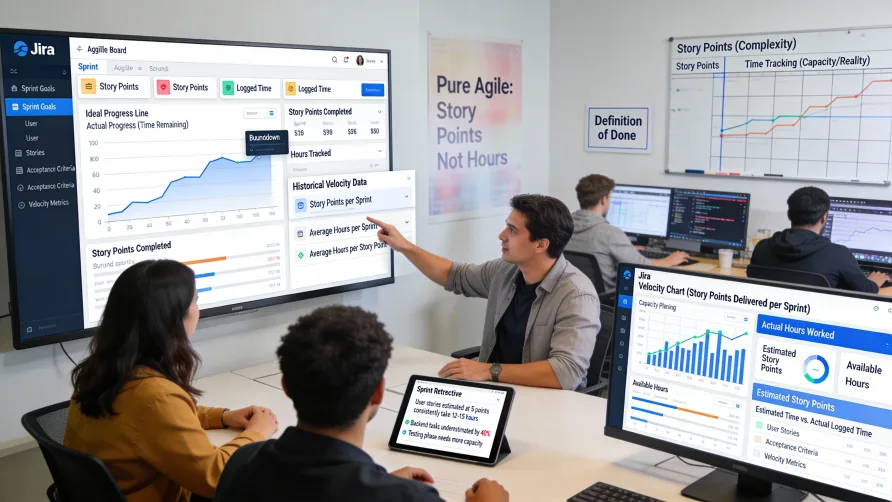
Time tracking in agile contexts generates ongoing debate among practitioners. Pure agile philosophies emphasize story points and velocity over time-based estimates, arguing that time tracking adds unnecessary overhead and contradicts agile principles. However, many real-world agile teams find practical value in tracking time alongside story points for improved planning, billing purposes, or organizational requirements.
Understanding how to implement time tracking in Jira for agile workflows requires balancing agile principles with practical business needs. This guide explores how agile teams use Jira's time tracking features, addresses common concerns, and provides best practices for teams who decide time tracking adds value to their agile processes.
Should Agile Teams Track Time?
The agile community remains divided on whether time tracking belongs in agile methodologies. Understanding both perspectives helps teams make informed decisions about their own practices.
Arguments Against Time Tracking in Agile
Traditional agile thinking emphasizes story points over time estimates. Story points represent relative complexity and effort rather than absolute time duration, which theoretically leads to better estimates because humans estimate relative difficulty more accurately than absolute time.
Time tracking can create overhead that slows team velocity. Logging time on every task adds administrative burden, and some argue this overhead outweighs any benefits from the data collected.
Focus on time may undermine agile values. If teams focus excessively on hours worked rather than value delivered, it can create counterproductive behaviors and move away from outcome-focused thinking that agile promotes.
Trust and autonomy concerns arise when time tracking feels like micromanagement. If team members perceive time tracking as surveillance rather than planning data, it damages the trust that agile teams need to function effectively.
Arguments For Time Tracking in Agile
Practical business needs often require time data. Organizations billing clients based on hours, managing budgets by labor costs, or processing payroll need actual time worked regardless of agile philosophy. Time tracking serves these business requirements.
Improved estimation emerges when teams compare story point estimates against actual time. Understanding how many hours different point values typically require helps refine both story point estimates and sprint capacity planning.
Resource planning benefits from time data. Knowing how team members allocate their time across projects helps with capacity planning, especially in environments where people work on multiple projects simultaneously.
Historical data analysis helps identify inefficiencies. Comparing estimated versus actual time reveals where estimates consistently miss, which stories take unexpectedly long, or which types of work consume disproportionate time.
Hybrid approaches work well for many teams. Using story points for sprint planning while also tracking time for billing or retrospective analysis combines agile estimation benefits with practical time data.
Making the Decision
Teams should decide based on their specific context rather than dogmatic adherence to agile purity. Consider whether you have genuine business needs for time data or if you're tracking time because "that's what we've always done."
If you track time, be explicit about why and how the data will be used. Transparency about time tracking purposes reduces concerns about micromanagement and helps teams understand the value.
How Do You Track Time in Sprints?
Sprint-based agile teams using Scrum or similar frameworks can incorporate time tracking into their sprint workflows without undermining agile principles.
Sprint Planning With Time Estimates
During sprint planning, teams can set both story point estimates and time estimates on stories and tasks. Story points guide how many stories fit in the sprint based on velocity, while time estimates help verify that planned work fits within team capacity hours.
Original time estimates in Jira represent the initial expectation of how long work will take. These estimates can be set at the story level or at the task level within stories, depending on your preferred granularity.
Team capacity calculation considers available hours per team member during the sprint. Account for vacations, holidays, meetings, and other commitments that reduce available development time.
Comparing total estimated hours against team capacity provides a sanity check on sprint plans. If story points suggest the sprint is appropriately sized but time estimates exceed capacity, investigate the discrepancy.
Some teams use time estimates at the task level while using story points at the story level. This hybrid approach uses story points for relative sizing and sprint commitment while using task-level time estimates for daily planning and tracking.
Tracking Time During Sprints
Team members log time as they work on sprint tasks. This tracking creates data about how long work actually takes compared to estimates.
Daily work log creation maintains current data. Some teams log time at the end of each day, while others use running timers throughout the day for more accuracy.
Remaining estimate updates help monitor sprint progress. As team members work on tasks, they update remaining time estimates to reflect current predictions about completion, even if those predictions differ from original estimates.
Sprint burndown charts in Jira use remaining estimate data to show progress. The burndown visualizes whether the team is on track to complete committed work by sprint end.
Sprint Retrospectives Using Time Data
Time tracking data informs sprint retrospectives by revealing patterns and insights about team performance and estimation accuracy.
Estimated versus actual time comparisons highlight estimation skill. Stories that took significantly longer or shorter than estimated deserve discussion about why estimates missed.
Time distribution analysis shows how the team allocated hours across different work types. If substantial time went to unplanned work, technical debt, or bug fixes, it affects sprint planning for future sprints.
Team member utilization patterns might reveal imbalances. If some team members consistently log far more or fewer hours than others, investigate whether workload distribution is appropriate.
Velocity and time correlation analysis helps understand the relationship between story points and hours. Over time, teams can determine how many hours different point values typically require for their specific context.
Time Tracking in Kanban
Kanban teams using continuous flow rather than sprints can also benefit from time tracking, though the application differs from sprint-based approaches.
Cycle Time Analysis
Kanban emphasizes cycle time—how long items take from start to finish. Jira time tracking provides data for cycle time analysis by showing actual hours invested in items.
Lead time and cycle time metrics combine with time tracking data to understand both how long items take in calendar time and how many work hours they consume.
Identifying bottlenecks becomes easier when you see which workflow stages consume disproportionate time. If items consistently spend excessive time in specific workflow states, it suggests process improvements.
Work in Progress Limits
WIP limits control how many items can be in progress simultaneously. Time tracking data helps verify whether WIP limits are set appropriately by showing whether team members have capacity for their in-progress items.
Time allocation across WIP items reveals whether people are context-switching excessively. If team members log small amounts of time across many items rather than focusing on few items, it suggests WIP limits might need adjustment.
Continuous Improvement
Kanban's emphasis on continuous improvement benefits from time tracking data that reveals opportunities for process optimization.
Comparing similar work items shows which complete efficiently and which take excessive time. Understanding why some items are more efficient helps spread best practices.
Time data combined with quality metrics helps understand trade-offs. If faster completion correlates with more defects, it suggests rushing versus taking appropriate time affects quality.
Jira Features Supporting Agile Time Tracking
Jira includes several features specifically designed to support time tracking in agile contexts.
Sprint Reports
Sprint reports in Jira Software incorporate time tracking data alongside story points and completion status.
Sprint burndown charts can display either story points or time-based burndown. Time-based burndown shows remaining estimate hours decreasing over the sprint, visualizing whether the team will complete committed work.
Sprint reports show estimated versus actual time at the sprint level. This comparison helps understand whether the team's overall sprint time estimates were accurate.
Incomplete work summaries include time data showing how much effort went into incomplete stories. This information helps during sprint reviews when discussing why certain stories didn't finish.
Velocity Charts
Velocity charts traditionally show story points completed per sprint, but time data provides complementary insights.
Story points and hours correlation becomes visible over multiple sprints. Teams can analyze whether higher-velocity sprints actually involved more hours or if velocity increased through better estimation or efficiency.
Velocity trends combined with time data help distinguish between true productivity changes and estimation drift. If velocity increases while hours remain constant, estimation has probably shifted rather than productivity improving.
Issue Time Tracking Fields
Jira's time tracking fields serve agile time tracking needs when properly configured.
Original estimate represents initial expectation of required time. In agile contexts, this might be set during backlog refinement or sprint planning.
Time spent accumulates as team members log work throughout the sprint. The running total shows actual investment in each story or task.
Remaining estimate should update as work progresses. Agile teams typically adjust remaining estimates based on current understanding rather than mechanically subtracting time spent from original estimate.
The time tracking bar visualizes progress by showing time spent versus estimates. This quick visual indicator helps teams identify items consuming unexpected time.
Dashboards and Gadgets
Jira dashboards can display time tracking metrics relevant to agile teams.
Sprint health gadgets show whether the current sprint is on track based on time tracking data. These visualizations provide at-a-glance status for stand-ups or stakeholder updates.
Team workload gadgets display how team members are allocating time. In sprint contexts, these show whether people are focused on sprint work or dividing attention across other commitments.
Time tracking summary gadgets aggregate time data across projects or teams. Multi-team agile environments use these to understand organization-wide time allocation.
Best Practices for Agile Time Tracking in Jira
Implementing time tracking in agile Jira environments works best when following practices that minimize overhead while maximizing value.
Keep Time Tracking Lightweight
Minimize required fields and steps for logging time. Every additional requirement adds friction that reduces compliance and slows team velocity.
Allow flexible time entry methods. Some team members prefer logging time daily while others prefer end-of-week batch entry. Accommodate different preferences unless business requirements demand specific approaches.
Don't require excessive detail in time entry descriptions. Basic notes about what was accomplished suffice for most purposes. Detailed time accounting adds overhead without proportional value.
Use Time Data to Improve, Not Judge
Frame time tracking as an estimation improvement tool rather than performance measurement. Emphasize how the data helps refine planning rather than evaluating individuals.
Analyze time data at the team level more than individual level. Team-level analysis supports collective improvement, while excessive individual-level analysis can feel like micromanagement.
Focus retrospective discussions on estimation accuracy and process efficiency. Use time data to identify where estimates consistently miss and why, leading to action items for improvement.
Combine Story Points and Time Thoughtfully
Use story points for sprint commitment decisions based on historical velocity. Story points remain the primary sprint planning metric in agile environments.
Use time estimates as a secondary check on sprint feasibility. If time estimates suggest the sprint is too aggressive despite story point alignment, investigate the discrepancy.
Analyze the relationship between story points and time over multiple sprints. Understanding how many hours different point values typically require helps calibrate both estimation methods.
Don't try to convert story points directly to hours with rigid formulas. The relationship between points and hours varies by story type, complexity, and team member, so rigid conversion formulas oversimplify.
Maintain Estimation Hygiene
Update remaining estimates as work progresses rather than letting them become stale. Current remaining estimates keep burndown charts accurate and sprint tracking meaningful.
Distinguish between estimation changes and scope creep. If remaining estimates increase during work, clarify whether the increase reflects better understanding of existing scope or new scope added mid-sprint.
Reset time tracking for stories that carry over between sprints. Incomplete stories starting a new sprint should have remaining estimates that reflect current expectations, not stale estimates from the previous sprint.
Leverage Time Tracking for Billing When Needed
Teams billing clients based on hours can track time for billing purposes without undermining agile practices. The key is maintaining separation between billing time tracking and estimation.
Mark time as billable or non-billable if you distinguish between client work and internal time. This distinction helps with accurate client invoicing without complicating sprint planning.
Generate time-based reports for clients separately from agile metrics shared with the team. Clients may need hour-based summaries while the team focuses on story points and velocity.
Review and Adjust Regularly
Periodically assess whether time tracking provides value proportional to its overhead. If the data isn't informing decisions or improving estimation, consider whether to continue tracking.
Gather team feedback about time tracking burden. If team members find it excessively burdensome, look for ways to reduce overhead or question whether the benefits justify continuation.
Adjust time tracking granularity based on needs. You might track at story level rather than task level, or only track certain types of work rather than all work, if reduced granularity still meets your needs.
Common Pitfalls to Avoid
Several common mistakes undermine effective agile time tracking in Jira.
Tracking time because "we always have" without clear purpose creates overhead without value. Always maintain clarity about why you're tracking time and how the data will be used.
Treating time tracking as performance evaluation damages trust and creates perverse incentives. Agile teams need psychological safety, which time-based performance measurement undermines.
Requiring excessive detail or rigid time entry processes adds burden that reduces velocity. Keep time tracking as lightweight as possible while meeting your needs.
Ignoring the time data you collect wastes everyone's effort. If you require time tracking but never analyze or use the data, stop requiring it.
Forgetting to update remaining estimates makes burndown charts misleading. Stale remaining estimates suggest false progress or false delays, undermining the charts' utility.
Using time-based commitment instead of story point velocity abandons agile estimation benefits. Time-based sprint planning loses the relative estimation advantages that story points provide.
Getting Started With Agile Time Tracking
If your agile team decides to implement time tracking in Jira, start by clarifying why you're tracking time and how the data will be used.
Begin with lightweight time tracking focused on sprint planning and retrospective analysis. Avoid immediately adding heavy-weight timesheet approvals or complex billing configurations.
Train the team on the agile context for time tracking. Explain that time data improves estimation and planning rather than measuring individual performance.
Start with task-level time estimates during sprint planning and track actual time as work progresses. Use remaining estimate updates to maintain accurate burndown charts.
Review time tracking data in sprint retrospectives. Discuss estimation accuracy, identify patterns, and determine action items for improvement.
Adjust your approach based on team feedback and actual value derived from the data. Be willing to simplify, eliminate, or modify time tracking practices that don't serve your team effectively.