
A Monitoring-Forward Approach to Time and Attendance
Managing a distributed team means answering a question that most office-based managers never have to think about: how do you verify that the hours logged actually reflect work performed? Hubstaff was built around that exact problem, and its answer involves a level of visibility that most time tracking tools don't attempt. We score Hubstaff 7.3 out of 10 for the time and attendance software category, reflecting a platform that delivers real depth in tracking and monitoring but asks you to pay for it across a tiered pricing structure that gates some of the most valuable features behind higher plans.
Hubstaff isn't just a clock-in, clock-out tool. It layers screenshots, app usage data, activity level metrics, and GPS tracking on top of standard timesheets, giving managers a detailed picture of how remote and field employees spend their working hours. For businesses that need that level of accountability, few platforms cover as much ground.
The Company Behind the Product
Co-founded by Jared Brown and Dave Nevogt in 2012, Hubstaff operates out of Indianapolis, Indiana, and has grown steadily over more than a decade without taking on significant venture capital. The company reports that over 112,000 businesses now use the platform, and in 2025 alone, Hubstaff users collectively logged more than 240 million hours across 3 million tasks. That kind of scale provides the data backbone for features like industry-specific productivity benchmarks, which the Insights add-on uses to help managers contextualize their team's activity levels against similar organizations.
That history matters when you're trusting a platform with your payroll data and employee records.
How Hubstaff Tracks Time and Attendance
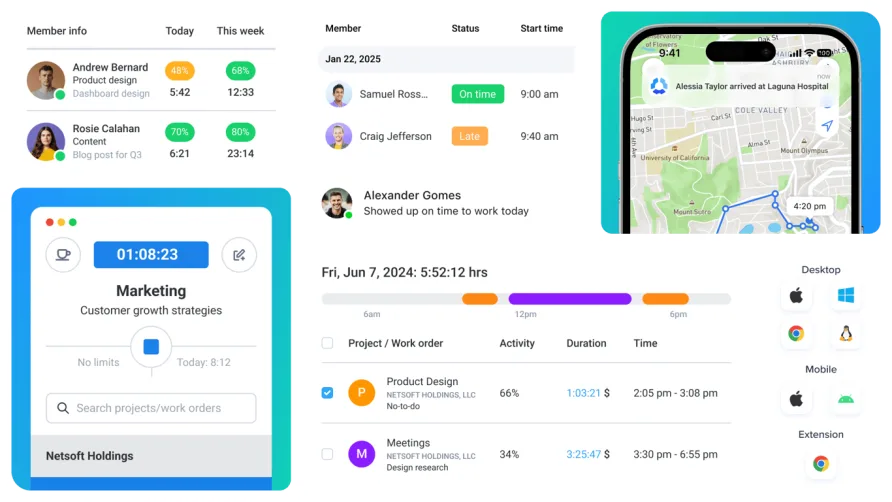
At its foundation, Hubstaff is a multi-platform time tracker. Employees can clock in from a desktop app (Windows, Mac, or Linux), a Chrome browser extension, or mobile apps on iOS and Android. The desktop experience is where Hubstaff performs best. Timers are straightforward to start and stop, and the automatic idle detection kicks in after a configurable period of inactivity, prompting the employee or discarding idle time depending on the admin's settings. Timesheets generate automatically from tracked entries, and managers can require approval before entries are finalized, a feature Hubstaff added in late 2025 as a direct response to user requests.
The mobile app handles the basics competently but doesn't match the desktop version's reliability. Users managing field teams of 20 or more employees report occasional sync delays between the mobile app and the web dashboard, particularly when crews are in areas with spotty cellular coverage. GPS data generally catches up once connectivity returns, but real-time visibility isn't always real-time on mobile.
Productivity Monitoring: Screenshots, Apps, and Activity
This is where Hubstaff's identity becomes clear. The platform can capture screenshots at configurable intervals, one, two, or three per 10-minute window, while employees are clocked in. Admins control who gets screenshotted, how often, and whether screenshots are blurred to protect sensitive information. The screenshots stop the moment an employee clocks out. That boundary matters, and Hubstaff is explicit about it: the tool tracks during work time only, it doesn't record audio or video, and it doesn't log individual keystrokes.
App and URL tracking adds another layer. On the desktop app, Hubstaff records which applications and websites an employee uses during tracked time. Combined with the Insights add-on, managers can classify specific apps as productive or unproductive by role. A social media manager's time on Instagram counts differently than an accountant's. Activity levels are measured by keyboard and mouse input frequency over 10-minute intervals, expressed as a percentage. An activity rate above 50% is generally considered good, though Hubstaff's own benchmarking data shows this varies by industry and role.
A word on the monitoring conversation. Some teams will find these features essential. Others will see them as heavy-handed. Hubstaff gives admins granular control over what gets tracked and for whom, which means the monitoring experience can range from light-touch time logging to full screenshot and app visibility. The configuration choices you make as an admin will shape how your team perceives the tool.
GPS and Location Features for Field Teams
Hubstaff's GPS tracking and geofencing are built for businesses with employees working outside an office. Think cleaning companies dispatching crews to client homes each morning, or a security firm verifying that guards actually arrived at their assigned post before shift start. The mobile app tracks location while clocked in, and managers can set up geofenced job sites that automatically trigger clock-in when an employee enters a defined area. Route tracking shows where employees traveled during the workday.
The Locations add-on, which costs $3.33 per seat per month and is only available on Team and Enterprise plans, is required for these GPS features. That's an important cost detail: a field service company with 15 employees on the Team plan would pay $12 per seat for the base plan plus $3.33 per seat for Locations, bringing the actual per-seat cost to $15.33 per month.
GPS accuracy is generally solid outdoors. Users in industries like landscaping and home healthcare report reliable location pins at job sites. Indoor tracking is less consistent, which is a known limitation of GPS technology rather than a Hubstaff-specific issue, but it means that warehouse or facility-based check-ins can occasionally drift.
What Hubstaff Costs in Practice
Hubstaff's free plan covers a single user with basic time tracking and limited reporting. It works for a solo freelancer proving hours to a client, but it won't serve any team evaluation. All paid plans require a minimum of two seats.
The Starter plan at $7 per seat per month includes limited screenshots (500 per month), basic app and URL tracking (500 events per month each), and email support with a 2-plus day response time. The Grow plan at $9 per seat per month adds one integration, project budgets, idle timeout, expense tracking, and improved reporting. The Team plan at $12 per seat per month is where the platform opens up: unlimited screenshots, unlimited app and URL tracking, scheduling, attendance, time-off management, payroll, and unlimited integrations. Enterprise pricing sits at $25 per seat per month with annual billing and adds HIPAA compliance, SOC-2 Type II, SSO, and dedicated support with a 2-hour email SLA.
Annual billing saves 16% across all plans. Here's what the real costs look like. A solo user on the Grow plan pays $108 per year ($9 times 12 months), or roughly $91 annually with the annual discount. A team of 10 on the Team plan pays $1,440 per year at monthly rates, or about $1,210 with annual billing. Add the Insights add-on at $3 per seat per month and the Locations add-on at $3.33 per seat per month, and that same 10-person team's annual cost climbs to approximately $1,970 on annual billing. Those add-ons aren't optional for many businesses; they're where the GPS tracking and advanced analytics live.
Hubstaff offers a 14-day free trial across all paid plans with no credit card required. There's also a 30-day money-back guarantee on new paid subscriptions. Non-profit organizations qualify for a 30% discount, which is a detail worth knowing if that applies to you.
Workforce Management Beyond the Clock
On the Team plan and above, Hubstaff includes scheduling, attendance tracking, and time-off management. The scheduling tool lets managers build shifts and assign them to employees, though it doesn't support drag-and-drop placement. Employees see their schedules in the app and receive notifications for new or changed shifts. Time-off requests flow through the same interface, and managers can set custom PTO policies by role or department. Attendance tracking flags late arrivals, missed shifts, and early departures against the posted schedule.
Payroll automation is one of Hubstaff's underrated strengths. The platform calculates pay based on tracked hours and configured rates, supports both hourly and fixed compensation, handles overtime multipliers, and sends payments through Wise, PayPal, Payoneer, or direct bank transfer. For teams paying international contractors across multiple currencies, this removes significant manual effort. Hubstaff processed 550,000 payments in 2025 across its user base, which signals that the payroll system handles real volume.
The integration ecosystem rounds out the workforce management picture. Hubstaff connects with 35-plus tools, including project management platforms like Asana, Jira, Trello, and ClickUp, plus accounting software like QuickBooks. Communication tools like Slack are covered, and payment processors like PayPal and Wise are built into the payroll workflow. The catch: the Starter plan allows zero integrations, Grow permits one, and you need the Team plan for unlimited connections. If your workflow depends on syncing Hubstaff data with multiple tools, that gating forces you up the pricing ladder.
Where the Interface Gets in Its Own Way
The web dashboard organizes a lot of information into a manageable layout, and most managers will find the reporting tools clear enough after a few sessions. Over 20 report types are available, covering time and activity summaries, project budgets, payment history, and weekly team comparisons. Reports can be scheduled to arrive in your inbox automatically, which saves the habit of logging in just to pull numbers. The settings panel is where things get less intuitive. Configuring screenshot frequency, idle detection thresholds, and tracking permissions for individual team members requires navigating multiple layers of the admin interface. The labels aren't always self-explanatory; "automatic tracking," for example, refers to a feature that starts and stops the timer based on pre-set rules, not the passive activity monitoring that some users expect from the name.
A recurring theme among long-term users is that the desktop app runs reliably in the background without demanding attention, while the mobile app occasionally needs to be force-quit and relaunched to resume tracking after connectivity interruptions. For office-based teams, this isn't a problem. For field-heavy operations, it's a friction point worth testing during the 14-day trial.
Recent Product Updates
Hubstaff shipped several meaningful updates in late 2025 and early 2026. The Insights Timeline now gives managers a visual breakdown of each employee's day, showing tracked work, idle time, breaks, meetings, and PTO in a single view. Manual time entry approval lets managers review and approve any manually added time before it counts toward timesheets, adding a verification layer that wasn't available before. The Unusual Activity detection page was redesigned with clearer confidence ratings and priority sorting, and a new Audit Log Export feature allows admins to pull compliance records in CSV or PDF format. These additions suggest active development focused on the oversight and compliance side of the platform.
Is Hubstaff the Right Fit for Your Team?
Consider a digital marketing agency with 12 remote contractors spread across three time zones. The owner needs to verify billable hours for client invoicing, wants visibility into whether contractors are focused during tracked time, and processes international payments twice a month. Hubstaff's Team plan covers every piece of that workflow: time tracking with activity monitoring, project-based hour allocation, and automated multi-currency payments.
Now consider a five-person accounting firm where everyone works from the same office and trust isn't an issue. They need clock-in/clock-out for payroll accuracy and basic PTO tracking. Hubstaff would work, but the monitoring features would go unused, and the per-seat cost wouldn't deliver proportional value compared to simpler alternatives in the category.
The pattern is clear. Hubstaff's value increases in direct proportion to how distributed your team is and how much verification your business requires.
Our Verdict on Hubstaff
Hubstaff covers an unusual amount of ground for a time and attendance platform, blending clock-in functionality with productivity monitoring, GPS verification, and payment processing that most competitors split across separate tools. The 13-year track record and 112,000-business user base provide genuine stability, and the late 2025 updates show a team still actively refining the product. Where it falls short is pricing transparency: the platform's real value sits at the $12/seat Team tier, and the add-on model means the sticker price rarely tells the full story. The mobile experience also needs continued investment, particularly for the field teams that GPS tracking is designed to serve. For businesses that need accountability tooling and are willing to configure the monitoring settings thoughtfully, Hubstaff delivers on its promise. The 14-day trial is the right starting point.