
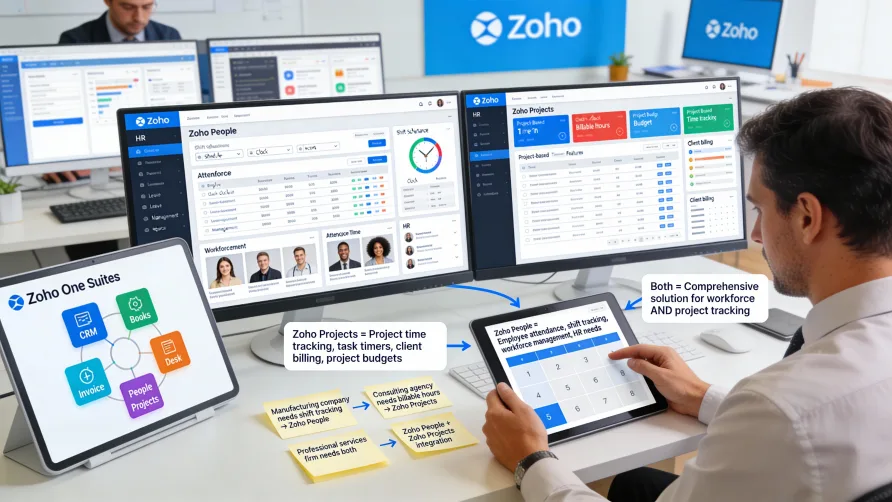
Yes, Zoho offers time tracking capabilities across multiple products in its business software ecosystem. Rather than having a single standalone time tracking application, Zoho incorporates time tracking features into several of its products including Zoho People for HR and workforce management and Zoho Projects for project management and collaboration.
Understanding which Zoho product contains the time tracking features you need depends on your specific use case. Workforce time and attendance management happens in Zoho People, while project-based time tracking lives in Zoho Projects. Some businesses use both products to address different time tracking needs across their organization.
Zoho People Time Tracking
Zoho People is Zoho's human resources management system that includes comprehensive time and attendance features. The platform handles employee time tracking, shift scheduling, attendance monitoring, and leave management as part of broader HR functionality.
Time and attendance in Zoho People focuses on workforce management rather than project task tracking. The system captures when employees clock in and out, tracks total hours worked, monitors attendance patterns, and supports payroll processing.
Employees can clock in and out using web-based time clocks, mobile apps, or biometric devices integrated with Zoho People. The platform records timestamps for each punch and calculates total hours worked based on your configured rules.
The mobile app turns smartphones into portable time clocks for remote or field workers. Employees clock in through the app, which can capture GPS location to verify where workers were when recording their hours.
Shift scheduling features let managers create and publish work schedules. Employees view their assigned shifts through the mobile app or web portal, and the system can send notifications about upcoming shifts or schedule changes.
Attendance tracking monitors patterns beyond just hours worked. Zoho People identifies tardiness, early departures, unscheduled absences, and other attendance issues based on rules you configure.
Leave management integrates with time tracking. Approved time off appears in attendance records and affects hours worked calculations. Accrual tracking happens automatically based on policies you define.
Timesheet functionality provides a formal process for reviewing and approving employee hours. Managers review timesheets, address exceptions, and approve hours before they transfer to payroll processing.
Overtime management tracks hours against thresholds you configure and alerts managers when employees approach overtime limits. The system calculates overtime based on rules you define including daily, weekly, or other overtime triggers.
Payroll integration capabilities let you export time data to payroll systems. Zoho People generates exports in formats compatible with various payroll providers, facilitating the transfer of approved hours for wage processing.
Zoho Projects Time Tracking
Zoho Projects is Zoho's project management platform that includes time tracking features focused on project task duration rather than employee attendance. The system lets team members track time spent on specific project tasks and activities.
Time tracking in Zoho Projects operates at the task level. Users can start timers for individual tasks or manually log time they've spent working on specific items. The time data connects to projects and tasks, showing how much effort went into completing work.
Running timers provide automatic time tracking. Users start a timer when beginning work on a task, and the timer runs until they stop it. This automatic tracking is more accurate than manual time entry and requires less effort from team members.
Manual time entry lets users log hours after completing work. If someone prefers not to use running timers or needs to record time worked earlier, they can manually add time entries to tasks.
Time entries can include descriptions explaining what work the time represents. These notes provide context when reviewing time later or when analyzing where project hours went.
Multiple team members can track time on the same task if several people collaborate on work. Each person's time records separately, giving visibility into both total time investment and individual contributions.
Project-level time summaries aggregate time across all tasks within a project. You can see total time invested in projects, which helps with project tracking and understanding resource consumption.
Time tracking reports analyze time distribution across various dimensions. Zoho Projects provides reports showing time by user, by project, by task, or by time period for understanding team productivity and project progress.
Billable hours tracking lets you mark time as billable or non-billable. For agencies or consultancies billing clients based on hours, this distinction helps separate client work from internal time.
Time estimates on tasks let you set expected durations. Comparing estimated time against actual tracked time helps improve future estimates and identifies tasks that consistently take longer than expected.
Budget tracking based on time helps monitor project costs. If you assign labor rates to team members, Zoho Projects can calculate labor costs based on tracked time and compare actual costs against project budgets.
Does Zoho Projects Have Time Tracking?
Yes, Zoho Projects includes built-in time tracking features as described above. The time tracking focuses specifically on project task duration rather than employee attendance or workforce management.
The time tracking in Zoho Projects serves project management needs including understanding task completion time, tracking project progress based on hours invested, and analyzing team productivity on project work.
For businesses using Zoho Projects for project management, the integrated time tracking provides convenient functionality without requiring separate time tracking software. Team members track time within the same tool where they manage their tasks and collaborate on projects.
However, Zoho Projects time tracking differs from the workforce management features in Zoho People. If you need formal timesheet approval for payroll, shift scheduling, or attendance monitoring, Zoho People provides those capabilities while Zoho Projects focuses on project task time.
How Do I Track Time in Zoho?
The method for tracking time in Zoho depends on which Zoho product you're using and what type of time tracking you need.
For employee time and attendance management, you use Zoho People. Employees clock in and out using web portals, mobile apps, or integrated hardware. Managers review and approve timesheets, and approved hours export to payroll systems.
For project-based time tracking, you use Zoho Projects. Team members start timers for tasks they're working on or manually log time spent on project activities. The time data feeds into project tracking and reporting.
Some organizations use both Zoho People and Zoho Projects to address different time tracking needs. HR teams might use Zoho People for payroll and attendance management while project teams use Zoho Projects for tracking time on client work or internal projects.
The integration between Zoho products means data can flow between systems when needed. For businesses using multiple Zoho applications, the products work together within the broader Zoho ecosystem.
Comparing Zoho People and Zoho Projects Time Tracking
Zoho People time tracking focuses on workforce management including attendance, shift scheduling, leave management, and payroll processing. The features serve HR departments managing employee time for compliance and wage payment purposes.
Zoho Projects time tracking focuses on project management including understanding task duration, tracking project progress, and analyzing productivity. The features serve project managers and teams who need to monitor time investment in their work.
Choose Zoho People when you need formal timesheet approval workflows for payroll, shift scheduling for hourly workers, attendance monitoring for workforce compliance, or integration with payroll systems for processing wages.
Choose Zoho Projects when you need to track time at the task level for project management, compare actual time against estimates to improve planning, bill clients based on project hours, or analyze team productivity on project work.
Use both products when you have different time tracking requirements for different parts of your organization. HR might need Zoho People for managing employee attendance and payroll, while delivery teams need Zoho Projects for tracking client project time.
Integration With Other Zoho Products
Zoho's product ecosystem includes numerous business applications that can work together. Time tracking in Zoho People and Zoho Projects can integrate with other Zoho products to support broader business processes.
Zoho Books, Zoho's accounting software, can integrate with both Zoho People and Zoho Projects for financial management. Time tracking data can flow into accounting for expense tracking, project cost analysis, or client invoicing purposes.
Zoho Invoice can generate client invoices based on billable hours tracked in Zoho Projects. The integration lets you bill clients based on project time without manually transferring hours into invoicing software.
Zoho CRM integration with Zoho Projects connects sales opportunities with project delivery. When deals close in Zoho CRM, you can create corresponding projects in Zoho Projects where teams track time on client work.
Zoho Analytics provides business intelligence capabilities that can analyze time tracking data from Zoho People or Zoho Projects. You can create custom reports and dashboards combining time data with other business metrics.
The integration capabilities within Zoho's ecosystem provide value for businesses using multiple Zoho products. Time tracking data becomes part of a larger connected business system rather than existing in isolation.
Limitations and Considerations
While Zoho offers time tracking across multiple products, the features may not match dedicated standalone time tracking platforms in depth or sophistication. Businesses with complex time tracking requirements might find Zoho's embedded time tracking features somewhat limited.
Zoho People's time tracking serves workforce management well but may lack some specialized features that dedicated time and attendance systems provide. Advanced scheduling, complex compliance rules, or industry-specific workforce management needs might require more specialized tools.
Zoho Projects time tracking handles project task tracking adequately but may not provide the comprehensive project accounting or professional services automation features that specialized PSA platforms offer.
Using multiple Zoho products for different time tracking needs increases total software costs. While Zoho products generally have competitive individual pricing, purchasing several products adds up, potentially approaching the cost of comprehensive single platforms.
Some businesses find Zoho's broad product portfolio confusing. Determining which Zoho product addresses which need requires research and understanding of how different Zoho applications divide functionality.
Getting Started With Zoho Time Tracking
Identify your specific time tracking needs before selecting Zoho products. Clarify whether you need workforce time and attendance, project task tracking, or both, which determines whether to implement Zoho People, Zoho Projects, or both.
Review the specific features available in each product's time tracking functionality. Verify that the Zoho product you're considering includes the specific features you need for your time tracking use case.
Consider how Zoho time tracking fits with other software you use. If you already use Zoho products, adding time tracking from within the Zoho ecosystem may provide better integration than standalone time tracking tools.
Evaluate alternatives if you're not already invested in the Zoho ecosystem. Dedicated time tracking platforms might provide more comprehensive functionality if you don't benefit from integration with other Zoho products.
Test Zoho products through free trials before committing. Both Zoho People and Zoho Projects offer trial periods that let you evaluate time tracking features with your actual workflows.
Plan implementation carefully if using multiple Zoho products. Consider how time tracking in different products will work together and whether data needs to sync between systems for your specific workflows.
Train users on the specific Zoho product they'll use for time tracking. The workflows differ between Zoho People and Zoho Projects, so training should target the appropriate product for each user group.
Establish time tracking policies that account for which system users should access for different time tracking needs. Clear guidance prevents confusion when multiple Zoho products exist in your environment.
When Zoho Time Tracking Makes Sense
Zoho time tracking works well for businesses already using other Zoho products who want to keep time tracking within the same ecosystem. The integration between Zoho applications provides value that standalone time tracking can't match.
Small to medium businesses looking for affordable time tracking as part of broader business software may find Zoho products cost-effective. The pricing generally compares favorably to purchasing separate specialized tools for each function.
Organizations that need both workforce management and project time tracking can address both needs within the Zoho ecosystem using People and Projects respectively, maintaining a consistent software environment.
Businesses wanting to avoid managing many different software vendors may prefer Zoho's approach of providing numerous business functions from a single company. Consolidated billing, support, and administration simplify software management.
When to Consider Alternatives
Businesses with specialized time tracking requirements that go beyond what Zoho People or Zoho Projects provide should evaluate dedicated time tracking platforms. Specialized tools often offer greater depth in time tracking features.
Organizations not already using Zoho products may find dedicated time tracking platforms more focused and feature-rich for the specific purpose of time tracking without requiring adoption of a broader ecosystem.
Companies needing advanced professional services automation, complex resource management, or sophisticated workforce analytics might find specialized PSA or workforce management platforms better suited than Zoho's embedded time tracking features.
The decision between Zoho time tracking and alternatives depends on your specific requirements, existing software environment, and whether the integration within Zoho's ecosystem provides meaningful value for your workflows.