
Built for Schedules That Never Stay the Same
Shift-based businesses don't have the luxury of static schedules. Employees swap shifts, availability changes weekly, and managers need to fill gaps fast without blowing the labor budget. When I Work is built specifically for that reality, and it scores 8.1 out of 10 in our time and attendance software evaluation. The platform combines employee scheduling, a GPS-enabled time clock, and built-in team messaging at a per-user price that's hard to match in this category.
What When I Work Brings to Shift Management
When I Work launched in 2010 out of Minneapolis, Minnesota, with a focused mission: make scheduling hourly workers less painful. Fifteen years later, the company has raised $333 million in funding, with Bain Capital Tech Opportunities among its investors, and employs roughly 200 people. The platform now serves over 200,000 workplaces across more than 50 countries, with a user base that's crossed the one million mark. That's a meaningful footprint for a tool that still positions itself as a small-business solution.
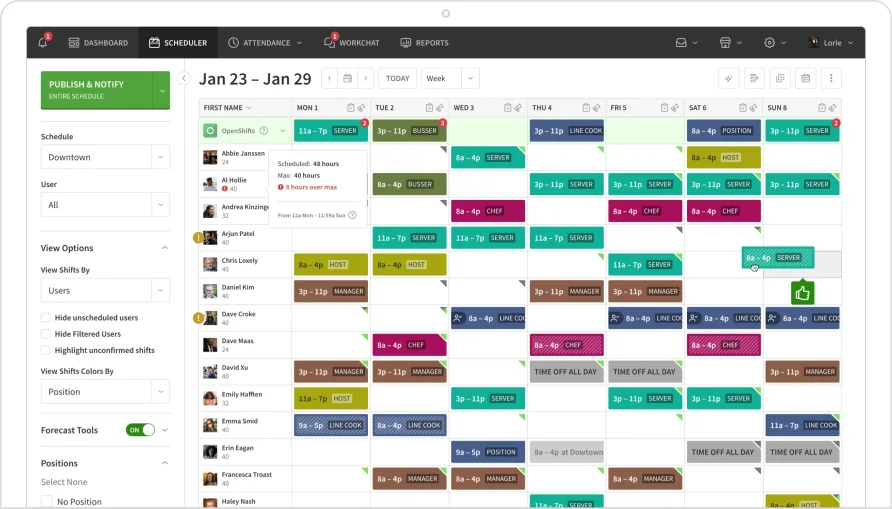
The core of the product is its scheduling engine. Managers build weekly schedules using a drag-and-drop interface that supports shift templates, copy-paste across weeks, and color-coded position views. Auto-scheduling can generate a full week based on employee availability and scheduling rules, though this feature lives in the higher-priced tiers. OpenShifts let managers post unfilled slots for employees to claim on their own, and shift swapping happens directly in the app with manager approval baked into the workflow. For a restaurant running five dinner shifts a week with rotating staff, or a retail store juggling part-timers across morning and evening coverage, this is the kind of scheduling infrastructure that turns a two-hour task into a 15-minute one.
The time clock works from any device. Employees clock in and out through the mobile app or a shared kiosk, with GPS verification and geofencing to confirm they're on-site. Managers can set geofence boundaries around each work location, and the system flags any clock-in that falls outside the defined radius. Break tracking, including scheduled breaks with attestation for compliance, was a major 2025 addition. A Q1 update introduced break attestation that prompts employees to confirm whether they took their breaks at clock-out, with a field for documenting reasons if they didn't. That's a compliance-focused detail that matters in states with strict meal and rest break requirements. The platform announced its 2026 roadmap will prioritize additional automation, compliance features, and custom scheduling rules, signaling continued investment in the areas that shift-based businesses care about most.
The Mobile Experience and Team Communication
When I Work's mobile app is where most employees interact with the platform, and it's one of the strongest aspects of the product. Schedule viewing, shift swaps, time-off requests, and clock-ins all happen from the phone. A Q2 2025 update redesigned the clock-in interface to display current shift information directly on the button, showing employees how long until their shift starts or whether they're already past the start time. An iOS widget also surfaces "next shift" information on the home screen without opening the app, which helps reduce no-shows.
WorkChat, the built-in messaging tool, lets managers communicate with individuals or groups without sharing personal phone numbers. It handles shift-related notifications, schedule announcements, and general team communication in one place. Users managing teams of 20 or more employees report that centralizing communication inside the scheduling tool cuts down on the text message chains and group chats that tend to miss people or create confusion. A recurring observation from hospitality and retail managers is that new hires with limited tech experience pick up the messaging and scheduling features within their first couple of shifts, which speaks to how approachable the interface is.
There's a UX consideration worth flagging, though. The mobile app's home screen defaults to showing available open shifts rather than the employee's own scheduled shifts. For teams that rely heavily on open shift pickup, that's a reasonable design choice. But employees who just want to check their own upcoming schedule have to go one screen deeper to find it. It's a small friction point, not a dealbreaker, but it trips up new users in the first week or two.
What When I Work Costs in Practice
The pricing structure runs across three tiers, and all of them sit at the low end of the time and attendance market. The Essentials plan starts at $2.50 per user per month and includes scheduling, auto-scheduling, multi-location support, shift templates, forecasting tools, team messaging, and OpenShift management. That's a dense feature set for the price. The Pro plan at $5 per user per month adds advanced scheduling rules, labor sharing across locations, role permissions, custom unit forecasting, and custom reporting. Premium, at $8 per user per month, adds API access, webhooks, and SAML/SSO for enterprise security needs.
Time and attendance tracking is an add-on toggle that increases each tier by approximately $1.50 per user per month. So a manager running the Essentials plan with time tracking pays $4 per user. The Pro plan with time tracking comes to $7.
Here's what that looks like in annual terms. A solo manager on the Essentials plan with time tracking pays $48 per year. A team of 10 on that same plan runs $480 annually. Move to Pro with time tracking for a 10-person team, and the annual cost reaches $840. Even at the Pro level, you're spending less than $85 per employee per year for scheduling, time tracking, messaging, and reporting. For a 25-person operation on Essentials with time tracking, the annual spend comes to $1,200. That's a budget line most small businesses won't flinch at.
There's no permanent free plan. The 14-day trial gives full access to all features, which is adequate for testing but tight if you're trying to evaluate across a full pay cycle. Monthly and annual billing are both available, with no contracts and the ability to cancel anytime. The flexibility to scale seats up or down month-to-month is useful for seasonal businesses that add staff during peak periods and trim back when volume drops.
Where When I Work Fits Best
The product is designed for shift-based operations, and that's where it delivers the most value. Consider a home healthcare agency dispatching 15 caregivers to client homes across a metro area each day. The manager needs to build weekly schedules around caregiver certifications, client preferences, and geographic proximity. When I Work lets her create position-specific templates, post open shifts when someone calls out, and verify through GPS that the caregiver arrived at the correct address before their shift started. The mobile clock-in eliminates paper timesheets, and WorkChat keeps the team coordinated without a shared group text that mixes work and personal messages.
Or take a quick-service restaurant with 30 employees across morning, lunch, and dinner shifts. The general manager copies last week's schedule, adjusts for two time-off requests, posts three open shifts for the weekend rush, and publishes the whole thing in under 20 minutes. Employees get notified instantly, swap shifts among themselves with approval, and clock in through a tablet mounted near the kitchen. The labor forecasting tool shows whether next week's scheduled hours align with projected sales, giving the manager a chance to trim or add coverage before the week starts.
Where the product doesn't fit as well is salaried or project-based workforce tracking. There's no project timer, no billable-hours tracking, and no client-level time allocation. Teams that need to log hours against specific projects or generate client invoices from tracked time won't find those capabilities here. That's not a flaw in the product; it's a scope boundary. When I Work is built for shift workers, and it stays focused on that use case.
Integrations and Payroll Connections
When I Work connects to a solid set of payroll and point-of-sale systems. Rippling is the current preferred partner, with a promotional offer giving new When I Work customers six free months of Rippling's payroll, HR, and compliance tools. The partnership is a significant value add if you don't yet have a payroll provider, since it bundles workforce management with payroll at no additional cost during the introductory period. Beyond Rippling, the platform integrates with ADP Workforce Now, Gusto, QuickBooks Online, Square POS, Square Payroll, and OnPay. Google Calendar sync and Zapier connectivity extend the platform's reach into broader workflows.
API access is reserved for the Premium tier at $8 per user per month. That's a consideration for businesses that need custom data flows between When I Work and internal systems. If your operation runs on a homegrown POS or an industry-specific ERP, you'll either need the Premium plan or a Zapier workaround to bridge the gap. For most small businesses using standard payroll and accounting tools, the native integrations cover the essentials without requiring the top-tier plan.
The Gaps to Know About
Within the scope of time and attendance, a few gaps stand out. There's no biometric clock-in option, so businesses that require fingerprint or facial recognition verification for time tracking will need supplemental hardware or a different platform. The GPS-based clock-in, while functional, has limitations in certain environments. Users operating in large warehouse or indoor campus settings have reported that GPS readings can drift, occasionally logging a clock-in location that appears to be off-site when the employee is actually inside the building. The geofencing radius helps mitigate this, but it doesn't eliminate the issue entirely.
Reporting, while improved at the Pro tier with custom reports, doesn't offer the depth of customization that larger operations sometimes need for labor compliance audits. Users managing complex overtime rules across multiple jurisdictions report that the standard overtime calculations don't always account for state-specific nuances without manual adjustments. If your business operates in California or another state with daily overtime thresholds, you'll want to test those calculations carefully during the trial.
Phone support isn't available on the lower plans. Help comes through a knowledge base and live chat, which handles most issues but can leave managers waiting during peak operational hours when a scheduling problem needs an immediate voice conversation. The help center documentation is thorough, and the support team is responsive through chat during business hours, but the absence of a phone line on Essentials and Pro plans is a gap that managers in high-urgency environments should factor in.
Looking Ahead: 2026 Priorities
The 2025 focus on break compliance and mobile UX improvements suggests a product team that's listening to operational frustrations from the user base rather than chasing feature bloat. Custom scheduling rules and deeper manager insights are among the confirmed priorities for the year ahead. For businesses evaluating the platform today, the trajectory points toward a product that's going to keep getting more useful for shift-based operations over the next 12 to 18 months.
Is When I Work the Right Choice for Your Team?
When I Work earns its 8.1 score by doing one thing very well: making shift scheduling and time tracking fast, accessible, and affordable. The scheduling engine is mature, the mobile experience is strong, and the pricing undercuts most of the category without sacrificing the features that shift-based businesses actually need. The 2025 compliance additions around break scheduling and attestation show a product team that's paying attention to where labor regulations are heading, which matters for businesses operating in states with strict break laws.
If your business needs deep customization, complex reporting across multiple jurisdictions, or advanced configuration for unique workflows, the platform's simplicity may become a constraint rather than a benefit. Per-user costs also scale linearly, so a 100-person operation will want to run the math against flat-rate alternatives before committing. And the lack of a permanent free plan means you're paying from day one after the trial ends, even for small teams that might only use basic scheduling.
For the manager running a 10-to-50 person shift-based team who spends too many hours building schedules, chasing shift swaps, and reconciling timesheets, When I Work solves the right problems at the right price. The product has earned the trust of 200,000+ workplaces for a reason, and for most small to mid-size operations, it'll deliver on what it promises.