
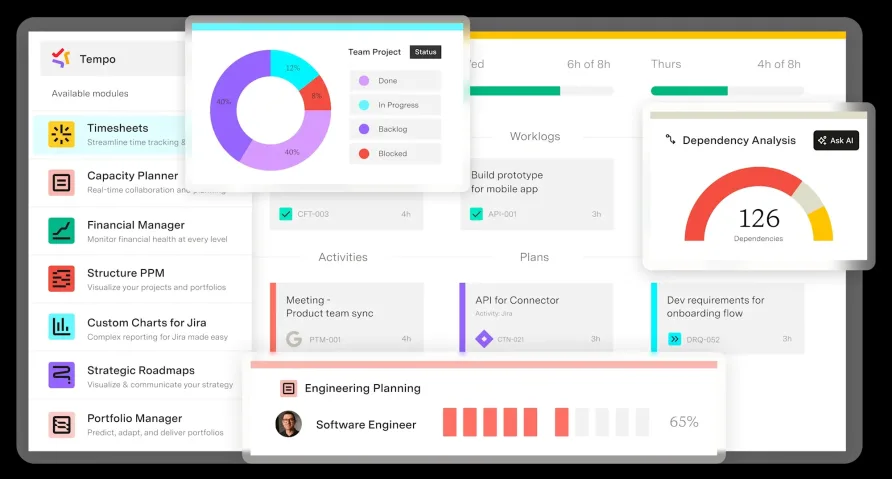
A Purpose-Built Upgrade for Jira Time Logging
For Jira teams that have tried logging time in spreadsheets, sticky notes, or Jira's own bare-bones worklog field, Tempo Timesheets represents a different category of solution entirely. It doesn't just sit alongside Jira. It lives inside it, attaching time entries directly to issues, epics, and sprints so that every logged minute ties back to a trackable unit of work. We score Tempo Timesheets 7.7 out of 10 in the time and attendance software category, reflecting its unmatched Jira integration depth and increasingly useful AI features, balanced against a hard ceiling: if your team doesn't use Jira, this product does nothing for you.
Tempo Software has been building for the Atlassian ecosystem longer than most competitors have existed. The company started in 2009 as an internal tool at an Icelandic IT consulting firm where developers needed to log billable hours against the same Jira tickets they were already working in. It spun off as its own entity in 2015, and Diversis Capital acquired the company in 2018. Today Tempo is headquartered in Burlington, Massachusetts with additional offices in Reykjavik and Laval, Canada, employing roughly 350 people. More than 9,000 organizations across 115 countries run Tempo products, with enterprise clients including NASA, Amazon, BMW, Disney, and PayPal. The company earned Atlassian's Partner of the Year award for Enterprise Apps in both 2024 and 2025, and brought on a new CEO, Vic Chynoweth, in January 2025 to lead its next growth phase. That track record matters when you're evaluating a tool that will hold years of your organization's time data.
How Time Logging Actually Works Inside Jira
The core interaction is simple: you open a Jira issue, and a Tempo panel lets you log time directly against that ticket. You can type a duration manually, start a running tracker, or drag issues into a calendar-style "My Work" view where each block represents logged time. That calendar view is where most daily users spend their time, and it doubles as a visual check on whether your week looks accurate before you submit. There's also a traditional timesheet view that groups logged hours by a configurable period, and a list view that shows planned versus actual time side by side.
Where Tempo pulls ahead is its AI-powered suggestions, a feature the company soft-launched in early 2023 and has been training on over 17 million worklogs since. The system pulls activity signals from your Jira issues, connected calendars (Google Workspace and Microsoft 365), and IDE tools like VS Code, JetBrains, GitHub, and GitLab. It then offers one-click suggestions for time entries you haven't logged yet. Roughly 75% of cloud customers now use these AI suggestions, and the speed improvement is noticeable: users log time about 50% faster with them enabled. The dataset underpinning the AI includes roughly 300,000 active monthly users contributing worklogs, giving the models a substantial training base to draw from.
In early 2025, Tempo extended this further with two Rovo AI agents on the Atlassian Marketplace: a Worklog Assistant that lets you log time through natural language from any Jira page, and a Summary Analyzer that answers reporting questions without building manual filters. The Worklog Assistant can start trackers, submit timesheets, and create entries from conversational prompts. The Summary Analyzer pulls data like billable versus non-billable breakdowns or per-project hour totals on demand, which is useful for team leads who need quick answers during standups or planning sessions.
The practical result is less friction. Teams that struggled with adoption because manual time entry felt like busywork have a genuine path to better data.
Reporting Depth and Approval Workflows
Tempo's reporting engine lets you slice logged time by team, project, account, user, and individual issue. Reports export to CSV, XLS, and PDF, and you can save filter configurations to reuse them. For finance-focused teams, the built-in distinction between billable and non-billable hours means you can generate client invoicing data and CapEx/OpEx reports from the same dataset. Custom work attributes add another layer: you can tag worklogs with fields like "overtime," "travel," or any category your organization needs, then filter reports by those attributes. If your company tracks R&D hours for tax refund documentation, this tagging system gives auditors the structured data they need without a separate tool.
The approval system operates at both the team level and the project level. Managers review submitted timesheets, approve or reject them individually or in bulk, and the system locks approved periods so no one can retroactively edit entries after sign-off. An audit log, introduced as a recent cloud feature, tracks who changed what and when across a rolling 180-day window. Users managing teams of 20 or more employees frequently note that the bulk approval feature saves significant admin time at the end of each pay period, though a few have flagged that requesting amendments to already-submitted timesheets requires manager intervention rather than a self-service recall option.
One UX friction point: the reporting filters aren't always intuitive on first use. The sheer number of available dimensions means new users sometimes build reports that return unexpected results because they've combined filters in ways the interface doesn't make obvious. The labels on some dropdown menus assume familiarity with Tempo's internal terminology, like "Tempo Accounts" versus standard project categories, which can trip up teams during the first few weeks. A long-term user with multiple departments once described the initial reporting learning curve as a two-week investment that pays off once your team settles on three or four saved report templates they actually use.
What Tempo Timesheets Costs in Practice
Tempo uses a tiered pricing model based on your total Jira license size, and this is a detail that catches some buyers off guard. Your Tempo license must match your Jira license, meaning every Jira user counts toward your Tempo bill regardless of whether they actively log time. For a small team of 10 Jira users, the cost is $1 per user per month, or $120 annually. That's genuinely inexpensive. For a mid-size deployment of 50 Jira users, you're in the 11-100 tier at $5.21 per user per month, which works out to $3,126 per year. A 100-person Jira instance at the same tier would run $6,252 annually.
Pricing improves at scale. Organizations with 250-1,000 Jira users pay $1.81 per user per month, and above 1,000 users, it drops below a dollar. Keep in mind that Tempo announced a 15% price increase effective September 2025 for its cloud apps, so these figures may shift upward for new purchases after that date. Existing customers get a 60-day price override window under Atlassian's Marketplace protection policies, which provides some transition time. A free 30-day trial is available through the Atlassian Marketplace, giving you enough time to configure approvals, test reporting, and gauge team adoption before committing.
Data Center pricing follows a separate structure and varies by user tier. Contact Tempo's sales team for a custom quote if your organization runs on-premises. Tempo also offers complementary products, Capacity Planner and Financial Manager, at additional cost. These extend Timesheets data into resource planning and project budgeting, but they're separate licenses, so factor those in if you need the full suite.
Is Tempo Timesheets the Right Fit for Your Team?
Consider a 40-person software consultancy running three concurrent client projects in Jira. Each project has its own budget, each developer splits time across two or three codebases, and the finance team needs weekly billable-hour reports broken out by client. Tempo handles that scenario well because every time entry links to a Jira issue, which links to a project, which links to a billing account. The team lead approves timesheets on Friday, finance pulls the report Monday morning, and invoices go out with hours already categorized. The AI suggestions mean developers who used to forget their Friday afternoon logs now get prompted with entries pre-populated from their Git commits and calendar events.
Now consider a different scenario: a 15-person marketing agency that uses Asana for project management and needs basic clock-in/clock-out tracking for hourly contractors. Tempo offers nothing here. There's no way to use it without Jira, and there's no lightweight mode that strips away the development-focused features. The product is purpose-built for teams that already live inside Jira.
IT departments tracking internal project costs, product engineering teams measuring sprint velocity against actual hours, and professional services firms billing clients on logged effort are the clearest use cases. If your organization tracks R&D hours for tax credit documentation, Tempo's CapEx/OpEx categorization and custom work attributes provide the audit trail you'd otherwise build manually. The holiday scheme and workload scheme features also help multinational teams account for different working calendars across offices without manual adjustments.
What Tempo Has Shipped Recently
Beyond the AI suggestion engine and Rovo agents, Tempo's 2024-2025 development cycle included several notable updates. The platform added Jira 11 compatibility in August 2025, which required dropping Java 8 support in favor of Java 11, 17, or 21. Dynamic Dropdowns arrived for Cloud, a feature previously only available on Data Center, letting administrators configure conditional worklog fields that change based on issue type, user, or custom field selections. This reduces logging errors by limiting dropdown options to only what's relevant for a given task. Tempo also shipped a bulk worklog creation API (v4) that makes large-scale data imports significantly faster for teams migrating from other systems.
The company launched Capacity Insights, an AI-powered capacity visualization tool, as a free beta on the Atlassian Marketplace in mid-2024. While Capacity Insights is a separate product, it feeds directly from Timesheets data, which signals Tempo's investment in making time tracking the foundation of a broader planning toolkit. In April 2025, Tempo announced its Strategic Portfolio Management platform, Allegro, which brings together timesheets, capacity planning, and roadmapping into a unified workflow.
The pace of updates is consistent. That matters for a product this embedded in your workflow.
Where Tempo Timesheets Stops
Tempo doesn't offer offline time logging. If your team includes field workers or employees in areas with unreliable internet, they can't capture hours until they're back online. The mobile app (iOS and Android) supports on-the-go logging and tracker functionality, but users with limited connectivity have reported sync issues when moving between coverage areas. The mobile experience is also more limited than the desktop interface, missing some of the reporting and configuration options available in the browser.
Geolocation-based clock-in isn't part of the product. There's no GPS verification for shift starts or job site arrivals, which means industries that require proof-of-presence tracking will need a different solution or a supplementary tool. Similarly, Tempo doesn't include biometric verification, hardware clock integration, or shift scheduling. It's a time logging and reporting layer for knowledge work, not a field workforce management system.
The Chrome extension helps capture time outside of Jira itself, letting users start and stop trackers from any browser tab. But all that tracked time still routes back to Jira issues. If your workflow involves significant time spent on activities that don't map to a Jira ticket, you'll need to create internal issue types to capture it, or those hours go unlogged.
Our Verdict
Tempo Timesheets has spent 15 years becoming the default time tracking layer for Jira, and the product reflects that focus. The AI suggestions are a real differentiator that directly address the biggest problem in time tracking: people not doing it. If your team already runs on Jira and you need time data that ties cleanly to issues, projects, and budgets, Tempo is the most natural choice available. The approval workflows, reporting depth, and ecosystem integrations with IDEs, calendars, and developer tools make it a complete solution for the audience it serves.
The 7.7 score reflects both that strength and its constraints. You're paying for every Jira user on your license whether they log time or not. The initial configuration demands Jira admin attention and some patience with permission schemes. And if your organization ever moves off Jira, your Tempo investment moves to zero. For the right team, those tradeoffs are easy to accept. Tempo does one thing, for one ecosystem, and it does it better than anything else in the market.