
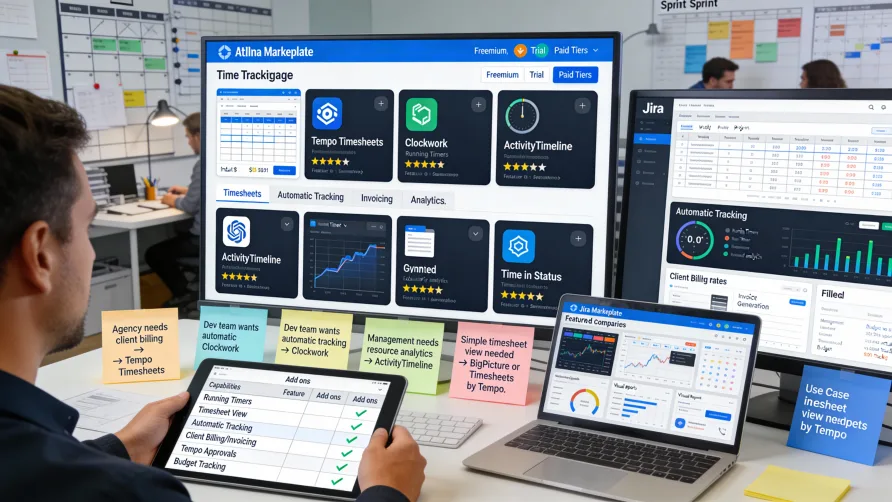
Jira's native time tracking provides basic work log functionality, but many teams need more sophisticated time tracking capabilities than built-in features offer. The Atlassian Marketplace hosts dozens of time tracking add-ons that extend Jira with running timers, timesheet interfaces, advanced reporting, approval workflows, and billing features.
Selecting the right time tracking add-on depends on your specific needs including team size, whether you bill clients based on hours, reporting requirements, and desired user experience. Understanding what different add-ons provide helps you choose the solution that best addresses your time tracking challenges.
Why Teams Use Jira Time Tracking Add-ons
Native Jira time tracking requires manual entry of work logs on individual issues. While this approach works for basic time logging, it lacks convenience features that improve compliance and accuracy.
Running timers that automatically track elapsed time represent one of the most requested enhancements. Teams want to start a timer when beginning work and stop it when finished, letting the system capture exact duration rather than estimating time after the fact.
Timesheet interfaces provide another common need. Native Jira requires opening individual issues to log or review time, which becomes tedious when managing time across many issues. Timesheet views show all time entries in one place, making time management more efficient.
Advanced reporting beyond native Jira capabilities helps teams analyze time data. Organizations want project profitability reports, resource utilization analysis, billable hours summaries, and custom reports that native Jira doesn't provide.
Approval workflows for time entries matter when time data feeds payroll or client billing. Businesses need formal processes where managers review and approve time before it's used for financial purposes.
Billing and invoicing features let agencies and consultancies convert tracked time into client invoices. Native Jira can't mark time as billable, apply billing rates, or generate invoices from logged hours.
Categories of Jira Time Tracking Add-ons
Time tracking add-ons in the Atlassian Marketplace fall into several categories based on their primary focus and feature sets.
Comprehensive Timesheet Add-ons
These add-ons provide full-featured timesheet interfaces, approval workflows, reporting, and often billing capabilities. They're designed to replace manual work log entry with structured timesheet processes.
Comprehensive timesheet add-ons typically include weekly or monthly calendar views where users see all their time entries across multiple issues. Users can quickly log time for different issues without navigating between issue screens.
Timesheet submission and approval workflows let team members complete their timesheets and submit them for manager review. Managers can approve, reject, or request corrections before finalizing time for payroll or billing.
Advanced reporting in these add-ons covers project costs, team utilization, billable hours analysis, and custom reports. The reporting often exceeds native Jira capabilities significantly.
These comprehensive solutions work well for professional services firms, agencies, or any organization where formal time tracking with approval workflows is necessary.
Timer-Focused Add-ons
Timer add-ons prioritize convenient time tracking through running timers. These tools let users start timers for Jira issues with minimal friction, and tracked time automatically logs as work logs in Jira.
Browser extensions or desktop applications often accompany timer add-ons. Users can start timers from their browser toolbar or system tray without opening Jira issue screens, reducing the barrier to time tracking.
Some timer add-ons include reminder features that prompt users to start tracking when they begin work or alert them to running timers they may have forgotten to stop.
Timer add-ons appeal to teams who primarily want easier time tracking without necessarily needing formal timesheet processes or approval workflows.
Reporting and Analytics Add-ons
These add-ons focus on extracting insights from time tracking data through sophisticated reporting and visualization. They work with native Jira work logs or with other time tracking add-ons to provide analytics.
Customizable dashboards let you create views showing key time metrics relevant to your team or stakeholders. Real-time data updates provide current visibility into time tracking status.
Resource utilization reports help managers understand how team members allocate time across projects and identify capacity constraints or imbalances.
Project profitability analysis compares time investment against project budgets or revenue, helping understand which projects are profitable and which consume excessive resources.
Billing and Invoicing Add-ons
These add-ons add client billing capabilities to Jira time tracking. They let you mark time as billable, configure billing rates, and generate invoices from tracked time.
Rate configuration features support different hourly rates for different team members, issue types, or projects. The system applies configured rates when calculating billing amounts.
Invoice generation creates professional invoices based on billable time logged in Jira. Some add-ons include customizable invoice templates and integration with accounting systems.
Client approval workflows in advanced billing add-ons let clients review and approve time before invoices are finalized, reducing billing disputes.
Key Features to Consider
When evaluating Jira time tracking add-ons, consider which features matter most for your use case.
User Experience
How easy is it for team members to track time? Add-ons with intuitive interfaces and minimal friction see better adoption than complex tools requiring extensive training.
Browser extensions that add time tracking buttons directly to Jira interfaces make tracking more convenient than solutions requiring navigation to separate interfaces.
Mobile apps matter if team members work from phones or tablets. Some add-ons provide robust mobile experiences while others focus exclusively on desktop usage.
Integration With Jira
Deep integration with Jira data means the add-on accesses your projects, issues, custom fields, and other Jira elements. Better integration provides more seamless experiences.
Compatibility with Jira workflows matters if you want time tracking integrated into your issue lifecycle. Some add-ons trigger actions based on workflow transitions or require time tracking at specific workflow stages.
Custom field support lets you use Jira custom fields in time tracking contexts, such as marking time with project codes or client identifiers from custom fields.
Reporting Capabilities
Standard reports should cover common needs like time by user, time by project, billable hours, and time within date ranges. Verify that standard reports match your requirements.
Custom report building lets you create analyses specific to your business. Flexible reporting tools accommodate unique requirements beyond what standard reports provide.
Export capabilities determine whether you can get time data out of the add-on for use in other systems. Common export formats include CSV, Excel, and PDF.
Approval Workflows
Timesheet submission processes define how team members complete and submit time for approval. Clear submission interfaces with validation reduce errors.
Manager review interfaces show submitted timesheets needing approval. Good review tools highlight anomalies, missing time, or unusual patterns requiring attention.
Approval history and audit trails record who approved what and when. These records support compliance requirements and resolve disputes about approved time.
Billing Features
Billable status marking lets you designate time as billable or non-billable. This distinction is essential for organizations billing clients based on hours.
Rate configuration flexibility supports different billing models. You might need different rates by team member, project, client, or work type.
Invoice customization determines how much control you have over invoice appearance and content. Professional services firms often need branded invoices with specific layouts.
Performance and Reliability
Response time matters when team members interact with time tracking daily. Slow add-ons create friction that reduces compliance.
Data backup and recovery capabilities protect time tracking data. Understand how add-on data is stored and whether it's included in Jira backups.
Uptime and reliability affect whether team members can access time tracking when needed. Check add-on vendor reliability through reviews and ratings.
Popular Jira Time Tracking Add-ons
Several time tracking add-ons have established strong reputations in the Atlassian Marketplace based on features, reliability, and customer satisfaction.
Tempo Timesheets
Tempo Timesheets is one of the most widely used Jira time tracking add-ons, offering comprehensive timesheet management, reporting, and team planning features.
The add-on provides calendar-based timesheet views where users log time across multiple issues in one interface. The timesheet experience significantly improves on native Jira work log entry.
Tempo includes approval workflows for submitted timesheets. Managers review team time before approval, ensuring accuracy before time is used for payroll or billing.
Advanced reporting covers project costs, team utilization, billable hours, and custom analyses. The reporting capabilities exceed native Jira substantially.
Team planning features help with capacity management and resource allocation. You can view team availability, planned work, and actual time to optimize resource use.
Tempo integrates with Jira portfolio management and connects to external systems for broader workforce planning.
Clockwork
Clockwork focuses on providing intuitive time tracking with running timers and streamlined timesheet interfaces. The add-on emphasizes user experience and ease of use.
Timer functionality lets users start and stop tracking with minimal clicks. Timers can run in the background as users work on issues, capturing exact elapsed time.
Timesheet views provide weekly summaries of time entries. Users can quickly review their tracked time and add missing entries without opening individual issues.
Reporting includes standard time tracking reports suitable for most teams. While not as extensive as some alternatives, the reports cover common analysis needs.
Clockwork works well for teams who want better time tracking user experience without necessarily needing comprehensive project accounting or approval workflows.
BigPicture and BigGantt
These related add-ons provide project portfolio management features that include time tracking and resource management. They work well for organizations managing multiple projects simultaneously.
Time tracking integrates with project planning, letting you compare planned versus actual time. The connection between planning and tracking helps identify variances.
Resource management features show team capacity and allocation. You can see who's overloaded, who has capacity, and how to optimize resource distribution.
Gantt chart views display project timelines with time tracking data. This visualization helps understand whether projects are progressing as planned.
These add-ons suit organizations needing project portfolio management alongside time tracking rather than just time tracking in isolation.
Everhour for Jira
Everhour provides time tracking that integrates with Jira while also working with other project management tools. The cross-platform approach helps teams using multiple systems.
Browser extensions add time tracking buttons throughout Jira's interface. Users can start timers without navigating away from their current work context.
Timesheet interfaces provide weekly views of tracked time across all integrated platforms, not just Jira. This unified view helps teams working across multiple tools.
Billing features support client invoicing based on tracked time. You can configure rates, mark time as billable, and generate invoices.
Everhour works well for teams using Jira alongside other project management platforms who want unified time tracking across all systems.
ActivityTimeline
ActivityTimeline combines time tracking with resource planning and scheduling. The add-on provides timeline views showing team assignments and tracked time.
Resource scheduling interfaces help plan team work across projects. You can assign people to tasks and see their workload over time.
Time tracking integrates with scheduled work. Team members track time on assigned tasks, and you can compare planned versus actual effort.
Leave management features track vacation, sick days, and other absences. The leave tracking integrates with resource planning to show true team availability.
ActivityTimeline suits organizations that need both time tracking and resource management rather than time tracking alone.
Choosing the Right Add-on
Select time tracking add-ons based on your specific requirements and constraints rather than defaulting to the most popular or feature-rich option.
Assess Your Requirements
Define what you need from time tracking before evaluating add-ons. Do you need formal timesheet approval? Client billing? Advanced analytics? Resource planning? Clear requirements help narrow options.
Distinguish between must-have features and nice-to-have capabilities. Focus on add-ons that excel at your essential requirements rather than those with the most features overall.
Consider Team Size
Some add-ons have pricing models that work better for small teams while others are designed for larger organizations. Calculate total costs based on your actual team size.
User experience matters more as teams grow. What works for five people may become unwieldy with fifty. Consider scalability when making selections.
Evaluate Integration Needs
If you use other systems beyond Jira for project management, accounting, or payroll, verify that add-ons integrate with those systems or export data in compatible formats.
Deep Jira integration provides better user experience but may create vendor lock-in. Consider whether you need maximum Jira integration or flexibility to change tools later.
Test Before Committing
Most add-ons offer free trials. Test your top candidates with real team members using actual work scenarios before purchasing.
Involve multiple user types in testing including individual contributors who will log time daily, managers who will review and approve time, and administrators who will configure and maintain the add-on.
Review Support and Documentation
Quality documentation helps with implementation and ongoing use. Review available documentation to ensure you'll be able to configure and troubleshoot the add-on.
Support responsiveness matters when you encounter issues. Check vendor support options and read reviews about support quality.
Consider Total Cost
Calculate total cost including license fees for all users who need access. Some add-ons charge only for time trackers while others charge for all users with access to time data.
Implementation costs may include professional services for configuration, data migration from existing systems, or custom development for specific requirements.
Ongoing maintenance time represents another cost. Some add-ons require minimal administration while others need regular maintenance and configuration updates.
Implementation Best Practices
After selecting an add-on, implement it thoughtfully to maximize adoption and effectiveness.
Plan Configuration
Design your time tracking configuration before installing the add-on. Decide on approval workflows, required fields, time entry rules, and reporting needs.
Document your planned configuration and share it with stakeholders. Getting input before implementation prevents costly changes later.
Pilot With a Small Group
Test the add-on with a pilot team before organization-wide rollout. The pilot helps identify configuration issues, training gaps, or workflow problems.
Gather feedback from pilot users and refine your approach based on their experience. Address problems before expanding to larger groups.
Provide Adequate Training
Train users on the add-on's specific features and your organization's time tracking expectations. Generic training on the add-on's capabilities should be supplemented with your specific policies and procedures.
Create role-specific training covering what different user types need to know. Time trackers, approvers, and administrators each need different training.
Monitor Adoption
Track whether team members are using the add-on consistently. Low adoption may indicate usability issues, unclear expectations, or insufficient training.
Address adoption problems promptly. The longer poor adoption continues, the harder it becomes to establish good time tracking habits.
Review and Refine
Periodically review whether the add-on is meeting your needs. As your organization changes, your time tracking requirements may evolve.
Be willing to adjust configuration or even switch add-ons if your chosen solution isn't working. The goal is effective time tracking, not loyalty to a specific tool.
Getting Started
For teams currently using native Jira work logs, start by identifying specific limitations you're experiencing. Do team members forget to log time? Is reporting insufficient? Do you need approval workflows? Your pain points guide which add-ons to evaluate.
Browse the Atlassian Marketplace time tracking category to see available options. Read descriptions, check ratings and reviews, and identify add-ons that appear to address your needs.
Shortlist two to three add-ons based on features and reviews. Install trials of your top candidates in a test Jira instance or sandbox environment.
Test each add-on with realistic scenarios. Have team members log time, managers review timesheets, and administrators generate reports using real-world workflows.
Compare experiences across add-ons and select the one that best balances features, usability, and cost for your specific situation.
Implement your chosen add-on starting with a pilot group, then expand organization-wide after refining your approach based on pilot feedback.