
Free Biometric Tracking on a Shoestring Budget
For small businesses watching every dollar, buddy punching and inaccurate timesheets aren't just annoyances. They're direct hits to the bottom line. Jibble built its entire platform around eliminating those problems, and it does so with tools that most platforms lock behind paid plans: facial recognition, GPS tracking, and shared kiosk attendance. We score Jibble 8.0 out of 10 in the time and attendance software category, driven primarily by a free plan so feature-rich it raises the question of whether the paid tiers are even necessary for smaller teams.
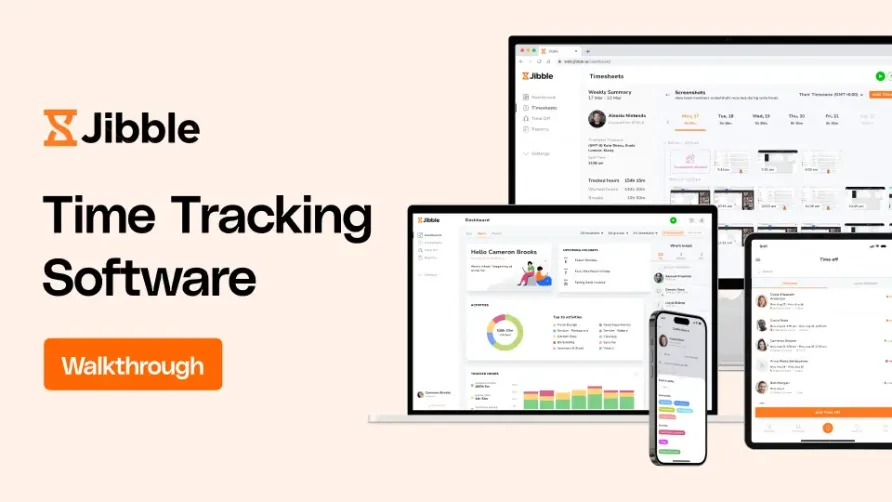
The platform runs across web, mobile, desktop, and shared kiosk devices, giving employees multiple ways to clock in while giving managers a single dashboard to verify everyone's hours. That flexibility is the core of what makes Jibble work. A five-person cleaning crew can use a tablet kiosk at the office. A 30-person construction company can require GPS-verified clock-ins from the field. A remote marketing agency can track hours through Slack without anyone opening a separate app.
Jibble is a product of Jibble Group, which also operates PayrollPanda, a cloud payroll platform popular in Southeast Asia. The company was founded in 2016 by Asim Qureshi, a former VP at Morgan Stanley, alongside co-founders Fawad Akram and Sani Gouw. Headquartered in Palo Alto, California, with operations in Kuala Lumpur, Jibble Group runs as a fully remote company with roughly 67 employees. The platform now claims over 1.3 million users across 150+ countries, and the company reached approximately $7.4 million in annual revenue by mid-2025. That growth trajectory, combined with a venture-backed foundation of around $2.5 million in funding, positions Jibble as a smaller but fast-moving player in a category dominated by much larger companies.
How Jibble Handles Biometric Attendance Verification
Jibble's facial recognition is the feature that gets the most attention, and for good reason. Employees take a selfie when clocking in, and the system matches it against their stored photo using AI-based verification. This happens on mobile devices, through the web app, or at a shared kiosk. The result is a verifiable record that the right person clocked in at the right time, which directly addresses buddy punching without requiring expensive biometric hardware.
GPS tracking adds a second layer. Each clock-in logs the employee's location coordinates, creating an audit trail that managers can review from the dashboard. On paid plans, geofencing restricts clock-ins to designated areas, so a field worker physically has to be at the job site before the system accepts their punch. The free plan includes GPS tracking and two geofenced locations, which covers a single office and one remote site for most small operations.
The kiosk mode deserves its own mention. Any tablet or phone can become a shared time clock, and Jibble supports four clock-in methods on kiosks: facial recognition, NFC tags, speed mode, and basic PIN entry. NFC support, which was expanded in 2025, lets employees tap a physical tag against the device instead of standing for a photo. That's useful in environments where speed matters, like a restaurant during shift changes or a warehouse floor where workers wear gloves. Speed mode uses facial recognition but skips the manual confirmation step, cutting clock-in time to under two seconds per employee. The free plan includes one kiosk instance, while paid plans allow unlimited kiosks across multiple locations. Users managing crews of 20+ employees report that the kiosk handles high-traffic clock-ins without noticeable delays, and the offline capability means the kiosk keeps recording attendance even if the site's internet connection drops temporarily.
The desktop app, which launched with screenshot monitoring capabilities, captures screen images at configurable intervals of 2, 5, or 10 minutes. Screenshots are blurred by default to protect employee privacy, and employees can delete captures they consider sensitive. This is a productivity monitoring tool, not a surveillance system, and the transparency of the blurring approach reflects that positioning.
What Jibble Costs in Practice
The free plan is where most small businesses should start, and many won't need to leave. It includes unlimited users, facial recognition, GPS tracking, basic reporting, kiosk mode, automated timesheets, and two geofenced locations. There are no time limits or hidden usage caps. That's a remarkable amount of functionality at zero cost.
When you do need more, the paid plans are priced lower than most of the category. The Premium plan runs $3.49 per user per month on annual billing, or $4.99 month-to-month. It adds automated overtime calculations, time-off management with accrual policies, advanced reports, unlimited geofences, unlimited work schedules, unlimited kiosk instances, and integrations with payroll and accounting platforms. For a solo user, that's $41.88 per year. A team of 10 on Premium with annual billing costs $418.80 per year, or about $35 per month.
The Ultimate plan at $6.99 per user per month (annual) adds geofence-based automatic clock-in/out, project and client tracking, scheduling, admin permission controls, attendance insight reports, and API access. A 10-person team on Ultimate runs $839.88 annually. The Enterprise tier is custom-priced and includes SSO, a dedicated support manager, and custom integrations. Organizations with more than 500 users receive volume discounts on any paid tier.
One thing to flag: month-to-month pricing on Premium ($4.99) and Ultimate ($9.99) runs about 43% higher than annual rates. That's a steeper annual-vs-monthly gap than you'll find with many platforms, so committing to annual billing makes a real difference here.
What the Day-to-Day Experience Looks Like
The onboarding process walks new accounts through a seven-step setup covering time tracking rules, work schedules, locations with geofencing, activities, and team members. Each feature also includes a guided walkthrough the first time you open it. Users consistently report that getting a new employee onto the system takes about two minutes of explanation, which is fast even by the standards of simple time clocks.
The time tracking policies are a nice touch. Admins choose from flexible, moderate, strict, or custom modes. Flexible lets employees clock in without any verification. Strict requires both facial recognition and geofence compliance. That granularity means the same Jibble account can handle office employees who just need a simple timer and field crews who need GPS-verified attendance, all under one roof.
Timesheets generate automatically based on clock-in and clock-out data, updating in real time. Managers can review, edit, and approve timesheets from the admin dashboard or on mobile. Reports cover tracked hours, attendance, projects, activities, clients, locations, and employee performance. The catch is that reports export only in XLS and CSV formats. There's no direct PDF export, which means an extra manual step if you need formatted reports for client presentations or compliance documentation. That's a small friction point, but a recurring one in user feedback.
The navigation label for configuring time-off policies isn't immediately obvious to new admins. Finding where to set up accrual rules requires some clicking through the settings menu rather than being surfaced in the main navigation. Once you find it, the configuration itself is straightforward, but the initial discovery could be smoother.
Is Jibble the Right Fit for Your Team?
Picture a janitorial company dispatching eight crews to different commercial buildings every evening. Each crew lead needs to verify that workers arrived on site before their shift started, without installing dedicated hardware at every location. Jibble's mobile facial recognition and GPS tracking handle this scenario on the free plan. The crew lead can use their own phone as a kiosk, workers verify with a selfie, and the office manager reviews GPS-stamped timesheets the next morning.
Now picture a mid-size home healthcare agency with 40 caregivers visiting patients across a metro area. Each caregiver needs to clock in at the patient's home, and the agency needs documentation for billing and compliance. Jibble's geofencing on a Premium plan creates virtual boundaries around each patient address, and the GPS trail provides proof of service for billing disputes. The annual cost for 40 caregivers on Premium would be $1,675.20, less than $140 per month for the entire operation.
Where Jibble fits less naturally is in organizations that need deep project billing, resource allocation, or advanced workforce analytics. The project tracking features exist on the Ultimate plan, but they're built for basic hour allocation rather than the kind of granular billable-rate management that professional services firms require. Teams that rely heavily on a specific payroll or HR platform should also check the integration list before committing, because while Jibble covers the major names (QuickBooks, Xero, Deel, Slack, MS Teams), the total library is smaller than what you'd find on more mature platforms.
The Gaps to Know About
Jibble doesn't include shift scheduling as of early 2026, though the company has indicated this feature is coming to the Ultimate plan. For businesses that assign rotating shifts, split shifts, or complex weekly patterns, the absence of a built-in scheduler means relying on a separate tool for that piece of the workflow. Standard work schedules (set days and hours) are supported on paid plans, but dynamic scheduling isn't there yet.
Report customization has limits. You can filter by date range, team members, groups, locations, projects, and clients, but the level of drill-down and visual formatting available doesn't match what larger platforms offer. Users who need polished management reports will likely export the data and format it themselves.
One other area: admin settings changes made through the web dashboard don't always sync to the employee mobile app immediately. A recurring observation among users is that changes like clock-in restrictions sometimes require employees to log out and back in before the new settings take effect. It's not a major issue, but it creates moments of confusion when policies update mid-week.
Recent Development and Product Direction
Jibble's 2025 product development focused heavily on expanding beyond mobile-first tracking. The desktop app brought screenshot monitoring, automatic clock-in/out based on computer wake and sleep states, and offline functionality with auto-sync. The Chrome extension, updated to version 1.5.1 in August 2025, lets users start and stop timers directly from the browser toolbar with keyboard shortcuts.
The kiosk experience also expanded with NFC tag support, adding a tap-to-clock option alongside facial recognition. Two-factor authentication for login was added to address security for accounts managing larger teams. The company's public product roadmap mentions keyboard and mouse activity tracking, IP-based geofencing for the desktop app, and the much-anticipated shift scheduling feature as upcoming priorities.
Our Verdict on Jibble
Jibble delivers an unusual value proposition: biometric attendance verification at no cost, with paid upgrades that remain cheaper than most platforms' entry-level plans. The facial recognition, GPS tracking, and kiosk flexibility give it real teeth as an attendance tool, and the 1.3 million user base with Capterra ratings of 4.8 out of 5 across more than 1,500 reviews confirms that the product delivers on its core promise. The gaps are real but narrow. Reporting could go deeper, the integration library could be wider, and shift scheduling would round out the feature set for businesses with complex staffing patterns. None of those gaps affect the core attendance tracking workflow, which is where Jibble performs strongest. For a team that needs verified attendance data without a large per-user software budget, Jibble is hard to beat on the combination of features and price, and the free plan alone puts it in a category of its own.