
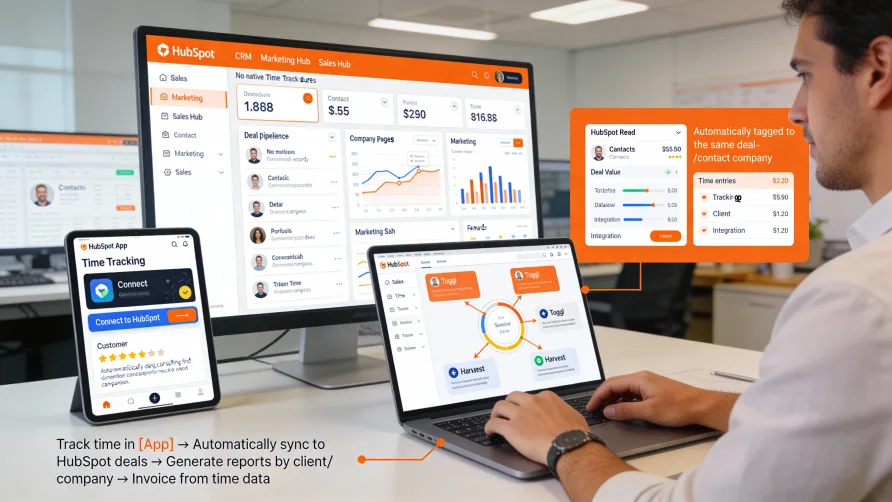
HubSpot does not include built-in time tracking capabilities. The platform focuses on marketing automation, sales enablement, customer service, and CRM functions, but does not provide native features for tracking work hours or managing employee time.
This absence means you cannot track time directly within HubSpot without connecting external applications. However, HubSpot's App Marketplace includes numerous time tracking integrations that bring time tracking functionality into your HubSpot environment, connecting time data with your customer and deal information.
Why HubSpot Doesn't Include Time Tracking
HubSpot built its platform around the inbound marketing methodology and customer relationship management rather than project delivery or workforce management. The core product addresses attracting prospects, nurturing leads, closing deals, and serving customers, not tracking how employees spend their time.
Time tracking represents a different business function than HubSpot's primary focus areas. While agencies and professional services firms using HubSpot often need to track time spent on client work, this functionality falls outside HubSpot's core capabilities.
HubSpot's strategy relies on its App Marketplace ecosystem to extend functionality beyond core marketing, sales, and service features. Rather than building time tracking into the platform, HubSpot enables specialized time tracking providers to integrate with HubSpot data.
This approach lets HubSpot remain focused on its strengths while giving customers flexibility to choose time tracking solutions that match their specific needs and integrate with their HubSpot workflows.
How Do I Track Time in HubSpot?
Time tracking in HubSpot requires integrating a dedicated time tracking application with your HubSpot account. These integrations connect time tracking platforms to HubSpot, letting you track time against HubSpot deals, contacts, companies, or tickets.
The integration process typically involves selecting a time tracking platform, creating an account with that service, and then connecting it to your HubSpot account through the platform's integration settings or through HubSpot's App Marketplace.
Once connected, time tracking apps can access your HubSpot data including deal records, company information, and contact details. This access lets you track time against specific clients or projects represented in HubSpot without manually recreating that information in your time tracking system.
Most integrations work bidirectionally. You track time in the time tracking platform, and that time data can sync back to HubSpot as custom properties or as associated records. This synchronization provides visibility into time investment directly within HubSpot where you manage client relationships.
Some time tracking platforms offer browser extensions that add time tracking buttons to HubSpot's interface. These extensions let you start timers for HubSpot deals or tickets without leaving HubSpot, making time tracking more convenient.
The time tracking data typically lives primarily in the external platform rather than being stored comprehensively in HubSpot. The integration maintains connections between time entries and HubSpot records, but detailed time tracking, reporting, and timesheet management happen in the dedicated time tracking application.
What Time Tracking Integrates With HubSpot?
Several time tracking platforms offer integrations with HubSpot, ranging from simple time logging tools to comprehensive project management platforms with built-in time tracking. The best choice depends on your specific requirements including team size, billing needs, and desired features.
Project-Based Time Tracking Tools
Many project management platforms with time tracking capabilities integrate with HubSpot. These tools serve agencies and professional services firms that need to track client project time alongside their HubSpot-based sales and marketing activities.
These integrations typically connect HubSpot deals with projects in the time tracking platform. When you close a deal in HubSpot, you can create a corresponding project in the time tracking tool, maintaining the connection between the sale and the delivery work.
Team members track time against projects that link back to HubSpot clients. The time data provides visibility into resource allocation, project progress, and time investment per client, complementing the customer relationship data in HubSpot.
Reporting across both systems helps analyze client profitability. You can see revenue data from HubSpot deals alongside time tracking data showing how many hours were required to deliver the work, calculating actual project margins.
Some platforms sync time summaries back to HubSpot as custom properties on deals or companies. This synchronization lets you view time metrics without leaving HubSpot, though detailed time analysis requires accessing the time tracking platform.
Professional Services Automation Platforms
Comprehensive PSA (Professional Services Automation) platforms that include time tracking among broader project delivery features often integrate with HubSpot. These platforms serve professional services organizations that manage the full client lifecycle from sales through project delivery.
PSA integrations connect HubSpot's sales pipeline with project delivery workflows. The integration maintains data continuity as clients move from prospects to active projects, ensuring information captured during sales flows into delivery processes.
These platforms typically include resource management, project planning, and financial management alongside time tracking. The HubSpot integration specifically connects customer and opportunity data, while the PSA handles project execution.
Billing and invoicing capabilities in PSA platforms can incorporate HubSpot deal information. You track time on projects linked to HubSpot clients, then generate invoices that reference the customer data from HubSpot.
The comprehensive nature of PSA platforms means they address needs beyond just time tracking. Organizations choosing these solutions typically need full project delivery management, not just time capture.
Standalone Time Tracking Applications
Simpler time tracking tools focused specifically on hours tracking rather than comprehensive project management also integrate with HubSpot. These applications serve businesses that need time tracking within the HubSpot context but already have other tools for project management.
Standalone integrations typically let you track time against HubSpot deals, companies, or tickets. The time tracking app reads your HubSpot data and lets you associate time entries with appropriate HubSpot records.
These tools emphasize easy time capture with running timers, mobile apps, and simple interfaces for logging hours. The focus is specifically on time tracking rather than broader project or resource management.
Reporting capabilities center on time analysis including hours by client, time by team member, and billable versus non-billable hours. Some tools generate invoices from tracked time for client billing purposes.
Standalone time tracking apps generally cost less and implement faster than comprehensive PSA platforms. They work well when you need time tracking connected to HubSpot but don't require the full suite of project management features.
Benefits of HubSpot-Integrated Time Tracking
Time tracking integrated with HubSpot connects hours worked with customer relationship data. You can analyze time investment per client, understand which types of clients consume the most resources, or correlate time spent with deal value.
The integration eliminates duplicate data entry. Client information from HubSpot flows into your time tracking system, so you don't recreate customer records or manually enter contact details into separate time tracking applications.
Unified reporting provides visibility across sales and delivery. You can analyze metrics spanning the full client lifecycle from deal close through project completion, understanding both revenue and resource costs.
For agencies and professional services firms, the connection between CRM and project delivery maintains continuity in your business processes. Sales data in HubSpot connects to project execution in time tracking tools without information gaps.
Team members working in both systems can see relevant information in their primary interface. Sales teams see time summaries in HubSpot, while project teams access full time tracking in dedicated tools designed for that purpose.
Limitations of HubSpot Time Tracking Integrations
Time tracking integrations add costs beyond your HubSpot subscription. Most time tracking platforms charge separately per user, increasing your total software expenses.
Integration depth varies significantly by platform. Some integrations provide robust bidirectional syncing and deep connections to HubSpot data, while others offer limited integration that may not meet all your workflow needs.
Setup complexity depends on the specific integration. Some connect easily through pre-built integrations available in HubSpot's App Marketplace, while others require custom API work or professional services to implement properly.
HubSpot's data model may not perfectly align with your time tracking needs. The integration must map time tracking concepts like projects or tasks to HubSpot objects like deals or companies, which may require workarounds for complex workflows.
Reporting across both systems can be challenging. While some integrations sync data bidirectionally, creating unified reports spanning HubSpot and time tracking data may require exporting to spreadsheets or using third-party business intelligence tools.
Choosing a Time Tracking Solution for HubSpot
Start by defining your time tracking requirements. Do you need project management features alongside time tracking? Will you bill clients based on hours? Do you need resource scheduling? Understanding your needs helps identify appropriate solutions.
Evaluate integration capabilities specifically. Verify that time tracking platforms you're considering offer HubSpot integration and understand what data syncs between systems. Some integrations are more comprehensive than others.
Consider your primary use case for time tracking. If you're tracking billable hours for client invoicing, prioritize tools with strong billing features. If you need time data for payroll, ensure proper timesheet and approval workflows exist.
Review user experience in both systems. Time tracking tools should be convenient for daily use, while HubSpot visibility should provide adequate insight without requiring constant switching between platforms.
Calculate total costs including both the time tracking platform subscription and any HubSpot API or integration fees. Some integrations consume HubSpot API limits, which may affect other integrations if you're close to limits.
Implementation Considerations
Implementing time tracking integrated with HubSpot requires accounts with both platforms. You'll need appropriate HubSpot permissions to authorize the integration and administrative access in your time tracking tool to configure the connection.
Data mapping decisions determine how time tracking information relates to HubSpot objects. Decide whether time tracks against deals, companies, contacts, or custom objects, and configure the integration accordingly.
Existing HubSpot customizations may affect integration compatibility. Custom properties, fields, or objects in your HubSpot account need consideration when setting up time tracking connections.
Training spans both platforms. Users need to understand how to track time in the dedicated tool and how that time data appears in HubSpot if you're syncing information back.
Historical data migration requires planning if you're moving from another time tracking system. Determine whether importing historical time data is necessary and how it will connect to existing HubSpot records.
Getting Started With HubSpot Time Tracking
Define your specific time tracking requirements including features you need, team size, and how you'll use time data. This clarity helps narrow your options among available integrations.
Research time tracking platforms that integrate with HubSpot. Browse HubSpot's App Marketplace, review integration documentation, and read customer reviews to identify promising options.
Test integrations before committing. Most time tracking platforms offer free trials, letting you evaluate functionality and integration quality before purchasing.
Involve actual users in the evaluation process. Have team members test time tracking workflows to ensure the platform and integration work well for people who will use them daily.
Plan your implementation including data mapping decisions, training requirements, and rollout timeline. Phased rollout starting with a pilot group helps identify issues before organization-wide deployment.
Establish time tracking policies covering when to track time, what level of detail to include, and how time data will be used. Clear expectations improve compliance and data quality.
Configure integration settings to sync appropriate data between systems. Balance the desire for information visibility against API consumption and system performance.
Monitor the integration after launch to ensure data syncs correctly and users aren't experiencing issues. Address problems quickly to maintain confidence in the integrated systems.
Review time tracking data regularly to ensure you're gaining value from the integration. Adjust processes or integration configuration if the data isn't supporting your decision-making needs.
Alternative Approaches
Some businesses find that maintaining separate systems for CRM and time tracking works better than integration. If the connection between client relationships and time tracking isn't critical for your workflows, standalone systems may be simpler.
For agencies with light time tracking needs, manual processes tracking time in spreadsheets may suffice despite lacking integration. This low-tech approach avoids additional software costs though it sacrifices automation and integration benefits.
Organizations using HubSpot primarily for marketing rather than client relationship management may find time tracking integration less valuable. If your HubSpot usage doesn't center on managing active client relationships, the connection to time tracking provides less benefit.
Businesses with complex time tracking requirements may need specialized workforce management platforms that don't integrate with HubSpot. In these cases, you maintain separate systems for distinct business functions rather than forcing integration that doesn't serve real needs.
The right approach depends on your specific business model, how you use HubSpot, and what role time tracking plays in your operations. Integration makes sense when connecting client relationship data with time tracking provides operational value or business insights, but it's not universally necessary for every HubSpot user who tracks time.