
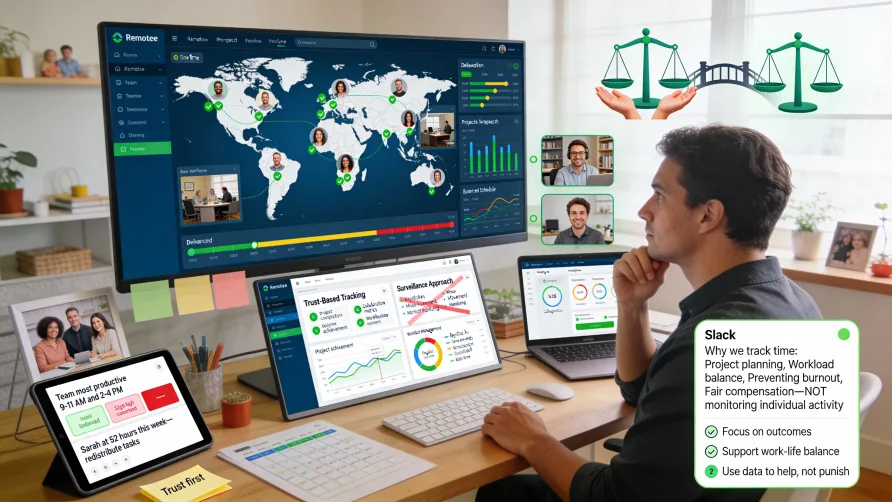
Managing remote teams creates unique challenges that don't exist with co-located workers. You can't observe who's working on what by walking through an office, team members span different time zones making real-time collaboration difficult, and the informal awareness of team activity that comes from physical proximity disappears entirely when everyone works from different locations.
Time tracking provides one tool to help address these remote management challenges by creating visibility into work patterns, project progress, and team capacity without requiring physical presence. However, implementing time tracking for remote teams requires careful attention to trust, autonomy, and privacy concerns that are more sensitive in remote contexts than traditional office environments.
Is Time Tracking Necessary for Remote Workers?
The question of whether remote teams need time tracking generates strong opinions. Some argue time tracking is essential for accountability when workers aren't physically visible, while others contend it represents distrust that undermines remote work culture.
Arguments for Remote Time Tracking
Visibility into work patterns helps managers understand what team members are working on without physically seeing them. When you can't observe activity directly, time tracking provides data about work distribution and focus.
Project progress monitoring becomes more challenging remotely. Time tracking shows whether team members are making expected progress on committed work, helping identify blocked tasks or resource constraints before they become critical problems.
Workload balancing requires understanding how team members allocate time across projects. Remote managers can't see when someone stays late to handle excess work or when someone finishes tasks with time to spare, making time data valuable for capacity planning.
Preventing burnout in remote contexts needs visibility into work patterns. Time tracking can reveal when team members work excessive hours, evenings, or weekends, allowing managers to intervene before burnout occurs.
Client billing requirements for professional services demand accurate time records. Agencies, consultancies, and similar businesses billing clients hourly need time tracking regardless of work location.
Arguments Against Remote Time Tracking
Trust and autonomy represent fundamental remote work values. Remote work arrangements often emphasize outcomes over hours, and time tracking can feel like surveillance that contradicts this philosophy.
Focus on deliverables rather than hours aligns with remote work culture. Many remote advocates argue that what matters is completing high-quality work, not how many hours were logged.
Privacy concerns increase in remote contexts. When people work from home, time tracking can feel more invasive than in office environments where the line between work and personal life is clearer.
Potential for misuse exists when managers treat time tracking as a surveillance tool. Activity monitoring, screenshot capture, and similar features can create toxic environments that damage trust.
Finding the Right Balance
The decision about time tracking for remote teams should consider your specific context including team maturity, business requirements, work type, and organizational culture.
Teams working on client projects with billable hours need time tracking regardless of location. The business requirement for accurate billing supersedes cultural preferences.
Organizations with mature remote cultures often find outcome-focused management without time tracking works well. When teams have established trust and clear deliverables, hour tracking adds limited value.
Newly remote teams or organizations transitioning to remote work might benefit from time tracking as they build remote management capabilities. The visibility helps managers adjust to not having physical presence.
Hybrid approaches work for many organizations. Light time tracking focused on project progress and workload management without surveillance features balances accountability with autonomy.
How Do You Manage Time for Remote Teams?
If you implement time tracking for remote team management, focus on approaches that provide useful information without creating oppressive surveillance environments.
Time Tracking for Visibility, Not Surveillance
Frame time tracking as a tool for understanding work patterns and supporting team members rather than as a monitoring or accountability mechanism.
Focus on aggregate patterns rather than minute-by-minute tracking. Understanding that someone spent substantial time on a particular project this week matters more than knowing exactly when they were working each day.
Use time data to identify problems, not punish people. When time tracking reveals someone working excessive hours, the response should be reducing their workload, not questioning their efficiency.
Avoid surveillance features like screenshot capture, keystroke logging, or excessive activity monitoring. These features create hostile environments that damage trust and culture.
Communicate openly about why you're tracking time and how the data will be used. Transparency about time tracking purposes reduces concerns about hidden monitoring.
Project and Task Time Tracking
Track time at the project and task level rather than just total hours. This granularity provides insights about work distribution and project progress.
Project-level time shows how team members allocate capacity across different initiatives. Understanding whether someone spends 80% of their time on Project A or splits time evenly across three projects helps with workload management.
Task-level time reveals what types of work consume capacity. If developers spend most of their time fixing bugs rather than building features, that pattern suggests process issues.
Sprint or milestone progress becomes visible through time tracking. Comparing actual time against estimates helps predict whether teams will complete committed work on schedule.
Client or customer time allocation matters for professional services teams. Understanding which clients consume the most team capacity helps with relationship management and pricing decisions.
Asynchronous Time Tracking
Remote teams often work asynchronously across time zones. Time tracking approaches need to accommodate asynchronous work patterns rather than assuming synchronized schedules.
Flexible time entry lets team members log time when convenient for them rather than requiring real-time tracking. Some people prefer daily time logging while others batch time entry weekly.
Focus on time summaries rather than timestamps. What matters is that someone spent six hours on a project this week, not exactly when during the week they did the work.
Respect different time zones and work schedules. Don't expect everyone to work the same hours or start time tracking at the same time each day.
Support varied work patterns including split shifts, non-standard hours, or flexible scheduling. Remote work enables flexibility, and time tracking shouldn't undermine that benefit.
Workload and Capacity Management
Time tracking helps distributed team managers understand who's overloaded, who has capacity, and how to balance work across the team.
Compare time logged against available capacity to identify overwork. If someone consistently logs 50+ hour weeks, they're overloaded regardless of whether they complete all assigned tasks.
Understand time distribution across team members. If some people consistently work evenings or weekends while others maintain standard schedules, investigate whether workload distribution is equitable.
Identify idle capacity that could be redirected. When someone finishes assigned work with time remaining, they can take on additional tasks or help teammates who are struggling.
Plan future work allocation based on current capacity utilization. Understanding who has availability helps assign new work appropriately rather than defaulting to the same people repeatedly.
Communication and Context
Time tracking data needs context from communication and collaboration to be meaningful. Numbers alone don't tell the complete story.
Combine time data with regular check-ins and updates. Time tracking shows what team members are working on, but conversations provide context about progress, blockers, and challenges.
Use time patterns as conversation starters rather than conclusions. If someone's time tracking reveals unusual patterns, ask questions to understand what's happening rather than jumping to conclusions.
Encourage team members to add context to time entries. Brief descriptions about what was accomplished provide valuable information beyond just hours logged.
Respect privacy boundaries. Time tracking for work hours doesn't entitle managers to know everything about how people spend their time or manage their personal lives.
Benefits of Time Tracking for Remote Management
When implemented thoughtfully, time tracking provides several specific benefits for managing distributed teams.
Reduced Need for Status Meetings
Time tracking reduces the need for frequent status meetings by providing passive visibility into work activity.
Managers can see what team members are working on through time tracking data rather than requiring everyone to report status synchronously. This asynchronous visibility respects people's time and focus.
Stand-up meetings can be shorter or less frequent when time tracking provides baseline visibility. Focus precious synchronous time on problem-solving rather than status reporting.
Transparency about work allocation reduces the "what are people working on" questions that drive excessive meeting schedules. When managers have visibility through time tracking, they need fewer meetings to understand team activity.
Workload Balance Across Time Zones
Distributed teams spanning multiple time zones face challenges with workload distribution. Time tracking helps ensure work is balanced fairly across regions.
Visibility into hours worked across time zones reveals whether certain regions are overloaded while others have capacity. This insight helps rebalance work distribution.
Understanding when people work helps with meeting scheduling. Time tracking shows team members' typical work hours, helping schedule meetings at times that work for everyone.
Preventing timezone-related burnout becomes possible when you can see whether people in certain regions consistently work outside their preferred hours to accommodate other time zones.
Data-Driven Resource Allocation
Time tracking provides objective data for resource allocation decisions rather than relying on intuition or political factors.
Project time investment reveals which initiatives consume the most capacity. This information helps prioritize work and allocate resources appropriately.
Comparing estimated versus actual time improves future planning. Historical time data makes estimates more accurate and helps set realistic expectations.
Identifying skill or capacity gaps becomes possible through time analysis. If projects consistently take longer than expected because specific skills are scarce, time data highlights the need for hiring or training.
Early Problem Detection
Time tracking patterns can reveal problems before they become critical, giving managers opportunity to intervene early.
Excessive hours worked signal potential burnout risk. When time tracking shows someone working unsustainable hours, managers can redistribute work before exhaustion sets in.
Insufficient time on priority work suggests misaligned priorities. If someone logs minimal time on high-priority projects, investigate whether blockers exist or if priorities need clarification.
Unexpected time investment in certain areas might indicate scope creep, technical challenges, or process inefficiencies. Time patterns that deviate from expectations warrant investigation.
Declining logged hours could indicate disengagement, technical problems, or personal challenges. Unusual changes in time tracking patterns provide early warning signs.
Best Practices for Remote Time Tracking
Implementing time tracking for remote teams works best when following practices that balance accountability with trust and autonomy.
Lead With Trust
Establish trust as the foundation for your remote time tracking implementation. Frame time tracking as a tool for supporting the team rather than as a surveillance mechanism.
Assume good faith from team members. Treat time tracking as shared information that helps everyone work better rather than as a way to catch people not working.
Focus conversations on outcomes and challenges rather than hours logged. Use time data to understand how to support team members, not to question their dedication.
Give team members benefit of the doubt when time patterns seem unusual. Approach unusual patterns with curiosity and support rather than suspicion or judgment.
Keep Time Tracking Lightweight
Minimize the overhead of time tracking so it doesn't become a burden that outweighs its benefits.
Use simple time tracking tools with minimal required fields. The easier time tracking is, the more consistently team members will do it.
Don't require excessive detail in time entries. Basic information about what project or task someone worked on suffices for most management purposes.
Allow flexibility in when and how people track time. Some people prefer real-time tracking while others prefer daily or weekly batch entry.
Avoid surveillance features that create anxiety or resentment. Screenshot capture, activity monitoring, or keystroke tracking damages culture more than helps management.
Use Time Data to Support Team Members
Focus on using time tracking data to help team members succeed rather than to catch problems or assign blame.
Identify overwork early and redistribute workload. When time tracking shows someone is struggling, help them rather than questioning their efficiency.
Celebrate wins and progress visible in time data. If time tracking shows a team member made exceptional progress on a challenging project, acknowledge their effort.
Use time patterns to identify when team members need additional resources, training, or support. Time data helps understand what challenges people face.
Remove blockers revealed through time tracking. If someone logs minimal time on a project because they're waiting on dependencies, help clear the blockage.
Establish Clear Expectations
Set clear expectations about time tracking requirements, how data will be used, and what's considered acceptable.
Communicate what time should be tracked. Clarify whether you expect tracking of all work time, just billable time, or only project time.
Explain how time data will be used and who will see it. Transparency about data usage reduces anxiety about time tracking.
Define expectations for tracking frequency and accuracy. Let people know whether you expect daily entry, whether estimates are acceptable, or if precise tracking is required.
Clarify that time tracking is about work patterns, not performance evaluation. Separate time tracking from performance reviews to reduce stress about logging time.
Review and Adjust Regularly
Periodically review your remote time tracking approach and adjust based on team feedback and actual value derived from the data.
Ask team members how time tracking feels. If it creates anxiety or resentment, investigate why and adjust your approach.
Assess whether time tracking data actually informs decisions. If you require time tracking but never use the data, stop requiring it.
Adjust granularity or requirements based on what's actually useful. You might discover you need more or less detail than your initial implementation provided.
Be willing to stop time tracking if it's not providing value. Time tracking isn't universally necessary, and abandoning it when it doesn't help is better than continuing out of inertia.
Common Mistakes to Avoid
Several common mistakes undermine effective time tracking for remote team management.
Using time tracking as a surveillance tool damages trust and creates toxic culture. Focus on outcomes and support, not monitoring and control.
Treating hours logged as a proxy for productivity creates perverse incentives. What matters is results, not time spent, and conflating the two drives counterproductive behavior.
Not communicating about time tracking purposes leaves team members uncertain about why they're tracking time and how data will be used.
Requiring excessive detail or rigid time tracking processes creates burden that reduces compliance and creates resentment.
Using time data punitively rather than supportively destroys trust. Time tracking that's used to assign blame rather than solve problems damages team dynamics.
Implementing time tracking without business justification wastes everyone's time. Track time only when you have genuine use for the data.
Getting Started With Remote Time Tracking
If you're implementing time tracking for your remote team, start thoughtfully with clear communication and gradual rollout.
Clarify why you're implementing time tracking and how it will benefit both management and team members. Honest communication about purposes and benefits reduces resistance.
Select time tracking tools designed for remote teams with features like mobile apps, flexible time entry, and focus on high-level visibility rather than surveillance.
Start with optional or pilot implementation before requiring time tracking across the entire team. Learn what works and adjust before broad rollout.
Establish clear policies about what to track, how frequently, and what detail is required. Document expectations so everyone understands requirements.
Communicate regularly about how time tracking data is being used and what insights it's providing. Transparency about data usage builds trust in the process.
Gather feedback from team members about their time tracking experience. Adjust your approach based on what works well and what creates friction.
Review time tracking effectiveness periodically. Assess whether the benefits justify the overhead and whether you're using time data appropriately to support your team.
Focus on creating a remote time tracking approach that provides necessary visibility for management while respecting the autonomy and trust that make remote work successful. The goal is better team management, not maximum oversight.