
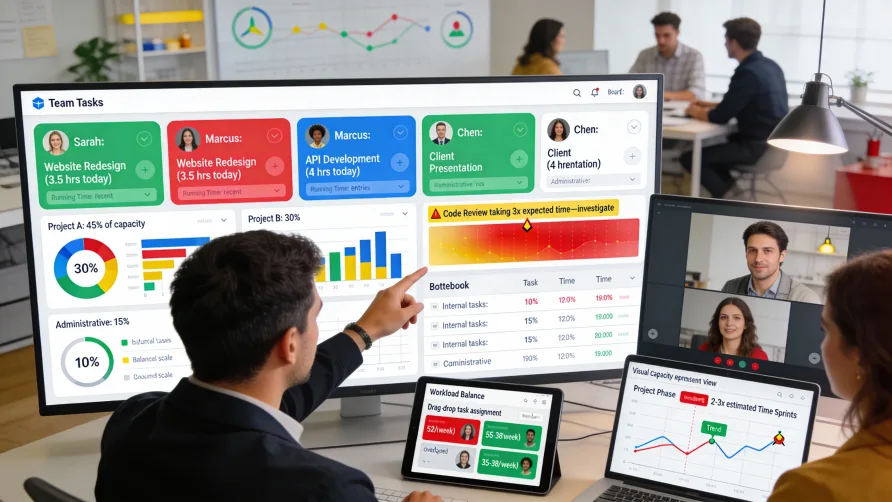
Managing teams without visibility into what everyone is working on creates significant challenges. You can't balance workload effectively when you don't know how people allocate their time, bottlenecks persist longer when they're invisible, and resource allocation decisions rely on guesswork rather than data.
Time tracking creates workflow visibility by documenting how team members spend their time, what projects consume capacity, and where work moves smoothly versus where it stalls. This transparency enables proactive management based on actual work patterns rather than reactive responses to problems that have already become critical.
How Does Time Tracking Improve Visibility?
Time tracking transforms invisible work into documented data that managers can observe, analyze, and act upon.
From Invisible to Visible Work
Knowledge work is inherently invisible compared to physical production. You can see manufactured goods accumulating on a factory floor, but you can't see progress on software development, creative work, or professional services the same way.
Time tracking creates visibility into invisible work by documenting activity. When team members log time on tasks and projects, that activity becomes observable data rather than hidden effort.
Real-time visibility shows current work allocation. Instead of waiting for status meetings or updates, managers can see what team members are currently focused on through recent time entries.
Historical visibility reveals patterns over time. Looking back at time tracking data shows how work has been distributed, which projects have consumed the most capacity, and how allocation has changed.
Work Distribution Transparency
Time tracking shows how capacity distributes across different activities, revealing whether resource allocation matches priorities and expectations.
Project time allocation becomes visible. Rather than guessing how much team capacity goes to different projects, time tracking shows exact distribution. If you thought Project A was the team's main focus but time tracking shows it receives only 20% of capacity, that's valuable information.
Task-level granularity shows what types of work consume time. Understanding how much time goes to development versus testing, creative work versus revisions, or new features versus bug fixes informs process decisions.
Client or customer time allocation matters for professional services. Time tracking reveals which clients consume the most team capacity, informing relationship management and pricing decisions.
Internal versus billable time ratios affect profitability. Understanding how much capacity goes to client work versus internal projects, business development, or administration helps optimize resource use.
Workload Visibility Across Team Members
Time tracking reveals how work distributes across individuals, making workload imbalances visible before they cause burnout or missed deadlines.
Total hours worked per team member shows who's overloaded. When someone consistently logs 50+ hour weeks while others maintain 35-40 hours, workload distribution needs adjustment.
Project assignment transparency shows how many projects each person juggles. Tracking time across multiple projects reveals whether some team members split attention across too many initiatives.
Work type distribution by person might reveal specialization or constraints. If only one person logs time on certain work types, you've identified knowledge concentration that creates risk.
Capacity utilization helps identify who has bandwidth for additional work. Understanding who's fully utilized versus who finishes assigned work with time remaining guides new task assignment.
How Do You Track Team Workflow?
Implementing time tracking for workflow visibility requires focusing on information that illuminates work patterns and enables management decisions.
Project and Task-Level Tracking
Track time at a granularity that provides useful insight without creating excessive overhead.
Project-level time shows capacity allocation across major initiatives. This high-level view reveals whether resource distribution matches strategic priorities.
Task-level time within projects provides detail about work composition. Understanding what types of tasks consume time helps identify inefficiencies or process problems.
Milestone or phase tracking shows progress through project lifecycle. Comparing time spent in different phases reveals whether projects move smoothly or stall in certain stages.
Workflow stage tracking illuminates where work spends time. If your workflow includes stages like planning, execution, review, and deployment, time in each stage shows where bottlenecks occur.
Status and Context Capture
Beyond just duration, capture context that helps interpret time data.
Work status when tracking time provides additional information. Knowing whether tracked time represents active work, waiting time, or rework affects how you interpret the data.
Blockers or dependencies noted with time entries explain why work takes longer than expected. If someone logs time but notes they were blocked waiting for information, that context is valuable.
Description fields clarify what was accomplished during tracked time. Brief notes about what work occurred make time data more meaningful when reviewed later.
Tags or categories enable flexible analysis. Tagging time entries with attributes like client, department, work type, or priority enables various analytical views.
Real-Time Versus Historical Tracking
Different visibility needs require different time tracking approaches.
Real-time tracking shows current activity. Some time tracking systems display who's currently working on what, providing immediate visibility into team focus.
Daily summaries show what happened today. End-of-day views of time logged reveal how the team spent capacity without waiting for longer reporting periods.
Weekly or sprint summaries aggregate time for planning periods. Understanding capacity consumption for the week or sprint helps with short-term management.
Historical analysis shows trends over months or quarters. Longer-term patterns reveal strategic resource allocation and capacity trends.
Creating Actionable Workflow Visibility
Raw time tracking data only provides value when transformed into actionable insights that inform management decisions.
Dashboard Design for Visibility
Effective dashboards translate time tracking data into clear visualizations that highlight key information.
Team workload views show current capacity utilization across team members. Visual indicators like capacity bars or color-coding make overload or idle capacity immediately apparent.
Project time summaries display total investment per project. Charts showing hours by project reveal where capacity is going and whether it matches expectations.
Time trends over periods show how allocation changes. Line graphs of project time over weeks show whether projects are ramping up, winding down, or stable.
Exception highlighting draws attention to anomalies. Dashboards that flag unusual patterns like excessive hours, missed time entries, or unexpected project time help managers focus on issues.
Real-time updates keep dashboards current. Dashboards that refresh automatically show current work allocation rather than outdated snapshots.
Workload Balancing
Time tracking visibility enables proactive workload management rather than reactive crisis response.
Comparing planned versus actual time reveals whether assignments match capacity. If someone was assigned 20 hours of work but logged 35 hours, assignments exceeded capacity.
Identifying overload before burnout occurs. When time tracking shows someone working unsustainable hours, managers can redistribute work before the situation becomes critical.
Finding available capacity for new work. Understanding who has bandwidth helps assign new tasks to people with capacity rather than defaulting to overloaded team members.
Addressing chronic imbalances in work distribution. Time tracking might reveal some team members consistently receive more work than others, enabling corrective action.
Bottleneck Identification
Workflow visibility helps identify where work gets stuck or slows down.
Time spent in workflow stages reveals bottlenecks. If tasks consistently spend days in review while moving through other stages quickly, review is a bottleneck.
Waiting time tracked separately from active work shows dependency problems. Understanding how much time is spent waiting versus working highlights coordination issues.
Revision and rework time indicates quality or communication problems. Excessive time spent on revisions suggests unclear requirements, quality issues, or misaligned expectations.
Sequential dependencies that slow work become visible. Time tracking shows when tasks wait for other tasks to complete, revealing dependency chains that could be optimized.
Resource Allocation Decisions
Time tracking data informs strategic decisions about where to focus team capacity.
Comparing project value against time invested helps prioritize. If low-value projects consume disproportionate time, reallocation might be warranted.
Understanding true cost of initiatives requires knowing time investment. Time tracking reveals what projects actually cost in labor, informing build-versus-buy and prioritization decisions.
Identifying understaffed areas through time analysis. When projects consistently take longer than expected despite team effort, it suggests insufficient capacity allocation.
Capacity planning for future work uses historical data. Understanding how much time similar work required in the past improves estimates for future planning.
Benefits of Workflow Visibility
Implementing time tracking for visibility provides several specific benefits beyond just knowing what people are working on.
Faster Problem Detection
Visibility enables identifying problems early when they're easier to solve.
Project delays become apparent before deadlines. When time tracking shows insufficient progress relative to remaining time, you can intervene before missing deadlines.
Scope creep reveals itself through time data. When projects consume more time than budgeted without corresponding value delivery, scope has likely expanded.
Team capacity constraints surface through utilization data. When multiple team members consistently work at or above capacity, you need more resources or fewer commitments.
Process inefficiencies show up in time patterns. Repetitive time sinks, excessive rework, or surprising time consumption patterns indicate process problems worth investigating.
Improved Planning Accuracy
Historical time data improves future estimates and plans.
Estimates based on actual past performance are more accurate than guesses. When you know how long similar work actually took, future estimates improve.
Capacity planning uses real utilization data. Understanding typical team capacity consumption helps set realistic commitments for future work.
Buffer and contingency sizing informed by variance analysis. Historical data showing typical variance between estimates and actuals helps size appropriate buffers.
Project timelines based on real throughput rates. Knowing how quickly your team actually completes work informs realistic project schedules.
Data-Driven Decisions
Visibility transforms management from intuition-based to data-informed.
Resource allocation backed by actual time investment data. Decisions about where to focus capacity rely on facts about current allocation rather than perceptions.
Process changes justified by time analysis. When proposing workflow changes, time data shows which problems are worth solving and validates improvements.
Performance discussions grounded in objective data. Rather than subjective impressions, conversations about productivity and output can reference actual time and completion data.
Strategic prioritization informed by capacity realities. Understanding capacity constraints and current commitments helps make realistic strategic choices.
Accountability and Transparency
Visibility creates healthy accountability when implemented with the right culture.
Team members see how their work fits into larger efforts. Time tracking shows individuals how their contributions support team goals and projects.
Managers have objective basis for understanding team activity. Rather than wondering what people are working on, managers can see allocation and make informed decisions.
Cross-functional visibility improves coordination. When different teams can see each other's capacity and commitments, coordination improves.
Stakeholder communication supported by data. Reporting to leadership or clients about project status and resource allocation becomes easier with time tracking data.
Best Practices for Workflow Visibility
Implementing time tracking for visibility works best when following practices that maximize useful information while minimizing burden.
Focus on Patterns, Not Policing
Use time tracking to understand workflow patterns and support team members rather than to monitor individuals.
Analyze aggregate data more than individual entries. Team-level and project-level patterns provide more actionable insights than individual time entry scrutiny.
Look for systemic issues rather than individual blame. When time tracking reveals problems, investigate root causes and processes rather than questioning individuals.
Use time data to remove obstacles for team members. When tracking shows someone is blocked or struggling, help them rather than criticizing low productivity.
Celebrate wins visible in time data. When tracking shows exceptional progress or efficient work, acknowledge the achievement.
Keep Tracking Lightweight
Minimize time tracking overhead so it doesn't become a burden that outweighs benefits.
Track at appropriate granularity for your needs. Project-level tracking may suffice if you don't need task-level detail.
Don't require excessive detail in time entries. Basic descriptions of what work occurred provide adequate context for most purposes.
Allow flexible tracking approaches. Some people prefer real-time tracking while others prefer batch entry—accommodate different preferences.
Automate where possible. Integration with project management tools, calendar systems, or other work tools can reduce manual time entry.
Create Useful Dashboards
Design dashboards that provide actionable information at a glance.
Target dashboards to specific audiences. Individual contributors, team leads, and executives need different views of time tracking data.
Highlight actionable information. Dashboards should surface issues requiring attention rather than just displaying data.
Update dashboards frequently enough to be current. Stale dashboards undermine confidence and usefulness.
Make dashboards accessible. Time tracking visibility only helps if stakeholders can easily access relevant dashboards.
Act on Insights
Time tracking only provides value when visibility leads to action.
Define clear processes for responding to visibility insights. When dashboards reveal problems, establish who should respond and how.
Review time tracking data regularly with established cadence. Weekly or biweekly reviews ensure visibility translates to management action.
Close feedback loops by acting on time tracking insights. Teams lose motivation to track time accurately when data never influences decisions.
Communicate actions taken based on time data. When time tracking reveals problems that you address, let the team know their time tracking enabled the improvement.
Balance Transparency With Privacy
Provide visibility that supports work without creating surveillance culture.
Share team-level and project-level data broadly. Aggregate visibility helps everyone understand team focus and priorities.
Restrict individual-level detail to managers. Not everyone needs to see exactly how individuals spend their time.
Use time data for support, not evaluation. Keep time tracking separate from performance reviews to avoid creating anxiety.
Be transparent about what visibility exists and why. When team members understand what managers can see and why that visibility exists, trust remains intact.
Common Pitfalls to Avoid
Several common mistakes undermine effective use of time tracking for workflow visibility.
Collecting time data but never analyzing it wastes everyone's effort. If you require time tracking but don't use the data, stop requiring it.
Creating excessively complex time tracking systems reduces compliance. The more complicated tracking becomes, the less consistently team members do it.
Using time tracking for performance evaluation damages trust. Time tracking should inform workflow management, not individual performance reviews.
Focusing on hours worked rather than outcomes. Visibility into hours is less valuable than visibility into progress and completion.
Not acting on problems revealed by time tracking. When visibility shows issues but nothing changes, team members lose faith in the process.
Implementing time tracking without clear purpose. Track time to answer specific questions or support particular decisions, not just because you can.
Getting Started
Organizations wanting to improve workflow visibility through time tracking should start with clear objectives.
Define what visibility you need and why. Clarify what questions time tracking should answer before implementing it.
Start with high-level tracking before adding detail. Project-level tracking might provide adequate visibility before investing in task-level granularity.
Create dashboards for key visibility needs before going live. Having useful dashboards ready encourages actually using time tracking data.
Train team members on the purpose and benefits of time tracking for visibility. When people understand why they're tracking time, compliance improves.
Review time tracking data regularly from day one. Establish the habit of using time data for management decisions immediately.
Iterate based on what proves useful. Add granularity or detail where it provides value, eliminate tracking that doesn't inform decisions.
Measure whether visibility improves outcomes. Assess whether time tracking actually helps with better workload balance, faster problem detection, or improved planning.
Time tracking transforms invisible knowledge work into visible data that supports proactive team management. The key is implementing tracking focused on actionable visibility rather than surveillance, and actually using the insights for better team support and workflow optimization.