
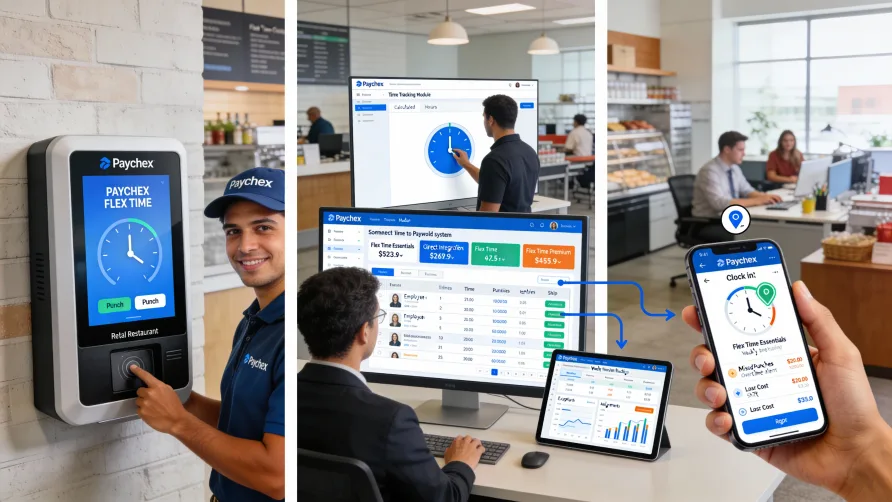
Yes, Paychex offers time tracking and attendance management through Paychex Flex Time, a component of its broader Paychex Flex platform. The system provides multiple ways for employees to record their hours and integrates directly with Paychex payroll services to automate the transfer of time data into payroll processing.
For businesses already using Paychex for payroll, adding time tracking means employee hours flow automatically into your payroll system without manual entry, spreadsheet uploads, or data reconciliation between separate platforms.
Paychex Flex Time Overview
Paychex Flex Time is the company's time and attendance solution designed to work within the Paychex Flex ecosystem. This integrated system captures employee clock-ins and clock-outs, tracks hours worked, applies overtime calculations, and monitors attendance patterns across your workforce.
The platform handles various time entry scenarios including regular shifts, overtime hours, different pay rates for different work types, and time off requests. For businesses with multiple locations or departments, the system can track hours separately for each work site while consolidating data for company-wide reporting.
Managers access time and attendance data through the same Paychex Flex dashboard they use for other HR functions. This unified interface means you don't switch between different systems to review timesheets, check schedules, or approve hours before payroll runs.
The time tracking system applies your configured business rules automatically. If you have specific overtime thresholds, meal break requirements, or shift differential calculations, Paychex Flex Time enforces these policies as employees record their hours.
Does Paychex Have a Time Clock?
Yes, Paychex provides multiple time clock options to accommodate different work environments and employee situations. You can choose the clock-in methods that match how and where your employees work.
The web-based time clock lets employees record hours from any computer with internet access. Employees log into the Paychex Flex portal and clock in through their browser, which works well for office workers or anyone with computer access during their shift.
Physical time clock terminals are available for businesses that need dedicated hardware. These terminals can be mounted in common areas like break rooms or near facility entrances. Employees clock in using methods like badge swipes, PIN codes, or biometric verification depending on the hardware model you choose.
Paychex also offers kiosk solutions that convert tablets into shared time clocks. A tablet-based kiosk costs less than dedicated time clock hardware while still providing a centralized clocking location for employees. The kiosk runs the Paychex time clock application and supports multiple identification methods to verify employee identity at clock-in.
Each clock-in method records the same core data including employee identification, timestamp, and any required attestations or job codes. You can mix different clock-in methods across your organization, using physical terminals at manufacturing facilities while office employees use the web clock.
Paychex Mobile Time Clock
The Paychex Flex mobile app turns employee smartphones into portable time clocks. Workers can clock in and out directly from the app regardless of their location, which solves time tracking challenges for remote employees, field service technicians, or sales teams who work off-site.
Mobile time tracking includes GPS verification to capture employee location at clock-in. You can review where employees were when they recorded their hours, which helps verify that field workers are at assigned job sites. Some businesses use this feature to ensure remote employees are clocking in from approved work locations.
The app supports photo verification at clock-in, adding another layer of identity confirmation for remote time tracking. When enabled, employees take a selfie as part of the clock-in process, helping prevent situations where someone records hours for another employee.
Beyond basic time tracking, the mobile app gives employees access to their schedules, time off balances, and timesheet history. They can submit time off requests, view approved hours, and receive notifications about schedule changes or upcoming shifts without needing to access a computer.
How Does Paychex Time and Attendance Work?
Paychex time and attendance captures employee hours as they occur throughout each workday. When an employee clocks in using any approved method, the system records the timestamp and associates it with that employee's profile.
As employees work their shifts, the system tracks total hours in real-time. Managers can view who's currently clocked in, monitor hours worked so far during the pay period, and identify employees approaching overtime thresholds before they exceed standard hour limits.
The platform applies your configured pay rules during time calculation. If different employees earn different rates, qualify for shift differentials, or have unique overtime rules, the system applies the correct calculations based on each employee's profile and the hours they worked.
Timesheet approval workflows route completed timesheets to designated managers for review. Managers see flagged exceptions like missed clock-outs, early departures, or unscheduled absences that need attention before approving hours. This review step catches errors before data moves to payroll.
Once managers approve timesheets, the hours transfer automatically into the Paychex payroll system. The connection eliminates manual data entry and ensures the hours you approved are exactly what payroll processes, reducing discrepancies between time records and paychecks.
Integration With Paychex Payroll
The connection between Paychex time tracking and payroll is where the system provides the most value for businesses already using Paychex payroll services. Approved hours flow directly into payroll processing without exports, imports, or manual transfer steps.
This integration means your time tracking and payroll systems share the same employee data. When you add a new employee to payroll, they automatically gain access to time tracking with their pay rules and job information already configured. You don't maintain separate employee records in different systems.
Pay calculations happen using the hours recorded in the time tracking system. Regular hours, overtime, different pay rates, and time off all factor into payroll automatically based on approved timesheets. The system applies federal and state overtime regulations according to your configuration and employee classifications.
For businesses that track labor costs by department, project, or client, time entries can include this allocation information. When employees clock in, they can select which cost center or job code applies to their work. This data flows through to payroll and helps with job costing or departmental budget tracking.
Key Features of Paychex Time Tracking
Scheduling capabilities within Paychex Flex Time let managers create and publish work schedules. Employees view their upcoming shifts through the mobile app or web portal, and the system can send automatic reminders before scheduled shifts begin to reduce no-shows.
Attendance tracking monitors patterns beyond just hours worked. The system flags chronic tardiness, unscheduled absences, or employees who frequently miss shifts. These analytics help managers identify attendance issues early and address them before they impact operations.
Time off management handles vacation requests, sick leave, and other absence types. Employees submit time off requests through the system, managers approve or deny requests, and approved time off appears on schedules and reduces available balances. Accrual calculations happen automatically based on your defined policies.
The platform supports multiple pay rules within the same organization. You can configure different overtime thresholds, break requirements, or shift differentials for different employee groups, and the system applies the correct rules based on each employee's classification and location.
Geofencing features let you define approved clock-in locations. When enabled, employees can only clock in when their mobile device is within specified geographic boundaries. This prevents employees from clocking in before arriving at work sites and ensures remote workers are where they should be.
Reporting and Analytics
Paychex time and attendance includes reporting tools that help you analyze workforce data. Standard reports cover common needs like hours by employee, department labor costs, overtime trends, and attendance summaries. You can run these reports for specific date ranges or pay periods.
Custom reporting capabilities let you build analyses specific to your business needs. If you track labor costs by project, need to monitor specific attendance metrics, or want to compare actual hours against scheduled hours, custom reports can surface this information.
Real-time dashboards show current workforce status. You can see who's clocked in right now, which employees haven't clocked in for scheduled shifts, and how many hours each person has worked so far during the current pay period. This visibility helps with day-to-day operational decisions.
Labor cost analytics break down expenses by department, location, or other dimensions you define. These insights help with budgeting, identifying cost overruns, and understanding where labor expenses are highest across your organization.
Implementation and Setup
Adding Paychex time tracking to your existing Paychex services typically involves working with your Paychex representative to configure the system for your business. The setup process includes defining your pay rules, overtime policies, approval workflows, and time clock access methods.
You'll need to configure job codes, cost centers, or departments if you track labor costs at a detailed level. The system needs to know which options employees can select when clocking in and how to categorize those hours for reporting and payroll purposes.
Employee setup includes assigning time clock access permissions, setting default pay rates and overtime rules, and configuring schedule parameters if you use the scheduling features. For businesses with existing employee data in Paychex payroll, much of this information carries over to time tracking automatically.
Time clock hardware requires physical installation if you're using terminals or kiosk tablets. Paychex typically coordinates this setup, including mounting hardware, configuring network connections, and testing clock-in functionality before you go live.
Training needs vary by role. Employees need basic instruction on clocking in and out, viewing schedules, and requesting time off. Managers require training on approving timesheets, running reports, handling exceptions, and using scheduling tools. Paychex provides training resources to support implementation.
Getting Started With Paychex Time Tracking
If you currently use Paychex for payroll and want to add time tracking, contact your Paychex representative to discuss your options. They can explain which time and attendance features are available based on your current service level and business size.
For businesses not yet using Paychex, time tracking typically implements alongside payroll setup. The combined implementation ensures your time tracking configuration aligns with payroll processing requirements from the start.
Consider which time clock methods your employees need before implementation begins. Understanding whether you need mobile access, physical terminals, web clocks, or a combination helps ensure you implement the right clock-in options for your workforce.
Plan your approval workflows and timesheet deadlines around your payroll schedule. Most businesses set timesheet approval deadlines that give managers time to review hours and make corrections before payroll processing begins, preventing delays caused by unresolved timesheet issues.