
How Homebase Handles Scheduling and Time Tracking
Small businesses with hourly workers face a specific operational challenge: scheduling, time tracking, team communication, and compliance all need to work together, and piecing those capabilities from separate tools creates gaps. Homebase addresses this by bundling scheduling, a time clock, messaging, hiring tools, and optional payroll into a single platform priced per location rather than per employee. We score Homebase 8.0 out of 10 for the time and attendance software category, with its strongest marks in core scheduling and tracking functionality and its most notable limitation being how quickly costs compound for multi-location operations.
The platform is operated by Pioneer Works, Inc. and was founded in 2014 by John Waldmann. Originally headquartered in San Francisco, the company has since relocated to Houston, Texas. Homebase reports serving over 100,000 small businesses, predominantly in restaurants, retail, healthcare, and service industries. The company has earned recent recognition including USA Today’s Best Payroll for Hourly Teams in 2024 and Inc. Magazine’s Best in Business for AI Implementation in 2025, the latter tied to its newer AI Scheduling Assistant feature.
The scheduling interface is where Homebase earns its reputation. Managers build weekly schedules using a drag-and-drop calendar, with employees’ availability and time-off preferences visible while they work. The platform supports open shifts that employees can claim, shift swapping between team members, and template-based scheduling for businesses with recurring patterns. A late 2025 addition, the AI Scheduling Assistant available on Plus plans and above, uses availability data, work history, and time-off records to generate draft schedules automatically. Managers review and adjust rather than building from scratch, which the company says reduces scheduling time for operations with 15 or more employees. Users managing multi-shift restaurant operations report that the AI-generated drafts typically need only minor adjustments for coverage gaps, especially once the system has several weeks of historical data to work from.
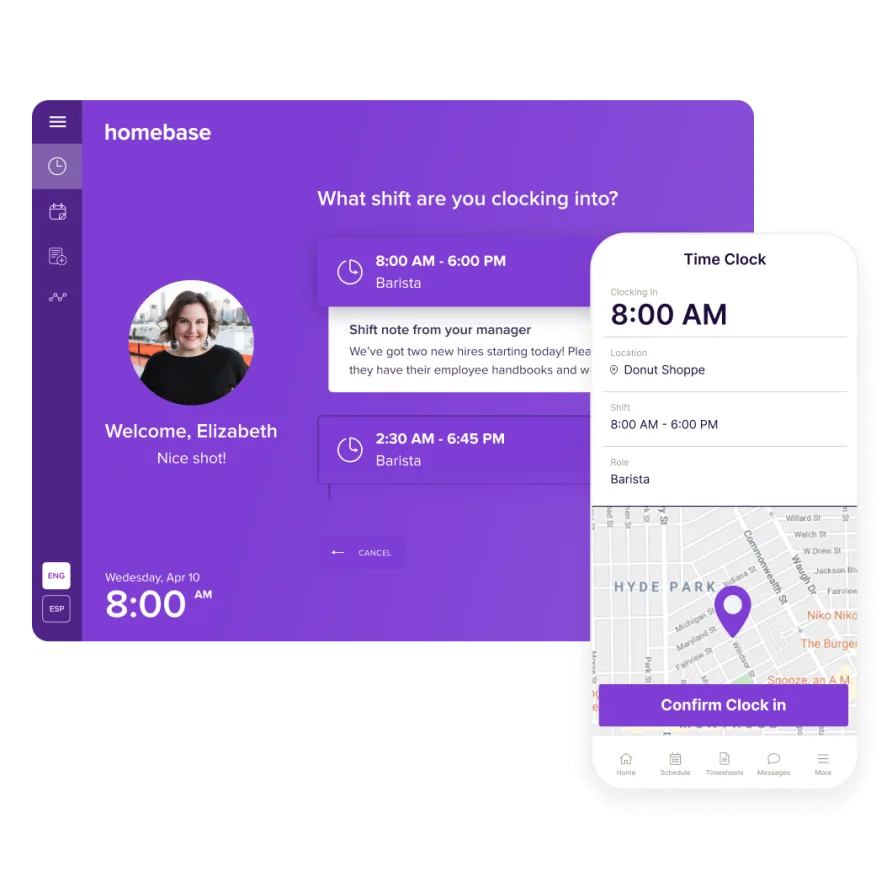
Time tracking runs through the same ecosystem. Employees clock in and out via mobile phone, tablet, desktop browser, or directly through a POS integration. GPS tracking captures the employee’s location at clock-in, and geofencing can restrict clock-ins to the physical business address. Break tracking is built in, with the ability to enforce mandatory break compliance rules and alert managers when breaks aren’t taken. The system auto-calculates overtime based on your configured rules and generates timesheets ready for payroll processing.
Break enforcement deserves a closer look because it’s a compliance area where many small businesses get tripped up. Homebase lets you configure mandatory break rules by state, then requires employees to either log their breaks or explicitly waive them at clock-out. This creates an audit trail that protects the business if a wage claim arises. The All-in-One tier adds auto clock-out at the end of scheduled shifts and early clock-in prevention, which give managers more control over unplanned overtime. The December 2025 Time Clock app refresh also brought a redesigned interface with cleaner navigation and faster load times, addressing some of the performance complaints that had accumulated in app store reviews through mid-2025.
One area where the interface could be clearer: the navigation between scheduling and the time clock on the web version isn’t immediately obvious. The time clock and team messaging sit as small icons in the top bar rather than in the main left sidebar, which means new managers sometimes spend a minute looking for them. The mobile app puts these features front and center, and feedback from teams with 15+ hourly employees consistently suggests the app is more intuitive for day-to-day management than the desktop dashboard.
What Homebase Costs in Practice
The free Basic plan is the entry point that sets Homebase apart. It covers one location with up to 10 employees and includes basic scheduling, time tracking, and POS integration at no cost. For businesses outgrowing that cap, Essentials at $24 per month per location billed annually (or $30 month-to-month) adds advanced scheduling, advanced time tracking, team communication, and unlimited employees.
Here’s where the annual math matters. A single-location coffee shop on the Plus plan pays $56/month annually, totaling $672 per year, with unlimited employees at that location. A three-location restaurant group on the same plan pays $168/month, or $2,016 per year, before payroll. The All-in-One tier at $96/month per location brings that three-location total to $3,456 annually. Add the payroll add-on at $39/month base plus $6 per active employee, and a 30-employee operation across three locations would spend roughly $5,616 per year on All-in-One with payroll. For a single location with the same 30 employees, that number drops to $2,832.
The per-location model means a busy restaurant with 40 hourly workers pays the same base rate as one with 12. That math works favorably for large single-site teams. It shifts for multi-location operators, where each new address multiplies the base cost regardless of headcount.
Homebase also offers add-ons: Tip Manager at $25/month per location for POS-integrated tip pooling, Task Manager at $13/month per location for daily checklists, background checks at $30 each, and a Hiring Assistant starting at $30 per job post. Payroll remains a separate add-on at every tier, including the All-in-One plan. Some owners find that counterintuitive given the plan name.
Homebase has recently introduced bundled payroll-included pricing tiers as an alternative to the traditional per-location model. These combined plans start at $49/month plus $6/employee for a Core tier and go up to $129/month plus $8/employee for Scale, which includes tip management, task management, and next-day pay. This per-employee pricing structure may work better for businesses that want a single predictable bill, though the per-location model remains available for operations where headcount fluctuates seasonally and the flat location rate provides more budget certainty.
Is Homebase Right for Your Team?
Picture a cleaning company dispatching five crews to different client sites each morning. The owner needs to verify that each employee actually arrived at the right location before their shift started, track break compliance across the crews, and pull accurate timesheets into payroll at the end of the week without chasing down paper logs. Homebase’s geofenced clock-in, break enforcement, and timesheet-to-payroll pipeline handle that workflow in a single app, and the free plan covers the entire operation if it runs from one office address with 10 or fewer employees.
Now picture a mid-size restaurant group with three locations, each staffed by 15-20 hourly workers across morning, evening, and weekend shifts. Scheduling needs differ by location, labor cost targets vary, and managers need to fill last-minute gaps when someone calls out. Homebase’s AI Scheduling Assistant and open shift claiming can reduce the time managers spend building and adjusting schedules week to week. But the per-location pricing means this business is paying three times the base rate, and the labor budget tools that help control costs sit behind the All-in-One plan at $96/month per location.
Where Homebase isn’t the right choice: salaried, project-based, or knowledge-work teams. The platform is purpose-built around shifts, clock-ins, and physical locations. If your workforce bills time to client projects, tracks hours for invoicing, or works remotely without location-based accountability, the architecture doesn’t fit. That’s not a flaw in the product. It’s a platform that knows its audience.
One more scenario worth considering: a single-location veterinary clinic with eight part-time technicians and two full-time vets. The techs work rotating shifts that change weekly based on appointment volume. Homebase’s scheduling tools handle the rotation, the free plan covers the headcount, and the built-in messaging keeps the team coordinated when appointment cancellations shift the day’s workload. This is the sweet spot where the product delivers the most value relative to cost.
Messaging, Hiring, and the Broader Toolset
Homebase includes built-in team messaging on all plans. An August 2025 update added GIF and photo sharing, conversation threads, polls, and post-send message editing, bringing the feature closer to what teams expect from a modern communication tool. Managers can create custom channels, share announcements, and get read confirmations when employees view their schedules. The messaging feature removes the need for a separate group texting app, keeping work communication in the same place as schedules and time data.
The hiring and onboarding pipeline, available on Plus and above, lets you post jobs to boards like Indeed and ZipRecruiter, track applicants through the interview process, and send digital onboarding packets with W-4, I-9, and direct deposit forms. Employees self-onboard by completing paperwork electronically before their first day. A newer Hiring Assistant feature, currently in beta, uses AI to help draft job ads and screen applicants. These tools won’t be the reason most buyers choose a time and attendance platform, but they add genuine operational value for small business owners who otherwise manage hiring through a mix of email, paper forms, and job board logins.
POS Integrations and Connected Tools
Homebase connects natively with major point-of-sale systems including Square, Clover, Toast, Shopify, Revel, and Lightspeed. The POS integration pulls in sales data for labor-cost-as-percentage-of-sales reporting and allows clock-in directly through the POS terminal. That matters for restaurants and retail shops that want one fewer device on the counter. On the All-in-One plan, this sales data feeds into forecasting tools that let managers build schedules against projected revenue, setting labor budget targets before the week starts rather than reviewing overages after the fact.
Beyond POS, Homebase integrates with payroll platforms like ADP, Gusto, QuickBooks, and Paychex for businesses that prefer their existing payroll provider over Homebase’s built-in option. Job board connections to Indeed and ZipRecruiter support the hiring workflow, and API access plus Zapier connectivity allow custom integrations. The integration list totals 25+ connections, covering most tools a location-based hourly business would use.
The Gaps to Know About
The labor reporting tools, while useful, don’t offer the depth of customization that larger operations might need. You can view labor costs by role, department, and as a percentage of sales, but building custom report views or exporting granular data for external analysis requires workarounds. The reporting dashboard provides a fixed set of views rather than a flexible query builder.
The mobile app, despite its high App Store rating of 4.8, has drawn periodic feedback about performance lag during peak usage and occasional geolocation glitches in indoor environments. Users managing field teams of 20+ employees report that GPS accuracy can drift in multi-story buildings or areas with weak cell signal. A December 2025 Time Clock app refresh addressed some of these concerns with a redesigned interface and smoother navigation, but the underlying GPS precision issues are more a function of mobile hardware limitations than software design.
The tiered feature lockout also creates a gap between what you experience during the 14-day All-in-One trial and what you actually get on a lower plan. Overtime alerts, auto clock-out, early clock-in prevention, and labor cost forecasting all live on the All-in-One tier. Businesses that test these features during the trial may feel the downgrade when they select a plan that fits their budget.
Final Assessment
For a single-location small business with hourly workers, Homebase is one of the strongest options in the time and attendance category. The scheduling engine is fast and flexible, the time clock covers the clock-in methods hourly teams actually use, and the POS integrations tie labor data to revenue in a way that helps owners make staffing decisions rather than just processing timesheets. The free plan offers enough functionality to run a small team indefinitely, and the paid tiers add depth without overcomplicating the interface. Across 100,000+ businesses and consistently high ratings on major review platforms, the product has proven itself in the market it was built for. The company’s investment in AI-powered scheduling and its 2025 messaging overhaul signal continued development rather than maintenance-mode stagnation.
Multi-location operators and businesses approaching the point where labor cost controls become essential should budget carefully. The per-location pricing model, combined with the All-in-One tier requirement for the most impactful management features, means the annual cost math can shift faster than expected as you add addresses. Payroll as a separate add-on, even on the highest plan, adds to that total. The newer bundled payroll pricing tiers offer an alternative path, but you’ll want to compare both models against your specific employee count and location footprint. Run the numbers for your operation before making the commitment. For the right business profile, Homebase delivers exactly what it promises.