
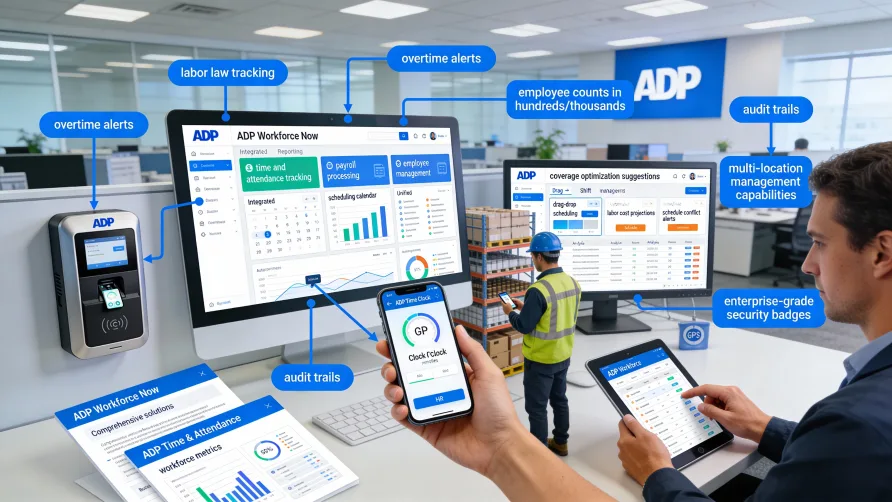
Yes, ADP offers comprehensive time tracking and attendance management capabilities. The company provides time tracking through ADP Workforce Now, its unified human capital management platform, as well as standalone time and attendance solutions that integrate with ADP payroll services.
If you're already using ADP for payroll, adding time tracking functionality means your employee hours flow directly into payroll processing without manual data entry or file transfers between systems.
What is ADP Time and Attendance?
ADP Time and Attendance refers to the suite of workforce management tools ADP offers for tracking employee work hours, managing schedules, and monitoring attendance. These solutions capture when employees clock in and out, calculate total hours worked, apply overtime rules, and flag attendance issues like tardiness or unscheduled absences.
The system handles different types of time entries including regular hours, overtime, paid time off, and various shift differentials. For businesses with complex pay rules or multiple locations, ADP time and attendance tools can apply different calculation methods based on employee classification, department, or work site.
ADP's time tracking integrates with its payroll platform, which means approved timesheets automatically populate payroll runs. This connection reduces errors that typically occur when transferring time data between separate systems and speeds up the payroll process.
ADP Time Tracking Through Workforce Now
ADP Workforce Now includes time and attendance as part of its broader human capital management suite. This integrated approach means time tracking sits alongside other HR functions like benefits administration, talent management, and employee self-service tools.
Within Workforce Now, managers can view team schedules, approve timesheets, and monitor attendance patterns from a single dashboard. The platform tracks hours in real-time, so you can see who's currently clocked in, identify scheduling gaps, and make adjustments before they become problems.
Employees access their timesheets through the same portal they use for other HR tasks. They can clock in and out, request time off, view their schedules, and check accrual balances without needing separate login credentials for different systems.
The time tracking component supports various pay policies including multiple overtime rules, shift differentials, and complex calculation requirements for industries like healthcare or manufacturing where pay structures can get complicated.
Does ADP Have a Time Clock App?
Yes, ADP provides mobile time clock functionality through its ADP Mobile Solutions app. Employees can clock in and out directly from their smartphones, which works well for remote teams, field service workers, or anyone who doesn't work from a fixed location.
The mobile app includes geofencing capabilities, allowing you to set geographic boundaries where employees can clock in. This feature helps ensure remote workers are actually at job sites when they record their hours. You can configure different geofences for different locations if your business operates across multiple work sites.
For situations where you need visual verification, the app supports facial recognition technology to confirm employee identity at clock-in. This addresses a common concern with mobile time tracking about ensuring the right person is recording hours.
The mobile solution also lets employees view their schedules, request time off, and check remaining PTO balances. Managers receive notifications when employees clock in late or miss scheduled shifts, enabling faster response to attendance issues.
ADP Time Kiosk Options
ADP Time Kiosk transforms a tablet or dedicated terminal into a shared time clock for employee use. This option works well for businesses where employees don't have individual devices or where you want a centralized clocking location.
The kiosk supports multiple identification methods. Employees can clock in using a PIN code, badge swipe, or biometric verification like fingerprint or facial recognition. Biometric options help prevent buddy punching, where one employee clocks in for another who isn't actually present.
Kiosks can be wall-mounted near entrances or placed in break rooms, and they work offline so temporary internet outages don't prevent employees from recording their time. The system stores clock-in data locally and syncs with the main platform once connectivity returns.
For businesses with specific workflow needs, the kiosk can be configured to prompt employees with questions at clock-in. You might ask employees to confirm which department they're working in that day, attest to meal breaks, or acknowledge safety reminders before starting their shift.
Integration With ADP Payroll
Time tracking in ADP connects directly to payroll processing, which is where the platform provides significant value for existing ADP payroll users. Approved timesheets automatically flow into the payroll system, eliminating the manual step of entering or importing hours.
The integration applies your configured pay rules during time calculation. If you have employees who earn different rates for different types of work, or who qualify for overtime after a certain threshold, the system applies these rules consistently before sending data to payroll.
When employees have exceptions like unpaid time off or partial-day absences, these adjustments factor into payroll calculations automatically. The connection between time tracking and payroll means fewer corrections after payroll runs and less time spent reconciling discrepancies.
For businesses that need detailed labor cost tracking, the integration can allocate hours to specific cost centers, projects, or job codes. This information feeds into both payroll and your accounting systems, giving you visibility into labor costs at a granular level.
Key Features of ADP Time Tracking
ADP's time and attendance solutions include scheduling tools that let managers create and publish work schedules. Employees can view upcoming shifts through the mobile app or web portal, and the system can send automatic reminders before scheduled shifts start.
The platform tracks various types of time off including vacation, sick leave, and custom leave categories you define. Accrual calculations happen automatically based on the rules you set, and employees can see their current balances when requesting time off.
Overtime management features highlight when employees are approaching overtime thresholds. Managers receive alerts when someone is close to exceeding standard hours, giving them the opportunity to adjust schedules before overtime becomes unavoidable.
For businesses with union contracts or complex labor agreements, the system can enforce specific work rules. You can configure limits on consecutive days worked, mandatory rest periods between shifts, or specialized overtime calculations that match your agreement terms.
Reporting capabilities let you analyze attendance patterns, labor costs, and schedule adherence. Standard reports cover common needs like hours by department or overtime trends, while custom reporting tools let you build specific analyses for your business requirements.
Plan and Product Requirements
ADP time and attendance functionality is available through different product tiers. Workforce Now, ADP's mid-market platform, includes time tracking as part of its standard offering, though specific features may vary based on your selected plan level.
For businesses using ADP for payroll only, standalone time and attendance products can be added to your existing services. This approach lets you maintain your current payroll setup while gaining time tracking capabilities that integrate with your ADP payroll data.
The system requires initial configuration to match your business rules, pay policies, and organizational structure. ADP typically provides implementation support to help set up your overtime rules, approval workflows, and reporting requirements during the onboarding process.
Access to certain features like advanced scheduling, labor forecasting, or specific biometric authentication methods may depend on your service tier. If you need specialized capabilities, confirm availability with ADP when evaluating your options.
Getting Started With ADP Time Tracking
If you currently use ADP for payroll and want to add time tracking, contact your ADP representative to discuss available options. They can review your current service level and explain which time and attendance features are included or available as add-ons.
For businesses not yet using ADP, implementing time tracking typically happens as part of a broader platform setup. The time and attendance configuration occurs alongside payroll setup, benefits enrollment, and other HR functions you're implementing.
Training requirements vary based on user roles. Employees need basic instruction on clocking in and out, viewing schedules, and requesting time off. Managers require more comprehensive training on approving timesheets, running reports, and handling exceptions. ADP provides training resources and documentation to support different user groups.
Your time tracking system should align with your payroll calendar and approval workflows. Most businesses set up timesheet approval deadlines that give managers time to review and correct hours before payroll processing begins. Building in this buffer prevents payroll delays caused by last-minute timesheet issues.